

Service accounts and API tokens
Why you shouldn't use a personal account
Using a personal user account for CI/CD or automation creates several problems:
- The token is tied to an employee — if they leave, all integrations break
- Personal account permissions are often broader than what the script needs
- Actions appear in the audit log under the person's name, not the pipeline's
- Revoking access requires deleting or changing the personal account
A dedicated service account separates automation from human identities, follows least privilege, and makes the audit trail clear.
Step 1 — Create a service account role
Before creating the account, create a role that grants only what automation needs.
- Go to Settings → User management → Roles.
- Click Create role and name it (e.g.
CI/CD service accountorRotation bot). - Enable only the following permissions:
- Use API (required for token generation)
- No access to user management, system settings, LDAP, SSO, or vault type management
- Click Create.
Directory access (which vaults and folders the service account can read or write) is configured separately when the service account is created
If you have multiple automation use cases (deploy bot, rotation script, audit exporter), create separate roles with different permission sets. This limits damage scope if a token is compromised.
Step 2 — Create the service account
- Go to Settings → User management → Users.
- Click Create user.
- Use a clearly identifiable login, e.g.
svc-cicd-productionorsvc-rotation-bot. - Assign the role created in Step 1 and groups, if necessary.
- Click Create.
If using LDAP, create a dedicated LDAP service account in your directory and map it to Passwork. Do not reuse an AD service account that has other system rights.
Step 3 — Grant vault access
The service account must be explicitly added to the vaults and folders it needs to access.
- Open the service account profile.
- Set the necessary access levels for the corresponding vaults listed on the Access rights tab.
| Use case | Minimum access level |
|---|---|
| CI/CD pipeline (read secrets for deployment) | Read only |
| Rotation script (update secret values) | Read and edit |
| Audit / reporting script | Read only |
| Migration / bulk import | Full access on target vault |
Use folder-level access if the service account only needs a subset of the vault.
Step 4 — Generate the token pair
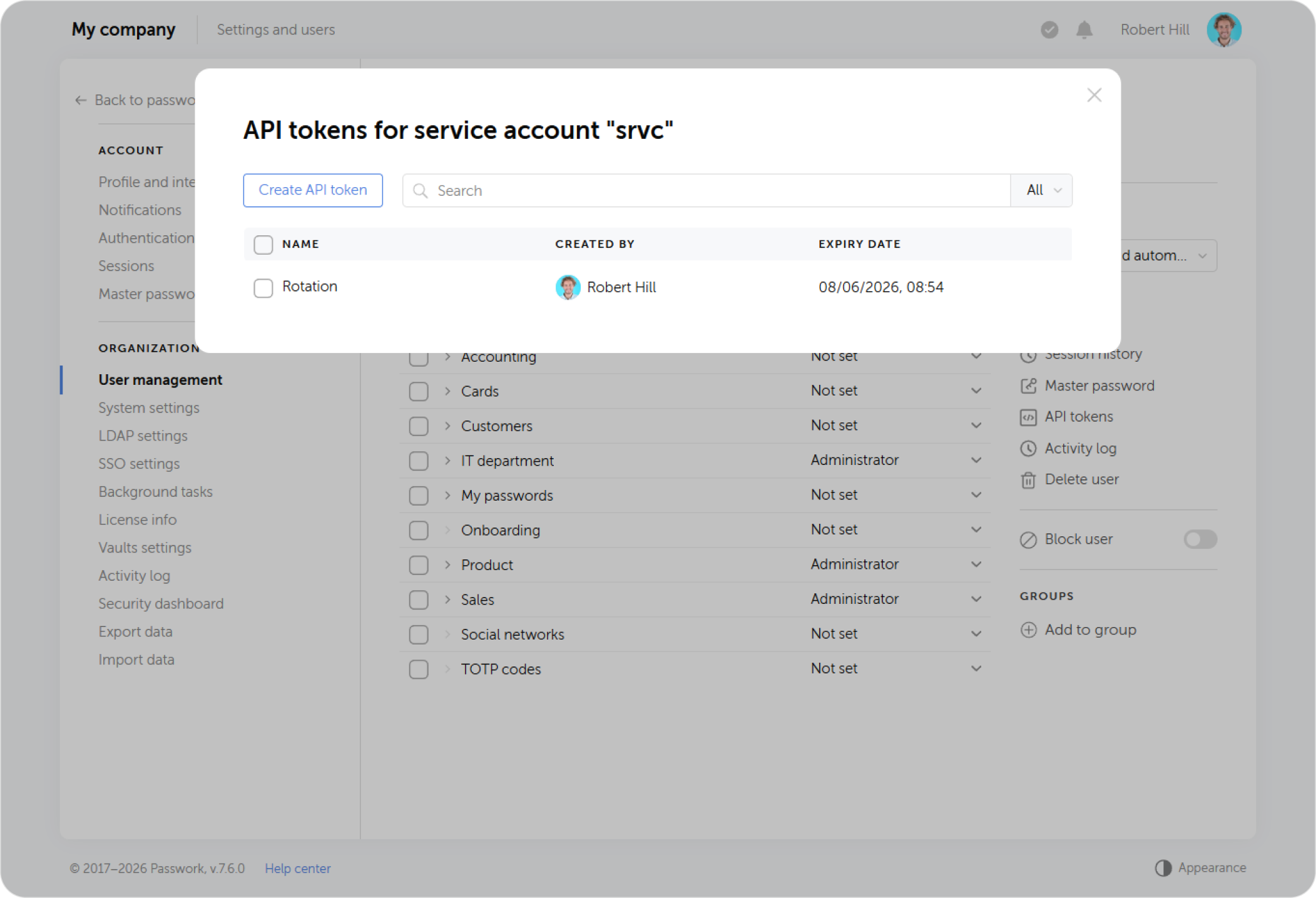
- Open the service account profile
- Open the API tokens menu in the rightside panel and click Create API token.
- Copy both the
accessTokenandrefreshTokenimmediately — they are shown only once.
Never store tokens in source code, .env files committed to repositories, or CI/CD job logs. Use your CI/CD platform's encrypted secret storage (GitHub Secrets, GitLab CI/CD with masked variables, HashiCorp Vault, AWS Secrets Manager, etc.).
Token pair lifecycle
Passwork API uses two tokens with different lifetimes:
| Token | Typical lifetime | Purpose |
|---|---|---|
accessToken | Minutes to hours | Added to every API request as Authorization: Bearer |
refreshToken | Days to weeks | Used to obtain a new token pair when access token expires |
When accessToken expires, the API returns HTTP 401 with code accessTokenExpired. The integration then calls the refresh endpoint and updates both tokens.
The Python connector handles this automatically. For shell scripts using passwork-cli, the CLI also handles token refresh transparently when PASSWORK_REFRESH_TOKEN is provided.
Token rotation strategy
Regular rotation of the service account's token pair reduces the risk from token leakage.
Recommended token lifetimes by use case:
| Use case | accessToken lifetime | refreshToken lifetime |
|---|---|---|
| CI/CD job (ephemeral) | 15–60 minutes | 1 day |
| Always-on service (monitoring, rotation bot) | 1–4 hours | 30 days |
| Manual/scheduled script | 1 hour | 7 days |
Rotating tokens via API:
Three endpoints are available (see API token rotation for full reference):
- Rotate full pair
- Rotate access token only
curl -s --request POST \
  --url "https://passwork.example.com/api/v1/sessions/refresh" \
  --header 'Content-Type: application/json' \
  --header 'X-Response-Format: raw' \
  --header "Authorization: Bearer $PASSWORK_TOKEN" \
  --data "{\"refreshToken\": \"$PASSWORK_REFRESH_TOKEN\"}" | jq .
curl -s --request POST \
  --url "https://passwork.example.com/api/v1/sessions/refresh-access-token" \
  --header 'Content-Type: application/json' \
  --header 'X-Response-Format: raw' \
  --data "{\"accessToken\": \"$PASSWORK_TOKEN\"}" | jq .
The token storage paradox
Passwork is the secret store — but you need a credential to access it. Where do you store the Passwork token?
Recommended approaches:
| Environment | Where to store Passwork tokens |
|---|---|
| CI/CD (GitHub Actions, GitLab) | Platform's encrypted secret storage (masked variables) |
| Kubernetes workloads | Kubernetes Secret, ideally populated by an external secret operator |
| Long-running services | Environment variable injected at startup via a higher-trust secret store or config management |
| Developer workstations | .env file not committed to VCS, or OS keychain |
The key principle: Passwork tokens are bootstrap credentials. They live one level above the secrets they protect. They need strong protection — not as strong as a cloud provider root key, but stronger than an application database password.