

Authentication audit
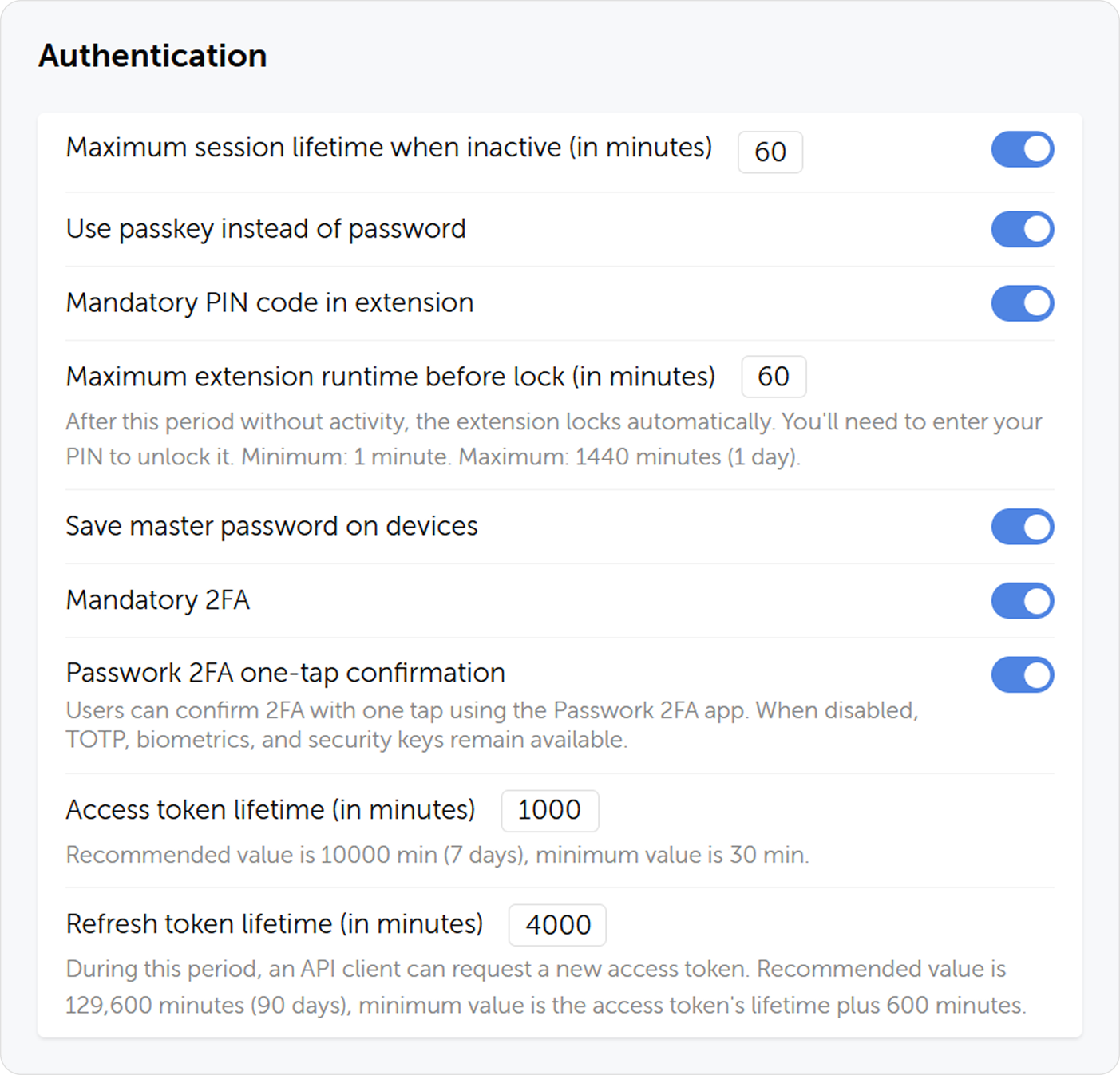
Authentication is the primary perimeter of Passwork security. This section verifies that all authentication controls are configured to resist credential-based attacks and enforce organizational policy.
Navigate to Settings → System settings for most controls in this section.
1. Two-factor authentication policy
What to verify
1.1 2FA enforcement by role
In Passwork, 2FA enforcement is configured per role. Navigate to Settings → Roles and open each role (Owner, Admin, and any custom roles with elevated privileges).
Verify that Mandatory two-factor authentication is enabled for:
- The Owner role
- All Administrator-level roles
- Any custom roles with access to User management, System settings, or Vault administration
1.2 Accepted 2FA methods
Review which 2FA methods are permitted for each role:
- TOTP (Passwork 2FA app, Google Authenticator, Microsoft Authenticator) — acceptable
- Physical security keys / WebAuthn passkeys — acceptable and preferred for admin accounts
- Biometrics — acceptable
For administrative accounts, require physical FIDO2/WebAuthn security keys rather than TOTP. Hardware keys are phishing-resistant; TOTP codes can be intercepted by real-time phishing proxies.
2. Account lockout policy
A missing or overly permissive lockout policy allows unlimited brute-force attempts.
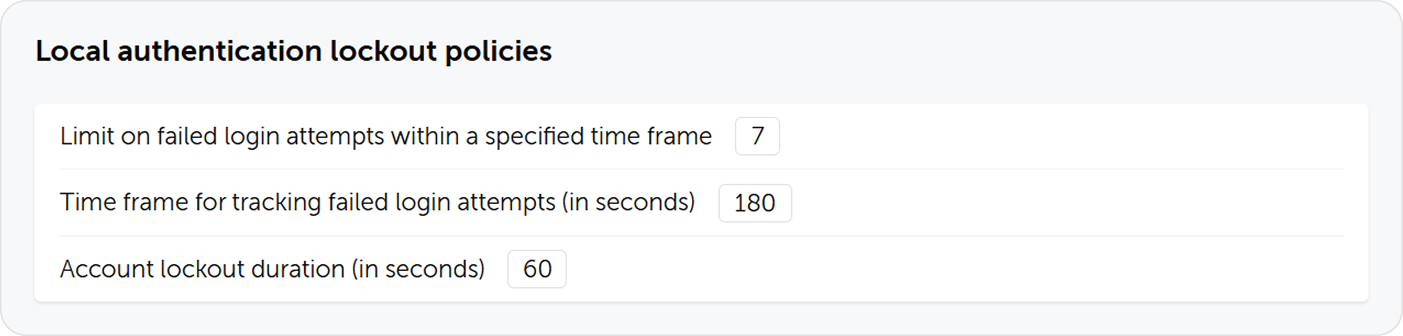
Navigate to Settings → System settings → Local authentication lockout policies.
What to verify
| Parameter | Recommended value | Finding if not met |
|---|---|---|
| Max failed attempts | ≤ 5 | High — allows credential stuffing |
| Attempt tracking window | 5–15 minutes | Medium — too short allows rapid cycling |
| Lockout duration | ≥ 15 minutes, or indefinite until admin unlock | High — short lockouts allow continued brute force |
NIST recommends limiting failed authentication attempts to no more than 100 over a 30-day period, with effective throttling after the first few failed attempts. A lockout after 5 attempts with a 15-minute cooldown is a reasonable and commonly accepted implementation.
3. Session management
What to verify
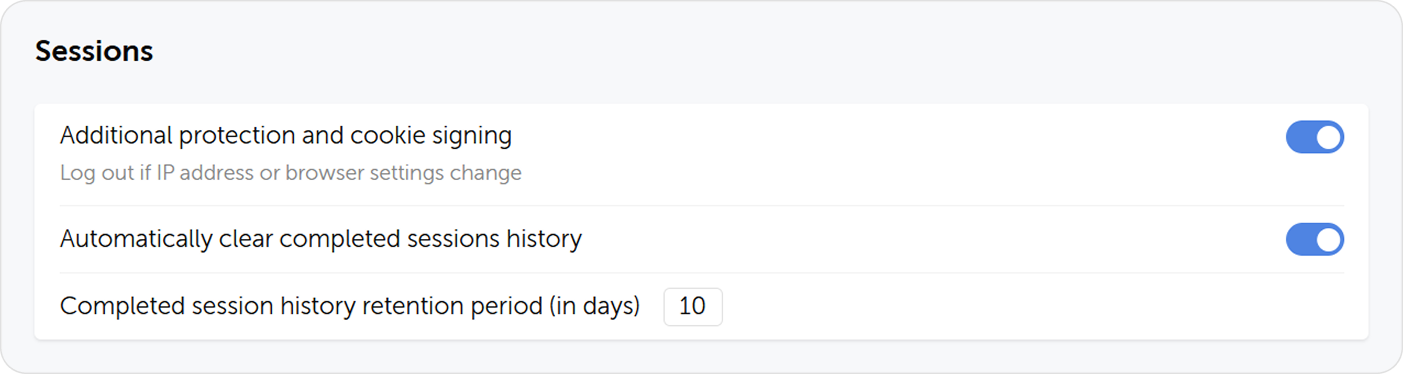
Navigate to Settings → System settings → Sessions.
3.1 Session inactivity timeout
Verify that a session timeout is configured. Users who walk away from their workstation without signing out should be automatically signed out after an inactivity period.
| Environment | Recommended timeout |
|---|---|
| General office use | 30–60 minutes |
| Privileged admin accounts | 15–30 minutes |
| Shared / kiosk workstations | 10–15 minutes |
3.2 Session history retention
Session history provides an audit trail of active and past sessions. Verify the retention period is sufficient to support investigation of incidents (recommended: at least 90 days).
3.3 Cookie security settings
In config.env, verify the session cookie is set with Secure and SameSite=Strict or SameSite=Lax flags. This prevents cookie theft via unencrypted channels and cross-site request forgery.
Users can review their own active sessions and terminate suspicious ones from Account settings → Sessions. As an administrator, you can terminate any user's sessions from the user profile.
4. Password complexity policies
Passwork enforces separate complexity policies for the local sign-in password and the master password (used for client-side encryption).
Local password policy
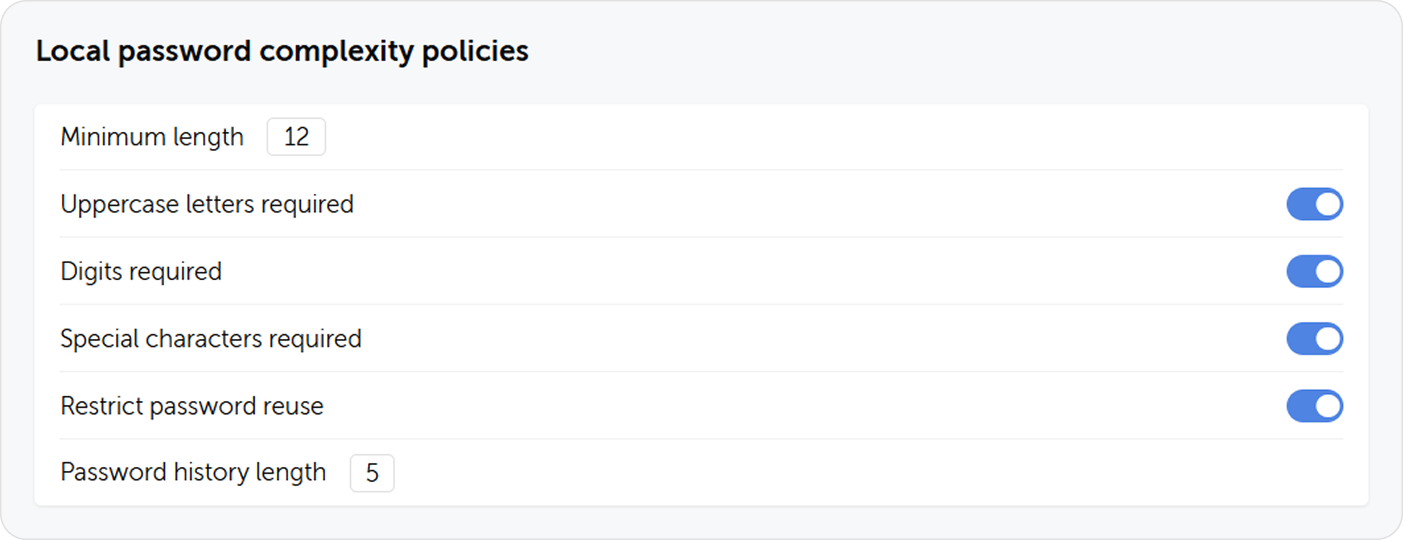
Navigate to Settings → System settings → Local password complexity policies.
| Parameter | Recommendation |
|---|---|
| Minimum length | 12 characters |
| Required character classes | Uppercase + lowercase + digit + special character |
| Password history | Last 5 passwords |
| Prohibit common passwords | Enabled (if available) |
Master password policy (CSE deployments)
If client-side encryption is enabled, navigate to Settings → System settings → Master password complexity policies.
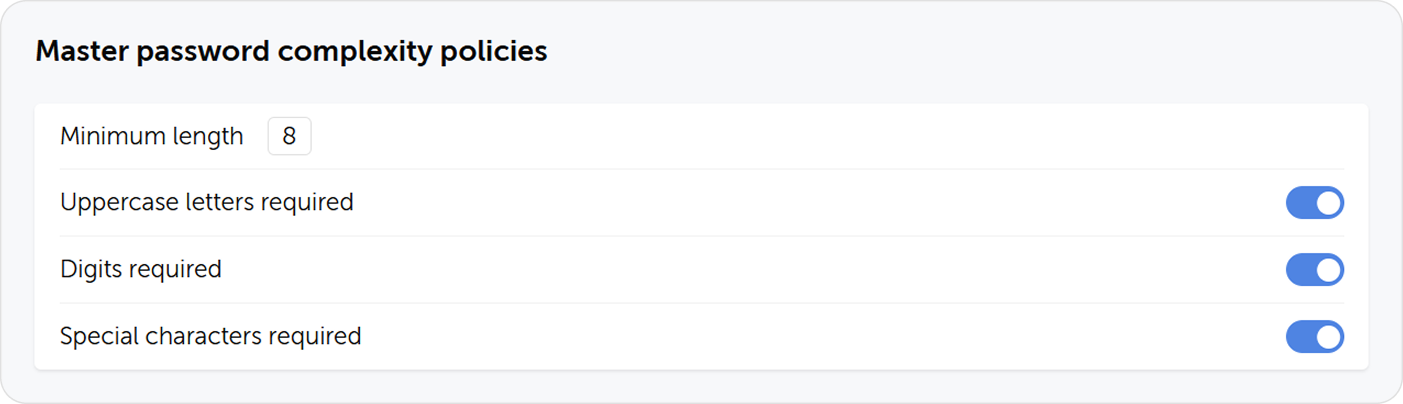
| Parameter | Recommended minimum |
|---|---|
| Minimum length | 14 characters |
| Required character classes | All four (uppercase, lowercase, digit, symbol) |
There is no server-side recovery path for a forgotten master password. Users who lose their master password lose access to their private vault contents. Enforce complexity requirements that are strong but memorizable — or train users to store master passwords in a secure offline location (not digitally).
5. LDAP security
If LDAP integration is configured, verify the following.
5.1 LDAPS (TLS-encrypted LDAP)
Passwork must connect to the directory service over LDAPS (port 636 with TLS), not plain LDAP (port 389). Plain LDAP transmits credentials in cleartext and is susceptible to man-in-the-middle attacks.
Verify in Settings → LDAP settings → Server configuration:
- The server URL starts with
ldaps:// - The port is 636 (or the correct custom port for your LDAPS service)

For LDAPS certificate installation instructions, see LDAPS Configuration.
5.2 LDAP service account permissions
The LDAP service account used by Passwork should have read-only access to the directory. It must not have permissions to modify users, groups, or other directory objects.
Verify with the directory administrator:
- The service account has Read permissions only
- The service account is in a dedicated Service accounts OU, not in a privileged group
- The service account password is stored only in Passwork config.env and is not reused for other services
5.3 LDAP credential storage
The LDAP bind password is stored in the Passwork database, encrypted with server-side encryption (AES-256-CFB). Verify:
- The
config.envfile (which contains the server encryption key) has restrictive file permissions:chmod 600 - The file is owned by the web server user, not world-readable
# Linux
ls -la /var/www/init/config.env
# Expected: -rw------- 1 www-data www-data
6. SSO security
If SSO is configured, verify the following.
6.1 IdP trust scope
In the SSO configuration, verify:
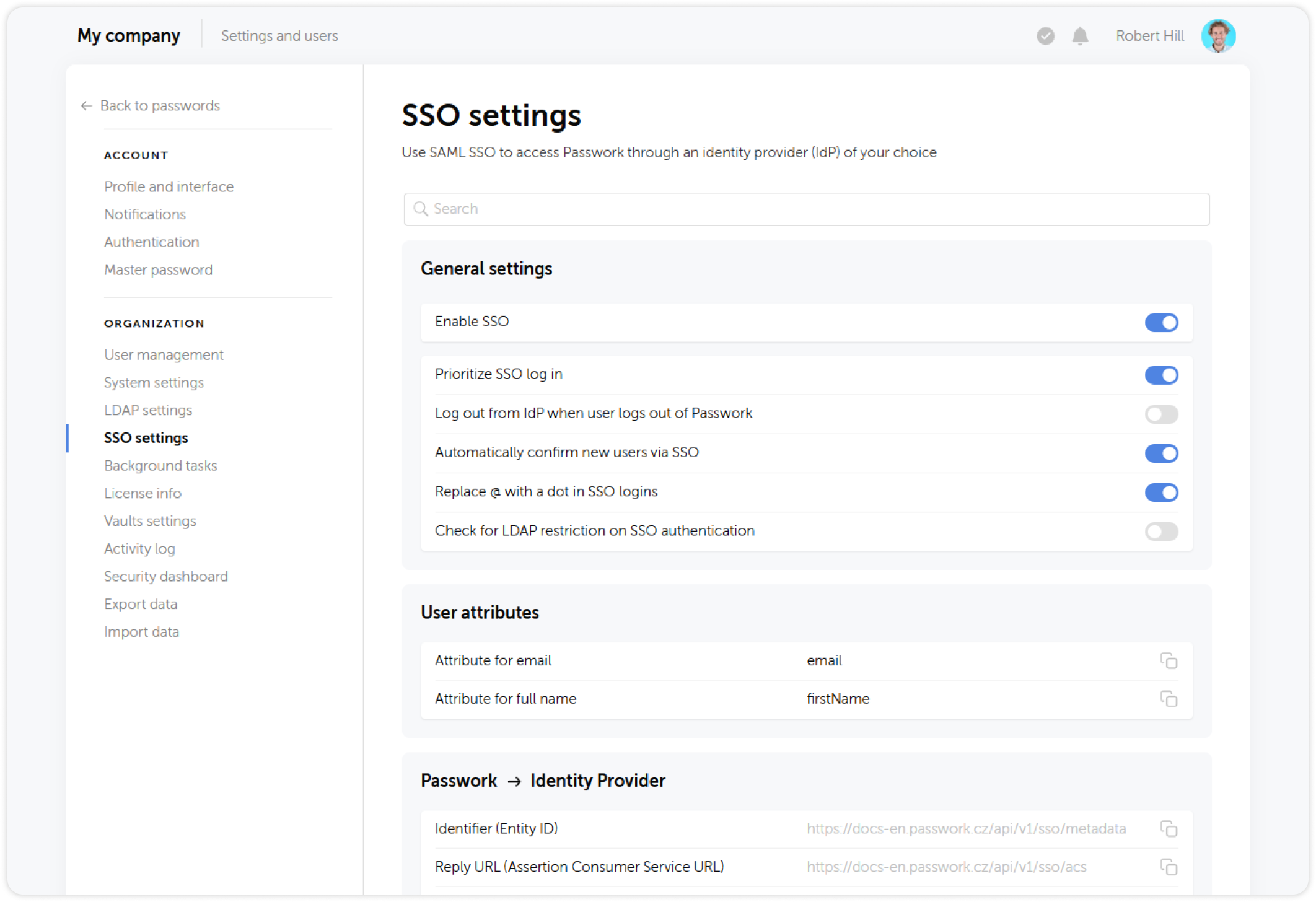
- The Assertion Consumer Service (ACS) URL is set to the exact Passwork URL — not a wildcard
- The audience/entity ID matches the Passwork application identifier
- The IdP signing certificate is valid and from the expected issuer
6.2 SSO as the enforced sign-in method
If SSO is the organization's authoritative authentication method:
- Enable Prioritize SSO sign-in in Passwork SSO settings
- Consider disabling local password authentication for SSO users via the user's Authentication settings
- Ensure local password authentication remains available for emergency access (service account, owner account)
6.3 Session token lifetime alignment
Passwork issues its own session tokens after SSO authentication. Verify that the Passwork session timeout (Section 3.1) is aligned with or shorter than the IdP session lifetime. A long Passwork session can outlive the SSO session, leaving a window where a revoked IdP user retains Passwork access.
7. Inactive and orphaned accounts
Orphaned accounts — accounts for users who have left the organization or changed roles — are a persistent access control risk.
What to verify
- Look for accounts with administrative roles assigned to users who no longer require them
- Verify that LDAP sync has correctly disabled or removed accounts for former employees
When LDAP sync is active, user accounts are automatically managed based on AD group membership. Removing a user from the relevant AD group revokes their Passwork access on the next sync cycle. Verify the sync schedule is frequent enough to meet your access revocation SLA.
Summary checklist
| # | Control | Status |
|---|---|---|
| 1.1 | 2FA mandatory for Owner and all Admin roles | |
| 1.2 | No admin accounts with 2FA disabled | |
| 2 | Account lockout after ≤ 5 failed attempts with ≥ 15-min cooldown | |
| 3.1 | Session timeout ≤ 60 min (≤ 30 min for admins) | |
| 3.2 | Session history retention ≥ 90 days | |
| 4.1 | Local password: ≥ 12 chars, all character classes | |
| 4.2 | Master password: ≥ 14 chars (if CSE enabled) | |
| 5.1 | LDAP uses LDAPS (port 636, TLS) | |
| 5.2 | LDAP service account is read-only | |
| 5.3 | config.env file permissions: 600, owned by web server user | |
| 6.1 | SSO ACS URL is exact (no wildcard) | |
| 6.2 | Local password disabled for SSO users (if applicable) | |
| 6.3 | Passwork session lifetime ≤ IdP session lifetime | |
| 7 | No orphaned/inactive accounts with active vault access |