

Server security
This section covers the verification of server-level security controls for a Passwork on-premise deployment. For cloud-hosted instances, network and certificate controls are managed by Passwork infrastructure — focus this review on application-level settings.
1. TLS / HTTPS
What to verify
1.1 HTTPS enforced
All HTTP requests must redirect to HTTPS. Verify with:
curl -I http://your.passwork.url/
# Expected: HTTP/1.1 301 Moved Permanently
# Location: https://your.passwork.url/
1.2 Valid certificate in production
Self-signed certificates are acceptable only in isolated development or PoC environments. Production deployments require a certificate signed by a trusted CA (Let's Encrypt, internal CA for air-gapped networks, or a commercial CA).
Check the certificate:
openssl s_client -connect your.passwork.url:443 -servername your.passwork.url 2>/dev/null \
  | openssl x509 -noout -issuer -subject -dates
Verify:
- Issuer is a trusted CA (not
self-signed) notAfteris at least 30 days in the future- Subject matches the hostname (
CNorSAN)
1.3 TLS version
TLS 1.2 minimum. TLS 1.3 preferred. SSLv3, TLS 1.0, and TLS 1.1 must be disabled.
nmap --script ssl-enum-ciphers -p 443 your.passwork.url
Or use an external scanner: SSL Labs, testssl.sh.
Expected grade: A or higher.
1.4 HSTS header present
The Strict-Transport-Security header prevents browsers from accessing the site over HTTP after the first HTTPS connection.
curl -s -I https://your.passwork.url/ | grep -i strict
# Expected: strict-transport-security: max-age=31536000; includeSubDomains
For Docker builds, HSTS is configured in conf/nginx/nginx.conf. For Apache2/IIS, it is set in the virtual host configuration. If the header is missing, see SSL termination.
2. HTTP security headers
Passwork sets the following headers by default in Docker (Nginx extra/security-headers.conf) and Apache2 (.htaccess). Verify all are present.
curl -s -I https://your.passwork.url/ | grep -iE "x-frame|x-content|x-xss|referrer|permissions|strict"
| Header | Expected value | Risk if missing |
|---|---|---|
X-Frame-Options | DENY | Clickjacking |
X-Content-Type-Options | nosniff | MIME sniffing attacks |
X-XSS-Protection | 1; mode=block | XSS in legacy browsers |
Referrer-Policy | strict-origin-when-cross-origin | Referrer leakage |
Permissions-Policy | camera=(), microphone=(), geolocation=() | Unnecessary API access |
Strict-Transport-Security | max-age=31536000; includeSubDomains | Downgrade/MITM attacks |
For configuration details, see Headers.
For Docker: verify that extra/security-headers.conf is included in the Nginx config and that the container has been restarted after changes. For Apache2: verify that .htaccess processing is enabled (AllowOverride All).
3. CORS configuration
CORS controls which external origins can make requests to the Passwork API.
Default configuration risk: The default Docker cors.conf sets Access-Control-Allow-Origin: *, which permits any origin to make cross-origin requests. This is acceptable when Passwork is deployed on a private network with no external access, but must be reviewed if the instance is internet-accessible.
What to verify
Check the current CORS header:
curl -s -I -H "Origin: https://attacker.example.com" https://your.passwork.url/api/ \
  | grep -i access-control
Finding: If the response includes Access-Control-Allow-Origin: * and the server is internet-accessible, restrict the origin to the exact Passwork URL.
How to restrict (Docker):
Edit conf/nginx/extra/cors.conf and replace the wildcard with a specific origin pattern. See Headers — CORS configuration for the exact configuration.
4. Network hardening
MongoDB
MongoDB must not be accessible from the internet. Verify:
# From an external host:
nc -zv your.passwork.url 27017
# Expected: Connection refused
Correct configuration: MongoDB binds to 127.0.0.1 (loopback) or a private network interface only. It must never bind to 0.0.0.0 in a production environment.
On-premise deployments should also verify that MongoDB authentication is enabled. See MongoDB Authorization Configuration.
Firewall / exposed ports
Only the following ports should be accessible from untrusted networks:
| Port | Protocol | Purpose |
|---|---|---|
| 443 | TCP | HTTPS (Passwork web interface and API) |
| 80 | TCP | HTTP (redirect to HTTPS only) |
All other ports (27017 for MongoDB, database replication ports, internal admin interfaces) must be blocked at the network firewall level.
Reverse proxy and trusted proxies
If Passwork is deployed behind a reverse proxy (Nginx, Apache, HAProxy, cloud load balancer), configure trusted proxies in config.env:
CLIENT_IP_SOURCES=REMOTE_ADDR
Or restrict to known proxy IPs to prevent IP spoofing via the X-Forwarded-For header. See Trusted Proxies.
5. Health check endpoint
Passwork exposes a health check endpoint at /api/latest/health-check. This endpoint can reveal system status information.
What to verify
Check whether the endpoint requires authentication:
curl -s https://your.passwork.url/api/latest/health-check
If the endpoint returns data without a token, configure HEALTH_CHECK_TOKEN in config.env:
HEALTH_CHECK_TOKEN=<random-256-bit-string>
After configuration, the endpoint requires the token in the request header. See Health Check.
6. Emergency reset mode
The IS_EMERGENCY_RESET_ENABLED=1 flag in config.env allows password and 2FA reset for the Owner account via the server console without authentication. This is a powerful recovery mechanism that must not remain enabled after use.
What to verify
On the server, check the config file:
# Linux
grep "IS_EMERGENCY_RESET_ENABLED" /var/www/init/config.env

# Docker
grep "IS_EMERGENCY_RESET_ENABLED" /<passwork>/conf/keys/config.env
Acceptable values:
- Setting not present → correct
IS_EMERGENCY_RESET_ENABLED=0→ correctIS_EMERGENCY_RESET_ENABLED=1→ finding: must be set to 0 or removed
If this flag was used recently, verify in the audit log that only the expected owner account was accessed.
For emergency reset procedure, see Emergency Mode.
7. Background tasks and LDAP sync freshness
Background tasks drive LDAP synchronization, password expiration checks, and other automated maintenance. If cron is not running, LDAP group membership may be stale — users who left an AD group may retain vault access in Passwork.
What to verify
In the Passwork admin panel, go to Settings → Background tasks and verify:
- All tasks show a recent Start time timestamp (within the expected schedule window)
- No tasks show error status
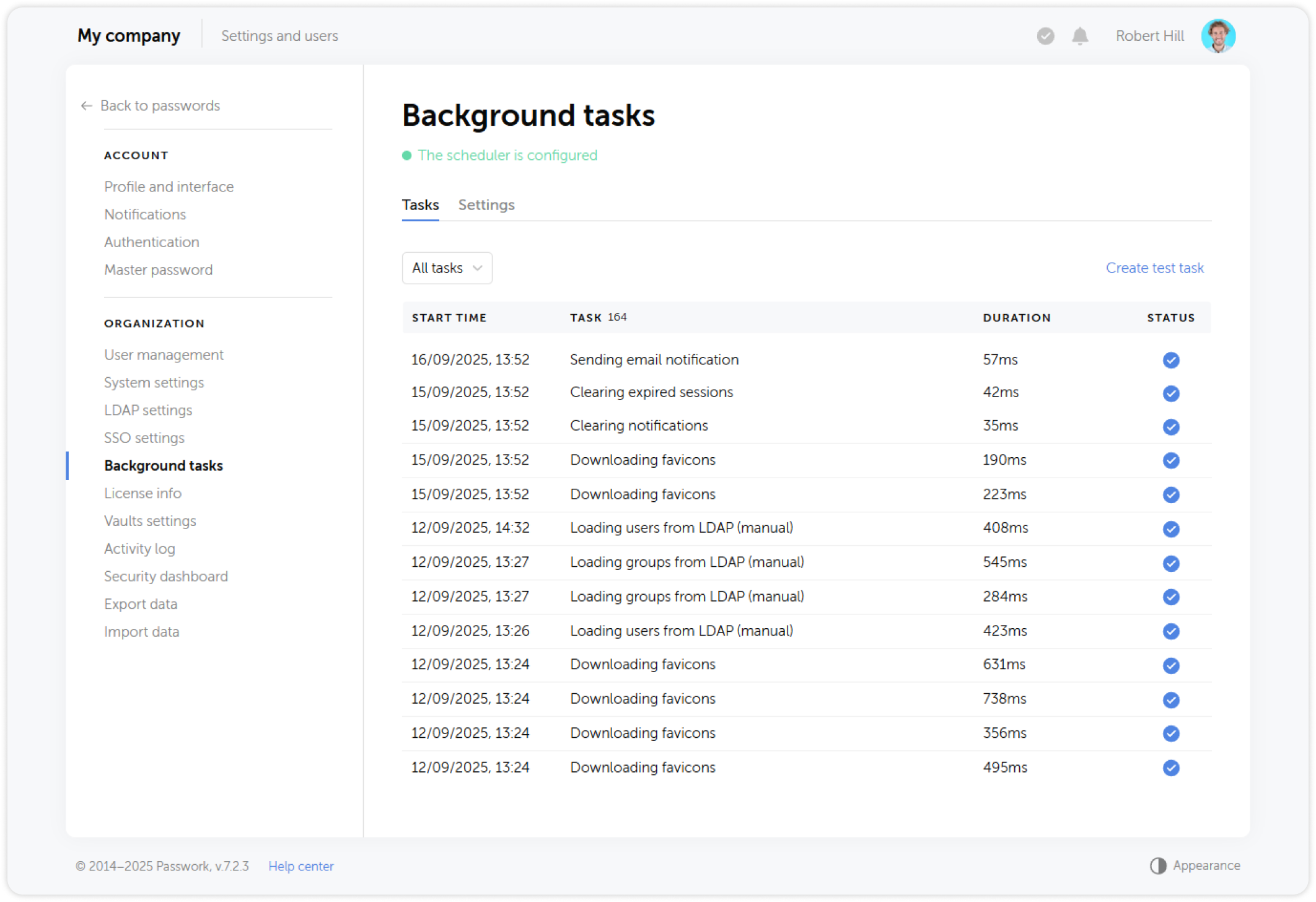
For cron configuration details, see Cron Setup for Linux or Windows Task Scheduler Setup.
Summary checklist
| # | Control | Status |
|---|---|---|
| 1.1 | HTTP → HTTPS redirect active | |
| 1.2 | Valid CA-signed SSL certificate | |
| 1.3 | TLS 1.2+ only; legacy TLS disabled | |
| 1.4 | HSTS header present with includeSubDomains | |
| 2 | All 6 security headers present | |
| 3 | CORS origin restricted (if internet-accessible) | |
| 4.1 | MongoDB port 27017 not externally accessible | |
| 4.2 | MongoDB authentication enabled | |
| 4.3 | Only ports 80/443 exposed to untrusted networks | |
| 4.4 | Trusted proxies configured (if behind reverse proxy) | |
| 5 | Health check endpoint protected with token | |
| 6 | IS_EMERGENCY_RESET_ENABLED is 0 or absent | |
| 7 | Background tasks running on schedule |