Configuración de SSO con AD FS
Antes de configurar SSO, asegúrese de que el parámetro APP_URL en config.env coincida con el dominio actual de Passwork, ejemplo — APP_URL=https://passwork.example.com
Los siguientes nombres de servidor se utilizan como ejemplos:
- Proveedor (IDP) — ad-fs.passwork.local
- Servidor de Passwork (SP) — passwork.example.com
Adición de una relación de confianza para usuario de confianza
Abra — Server Manager → Tools → AD FS Management → Relying Party Trusts → Actions:
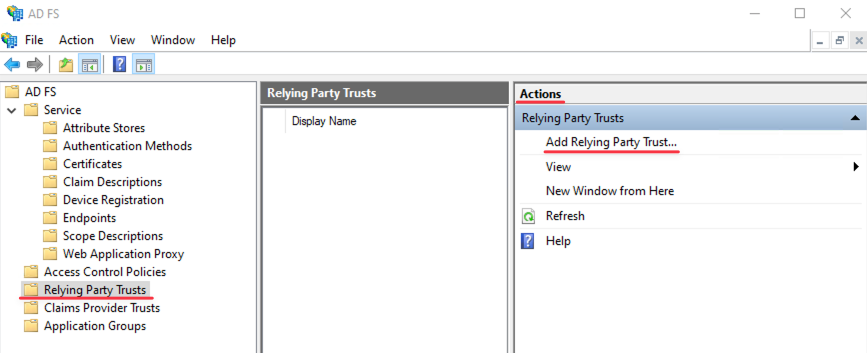
Realice los pasos en — Add Relying Party Trust Wizard:
- Claims aware;
- Enter data about the relying party manually;
- Complete el Display name (ejemplo: passwork-sp);
- Omita el paso — Configure Certificate, haga clic en Next;
- En el paso Configure URL:
- Enable support for the SAML 2.0 WebSSO protocol;
- Copie de Passwork en — Settings and Users → SSO Settings — la Reply URL;
- Pegue en Relying party SAML 2.0 SSO service URL — https://passwork.example.com/api/v1/sso/acs
- En el paso Configure Identifiers:
- Copie de Passwork en — Settings and Users → SSO Settings — el Identifier;
- Pegue en Relying party trust identifier — https://passwork.example.com/api/v1/sso/metadata
- Omita el paso — Choose Access Control Policy, haga clic en Next;
- Omita el paso — Ready to Add Trust, haga clic en Next;
Ejemplo de salida de la confianza creada en PowerShell
- PowerShell
Get-ADFSRelyingPartyTrust -Name "passwork-sp" # Command to display

AllowedAuthenticationClassReferences : {}
EncryptionCertificateRevocationCheck : CheckChainExcludeRoot
PublishedThroughProxy                : False
SigningCertificateRevocationCheck    : CheckChainExcludeRoot
WSFedEndpoint                        :
AdditionalWSFedEndpoint              : {}
ClaimsProviderName                   : {}
ClaimsAccepted                       : {}
EncryptClaims                        : True
Enabled                              : True
EncryptionCertificate                :
Identifier                           : {https://passwork.example.com/api/v1/sso/metadata}
NotBeforeSkew                        : 0
EnableJWT                            : False
AlwaysRequireAuthentication          : False
Notes                                :
OrganizationInfo                     :
ObjectIdentifier                     : 03363cb7-5eef-ef11-b8b3-000c2993a976
ProxyEndpointMappings                : {}
ProxyTrustedEndpoints                : {}
ProtocolProfile                      : WsFed-SAML
RequestSigningCertificate            : {}
EncryptedNameIdRequired              : False
SignedSamlRequestsRequired           : False
SamlEndpoints                        : {Microsoft.IdentityServer.Management.Resources.SamlEndpoint}
SamlResponseSignature                : AssertionOnly
SignatureAlgorithm                   : http://www.w3.org/2001/04/xmldsig-more#rsa-sha256
TokenLifetime                        : 0
AllowedClientTypes                   : Public, Confidential
IssueOAuthRefreshTokensTo            : AllDevices
RefreshTokenProtectionEnabled        : True
RequestMFAFromClaimsProviders        : False
ScopeGroupId                         :
ScopeGroupIdentifier                 :
DeviceAuthenticationMethod           :
Name                                 : passwork-sp
AutoUpdateEnabled                    : False
MonitoringEnabled                    : False
MetadataUrl                          :
ConflictWithPublishedPolicy          : False
IssuanceAuthorizationRules           :
IssuanceTransformRules               :
DelegationAuthorizationRules         :
LastPublishedPolicyCheckSuccessful   :
LastUpdateTime                       : 01.01.1900 5:00:00
LastMonitoredTime                    : 01.01.1900 5:00:00
ImpersonationAuthorizationRules      :
AdditionalAuthenticationRules        :
AccessControlPolicyName              : Permit everyone
AccessControlPolicyParameters        :
ResultantPolicy                      : RequireFreshAuthentication:False
                                       IssuanceAuthorizationRules:
                                       {
                                         Permit everyone
                                       }

Get-ADFSRelyingPartyTrust -Name "passwork-sp" | Select-Object -ExpandProperty SamlEndpoints # Command to display

Binding          : POST
BindingUri       : urn:oasis:names:tc:SAML:2.0:bindings:HTTP-POST
Index            : 0
IsDefault        : False
Location         : https://passwork.example.com/api/v1/sso/acs
Protocol         : SAMLAssertionConsumer
ResponseLocation :
Abra las Propiedades de la relación de confianza creada:
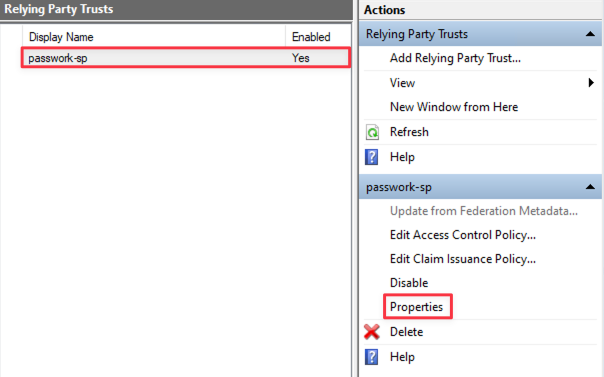
En Properties, vaya a Endpoints y realice las siguientes acciones:
- Add SAML;
- Endpoint type — SAML Logout Endpoint;
- Binding — Redirect;
- Copie de Passwork en — Settings and Users → SSO Settings — la Logout URL;
- Pegue en Trusted URL — https://passwork.example.com/api/v1/sso/sls
- Aplique los cambios y cierre Properties.
Configuración de reglas de procesamiento de solicitudes desde SP (Passwork) en IDP (AD FS)
Dependiendo del formato de inicio de sesión del usuario deseado en Passwork, puede configurar las reglas de procesamiento para que el formato del usuario pueda ser uno de los siguientes:
- username
- [email protected]
Elija el formato de inicio de sesión del usuario requerido en Passwork y configure en consecuencia.
En Relying Party Trusts, seleccione la confianza creada (passwork-sp) y abra — Edit Claim Issuance Policy:
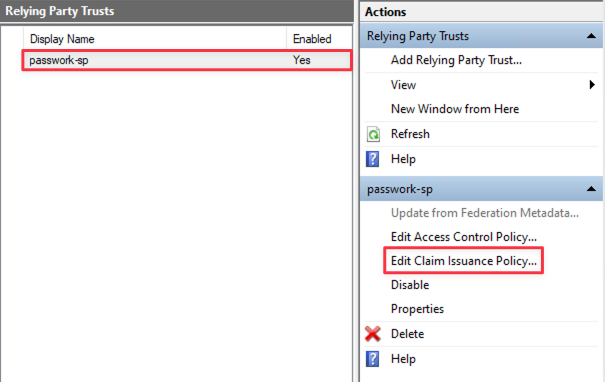
Configuración de reglas de procesamiento para el formato [email protected]
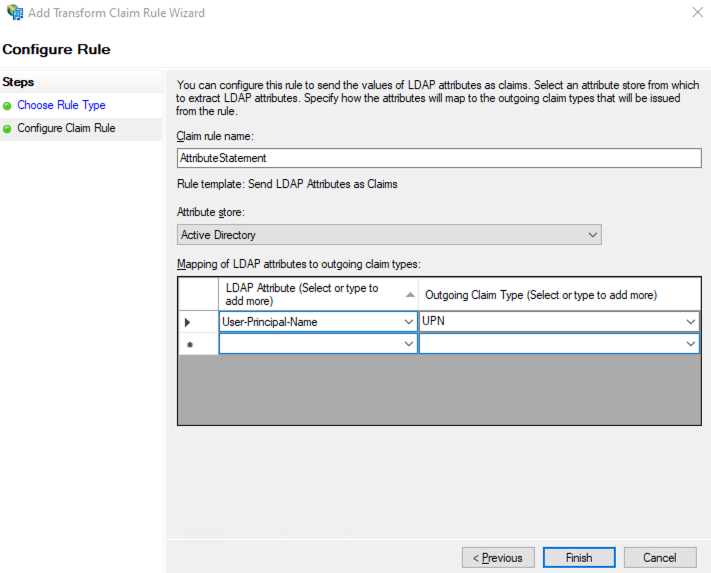
Realice las siguientes acciones:
- Add Rule;
- Send LDAP Attributes as Claims;
- Claim rule name — AttributeStatement;
- Attribute store — Active Directory;
- LDAP Attribute — User-Principal-Name;
- Outgoing claim type — UPN.
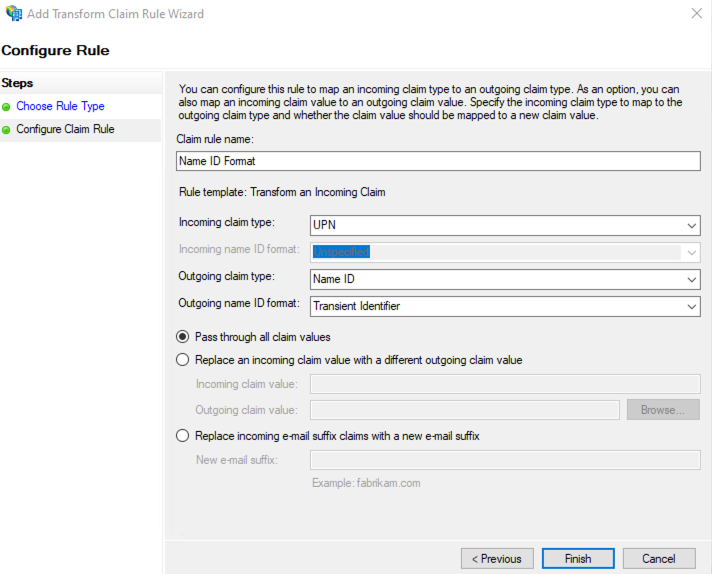
Realice las siguientes acciones:
- Add Rule;
- Transform an Incoming Claim;
- Claim rule name — Name ID Format;
- Incoming claim type — UPN;
- Outgoing claim type — Name ID;
- Outgoing name ID format — Transient Identifier.
Configuración de reglas de procesamiento para el formato username
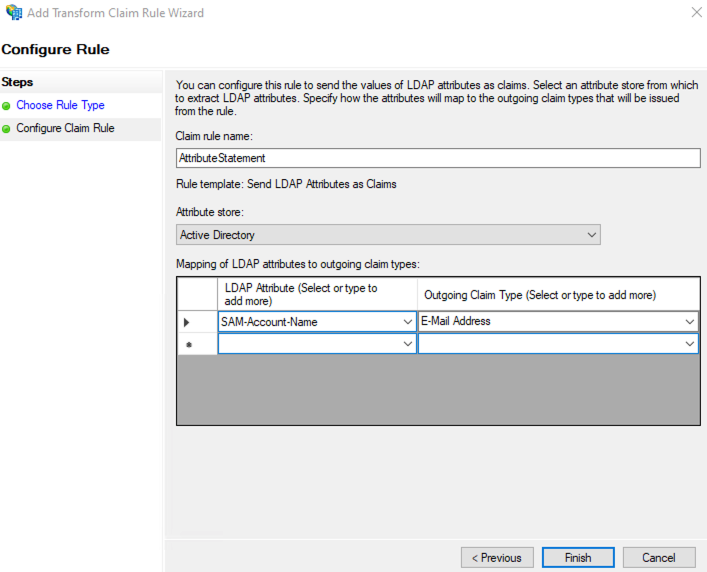
Realice las siguientes acciones:
- Add Rule;
- Send LDAP Attributes as Claims;
- Claim rule name — AttributeStatement;
- Attribute store — Active Directory;
- LDAP Attribute — SAM-Account-Name;
- Outgoing claim type — E-Mail Address;
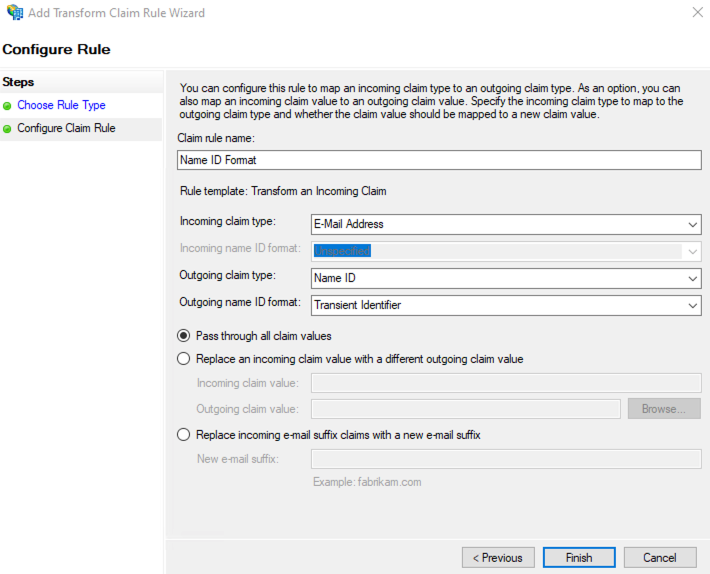
Realice las siguientes acciones:
- Add Rule;
- Transform an Incoming Claim;
- Claim rule name — Name ID Format;
- Incoming claim type — E-Mail Address;
- Outgoing claim type — Name ID;
- Outgoing name ID format — Transient Identifier.
Configuración de reglas adicionales de procesamiento de atributos para pasar al SP
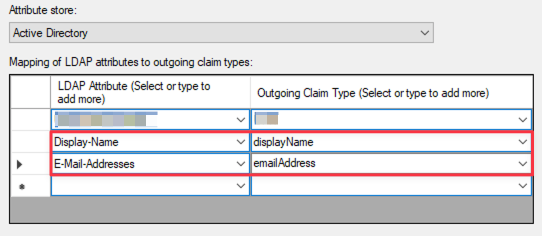
Edite la regla creada con el nombre AttributeStatement:
- Pase al SP (Passwork) el atributo Display-Name:
- LDAP Attribute — Display-Name;
- Outgoing claim type — introduzca displayName;
- Pase al SP (Passwork) el atributo E-mail-Address:
- LDAP Attribute — E-Mail-Addresses;
- Outgoing claim type — introduzca emailAddress;
Configuración y completar los parámetros de Single Sign-On (SSO) en Passwork
Completar los valores de «User Attributes»
Inicie sesión en la interfaz web de Passwork, vaya a — Settings and Users → SSO Settings y complete los mapeos de atributos:
- Email attribute — emailAddress;
- Full name attribute — displayName.
Completar los valores de «Identity Provider → Passwork»
Abra AD FS Management → seleccione el directorio AD FS → Edit Federation Service Properties:
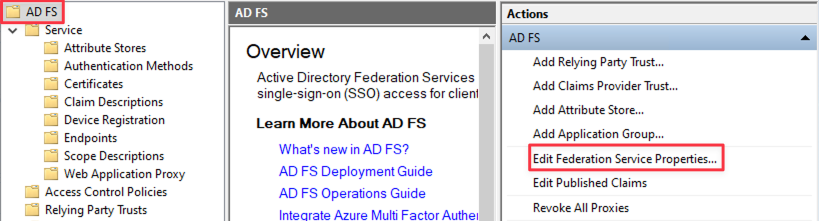
Copie la dirección — Federation Service Identifier → http://ad-fs.passwork.local/adfs/services/trust:
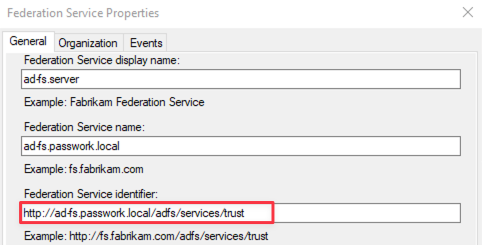
Abra — Settings and Users → SSO Settings y complete los valores:
- Identifier (Entity ID) — http://ad-fs.passwork.local/adfs/services/trust
- Login URL — https://ad-fs.passwork.local/adfs/ls
- Logout URL — https://ad-fs.passwork.local/adfs/ls/?wa=wsignout1.0
Completar el valor de «Certificate»
Abra y exporte el certificado SSL generado en formato base64 — AD FS Management → Service → Certificates → Token-signing:
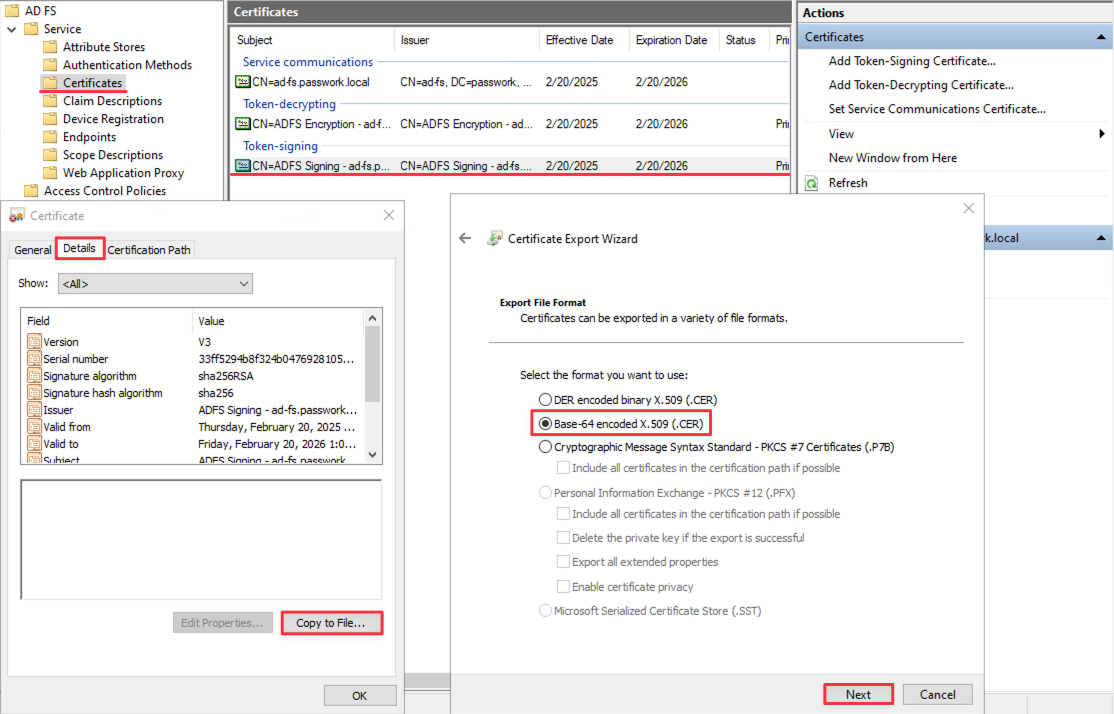
Abra el certificado SSL exportado con el Bloc de notas, cópielo y péguelo en el campo correspondiente — Settings and Users → SSO Settings.
Ejemplo de clave exportada en formato base64
- base64
-----BEGIN CERTIFICATE-----
MIIE5DCCAsygAwIBAgIQM/9SlLjzJLBHaSgQVsIEPzANBgkqhkiG9w0BAQsFADAu
MSwwKgYDVQQDEyNBREZTIFNpZ25pbmcgLSBhZC1mcy5wYXNzd29yay5sb2NhbDAe
Fw0yNTAyMTkyMDA3MjFaFw0yNjAyMTkyMDA3MjFaMC4xLDAqBgNVBAMTI0FERlMg
U2lnbmluZyAtIGFkLWZzLnBhc3N3b3JrLmxvY2FsMIICIjANBgkqhkiG9w0BAQEF
AAOCAg8AMIICCgKCAgEAs6isogLhwqdncR1tYqKgS+Dwmi3DOIMfDpQNgaD/S5Vd
FngFsZ048zfYqJAn9Ypnu8UCTftoKJ2BQzRPoqaT2lpaAivyTDLKBMmbaAyOHoQH
RAd6NQazUYcbW2vMWwA4sa8hTDwwwZPOFhx3AR5EbW4IQo0sHWHOYCIWmH0td9+4
Lqiy7VkHT3fcUCuDL+kopjnsvdJLvbpg7ZPFkYLgy/ANP9+90yt/L1/Mj682bV3b
HgaPbAOzaG7qS6pA94wPmKYLnNf2C89vSfBaA+KjfWjhK5YMPbWLUxolNX7zz6bx
BQKdU/W7pTQIIIffy0rLNwWyaQbKKh77C9OKWLE3k54OhNAyJHXF332CK7psPSVT
fRDqagYGZQF/EhPQG7kMPpr6IiZ76v9FmZz59ruYaLA9f0YYK2NpiLdY1EHLdm19
H+72T/ZFEOLKExr+BbEOcQAlnqGXSs0YdrWTwMEBCqnrPiS4153298VEqKto1sUz
hqnBookmLgUymqApN50KIffezRK/ghfoxBY16EzlYAyVyWqaAB5WEAbCgdB2p9RN
KZHeYz3iB/cQzps1DYsZhZJ9SLS0yr8aQgYMl0PyKS7ajPR9GlGSKKz/7Q6POOtY
jz7qLcBgApacUJfOqUr2OcPzU/TsvRyHhPNzW41hIEjGWBVJ6WlpUFQYJxp5rxkC
AwEAATANBgkqhkiG9w0BAQsFAAOCAgEAbKOjd7u1qnVfL4HsVNSCSUTqXI4knvxI
NKQxZWCpkdCxPzpJJdtMPsGukZQAblEcgQPX+v94F32BA2bk8cgp08ra2OrXEXR7r
XCCm3BvUAsI6nmbzKHPm6y/3awadOu59k8qE1c+DRSrHHM9927Z4QWMKYLfKEQL4
4WBYbw/jgqs7HqMbxrdfCtNdQzGKcE+sVaT9OnDp86TopHbsndRUyXqfqkB/LSbq
cstg/cC1b9xJ+FI3xUXEl/33e9/p8ovFko5slW5kU6qET9cg6GA0OreIb+8FbbiV
LOll4aIsn44/wQ6mu3biw77l1TpoUQpf11G9fpuOV10WRttOtk4IsryMhsbrGa/R
RZMbWH2MgkLs1VlcigrUE6kMIkU743d8oyLQb7N4+O+h56YLIuWWXUMM1FNNCIov
tVutUBpSO6OgTUo5tcD9uqaD5R1+rf5A68yUslMgU+4mE9hdY/143bZMDPexKcUt
jfZOI9v4ppmoFgeWZDYMtxU40OkYZh/grnxw9aoZEPLfr8Vnf+LhGvhEFWKvvwdv
J7n49c1WxZxK7rDaSwKeydgLC1bySFQoiYkOucfO+NcdBi6R44cXBrWk1EESLuCq
X2LLIS2NoKg8pX2BPqPcTuZGclEivpg0rrovksNj3L3BRtFO3jWooqxxOfVUbk8h
uFmSLzpAW1I=
-----END CERTIFICATE-----
Completar el valor de «Additional Settings»
Pegue el siguiente contenido en formato JSON:
- json
{
	"sp": {
		"entityId": "https://passwork.example.com/api/v1/sso/metadata",
		"assertionConsumerService": {
			"url": "https://passwork.example.com/api/v1/sso/acs"
		},
		"singleLogoutService": {
			"url": "https://passwork.example.com/api/v1/sso/sls"
		},
		"NameIDFormat": "urn:oasis:names:tc:SAML:2.0:nameid-format:transient"
	}
}
Reemplace el dominio passwork.example.com en las URL con el dominio de su servidor de Passwork.
Abra la ventana de inicio de sesión en la interfaz web de Passwork e inicie sesión a través de SSO para verificar la configuración correcta: