



Application servers
Introduction
Running multiple Passwork application servers is a core part of the fault-tolerant architecture. It delivers high availability, load distribution, and room for horizontal scaling.
Key benefits:
- Automatic traffic distribution — if a server fails, the load balancer removes it from the pool and routes traffic to healthy nodes
- Load distribution — requests are spread evenly
- Horizontal scaling — add more servers to increase capacity
- No downtime — remaining servers keep working when one fails
- Predictable failover — traffic shifts automatically without changing app config
Architecture with multiple application servers
Overview
Several Passwork application servers run in parallel. Each server is a full Passwork instance with a web server and PHP-FPM.
Application servers do not exchange data directly and do not know how many servers are in the pool — this information is not stored in the database. All requests (authentication, reads, writes, events) go through the database connection, where data is stored and retrieved for users.
Architecture:
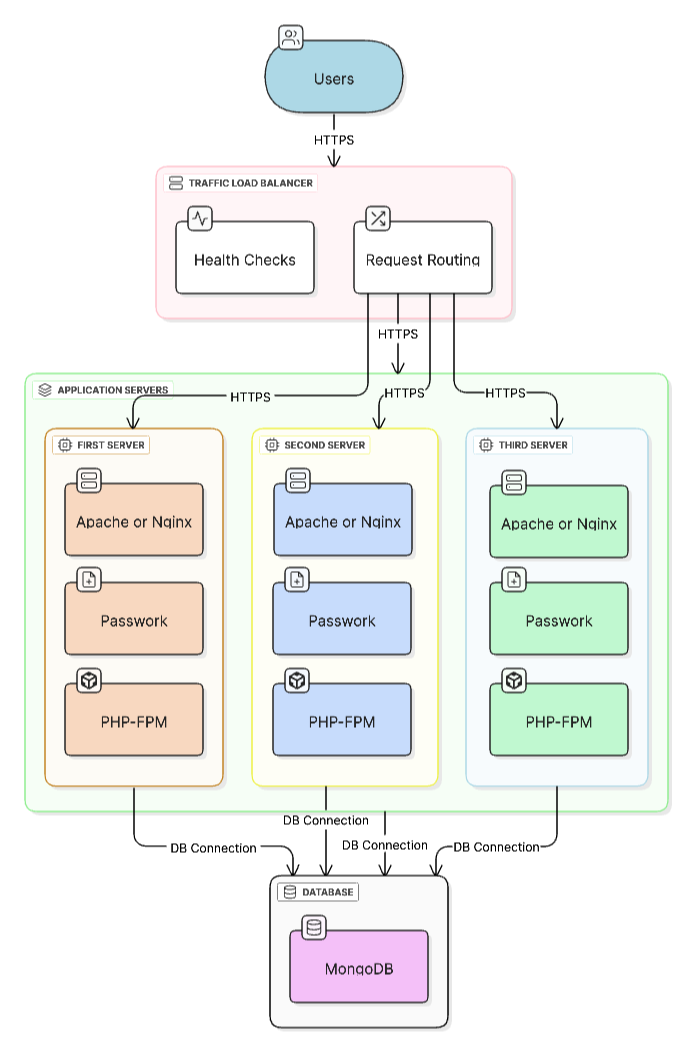
Components of an application server
-
Web server
- Handles HTTPS requests
- Serves static files
- Proxies requests to PHP-FPM
-
Passwork application
- Core Passwork logic
- Business operations
-
PHP-FPM (FastCGI Process Manager)
- Executes PHP code
- Manages PHP worker pool
- Connects to the database
Load balancer
The load balancer is critical for fault tolerance. It distributes requests across application servers and automatically shifts traffic when a server fails.
Functions of the load balancer
-
Load distribution
- Evenly distributes requests
- Supports algorithms such as round-robin, least connections, IP hash
-
Health check
- Periodically checks server availability
- Automatically removes failed servers from the pool
- Returns servers to the pool after recovery
Passwork exposes /api/v1/app/health-check for probing application server health.
- SSL/TLS termination (optional)
- Offloads HTTPS at the balancer
- Simplifies certificate management
User sessions are stored in the Passwork database. When a user is routed to another application server, existing tokens stay valid. Sticky sessions are not required — use even traffic distribution and health checks.
Sticky sessions and cache
- Sticky sessions are unnecessary: sessions and tokens are stored in the database.
- CDN/edge cache is fine for static assets (CSS/JS); do not cache API requests.
Traffic balancing options
Choose a solution that fits your infrastructure:
- HAProxy — popular L4/L7 balancer with flexible config
- Nginx — widely used L7 balancer
- Envoy / Traefik — dynamic L7 balancers with service discovery
- GSLB / DNS load balancing across sites — for geo-distributed deployments
- Hardware ADC (F5, Citrix, A10, etc.) — for high-load or highly secured environments
We do not provide installation or configuration guides for load balancers because they depend on each company's infrastructure.
Scaling recommendations
Horizontal scaling lets you increase capacity by adding servers:
- Start with 2–3 servers for basic fault tolerance
- Add servers gradually as load grows
- Monitor performance of each server
- Keep configurations identical across application servers
Limitations
- Licensing — fault tolerance is available with the advanced license
- Configuration synchronization — all servers must share the same settings
- Database — all servers connect to the same MongoDB replica set