
The 1Password breach disclosed on November 25 left customer vaults untouched, according to the company. Three things are still at risk: phishing that quotes real account details, invitation and recovery flows for a small group of users, and the build pipeline, because the attacker reached source code and the CI/CD system.
1Password's incident notice says an attacker used an employee's corporate GitHub account to push malicious code to backend services, and that code downloaded account records for a subset of customers. Most coverage stops at the reassurance about vaults.
This analysis takes the vendor's statement as given and works through the rest: what each stolen item allows, what is still undisclosed, and what an IT team should check this week.
Facts in this article are current as of November 26, 2026. 1Password has said it will update its incident notice.
Key takeaways
- An attacker used an employee's corporate GitHub account to push malicious code to 1Password's backend and copy account records for a subset of customers.
- 1Password says vault contents, vault keys and its apps were not affected, and that it stores neither account passwords nor Secret Keys.
- The copied records hold names, sign-in emails and last sign-in times, enough to write a phishing email that looks like it came from the vendor.
- The number of affected customers, the cause of the GitHub compromise and how long the malicious code ran are still undisclosed.
- Administrators should review pending invitations and recoveries, confirm SSO or MFA on sign-in, brief staff and re-read the notice on a set date.
What happened in the 1Password breach
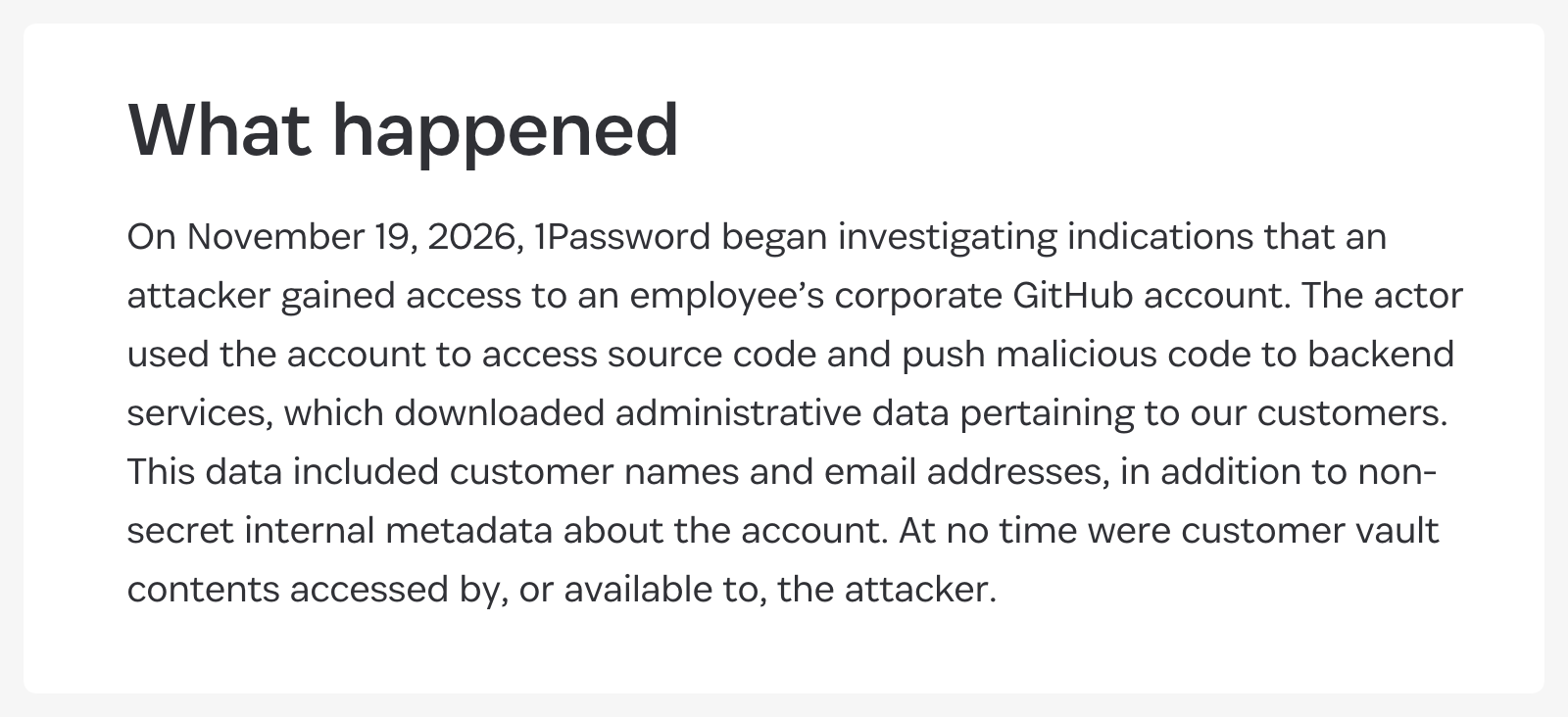
1Password began investigating on November 19, 2026, after signs that an attacker had gained access to an employee's corporate GitHub account. The attacker read private source code and pushed malicious code to backend services, which then downloaded administrative data about customers. The company went public six days later, on November 25.
The notice gives two dates and leaves several out.
| Date | Event | Source |
|---|---|---|
| November 19, 2026 | 1Password begins investigating signs of access to an employee's corporate GitHub account | Incident notice |
| November 25, 2026 | Public notice lists the copied data and the response | Incident notice |
| By November 26, 2026 | Staff answer customer questions about SRP verifiers and vault data | Community forum thread |
| Not disclosed | When access began, when it was cut off, how long the malicious code ran | None |
The attack path, step by step
- The attacker gains access to an employee's corporate GitHub account. 1Password has not said how.
- With that account, the attacker reads source code in private repositories.
- The attacker pushes malicious code to backend services.
- Those services download administrative data about customers: account records for a subset of users.
- The attacker also reaches the CI/CD system, which holds infrastructure secrets the product needs to run.
Step 3 is the one customers keep asking about: the notice does not explain what review or approval stood between that account and running services.
Build systems are a favored target. In GitGuardian's State of Secrets Sprawl Report 2026, 59% of the compromised machines it analyzed were CI/CD runners, not personal workstations. Our earlier analysis shows how developer accounts and build systems become the entry point.
How 1Password responded
- Disabled the GitHub account, revoked the stolen token and removed the access the attacker had created.
- Rotated or revoked internal credentials that may have been exposed, and restored clean versions of the affected service.
- Lengthened the codes in invitation and recovery emails from six digits to ten alphanumeric characters.
- Tightened GitHub, CI/CD and endpoint controls, and brought in independent experts to validate the cleanup.
Six days from the start of an investigation to a public notice with a specific data list is fast.
What the attacker copied, and what each item is worth
The attacker downloaded account records for what 1Password calls a subset of its users, copied private source code, and gained access to the CI/CD system. No record contains a password or a vault item. Several contain exactly what a phishing email needs: a real name, the sign-in address and the time of the last sign-in.
The table below maps each item in the notice to what it allows and what limits it. Where a limit rests on the vendor's word, the cell says so.
| Item copied | What an attacker can do with it | What limits it |
|---|---|---|
| Names and sign-in email addresses | Build a verified list of customers to phish; try the same address against other services | No secret in the record itself |
| Account and user identifiers | Make a forged support or security email look authentic | Cannot be used to sign in |
| Account creation and last sign-in times | Quote true details in a lure; see which accounts are active | Give no access on their own |
| Public keys | Nothing, per 1Password: they are public by design | None needed |
| SRP parameters, including the verifier | Per 1Password staff: cannot be reversed, cannot be used to sign in, cannot be brute-forced without the Secret Key | The 128-bit Secret Key, which 1Password says it does not store |
| Tokens from invitation, provisioning and recovery emails | Try to complete a pending invitation or recovery | Also needs an SSO sign-in or the emailed code; affected users were notified |
| Other account metadata (version and file numeric identifiers) | Possibly help map the internal architecture | Described by 1Password as non-secret |
| Private source code | Study it for weaknesses | Contains no customer data or user secrets, per 1Password |
| CI/CD access and infrastructure secrets | Reuse credentials against internal systems; reach the system that builds the software | Credentials rotated or revoked, per 1Password; apps and extensions reported as not affected |
The first three rows are the practical risk. Separately they are harmless. Together they turn a generic lure into a specific one: the attacker knows who the customer is, which address they sign in with and when they last did.
The SRP row needs precision. The verifier is the value a server uses to check a sign-in without receiving the password, and a stolen verifier usually invites offline guessing. A 1Password staff member wrote on the company's community forum that this one is "derived from both your account password and your Secret Key" and "can't be used to brute-force your account password without your Secret Key".
That is the vendor's statement. Its support documentation describes the Secret Key as a 128-bit value, and the company says it does not store it.
Why the vaults stayed out of reach, according to 1Password
1Password says vault data is encrypted on the customer's device with keys derived from the account password and a 128-bit Secret Key, and that it stores neither. An attacker inside the backend has no key to open a vault, even with code running on the company's servers. This is the vendor's explanation.
The company has made two statements about vault data, worded differently.
- In the incident notice of November 25, 2026: "At no time were customer vault contents accessed by, or available to, the attacker."
- In a staff reply on the community forum: "We have no evidence that encrypted vaults were downloaded or accessed."
The first describes reach: the attacker could not get to vault contents. The second describes evidence: the company has found no sign that encrypted vaults were taken. Both can be true at once.
The second quote answered a customer who asked whether encrypted vault data was out of the attacker's reach or protected only by end-to-end encryption. The reply added that backend access did not give the attacker the secrets needed to decrypt a vault.
If encrypted vault data were ever copied, an attacker would still need both the account password and the Secret Key. That is what zero-knowledge encryption protects and what it leaves outside: the vault contents are covered, the account records around them are not.
If vaults are safe, what is at risk?
Three things, and one caveat. Customers named in the copied records can be phished with accurate account details, and a small group of users had invitation, provisioning or recovery tokens exposed. The attacker also reached source code and the CI/CD system, which leaves open questions about the build pipeline. The caveat: the disclosed scope may still change.
Phishing that quotes real account details
This is the risk 1Password itself names. The notice tells customers to be cautious about unexpected emails, texts or calls that mention 1Password, invitations or account recovery.
A lure built on the copied data can carry the customer's correct name and sign-in address, a true last sign-in time and a reference to the incident. It then asks for what the attacker lacks: the account password, the Secret Key or a verification code. "Secure your account after the breach" is exactly the email a worried user expects to receive.
Phishing and stolen credentials remain among the most frequent causes of breaches in Verizon's 2026 Data Breach Investigations Report, which also reports higher click rates on mobile lures than on email. Expect texts as well as emails. We have covered how targeted phishing differs from broad social engineering separately.
Invitation and recovery flows
The exposed tokens matter to two groups: organizations that were onboarding users through SCIM Bridge or Hosted Provisioning during the incident, and users in the middle of an account recovery. 1Password says the number is small and that those users were notified.
A token alone does not complete either flow. It also needs an SSO sign-in or a code sent to the registered email address, which 1Password has lengthened from six digits to ten alphanumeric characters. The safe move is still to cancel and reissue anything that was pending.
The build pipeline
1Password says its source code holds no customer data or user secrets, that exposed credentials were rotated, and that apps and browser extensions were not affected.
Customers on the vendor's forum are asking two things the notice does not answer: how one compromised account could push code to backend services, and whether software built during the incident window was verified. Both are fair questions for any vendor whose client software handles the decryption keys. Neither has a public answer yet.
The scope may still change
1Password has promised to keep the notice current and to update it if it finds anything that changes what it has said.
There is a precedent for scope changing. On September 15, 2022, LastPass said it had seen no evidence that its incident involved access to customer data or encrypted vaults. In its update of December 22, 2022, it confirmed that a backup of customer vault data had been copied. That history is a reason to re-read the notice on a set date, and no evidence about 1Password.
How one GitHub account reached backend services
1Password has not explained it yet. The notice confirms a stolen token for an employee's corporate GitHub account, malicious code that ran on backend services, and attacker access to the CI/CD system. In any pipeline where source-control access can trigger a deployment or read deployment credentials, one account is enough. A root cause analysis is promised.
What the notice confirms, and what it does not
The table separates 1Password's own statements from claims circulating in forums and news coverage.
| Claim | Status | Basis |
|---|---|---|
| An employee's corporate GitHub account was used | Confirmed | Incident notice |
| A token was stolen | Confirmed | 1Password "revoked the stolen token". The token type and how it was taken are undisclosed |
| Malicious code ran on backend services | Confirmed | 1Password "restored clean versions of the affected service" |
| The attacker reached CI/CD and its infrastructure secrets | Confirmed | Incident notice |
| The attacker set up further access | Confirmed, no detail | 1Password "removed the access the attacker created" |
| Malicious code reached the apps or browser extensions | Not supported | Both are listed under "What was not affected". The notice does not say how releases were checked |
| Code went straight to a main branch with no review | Unverified | Forum posts and commentary only |
| Login credentials were stolen, or the code was infostealer malware | Unverified | Some news coverage. The notice mentions a token and "malicious code" |
"Pushed to backend services" describes server-side code. Nothing in the notice says client software was built from tampered sources.
One detail keeps the question open. 1Password's release notes show that 1Password for Linux 8.12.48 shipped on November 24, 2026, five days after the investigation began and one day before the disclosure. The notice lists apps as unaffected without saying how that release was verified. That is a gap in the disclosure, and no evidence of a tampered build.
Why MFA does not stop a stolen token
The notice says "token", and 1Password has not said what kind. For the common case, a personal access token, GitHub's documentation says it is used "in place of a password" and has the same capabilities as its owner, within the token's scopes. Whoever holds the token acts as the account until it expires or is revoked. The MFA prompt at sign-in never appears.
1Password also says it tightened "endpoint controls", which suggests an employee device was part of the chain. That is an inference: the notice does not say so.
Three ways repository access becomes production access
OWASP's Top 10 CI/CD Security Risks (2022) describes the paths. The notice is consistent with each of them and does not say which one applied.
| Path | How it works | What closes it |
|---|---|---|
| Unreviewed code flows to deployment (CICD-SEC-1) | A push to a branch that deploys automatically, or an account or branch excluded from branch protection. On GitHub, branch protection rules by default do not apply to repository admins | Second-person approval on every deploying branch, with the rules applied to admins too |
| Poisoned pipeline execution (CICD-SEC-4) | The attacker pushes a branch with an edited pipeline file, and CI runs it with the pipeline's secrets | Deployment secrets kept in environments that require a reviewer and accept only protected branches |
| Stolen deployment credentials used directly | With CI secrets in hand, the attacker changes production without going through the repository again | Short-lived credentials issued per job through OIDC, and alerts when production differs from what CI built |
The second path surprises teams most. GitHub's guidance on Actions states it plainly: "Any user with write access to your repository has read access to all secrets configured in your repository." A developer token with write access is therefore also a route to every deployment key stored at repository level.
A company with mature security can still have this gap. OWASP opens its description of the first risk with the reason: "CI/CD flows are designed for speed", and code can go from a developer's machine to production within minutes. Each control in the table is set per repository, per branch or per environment, so one admin exemption, one unprotected deploy branch or one long-lived secret is enough.
What to check in your own pipeline
- List every branch, tag and manual trigger that can deploy to production. Each one needs a rule that requires approval from a second person.
- Check who can bypass those rules. On GitHub, enable "Do not allow bypassing the above settings" so the rules apply to admins.
- Move deployment secrets from repository and organization level into environments with required reviewers and a branch restriction.
- Replace long-lived cloud keys in CI with OIDC, so each job receives a credential that expires when the job ends.
- Inventory personal access tokens that can reach your organization. Require approval for fine-grained tokens, set a maximum lifetime and restrict classic tokens.
What 1Password has not said yet
As of November 26, 2026, 1Password has not published how many customers are affected, how the employee's GitHub account was compromised, or how long the malicious code ran. These gaps are normal for a notice issued six days into an investigation, and they are the items to track as the notice is updated.
- The number of affected customers, and the split between individual, family and business accounts.
- How the GitHub account's token was stolen, and what kind of token it was.
- When the attacker's access began, when it ended and how long the malicious code ran.
- Why code pushed to backend services could not reach vault data.
- Whether software releases built during the incident window were verified, including 1Password for Linux 8.12.48 of November 24.
- What the independent experts found.
Until those are answered, treat "a subset" as an unknown number.
What IT admins should check this week
1Password says customers do not need to change anything in their accounts. Administrators still own their side of the incident: pending invitations and recoveries, sign-in enforcement, staff awareness and mail filtering. The first three steps below apply to 1Password customers. The rest apply to any organization that uses a hosted password manager.
- Find out whether your organization received a notice from 1Password about pending invitations or recoveries. The vendor says it contacted the affected users directly.
- Review every pending invitation and recovery request, then cancel and reissue any that were open during the incident. A copied token is only useful while its request is still open.
- Check the admin activity log for recovery or provisioning events that nobody requested. 1Password reports no evidence of account takeovers, and your own log confirms that for your organization.
- Confirm that SSO or MFA is enforced on password manager sign-in for every user. A phished account password is worth far less with a second factor behind it.
- Brief staff in two sentences. The vendor will never ask for the account password or Secret Key, and any message about the incident should be ignored in favor of opening the app directly. Ask them not to post details of your setup in public threads about the incident, and to treat direct messages from "support" on any forum as suspect.
- Add a mail-filter rule or banner for messages that mention the vendor but come from outside its sending domains.
- Set a date to re-read the vendor's notice and record what changed. The open questions above are the agenda for that review.
How a self-hosted Passwork deployment changes the exposure
Passwork Self-Hosted runs on the customer's own infrastructure, on-premises or in a private cloud. User accounts, vault data, encryption keys and backups are stored there and not on Passwork's servers. In the scenario analyzed above, a breach of the vendor's backend would find no customer vault database and no end-user account records to copy.
The table compares the two models for that scenario, including the work that moves to the customer.
| In a breach of the vendor's backend | Hosted model | Passwork Self-Hosted |
|---|---|---|
| User names, emails and sign-in times | Stored on the vendor's backend | Stored on your servers |
| Invitation and recovery emails | Sent by the vendor's systems | Sent through your own SMTP server |
| Encrypted vault data and backups | Stored by the vendor | Stored and backed up by you |
| Patching, monitoring and backup protection | The vendor's job | Your job |
| Trust in the vendor's build pipeline | Required | Still required: updates come from the vendor |
| Commercial records, such as purchaser contacts and license data | Held by the vendor | Held by the vendor |
The table covers one scenario only. For a full comparison of features, deployment options and administration, see Passwork vs 1Password.
What Passwork Self-Hosted gives the security team
- Deployment on your own infrastructure, including air-gapped networks, with data, keys and backups under your control.
- Zero-knowledge architecture with client-side encryption: when it is enabled, encryption and decryption happen on the user's device, and the server stores ciphertext and encrypted keys.
- A separate server-side AES-256 layer on the database, and a separate key for each vault with no mandatory organization-wide unlock key.
- Sign-in through SAML SSO, LDAP/AD, passkeys, hardware security keys or TOTP, with Active Directory group sync, so disabling a directory account revokes access.
- An Activity log of user, admin and system actions that exports to Syslog or a SIEM.
- External penetration tests through HackerOne.
Passwork is ISO 27001 certified, its source code is available to customers for audit, and the Docker installation script verifies downloads with SHA-256.
Black Friday 2026: Passwork Self-Hosted pricing until December 7
Passwork's Black Friday 2026 promotion runs from November 16 to December 7, 2026, inclusive. The price is 0,99€ per user per month on the Standard plan and 1,99€ on the Advanced plan for the first year, billed annually, with a minimum order of 10 users.
Each order includes one gift of the buyer's choice: a free user expansion of up to 5,000 users, to be activated by November 1, 2027, or 25% off the next renewal if the first renewal falls in 2027. For Passwork Cloud, balance top-ups made during the promotion are doubled.
Conclusion
By the company's own account, the encryption design held. The 1Password breach still exposed everything around the vaults: who the customers are, when they sign in and how new users are invited. For an IT team, that makes this a phishing and vendor-assurance problem to manage over the next few weeks.
Start with the pending invitations and recovery requests in your admin console today, then put a date in the calendar to re-read the vendor's notice.
If the incident has your team asking where its vault server should sit, a self-hosted deployment is one answer, with the operational work described above.
If you are weighing a move away from a сloud password manager, the Passwork vs 1Password comparison lists the differences side by side.
Frequently asked questions
Was 1Password hacked in November 2026?
Yes. 1Password disclosed on November 25, 2026 that an attacker used an employee's corporate GitHub account to push malicious code to backend services and copy account records for a subset of customers. The company says vault contents were not accessed and that its apps and services kept working normally.
What data was stolen in the 1Password breach?
Names and sign-in email addresses, account and user identifiers, account creation and last sign-in times, public keys, Secure Remote Password parameters, and tokens from invitation, provisioning and recovery emails. The attacker also copied private source code and gained access to the CI/CD system. No customer count has been published.
Are 1Password vaults safe after the breach?
1Password states that vault contents were not accessed by, or available to, the attacker, and that it does not store account passwords or Secret Keys. This is the company's account as of November 25, 2026. It has brought in independent experts to validate its containment and remediation work.
Do I need to change my 1Password password?
1Password says customers do not need to update anything in their accounts. Administrators should still review pending invitations and recovery requests, confirm that SSO or MFA is enforced on sign-in, and warn users about phishing emails, texts or calls that mention the incident or ask for a Secret Key.
Can stolen SRP parameters be used to crack a 1Password account?
According to 1Password staff, no. The stolen SRP verifier cannot be reversed, cannot be used to sign in, and cannot be used to brute-force the account password without the Secret Key. The Secret Key is a 128-bit value that 1Password says it does not store.
Does a self-hosted password manager remove this risk?
It removes one part of it. With a self-hosted deployment, user accounts and vault data are stored on your own servers, so a breach of the vendor's backend has no copy to take. Your team takes on patching, backups and monitoring, and you still depend on the vendor's software updates.
How did the attacker push code to 1Password's backend?
1Password has not said. Its notice confirms a stolen token for an employee's corporate GitHub account, malicious code pushed to backend services and access to the CI/CD system. It does not describe the review or approval controls involved. The company has promised a root cause analysis in the coming weeks, once its investigation is complete.
 Passwork Team
 Passwork Team

 Alex Muntyan
Table of contents
- Key takeaways
- What happened in the 1Password breach
- What the attacker copied, and what each item is worth
- Why the vaults stayed out of reach, according to 1Password
- If vaults are safe, what is at risk?
- How one GitHub account reached backend services
- What 1Password has not said yet
- What IT admins should check this week
- How a self-hosted Passwork deployment changes the exposure
- Black Friday 2026: Passwork Self-Hosted pricing until December 7
- Conclusion
- Frequently asked questions

Self-hosted password manager for business
Passwork provides an advantage of effective teamwork with corporate passwords in a totally safe environment. Double encryption and zero-knowledge architecture ensure your passwords never leave your infrastructure.
Learn more