
Introduction
Most organizations spend weeks evaluating which password manager to buy — and an afternoon deciding where to run it. That's the wrong ratio.
The deployment model determines whether your credentials are subject to a vendor's breach, whether your infrastructure satisfies GDPR without additional legal mechanisms, and whether your team can realistically maintain what they've built. Two organizations can run identical software and face completely different security postures — because one chose cloud and the other chose self-hosted.
The scale of the problem makes the stakes clear. Sixteen billion passwords were exposed in a single data compilation incident in June 2025 — a number that reframes credential security as an infrastructure problem, not a user behavior problem. According to global cybersecurity assessments in 2025, 74% of breaches involve stolen, weak, or leaked credentials.
A password manager is the obvious response. But the deployment model you choose — cloud, self-hosted, or hybrid — shapes everything that follows: where your data lives, who controls it, what compliance frameworks you can satisfy, and what your team will spend maintaining it.
This guide gives a concrete framework for making that architectural decision.
Key takeways
- Deployment model is an architectural decision. Cloud, self-hosted, and hybrid each optimize for a different set of priorities. The wrong choice creates compliance gaps that are expensive to unwind.
- Zero-knowledge encryption is a baseline, not a differentiator. The deployment decision determines who controls the server storing the ciphertext — and who is responsible when it's compromised.
- Cloud trades control for convenience. Vendor-managed infrastructure means a breach at the vendor level affects every customer simultaneously.
- Self-hosted trades convenience for control. Credentials never leave your infrastructure. The operational burden — patching, HA, backups — falls entirely on your team.
- Hybrid is four distinct patterns, not one. Split-by-sensitivity, decentralized sync, split control plane, and failover architecture each carry different security implications.
- Regulations prescribe controls, not deployment models. GDPR, HIPAA, and NIS2 can each be satisfied by more than one architecture — but some models make compliance evidence significantly easier to produce.
- Rotate all credentials after migration. It's the step most organizations skip — and the one that matters most when moving away from a cloud vault.
Understanding password manager architectures
The core concept of zero-knowledge encryption
Zero-knowledge encryption is a security architecture in which all encryption and decryption operations occur exclusively on the user's device — meaning the server receives, stores, and transmits only ciphertext and has no cryptographic ability to read the underlying data.
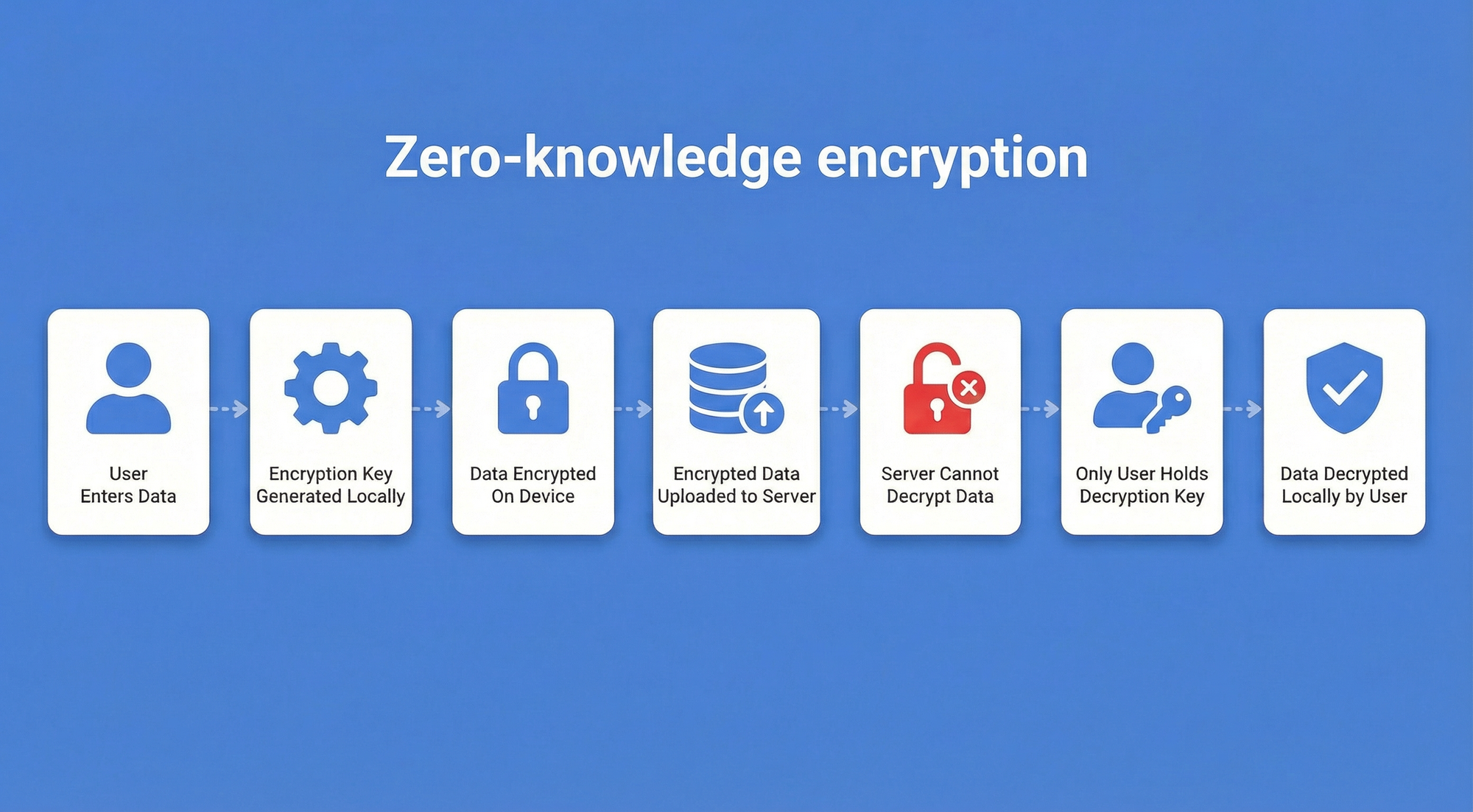
Before comparing deployment models, it's worth establishing what they share. Enterprise-grade password managers — regardless of where the vault lives — rely on zero-knowledge architecture. Encryption and decryption happen at the device level, using algorithms such as AES-256. The server, whether it sits in a vendor's data center or your own rack, stores only ciphertext. Even the vendor cannot read your credentials.
This matters for the deployment decision because zero-knowledge architecture shifts the security question away from "is the server trustworthy?" toward "who controls the server, and what happens if it's compromised?" The answer to that question differs significantly across the three models.
The three primary deployment models
Cloud deployment means the vendor hosts and manages the encrypted password vault on their infrastructure. Self-hosted deployment means the organization runs the vault on its own servers or private cloud. Hybrid deployment combines elements of both — typically splitting data storage, synchronization, or administrative control across cloud and on-premise components.
The choice affects data residency (where credentials physically reside), organizational control (who manages access and patching), and maintenance responsibility (who responds when something breaks). Each model optimizes for a different set of priorities.
| Characteristic | Cloud | Self-hosted | Hybrid |
|---|---|---|---|
| Vault location | Vendor's data center | Organization's infrastructure | Split across both |
| Data residency control | Vendor-defined | Full organizational control | Configurable by segment |
| Who manages patching | Vendor | Internal IT team | Shared |
| Who responds to incidents | Vendor (infrastructure) + org (credentials) | Organization | Both parties |
| Internet dependency | Required | Optional | Partial |
| Deployment speed | Hours to days | Days to weeks | Longest |
| Primary trade-off | Control for convenience | Convenience for control | Complexity for flexibility |
| Best fits | SMBs, fast-growing teams | Regulated industries, air-gapped environments | Multinationals, mixed compliance requirements |
Cloud-based password manager deployment
Architecture and mechanics
Cloud-based deployment is a model in which the vendor owns and operates the entire server infrastructure — hosting the encrypted password vault, managing availability, and handling all backend maintenance on the organization's behalf.
In practice, the vendor manages the full stack: servers, load balancers, backups, and availability zones. The organization installs client applications — browser extensions, desktop apps, mobile clients — that connect to the vendor's API. Credentials are encrypted locally before transmission and stored as ciphertext in the vendor's environment.
From an IT perspective, the operational footprint is minimal. There are no servers to provision, no database clusters to maintain, and no backup schedules to configure. The vendor handles all of that.
Strategic advantages
The primary advantage is speed. A cloud password manager can be deployed organization-wide in hours to days, with no infrastructure prerequisites. Automatic patching means the organization is always running the latest version without scheduling maintenance windows. High availability (HA) is vendor-managed, typically backed by SLAs that most internal IT teams would struggle to match independently.
Risks and limitations
The shared security responsibility model is the central risk. When a vendor's infrastructure is compromised, every customer is affected simultaneously. The 2022 LastPass breach is the clearest recent example: an attacker accessed a backup database through a third-party cloud storage service, ultimately affecting approximately 1.6 million UK users. In December 2025, the UK Information Commissioner's Office fined LastPass approximately $1.6 million for the security failures that made the breach possible. The incident demonstrated that vendor-managed compliance certifications do not eliminate vendor-side risk.
Beyond breach risk, cloud deployment introduces data residency constraints. If a vendor's data centers are located outside the EU, storing credentials there may require additional legal mechanisms to satisfy GDPR's cross-border transfer requirements. Continuous internet connectivity is also a hard dependency — an outage at the vendor or on the network path leaves users unable to access credentials. And subscription costs accumulate indefinitely; there is no point at which the organization "owns" the infrastructure.
Self-hosted (on-premise) password manager deployment
Architecture and mechanics
Self-hosted deployment is a model in which the organization runs the password manager on its own infrastructure — retaining full ownership of the vault server, the database, and every network layer that surrounds them.
This can mean physical servers in a corporate data center, virtual machines in a private cloud, or containers in a Kubernetes cluster. The organization installs and configures the password manager server software, manages the database, and handles all network access controls.
The client experience is identical to cloud: users access credentials through browser extensions and desktop or mobile apps. The difference is entirely on the server side — the organization controls every layer of the stack.
Strategic advantages
Self-hosting provides complete data sovereignty. Credentials never leave the organization's infrastructure, which directly satisfies strict data residency requirements. For organizations subject to GDPR, this eliminates the need for Standard Contractual Clauses or other cross-border transfer mechanisms. For regulated industries — defense contractors, financial institutions, healthcare organizations — this level of control is often a non-negotiable requirement.
Self-hosted deployments also support air-gapped environments. A vault server with no external network connectivity is physically isolated from internet-based attacks, making it appropriate for classified systems or critical infrastructure where even encrypted outbound connections are prohibited. And because there is no third-party vendor in the chain, the attack surface is limited to the organization's own infrastructure — which the organization already defends.
Risks and limitations
The operational burden is real and should not be underestimated. Self-hosting requires dedicated infrastructure (servers, load balancers for HA, backup systems), expertise to configure and maintain it, and a disciplined patching process. Security patches for the password manager software must be applied promptly; a missed update on a self-hosted vault is the organization's problem, not the vendor's.
High availability in a self-hosted environment means building it yourself: redundant database nodes, failover configurations, and tested recovery procedures. Organizations that lack this capability — or the IT staff to maintain it — face a genuine risk that a self-hosted deployment becomes less available and less secure than the cloud alternative it replaced.
Misconfigurations in network access controls or database permissions can expose the vault to internal threats that a vendor-managed environment would handle by default.
Passwork is built specifically for on-premise deployment. It ships with detailed installation documentation covering Linux, Windows, and Docker environments, and the support team is available to assist with configuration at every stage.
Try Passwork free
Hybrid password manager deployment
Defining the hybrid architecture
Hybrid deployment is a model in which the organization splits password manager functionality across cloud and on-premise components — assigning each part of the stack to the environment that best fits its security, compliance, or operational requirements.
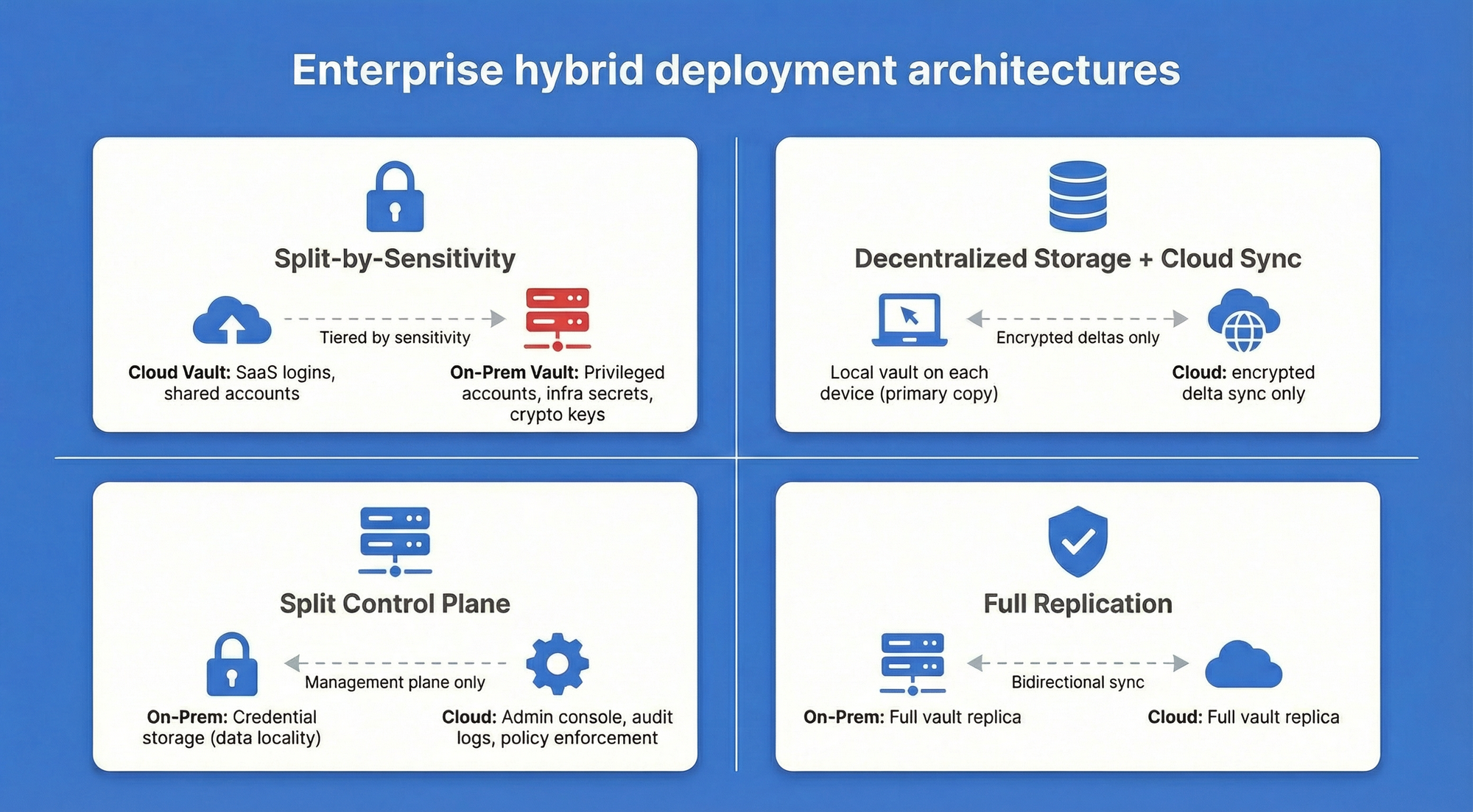
"Hybrid" is used loosely in vendor marketing, often meaning little more than "we have both a cloud and an on-premise option." In practice, enterprise hybrid deployments take four distinct architectural forms, each with different security and operational implications.
- Split-by-sensitivity keeps routine credentials — SaaS application logins, shared team accounts — in a cloud vault, while highly sensitive credentials (privileged accounts, infrastructure secrets, cryptographic keys) are stored in an on-premise vault. This pattern reduces the on-premise footprint while protecting the highest-value assets.
- Decentralized storage with cloud sync stores the password vault locally on each device or on-premise server, using cloud infrastructure only for synchronization between endpoints. The cloud component never holds the primary copy of credentials — it transmits encrypted deltas between local stores.
- Split control plane separates vault storage from administration: credentials are stored on-premise, but the management console, audit logging, and policy enforcement run in the cloud. This pattern suits organizations that want data locality without the overhead of managing an administrative interface internally.
- Failover architecture runs the primary vault on-premise, with a cloud-hosted replica that activates automatically if the on-premise environment becomes unavailable. This is a disaster recovery pattern rather than a day-to-day hybrid — the cloud component exists to guarantee continuity, not to handle routine access.
Strategic advantages
Hybrid deployments address the core tension between control and convenience. An organization subject to GDPR for EU employee credentials but also managing US-based SaaS accounts can route each credential type to the appropriate storage environment.
Mixed regulatory environments — common in multinational enterprises — become manageable when the deployment model can be segmented by data classification, geography, or sensitivity level.
The failover pattern specifically eliminates the single point of failure that both pure cloud (vendor outage) and pure self-hosted (on-premise infrastructure failure) deployments carry. For organizations with high availability requirements and the IT maturity to manage complexity, hybrid architecture can deliver better resilience than either model alone.
Risks and limitations
Hybrid deployments are the most architecturally complex option. Every boundary between cloud and on-premise components is a potential security gap: synchronization channels must be encrypted and authenticated, access policies must be consistent across both environments, and audit logs must be aggregated from multiple sources to provide a coherent picture of credential access.
Inconsistent policy enforcement at the boundary — for example, MFA required on-premise but not enforced for cloud-synced credentials — can create exploitable gaps that neither environment would have in isolation.
The operational overhead is also additive. The team must maintain both the on-premise infrastructure and the cloud integration, and incidents may span both environments, complicating diagnosis and response.
Compliance and data residency requirements
Regulatory frameworks don't prescribe deployment models — they prescribe controls. But certain controls are significantly easier to demonstrate with specific deployment architectures.
GDPR
GDPR (Regulation (EU) 2016/679) treats credentials as personal data and requires that cross-border transfers to third countries meet adequacy standards or use approved transfer mechanisms such as Standard Contractual Clauses.
Storing credentials in an EU-region cloud or on-premise within the EU eliminates the transfer question entirely. Organizations using US-based cloud vendors must verify that the vendor's data processing agreement covers credential storage and that the relevant data center region is contractually guaranteed.
HIPAA
HIPAA does not mandate on-premise or cloud deployment. The Security Rule (45 CFR Part 164, Subpart C) requires administrative, physical, and technical safeguards for electronic protected health information (ePHI).
For cloud deployments, the vendor must sign a Business Associate Agreement (BAA) and offer HIPAA-eligible services.
On-premise deployments place the full burden of demonstrating those safeguards on the organization. Either can satisfy HIPAA — the question is which the organization can implement and audit more reliably.
NIS2
NIS2 (Directive (EU) 2022/2555) applies to essential and important entities across critical infrastructure sectors. It requires organizations to implement access control measures and secure authentication practices as part of their cybersecurity risk management obligations.
Self-hosted or hybrid deployments give organizations direct control over these controls and the evidence needed to demonstrate them to national competent authorities.
Password managers with built-in audit logs and role-based access control — such as Passwork — simplify the process of producing that evidence during assessments.
| Regulation | Preferred deployment | Key requirement |
|---|---|---|
| GDPR | Self-hosted (EU) or EU-region cloud | Data residency; cross-border transfer controls |
| HIPAA | Either, with BAA for cloud | Technical safeguards; audit trail; BAA |
| NIS2 | Self-hosted or hybrid | Access control; authentication; risk management |
Migration and vendor lock-in considerations
Migrating between deployment models is operationally straightforward in principle and genuinely complex in practice. Most password managers support vault export in CSV or JSON format. The process involves exporting the existing vault, importing it into the new system, verifying credential integrity, and decommissioning the old environment.
The critical security step — one that is frequently skipped — is rotating all credentials after migration. Any credential that existed in the old environment should be treated as potentially exposed during the migration window, particularly if the old deployment was cloud-based and the organization is moving to self-hosted for security reasons. Password rotation for privileged accounts and shared credentials should happen before the old vault is decommissioned.
Vendor lock-in risk varies significantly by export format. Vendors that use proprietary formats — or that limit export to specific tiers — create real migration friction. Before committing to a platform, verify that the export format is open (CSV or JSON), that the export includes all credential fields (including TOTP secrets and custom fields), and that the process can be completed without vendor assistance. This is a contractual and technical due diligence item, not an afterthought.
Conclusion

The password manager deployment model decision carries the same weight as the software selection itself.
- Cloud deployment delivers speed, operational simplicity, and vendor-managed compliance certifications — at the cost of data control and shared breach exposure.
- Self-hosted deployment provides complete data sovereignty and air-gap capability — at the cost of significant IT overhead and full responsibility for security maintenance.
- Hybrid deployment offers a configurable balance between the two, at the cost of architectural complexity.
The right choice depends on three factors: your compliance obligations (which regulations apply, and what data residency requirements do they impose), your IT resources (do you have the infrastructure and expertise to run a self-hosted environment reliably), and your risk tolerance (how do you weigh vendor breach risk against misconfiguration risk).
Passwork supports all three deployment models — cloud, on-premise, and hybrid — so the architecture decision doesn't constrain your software choice.
- The on-premise version delivers full data sovereignty, LDAP/AD integration, and role-based access control for regulated environments.
- The cloud version provides the same feature set with vendor-managed infrastructure for teams that prioritize deployment speed.
- Hybrid configurations are available for organizations that need to segment credential storage across environments.
Frequently asked questions

What is the most secure password manager deployment model?
Security depends on implementation quality, not deployment model. A well-maintained self-hosted deployment with proper access controls, current patches, and tested backups is more secure than a poorly configured cloud deployment — and vice versa.
The self-hosted model eliminates third-party vendor breach risk but introduces the risk of misconfiguration and under-maintained infrastructure. The cloud model offloads infrastructure security to the vendor but creates shared-risk exposure.
The most secure option is whichever model the organization can implement and maintain to the highest standard given its actual IT capabilities.
Can I migrate from a cloud password manager to a self-hosted one?
Yes. Export your vault in CSV or JSON format from the cloud provider, import it into the self-hosted system, verify that all credentials transferred correctly, and then rotate all passwords — particularly privileged and shared credentials.
Plan for 1–2 weeks of parallel operation to catch any gaps before decommissioning the cloud vault. Confirm before starting that your cloud provider's export format is complete and includes all credential fields.
What does a hybrid password manager deployment actually mean?
In practice, hybrid takes four forms:
- Split-by-sensitivity (routine credentials in cloud, sensitive credentials on-premise)
- Decentralized storage with cloud sync (local vault, cloud-only for synchronization)
- Split control plane (on-premise vault storage, cloud-based admin console)
- Failover architecture (on-premise primary, cloud disaster recovery)
Each pattern has different security and operational implications. "Hybrid" as a marketing term often means simply that a vendor offers both cloud and on-premise options — that is not the same as a genuinely integrated hybrid architecture.
Which deployment model is required for GDPR compliance?
GDPR does not mandate a specific deployment model. Both cloud and self-hosted can satisfy GDPR requirements. The key requirements are that credentials are processed securely, that cross-border transfers to third countries use approved mechanisms (such as Standard Contractual Clauses or adequacy decisions), and that a data processing agreement is in place with any vendor handling personal data.
Self-hosted deployment within the EU eliminates the cross-border transfer question entirely. Cloud deployment through an EU-region provider with a compliant DPA can also satisfy GDPR, provided the vendor contractually guarantees data residency.
 Alex Muntyan
 Alex Muntyan
 Alex Muntyan
Table of contents
- Introduction
- Key takeways
- Understanding password manager architectures
- Cloud-based password manager deployment
- Self-hosted (on-premise) password manager deployment
- Hybrid password manager deployment
- Compliance and data residency requirements
- Migration and vendor lock-in considerations
- Conclusion
- Frequently asked questions
Table of contents
- Introduction
- Key takeways
- Understanding password manager architectures
- Cloud-based password manager deployment
- Self-hosted (on-premise) password manager deployment
- Hybrid password manager deployment
- Compliance and data residency requirements
- Migration and vendor lock-in considerations
- Conclusion
- Frequently asked questions

A self-hosted password manager for your business
Passwork provides an advantage of effective teamwork with corporate passwords in a totally safe environment
Learn more