

Most organizations have spent years hardening their perimeters — firewalls, endpoint detection, threat intelligence feeds. Yet the most common way threat actors get in remains unchanged: they simply log in.
Phishing ranked as the top initial attack vector in 2025, responsible for 16% of all data breaches — up from second place the prior year — according to IBM's Cost of a Data Breach Report 2025. Compromised credentials fell to third place but remained among the costliest vectors, averaging $4.67M per incident. Breaches where stolen data was spread across multiple environments were the most expensive of all, averaging $5.05M per incident — reflecting the compounded complexity of hybrid infrastructure attacks.
Here is the paradox: the more an organization invests in infrastructure, the more credentials it generates. B2B organizations run hundreds of cloud applications, on-premise systems, and an expanding layer of non-human identities: service accounts, API integrations, AI agents. Each one carries credentials. Most of those credentials are managed inconsistently, or not at all. Even the smallest leak gives the attackers the opportunity to obtain all private data.
Enterprise password management addresses this directly: centralized storage, automated policy enforcement, and the audit trail that compliance teams require. Unlike consumer password managers designed for individual use, enterprise password management solutions provide role-based access controls (RBAC), administrative oversight, and integration with existing security infrastructure.
This guide gives IT directors, security architects, and CISOs a practical framework for evaluating deployment models, understanding security architecture, executing a phased rollout, and building a defensible business case.
Understanding enterprise password management
Encrypted files once formed the foundation of organizational credential storage. Over time, dedicated platforms emerged to automate rotation, enforce complexity rules, and monitor for breaches. Today, these systems integrate directly with identity management infrastructure and handle complete credential lifecycles — from provisioning to decommissioning.
Organizations typically fall into one of three categories based on their approach:
- Basic: Spreadsheets or shared documents, no central oversight, no policy enforcement.
- Intermediate: Dedicated tools with encrypted vaults and limited sharing — but IT still cannot enforce policies automatically.
- Enterprise: Policy-based systems that centralize all credential data. Automated rotation runs on schedule, role-based permissions mirror organizational structure, and complete audit trails satisfy compliance requirements.
What is enterprise password management?
At its core, enterprise password management is an encrypted vault that stores passwords, API keys, certificates, and other secrets under strict access controls. Permission systems determine retrieval rights based on user roles and context. Policy automation enforces complexity rules and rotation schedules consistently, while usage limits prevent unauthorized behavior. Every interaction creates a log entry that supports both security reviews and compliance reporting.
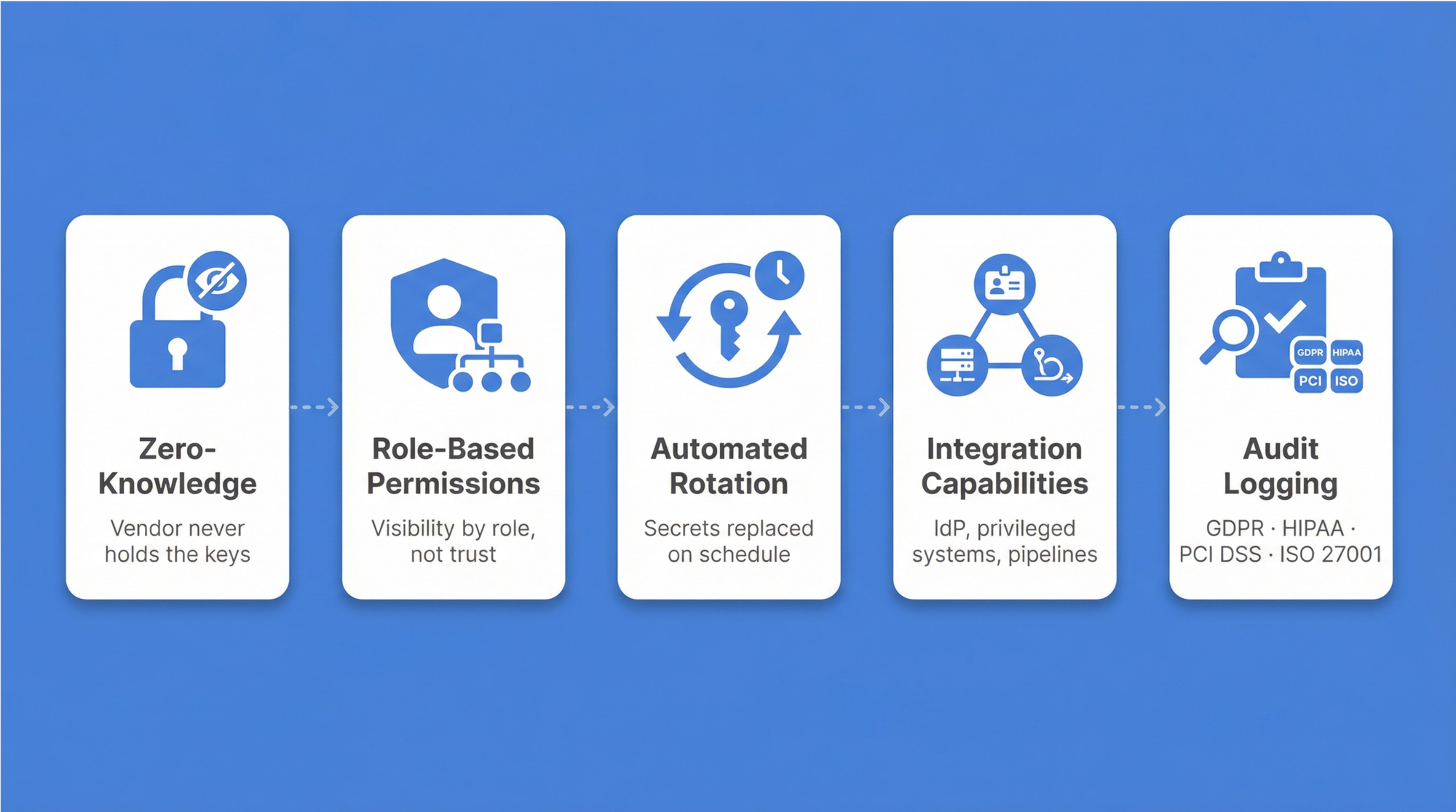
Five architectural principles define a mature implementation:
- Zero-knowledge architecture — only authorized users can decrypt their data; the vendor never holds the keys.
- Role-based permissions — visibility is restricted based on organizational roles, not individual trust.
- Automated rotation — secrets are replaced on defined schedules, limiting damage if credentials leak.
- Integration capabilities — connections extend across identity providers, privileged systems, and deployment pipelines.
- Compliance-ready audit logging — every credential access event is recorded with timestamp, user identity, and context, generating the evidence trail that GDPR, HIPAA, PCI DSS, and ISO 27001 audits require.
For C-level executives, compliance documentation tends to top the priority list — regulators demand complete audit trails and documented controls. Beyond regulatory pressure, risk reduction follows as password reuse gets eliminated and strong security standards take hold. Operational efficiency improves measurably when password-related support tickets decline.
Key differences between consumer and enterprise password managers
Consumer password managers serve individual users storing personal credentials. Enterprise solutions fulfill organizational needs with centralized administration, policy enforcement, and compliance capabilities that consumer tools were never designed to provide.
| Feature | Consumer solutions | Enterprise solutions |
|---|---|---|
| Administration | Individual control only | Centralized IT oversight with role-based delegation |
| Access controls | Basic sharing between users | Role-based access control mirroring organizational structure |
| Audit capabilities | Limited personal usage logs | Complete access trails for compliance and security monitoring |
| Integration | Browser extensions, mobile apps | Identity providers (AD — active directory; LDAP — Lightweight directory access protocol; SSO — Single sign-on), PAM systems, deployment pipelines |
| Deployment | Cloud-only subscription | On-premise, cloud, or hybrid options |
| Secrets management | Password-only focus | Passwords plus API keys, certificates, service accounts |
Passwork is built with these enterprise requirements as defaults: role-based access control that mirrors team structures, advanced administrative tools for IT oversight, on-premise deployment for data sovereignty, AD/LDAP/SSO integrations with existing identity infrastructure, and detailed audit capabilities for compliance reporting.
Critical components of an enterprise password vault
Enterprise vaults employ multiple protective technologies across the full credential lifecycle. Zero-knowledge encryption ensures only authorized users can decrypt sensitive data — even system administrators cannot access stored passwords. The Principle of Least Privilege (PoLP) governs every permission decision. Automated rotation shrinks exposure windows when credentials escape.
- Zero-knowledge architecture implements client-side encryption: decryption happens on user devices, never on servers. This is the architectural guarantee that separates trustworthy enterprise solutions from those that merely claim security.
- Role-based access control maps organizational structures to permission models. IT administrators see infrastructure credentials; Finance teams access accounting system passwords. For specific tasks, just-in-time credential retrieval provides temporary access that expires automatically after use — operational flexibility without persistent exposure.
Privileged access management integration
Privileged access management controls administrative credentials that grant elevated system access — domain administrators, database superusers, cloud administrators. Their compromise gives attackers complete control over critical infrastructure.
PAM integration addresses this through several layers: automated discovery locates privileged accounts across infrastructure, real-time monitoring captures administrative activity as it unfolds, and approval workflows route high-privilege requests to appropriate managers before access is granted. Encrypted storage combined with scheduled rotation keeps these credentials protected throughout their lifecycle.
Non-human credential management
Automated systems need authentication mechanisms that operate without human intervention: service accounts, API keys, application passwords. Deployment pipelines connect to production servers; monitoring tools query database metrics continuously. In most enterprises, non-human credentials outnumber traditional user passwords by a significant margin.
These credentials present a specific management challenge. Service accounts often outlive the projects that created them. Changing an API key requires updating every system that references it. Without active governance, orphaned credentials accumulate while teams avoid rotation to prevent breaking production deployments.
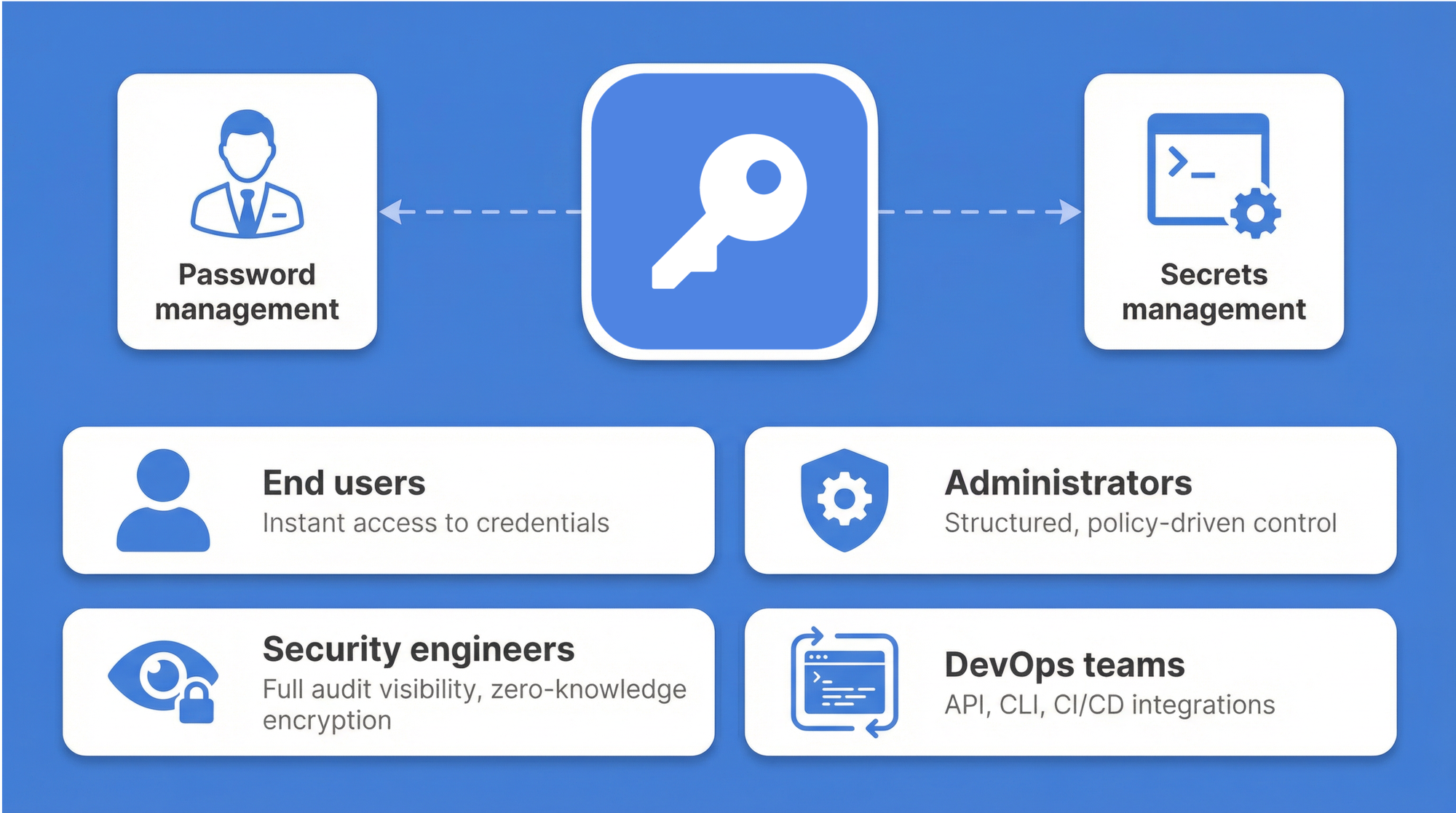
Passwork addresses this directly. While most enterprise password managers handle only human credentials, Passwork unifies password management with DevOps secrets management in a single platform. Deployment pipelines integrate directly with API key rotation; lifecycle tracking follows service accounts from creation to decommissioning. Housing both human and non-human credentials together eliminates duplicate tools and the operational complexity they create.
Credential discovery and management
Forgotten service accounts, shadow IT passwords, and abandoned contractor credentials remain hidden throughout infrastructure until something goes wrong. Automated scans sweep networks, servers, applications, and cloud platforms to locate these unmanaged secrets. The result is a complete credential inventory — often revealing hundreds of unknown accounts that create exploitable attack surface.
High-risk findings get immediate attention: privileged accounts without rotation schedules, passwords shared across teams, service accounts with no designated owner. Lifecycle management brings these under centralized governance, establishing clear ownership alongside rotation policies and audit tracking. GDPR and PCI DSS both require organizations to document exactly where sensitive data exists and who holds access permissions. Automated discovery makes this regulatory mandate achievable rather than aspirational.
Advanced security features
Enterprise password management combines multiple security technologies to protect credentials. AES-256 encryption with zero-knowledge architecture means all encryption happens client-side: passwords are encrypted on user devices before any transmission to servers, and only users holding proper decryption keys can access plaintext passwords.
The Open Web Application Security Project (OWASP) confirms that current-generation hashing algorithms — including Argon2id, bcrypt, and PBKDF2 — incorporate built-in salting mechanisms, requiring no additional configuration steps.
Beyond passwords and encryption, multi-factor authentication adds verification layers. Time-based one-time passwords (TOTP) generate six-digit codes that refresh every 30 seconds. or phishing-resistant hardware authentication, FIDO2/WebAuthn security keys are the stronger option — the key physically cannot be used on a spoofed domain.Organizations can stack these methods: password plus TOTP for standard access, password plus FIDO2 key for privileged accounts.
Enterprise password vaults rely on multiple security technologies working together. Encryption protects stored data, MFA adds verification layers, and automated monitoring catches threats before damage occurs.
| Security feature | Technology | Protection level | Implementation |
|---|---|---|---|
| Zero-knowledge encryption | AES-256 with client-side keys | Highest - provider cannot decrypt | Keys never leave user devices, decryption happens locally |
| Multi-factor authentication | TOTP, hardware keys, biometrics | Strong — requires multiple proofs | Integrates with existing infrastructure, stackable methods |
| Automated rotation | Scheduled credential replacement | Reduces exposure windows | Integrates with systems, policy-driven schedules |
| Audit logging | Complete access tracking | Detective — identifies suspicious patterns | Immutable records, compliance reporting |
Comparing enterprise password management solutions
Platform selection depends on deployment flexibility, integration requirements, and organizational scale. Regulatory environment, team structure, and technical capacity all shape the decision.
Open-source options offer code transparency with active communities. Cloud-only platforms trade deployment flexibility for convenience and faster initial setup. Passwork addresses a gap the others leave open: combining password management with DevOps secrets management while supporting both on-premise and cloud deployment.
For organizations with 50–200 users, cost efficiency and management simplicity matter most — IT managers need on-premise options for regulatory control without enterprise-grade complexity. Organizations with 200–1,000 users face different priorities: compliance reporting, centralized governance, and integration with existing identity infrastructure. Regulated industries — healthcare, finance, government — consistently move toward on-premise deployment where local data sovereignty laws require it.
Guide for B2B organizations: How to read it
The sections that follow are structured as a decision framework. Each section is self-contained. Organizations already committed to a deployment model can skip directly to implementation.
Part 1: Deployment models — cloud, on-premise, or hybrid?
The deployment decision shapes everything that follows: data residency, maintenance burden, cost structure, and integration complexity. There is no universally correct answer — only the right fit for a given organization's regulatory environment and operational capacity.
Quick comparison
| Feature | Cloud-hosted | On-premise | Hybrid |
|---|---|---|---|
| Control | Vendor-managed infrastructure | Full control over data and infrastructure | On-premise for sensitive data, cloud for flexibility |
| Compliance | Strong; vendors typically hold SOC 2, ISO 27001 certifications | Ideal for strict data residency requirements | Configurable to meet specific regional requirements |
| Cost model | Subscription-based (OpEx) | Higher upfront investment (CapEx) | Mix of CapEx and OpEx |
| Maintenance | Handled by the vendor | Requires dedicated IT resources | Shared responsibility |
| Scalability | High | Limited by internal infrastructure | High |
Cloud deployment
Cloud-hosted solutions offer the fastest time-to-value. Vendors handle infrastructure, updates, and availability. For distributed workforces with limited internal IT capacity, this model removes operational friction. The trade-off is dependency on the vendor's security posture and, for regulated industries, potential tension with data residency laws.
On-premise deployment
On-premise installation keeps all credential data within the organization's own infrastructure. For healthcare, financial services, and government sectors — where GDPR, HIPAA, or national data sovereignty laws apply — this is often the only viable path. The cost profile differs: higher upfront infrastructure investment, but no recurring per-user fees that compound at scale. For organizations with 200 or more users, the long-term economics frequently favor on-premise.
Hybrid deployment
Most large enterprises don't fit neatly into either category. A multinational operating across the EU, US, and APAC faces different regulatory requirements in each region. A financial institution may need on-premise storage for privileged credentials while allowing cloud-based access for general workforce accounts.
The hybrid model handles this directly: sensitive credentials and privileged accounts stay on-premise under full organizational control, while the broader workforce uses a cloud-connected interface. This architecture also supports gradual migration — organizations can move workloads incrementally rather than committing to a full cutover.
For enterprises deploying across multiple environments or business units, Passwork offers volume discounts on multi-instance purchases — making the hybrid model cost-effective at scale, not just architecturally sound. Try Passwork free to evaluate the full feature set before committing to a deployment model.
Part 2: Security architecture — beyond the vault
Encryption at rest is table stakes. The security architecture of a mature enterprise password manager goes considerably further.
Zero-knowledge architecture
Zero-knowledge architecture means the vendor never holds the keys to decrypt customer data. All encryption and decryption happens client-side, on the user's device. Even if the vendor's infrastructure were compromised, the attacker would retrieve only ciphertext. Passwork documents its encryption algorithm openly in its Technical documentation — security teams can verify the implementation independently rather than accepting vendor claims at face value.
Authentication layers
- Multi-factor authentication: TOTP adds a second verification layer for standard access. WebAuthn hardware security keys provide phishing-resistant authentication for privileged accounts — the key physically cannot authenticate against a spoofed domain. Organizations can stack these methods based on sensitivity level.
- Single Sign-On: Integration with existing identity providers — Microsoft Entra ID, Okta, or LDAP-based directories — means users authenticate through infrastructure they already trust. When an employee leaves, deprovisioning through the identity provider immediately revokes vault access.
- Passkeys: passkeys replace the password entirely for supported applications. The private key never leaves the user's device; authentication uses a cryptographic challenge-response. As enterprise application support for passkeys expands, this becomes the practical path toward eliminating passwords for human users.
Part 3: Implementation and rollout — a phased approach with Passwork
Technology selection is the easy part. The harder work is organizational: migrating existing credentials, configuring integrations, and getting thousands of employees to change how they handle passwords. A phased rollout reduces risk and builds confidence at each stage before expanding scope.
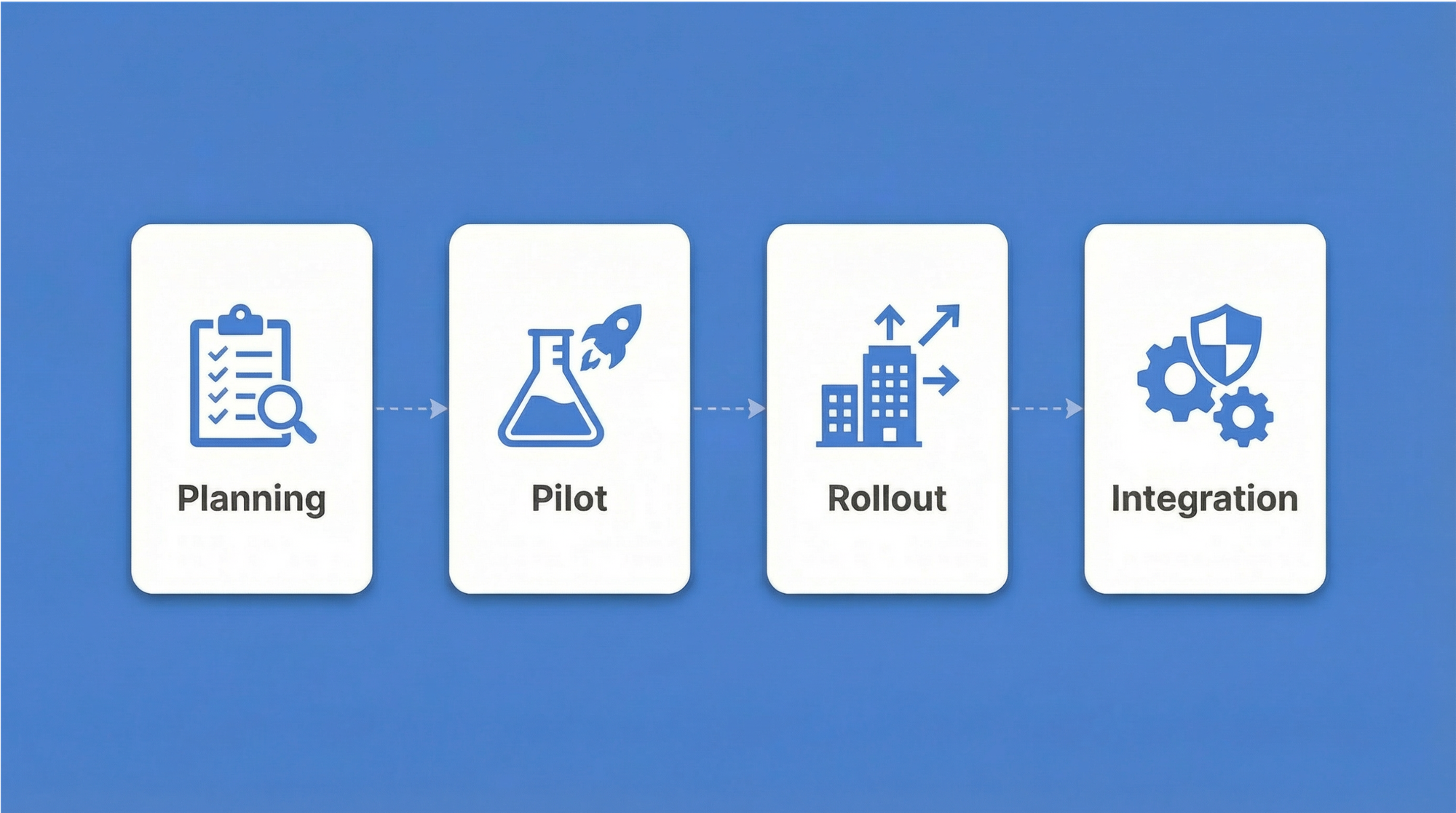
Phase 1: Planning and vendor selection
Before any software is installed, the project team needs a clear picture of what it's managing. This phase covers:
- Credential inventory: Catalog existing passwords, service accounts, API keys, and certificates. Most organizations discover significantly more credentials than expected — including orphaned accounts from departed employees and forgotten service accounts from decommissioned projects.
- Compliance mapping: Document which regulatory frameworks apply (GDPR, HIPAA, PCI DSS, ISO 27001) and what audit evidence each requires.
- Deployment model decision: Based on data residency requirements and IT capacity, select on-premise, cloud, or hybrid.
- Role structure design: Draft the initial permission model — how Passwork's role-based access control will mirror the organizational hierarchy.
- Vendor shortlist evaluation: Assess integration requirements (Active Directory, LDAP, SSO providers), secrets management needs, and total cost of ownership.
Phase 2: Pilot program
The IT department runs the pilot. This group has the technical context to identify integration issues and the tolerance for rough edges that end users don't.
During this phase:
- Identity provider integration gets configured — connecting Passwork to Active Directory or LDAP for user provisioning, and enabling SSO through the organization's existing identity provider.
- Password policies go live: complexity requirements, rotation schedules, and MFA enforcement.
- Credential migration begins incrementally. Passwork supports import from common formats and provides migration assistance for organizations moving from legacy platforms.
- Pilot participants provide structured feedback on usability, browser extension behavior, and workflow impact.
Migrating from a legacy password manager
Organizations moving from legacy password managers face a specific challenge: users have years of stored credentials in an existing system, and a hard cutover creates disruption. Passwork's migration tooling supports phased import: credentials move in batches by department or credential type, allowing parallel operation during the transition window. The legacy system stays available in read-only mode until migration is verified complete.
Phase 3: Departmental rollout and change management
Expansion happens department by department, not all at once. Finance, HR, and operations each have distinct credential sets and different technical comfort levels. Sequential onboarding lets the IT team address issues in one department before moving to the next.
Change management is where most enterprise rollouts succeed or fail. Common resistance patterns and how to address them:
| Objection | Response |
|---|---|
| "I already use my browser's built-in password manager" | Browser password managers lack centralized admin control, audit logging, and MFA enforcement. They also don't handle service accounts or API keys. |
| "This adds friction to my workflow" | Passwork's browser extension handles autofill automatically. After the first week, most users report faster authentication, not slower. |
| "What happens if the system goes down?" | On-premise deployment eliminates vendor availability dependency. Offline access modes are available for critical credentials. |
| "I don't trust a third party with our passwords" | Zero-knowledge architecture means Passwork never holds decryption keys. The vendor cannot read stored credentials even if compelled. |
During this phase, service accounts and application credentials also migrate into the system.
Phase 4: Integration, automation, and governance
The final phase completes the integration layer and establishes ongoing governance.
- Directory synchronization: SCIM provisioning automates user lifecycle management. When HR adds a new employee in the identity provider, Passwork automatically creates their account with the correct role assignments. When someone leaves, deprovisioning happens immediately — no manual steps, no orphaned access.
- Automated rotation: Scheduled credential rotation runs without human intervention. Passwork integrates with deployment pipelines so that rotating an API key updates every dependent system simultaneously, eliminating the "we can't rotate this because something will break" problem.
- Compliance reporting: Automated audit reports generate evidence for GDPR, HIPAA, PCI DSS, and ISO 27001 audits. The audit log captures every credential access event with timestamp, user identity, and context.
- Ongoing governance: The project team establishes review cadences — quarterly access reviews, annual policy updates, and incident response procedures that include credential revocation workflows.
Part 4: The business case — calculating ROI
Security investments require financial justification. The data here is straightforward.
Help desk cost reduction
Password-related issues account for 20–50% of all IT help desk calls, according to Gartner research. A single password reset carries a surprisingly high fully loaded cost when IT labor is factored in — and at scale, across hundreds or thousands of employees, these tickets add up to a significant and entirely avoidable operational expense.
Self-service password reset combined with an enterprise password vault that handles autofill and credential injection eliminates the majority of these tickets. Users who never need to manually type or remember passwords generate far fewer lockout events.
Breach cost avoidance
The global average cost of a data breach reached $4.44 million in 2025, down from $4.88 million in 2024 — but breaches involving data spread across multiple environments averaged $5.05 million. A single credential compromise enabling lateral movement across cloud and on-premise systems can easily exceed this figure once regulatory fines, legal costs, and reputational damage are included.
Enterprise password management reduces breach probability through several mechanisms: eliminating password reuse, enforcing complexity automatically, detecting compromised credentials through breach monitoring, and reducing exposure windows through automated rotation.
Part 5: The future of authentication — managing non-human identities
Human credentials are the visible part of the problem. The less-visible part is growing faster.
The rise of non-human identities
Service accounts, API keys, database connection strings, OAuth tokens, and TLS certificates now outnumber human user passwords in most enterprise environments. AI agents — autonomous systems that authenticate to APIs, databases, and internal tools to complete tasks — are accelerating this trend. Each agent carries its own credentials. Each credential is a potential attack surface.
Unlike human passwords, non-human credentials are often long-lived, rarely rotated, and owned by no one in particular. The developer who created a service account three years ago may have left the company. The API key embedded in a deployment script may be referenced by a dozen downstream systems. Changing it requires cross-team coordination — so it doesn't get changed.
Secrets management as a discipline
Managing non-human credentials requires a dedicated approach — what the industry calls secrets management. Passwork unifies password management and secrets management in a single platform. Deployment pipelines integrate directly with API key rotation; service account lifecycle tracking runs alongside human credential governance. Organizations eliminate the operational complexity of running separate tools for human and non-human credentials.
The passwordless enterprise
The trajectory is clear: passwords are being replaced, not improved. Passkeys eliminate shared secrets for human authentication. Short-lived tokens and certificate-based authentication handle machine-to-machine communication. The role of a password manager evolves accordingly — from a vault that stores passwords to an identity infrastructure layer that manages the full credential lifecycle, including the transition period where passwords, passkeys, and secrets coexist.
Organizations that build this infrastructure now are better positioned for that transition.
Conclusion: Build the infrastructure before the breach

Enterprise password management is infrastructure, not a product purchase. Organizations that treat it as such — investing in proper deployment architecture, phased implementation, and ongoing governance — avoid the $4.44 million average breach cost rather than contributing to it.
The decision framework is straightforward: assess data residency requirements, map existing identity infrastructure, account for non-human credentials alongside human ones, and select a deployment model that fits your regulatory environment and operational capacity.
Passwork offers on-premise, cloud, and hybrid deployment, combining password management with secrets management in a single platform. Free migration assistance are enterprise-grade implementation support for organizations moving from a legacy solution.
Frequently asked questions

What is enterprise password management?
Enterprise password management centrally stores, controls, and audits organizational credentials through encrypted vaults, role-based access controls, and automated password rotation. Unlike consumer tools, enterprise solutions provide IT oversight, compliance reporting, and integration with existing identity infrastructure.
How is enterprise password management different from a regular password manager?
Enterprise solutions add centralized administration, complete audit logging, and identity provider integration with AD/LDAP/SSO. They offer deployment flexibility — on-premise, cloud, or hybrid — and handle secrets management for DevOps teams, not just individual password storage.
What deployment model is right for my organization?
Regulated industries typically require on-premise deployment for data sovereignty. Distributed workforces with limited IT resources benefit from cloud deployment. Multinationals with varying regional regulations often use hybrid architectures that keep sensitive credentials on-premise while extending cloud access to the general workforce.
How does enterprise password management support compliance with GDPR, HIPAA, and PCI DSS?
Audit logging documents every credential access event, satisfying documentation requirements under GDPR Article 30, HIPAA's access control standards, and PCI DSS Requirement 8. Automated password policy enforcement demonstrates controls, and on-premise deployment supports data residency obligations.
What is zero-knowledge architecture, and why does it matter?
Zero-knowledge means all encryption and decryption happens on the user's device. The vendor never holds plaintext credentials or the keys to decrypt them. Even in the event of a vendor-side breach, attackers retrieve only ciphertext.
How does an enterprise password manager handle service accounts and API keys?
Dedicated secrets management capabilities store API keys, database connection strings, certificates, and service account credentials alongside human passwords. Automated rotation integrates with deployment pipelines, and just-in-time injection delivers credentials to systems at the moment of need without exposing them in plaintext.
 Eirik Salmi
 Ana Moore
 Eirik Salmi
Table of contents
- Understanding enterprise password management
- Guide for B2B organizations: How to read it
- Part 1: Deployment models — cloud, on-premise, or hybrid?
- Part 2: Security architecture — beyond the vault
- Part 3: Implementation and rollout — a phased approach with Passwork
- Part 4: The business case — calculating ROI
- Part 5: The future of authentication — managing non-human identities
- Conclusion: Build the infrastructure before the breach
- Frequently asked questions
Table of contents
- Understanding enterprise password management
- Guide for B2B organizations: How to read it
- Part 1: Deployment models — cloud, on-premise, or hybrid?
- Part 2: Security architecture — beyond the vault
- Part 3: Implementation and rollout — a phased approach with Passwork
- Part 4: The business case — calculating ROI
- Part 5: The future of authentication — managing non-human identities
- Conclusion: Build the infrastructure before the breach
- Frequently asked questions

A self-hosted password manager for your business
Passwork provides an advantage of effective teamwork with corporate passwords in a totally safe environment
Learn more