

Introduction
It's Monday morning. A developer can't log in to the production database. The password was rotated last week, the update never reached the shared spreadsheet, and the system is down. Someone opens a help desk ticket. An IT engineer drops what they're doing. Forty minutes later, the crisis is resolved.
The bill: $70 — one ticket, one engineer, one frustrated developer who produced nothing for the better part of an hour.
Multiply that by every forgotten, expired, or miscommunicated credential across your organization, and password chaos stops being an IT annoyance and starts looking like a balance sheet problem.
And the ticket is just the visible part. It doesn't count the developer's lost context after an interrupted morning, the deployment that slipped, or the client call that got pushed. It bleeds quietly, across every team, all year long.
Password chaos is the disorganized, insecure, and costly sprawl of credentials across an organization — unmanaged, duplicated, and shared through unsafe channels. According to the Verizon Data Breach Investigations Report, compromised passwords were involved in 28% of all data breaches in 2025. The financial exposure is real: the global average cost of a data breach reached $4.44 million in 2025, (IBM).
This article breaks down why password chaos persists despite security policies, what it actually costs across security, productivity, and compliance — and how to fix it structurally, not just symptomatically.
Key takeaways
- Compromised passwords are behind the majority of breaches — not sophisticated exploits, but credentials that were reused, shared carelessly, or never rotated.
- Password-related issues consume a disproportionate share of IT capacity — resets, lockouts, and access requests that shouldn't exist in the first place.
- Legacy password policies make the problem worse, not better — forced rotation and complexity rules drive workarounds that reduce actual security.
- Unmanaged credentials make compliance audits nearly impossible — without a centralized audit log, there's no way to prove who had access to what.
- The fix is structural — centralized storage, role-based access control, and a clear offboarding process eliminate the root causes, not just the symptoms.
Why password chaos is a silent business killer
Password chaos is the uncontrolled sprawl of credentials across an organization — stored in spreadsheets, shared over chat, duplicated across systems, and managed without a consistent process. It's a condition that compounds over time, creating simultaneous exposure across security, productivity, and compliance.
Security risks
Unmanaged credentials don't stay contained. They spread, weaken, and get exploited:
- Password fatigue drives reuse. When employees manage dozens of accounts, they default to familiar, weak credentials — often the same password across multiple systems.
- Reuse enables credential stuffing at scale. Attackers take leaked username and password pairs from one breach and automate login attempts across hundreds of other services. Verizon's research confirms that stolen credentials are tied to 86% of security breaches involving web-based applications.
- Shared credentials in uncontrolled channels create permanent exposure. Once a password leaves a secure system — via Slack, email, or a spreadsheet — there's no audit trail and no revocation mechanism. It exists somewhere you can't see or control.
Productivity and operational risks
- 40% of all help desk calls are password-related (Gartner). That's a significant share of IT capacity absorbed by a problem with a known, solvable root cause.
- When access is blocked, work stops. The downstream cost of an engineer or analyst waiting for a reset — lost context, delayed deployments, pushed deadlines — compounds the direct cost of the ticket itself.
- Workarounds become permanent fixtures. Temporary shared accounts, browser-saved passwords, and pinned Slack messages start as shortcuts and end as untracked access points.
Compliance risks
Credential sprawl makes regulatory compliance harder to demonstrate and easier to fail:
- Unmanaged credentials make access control impossible to prove under GDPR, NIS2, SOC 2, HIPAA, or ISO 27001. Auditors don't accept "we think access was limited" — they require evidence.
- Without a centralized audit log, there's no record of who had access to what and when. That gap is both a compliance failure and a forensic blind spot during incident response.
- Offboarding without credential rotation leaves access open indefinitely. Former employees, contractors, and vendors retain access to systems long after their engagement ends.
The compounding effect
Each risk dimension amplifies the others. A reused password becomes a credential stuffing vector. A stuffed credential bypasses access controls. A bypassed control leaves no audit trail. By the time the breach is detected the damage is already done. Password chaos is a systemic condition that requires a systemic response.
Password chaos in practice

Password chaos rarely announces itself as a security event. It looks like a routine Tuesday.
A mid-size SaaS company runs its infrastructure across AWS, three internal tools, a CRM, and a staging environment shared by the dev team. Credentials are managed the way they always have been: a shared spreadsheet on Google Drive, a few pinned entries in a team Slack channel, and a handful of passwords that exist only in one senior engineer's memory.
Here's what it looks like:
- Week 1. A new contractor joins the backend team. Someone shares the staging database password over Slack DM. The contractor finishes the engagement six weeks later. No one rotates the credential. It stays valid.
- Week 3. The CRM vendor forces a password reset. The team lead updates the spreadsheet. Two developers miss the update entirely and spend the better part of a morning troubleshooting what they assume is an API issue. A release gets pushed.
- Week 5. A senior engineer takes two weeks of leave. Three systems need access during that time. Someone finds a workaround: a second account gets created with admin rights. It won't be removed for four months.
- Week 7. A developer leaves the company. HR notifies IT. IT disables the Active Directory account. Nobody checks which shared credentials the developer had access to — the staging environment, the AWS test account, the internal monitoring tool. All three remain accessible under those credentials.
- Week 9. An IT audit flags the shared Google Drive spreadsheet as a compliance gap ahead of a SOC 2 review. The security team spends three days manually mapping who had access to which credentials, when, and whether any have been rotated since the last employee departure. Several haven't.
- Week 10. A phishing attack compromises one employee's Google account. The attacker now has read access to the credential spreadsheet. The team doesn't know this for 19 days.
No single event here is catastrophic on its own. Each one has a reasonable explanation: a contractor needed access, someone was on leave. But the pattern is exactly how organizations end up in breach post-mortems explaining why a contractor's credentials were still active months after the engagement ended.
The chaos doesn't build dramatically. It accumulates quietly, one workaround at a time.

Password chaos costs more than most teams realize. Passwork gives IT teams a structured vault with role-based access and a full audit log — deployed entirely within your own infrastructure. See how it works
Why traditional password policies are failing in 2026
Legacy password policies were designed for a different threat model. Mandatory 30-day rotation, complexity rules requiring symbols and numbers, and prohibition of reuse — these rules were well-intentioned, but they've been shown to increase risk rather than reduce it.
NIST's current guidelines (SP 800-63B) explicitly recommend against mandatory periodic password changes unless there's evidence of compromise. Forced rotation leads to predictable patterns: Password1! becomes Password2! on the next cycle. Users write passwords down. Reuse increases.
| Old approach | Current best practice (NIST SP 800-63B) |
|---|---|
| Mandatory rotation every 30–90 days | Change only on evidence of compromise |
| Complexity rules (symbols, numbers, mixed case) | Length over complexity; passphrases encouraged |
| Prohibit password reuse (last N passwords) | Use breach-detection databases to flag compromised credentials |
| No visibility into who accessed what | Full audit log with user-level activity tracking |
The result of outdated policies: employees work around them, security weakens, and IT teams spend time enforcing rules that don't reduce actual risk.
How to fix password chaos for good: the 4-step blueprint
Fixing password chaos requires a structured approach and a deliberate change to how credentials are created, stored, shared, and revoked across the organization.
1. Audit your current credential landscape
Map every system, application, and shared account. Identify credentials stored outside a secure vault: spreadsheets, email threads, chat logs, browser-saved passwords. Quantify exposure before attempting to fix it.
2. Centralize into a secure vault
Move all credentials into a centralized password manager with encrypted storage. For organizations in regulated industries or with strict data residency requirements, an on-premise or self-hosted deployment keeps all data within the company perimeter — no third-party cloud dependency.
3. Enforce access control with RBAC
Role-based access control (RBAC) ensures that employees access only the credentials their role requires. When someone leaves the organization, access is revoked immediately — and the system flags all credentials they had access to for rotation.
4. Automate with MFA and integrations
Require multi-factor authentication (MFA) for vault access. Integrate with your existing directory service via LDAP or Active Directory to synchronize users and groups automatically. Use API access to embed credential management into CI/CD pipelines and DevOps workflows.
Why Passwork is the right fit for enterprise control
Passwork is an on-premise password manager built for businesses that require full control over their credential data. Every piece of data stays within the company's own infrastructure and getting your team up and running takes minutes, not weeks.
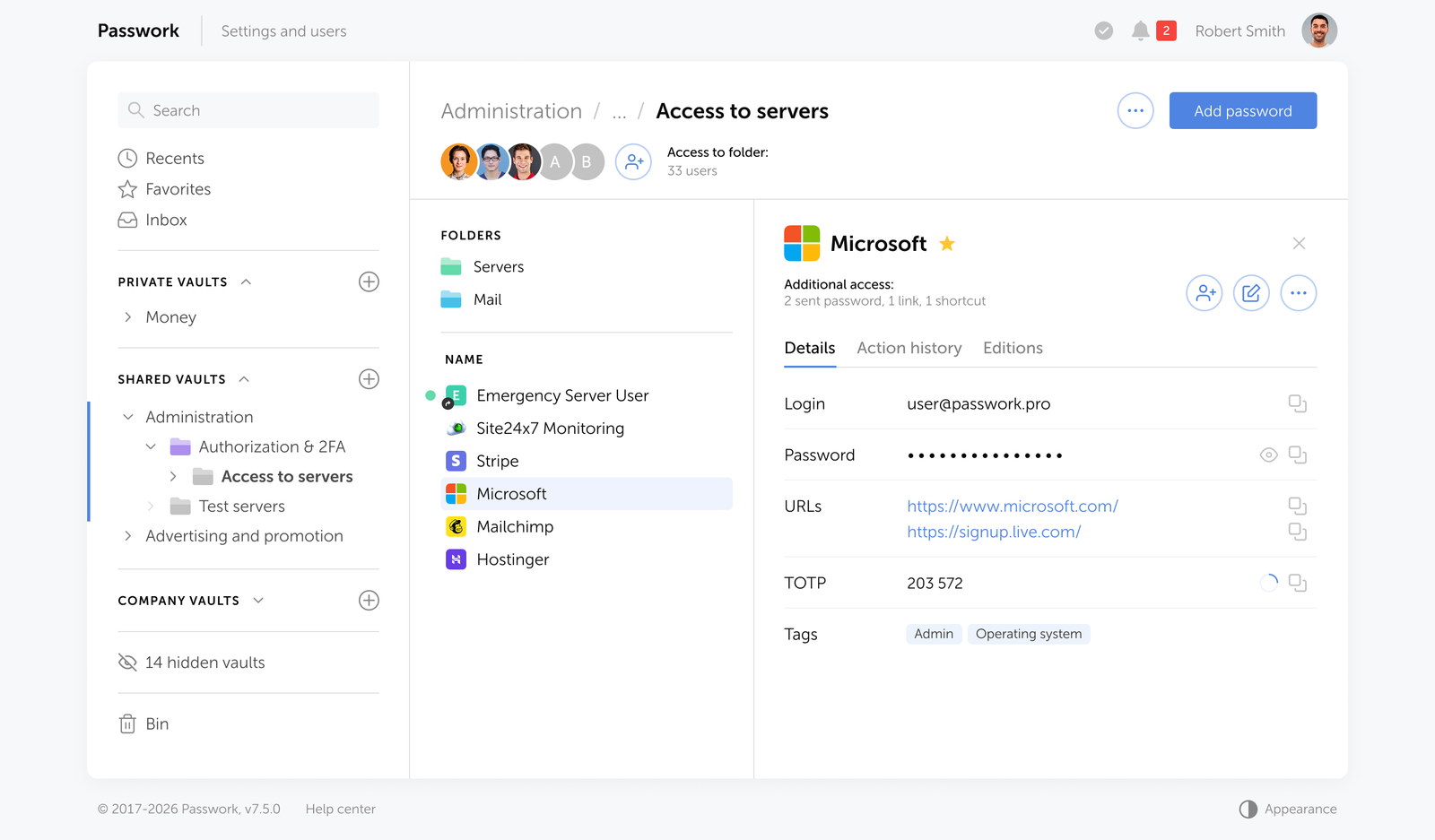
Creating and sharing passwords without the friction
Most credential chaos doesn't start with a breach. It starts with an employee pasting a password into Slack because there was no faster option. Passwork removes that temptation by making the secure path the easy one.
Storing passwords
Adding a password takes seconds: fill in the fields, attach tags or color labels for quick filtering, and save it to the relevant folder. he folder structure mirrors how teams actually work — organized by project, environment, department, or client. Employees find what they need through search or tags.
Sharing access
Need to share access with a colleague or an entire team? Invite them to a shared folder — they get access to every credential inside it, at the permission level you define. For one-off cases, send a credential directly to another user.
Onboarding and offboarding
When someone joins a project, add them to the vault or folder. When they leave the company, Passwork automatically flags every credential they had access to as potentially compromised and prompts the team to rotate them.
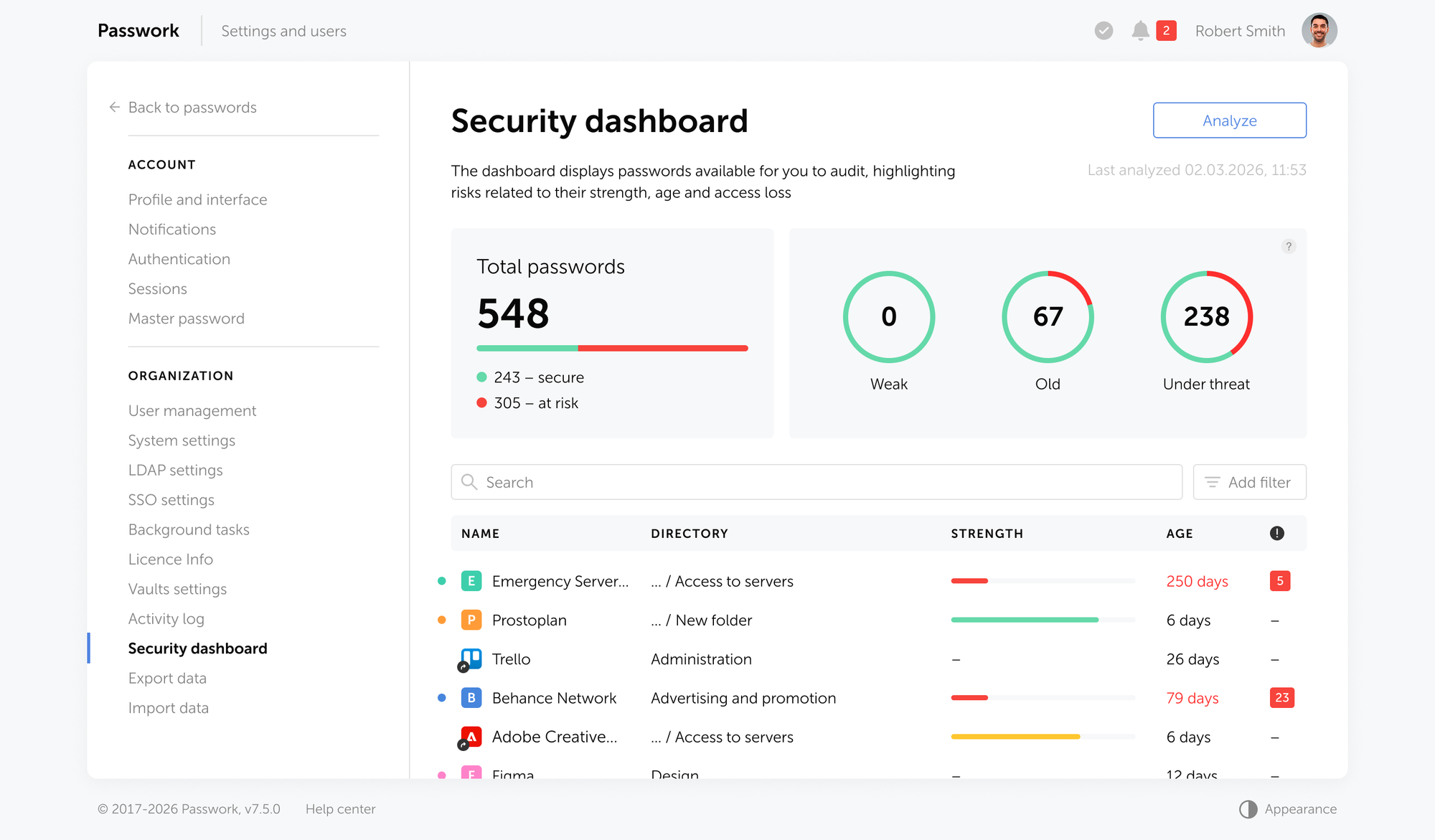
Access across devices and workflows
Browser extensions and mobile apps keep passwords accessible across devices — autofill handles the rest. For DevOps teams, the CLI and Python SDK bring the same access directly into terminal workflows and scripts.
The on-premise advantage
For organizations in finance, government, healthcare, and other regulated sectors, keeping credential data within the company perimeter is a hard requirement — not a preference. Passwork runs on the organization's own servers (Linux or Windows, with or without Docker), encrypted with AES-256 on both server and client sides. Zero-knowledge architecture means that even Passwork's own team cannot access your data.
Passwork eliminates that dependency entirely. The application runs on the organization's own servers (Linux or Windows, with or without Docker), encrypted with AES-256 on both server and client sides. Zero-knowledge architecture means that even Passwork's own team cannot access your data.
Key capabilities for IT and security teams
- LDAP/AD integration and SAML SSO — synchronize users and groups from your directory service; authenticate through your existing identity provider.
- Role-based access control — granular permissions at the user and group level; custom vault types with automatic administrator assignment.
- Full audit log — every action within the system is logged and reportable, supporting SOC 2, ISO 27001, and internal security policy requirements.
- Secrets management — store API keys, access tokens, database credentials, SSH keys, TLS certificates, and service account credentials alongside user passwords in a unified vault.
- Password security dashboard — flags weak, reused, outdated, and compromised credentials across the entire organization.
- Auditable source code — organizations can conduct their own security audit of the Passwork codebase to verify there are no vulnerabilities before deployment.
Passwork holds ISO/IEC 27001 certification, confirming a systematic, audited approach to information security management.
Conclusion

Password chaos is a financial and security liability — and an entirely preventable one. The $70 reset ticket, the $4.44 million breach, the audit that reveals no one knows who had access to what: none of these are inevitable. They're the predictable outcome of treating credentials as an afterthought.
The pattern is consistent across organizations of every size. Passwords get shared through the wrong channels. Policies get enforced inconsistently. Access accumulates over time and never gets cleaned up. Someone leaves, and no one rotates the credentials they touched. Each gap is small on its own. Together, they create the conditions for a breach — or a compliance failure that's just as costly.
The fix is a structural change: centralized storage, defined access, a full audit trail, and a process that makes the secure option the default one — not the inconvenient one.
Passwork is built to make that change straightforward. Whether you deploy on your own infrastructure or in the cloud, your team gets a structured vault, role-based access, and the visibility to know exactly who can reach what — before something goes wrong.
Ready to replace credential sprawl with structured control? Try Passwork on your own infrastructure — our team will assist with installation and configuration. Request a free demo
FAQ: taming the credential chaos

How do you manage passwords for a team without sharing them insecurely?
Use a centralized password manager with role-based access control. Each team member accesses only the credentials assigned to their role — no direct sharing required. Shared vaults with granular permissions replace spreadsheets and chat-based credential distribution. When someone leaves, their access is revoked and affected credentials are flagged for rotation automatically.
Is it safe to store business passwords in a browser?
No. Browser-stored passwords offer no access control, no audit trail, and no encryption beyond the browser's own security model. They sync across devices through cloud accounts that may not meet enterprise security standards. A browser compromise exposes every saved credential simultaneously.
What is credential stuffing and how does a password manager prevent it?
Credential stuffing is an attack where stolen username/password pairs from one breach are automatically tested against other services. It succeeds because of password reuse. A password manager generates and stores unique, strong credentials for every account, eliminating the reuse that makes credential stuffing effective. Combined with MFA, it removes the primary attack vector.
How does a password manager support GDPR and SOC 2 compliance?
A password manager with a full audit log, RBAC, and on-premise deployment directly supports compliance requirements. GDPR requires demonstrable control over who accesses personal data. SOC 2 requires evidence of access management and monitoring. An audit log with user-level activity tracking provides the documentation auditors need — and the visibility security teams need to act on anomalies.
What happens to shared credentials when an employee leaves?
In Passwork offboarding triggers an immediate access revocation. The system identifies all credentials the departing employee had access to and marks them as potentially compromised, prompting the team to rotate them. Without a centralized system, this process is manual, error-prone, and often incomplete.
Does a password manager eliminate the need for MFA?
No — and it shouldn't. A password manager secures credential storage and access; MFA secures authentication. They address different attack surfaces. A strong, unique password prevents credential stuffing; MFA prevents unauthorized access even when a password is compromised. The two controls are complementary, not interchangeable.
How long does it take to deploy a password manager across an organization?
A self-hosted solution like Passwork can be deployed on existing infrastructure — Linux or Windows, with or without Docker — in under an hour. LDAP and Active Directory integration synchronizes users and groups automatically, so there's no need to provision accounts manually. Most teams are fully operational within a day of deployment.
 Eirik Salmi
 Eirik Salmi
 Alex Muntyan
Table of contents
- Introduction
- Key takeaways
- Why password chaos is a silent business killer
- Password chaos in practice
- Why traditional password policies are failing in 2026
- How to fix password chaos for good: the 4-step blueprint
- Why Passwork is the right fit for enterprise control
- Conclusion
- FAQ: taming the credential chaos
Table of contents
- Introduction
- Key takeaways
- Why password chaos is a silent business killer
- Password chaos in practice
- Why traditional password policies are failing in 2026
- How to fix password chaos for good: the 4-step blueprint
- Why Passwork is the right fit for enterprise control
- Conclusion
- FAQ: taming the credential chaos

A self-hosted password manager for your business
Passwork provides an advantage of effective teamwork with corporate passwords in a totally safe environment
Learn more