

Secret rotation fails when teams treat it as a scheduled password change: set up rotation schedules, point to a vault, and call it done. Then an API key leaks from a CI/CD variable that nobody inventoried. Or a rotation job runs twice, creates a race condition, and takes down a service. Or an engineer leaves, and their SSH key stays active for six months because nobody mapped it to an owner.
A secrets rotation lifecycle is the controlled process for creating, storing, using, rotating, revoking, and retiring credentials such as API keys, passwords, tokens, certificates, and encryption keys. Its goal is to reduce the lifespan and blast radius of exposed credentials while keeping systems available.
Rotation is one control inside that process. Without the surrounding structure (inventory, ownership, access control, validation, cleanup, and audit evidence) rotation alone changes a credential's value without reducing its risk.
Key takeaways
- A secrets rotation lifecycle has seven stages: creation, classification, storage, distribution, rotation, revocation, and retirement.
- Rotation is one control inside a wider system, not the system itself. Without the surrounding structure, rotation changes a credential's value without reducing its risk.
- The exposure problem is structural, not procedural. GitGuardian detected 28.65 million new hardcoded secrets on public GitHub in 2025 – a 34% year-over-year increase. Of secrets confirmed valid in 2022, 64% were still exploitable in January 2026 (GitGuardian State of Secrets Sprawl 2026).
- Safe rotation has a specific sequence. Generate the new value, validate it against the target system, roll it out gradually, then disable the old one. Skipping validation or cutting over all consumers at once is how rotation causes outages.
- Dynamic secrets eliminate the rotation problem for supported workloads. Rotated static secrets remain necessary for legacy systems, third-party integrations, and long-running workloads that cannot request credentials on demand.
- Emergency revocation requires a complete inventory. If you cannot identify all consumers of a secret within minutes of a suspected exposure, you cannot contain the incident. Inventory is the prerequisite for everything else.
What is the secrets rotation lifecycle?
The secrets rotation lifecycle is the end-to-end governance model for managing machine and human credentials from the moment they are created to the moment they are permanently destroyed. It treats rotation as one stage inside a broader operational process, not as a periodic password-change task.
The distinction matters because rotation without the surrounding controls produces a false sense of security. A credential that rotates every 30 days but has no named owner, no consumer inventory, and no revocation path is still a liability.
| Lifecycle stage | What happens | Primary control |
|---|---|---|
| Creation | A secret is generated or issued. | Approved generation process, sufficient entropy, named ownership. |
| Classification | The secret is tagged by type, sensitivity, owner, and consumer. | Inventory metadata and risk tiering. |
| Storage | The secret is stored in a vault or managed system. | Encryption at rest, access policies, separation of duties. |
| Distribution and use | Authorized workloads or users retrieve the secret. | Least privilege, identity-based access, no hardcoding. |
| Rotation | A new version replaces the old value. | Automation, validation, version control, rollback. |
| Revocation | A secret is disabled after exposure, role change, or lifecycle end. | Incident workflow and access termination. |
| Retirement and cleanup | Old values are destroyed or archived according to policy. | Deletion, audit evidence, exception records. |
Each stage has a distinct set of controls. Skipping classification means rotation targets are unknown. Skipping cleanup means old credentials accumulate and create exposure. The lifecycle model forces teams to treat each stage as a deliberate operational decision.
Why rotation alone does not solve credential risk

Rotation reduces the window of exposure for a compromised credential. It does not eliminate the credential as an attack surface, and it does nothing for credentials that were never inventoried, never stored securely, or never revoked after exposure.
The scale of the unmanaged credential problem is structural. GitGuardian detected 28.65 million new hardcoded secrets on public GitHub in 2025 – a 34% increase over the previous year and the largest single-year jump the company has recorded. That figure covers only public repositories. Of the secrets GitGuardian confirmed as valid in 2022, 64% were still exploitable in January 2026, four years after they first leaked.
The pattern is consistent: secrets escape their intended environment, nobody notices, and rotation schedules don't catch them because the exposed copy is outside the vault entirely.
Rotation should be understood as a control that reduces credential lifespan for secrets that are properly managed. It is not a substitute for eliminating hardcoded credentials, enforcing least privilege, auditing access, scanning for secret sprawl, or revoking stale values. All of those controls need to be in place for rotation to deliver its intended effect.
Which secrets need lifecycle management?
Any credential that grants access to a system, data store, service, or identity needs lifecycle management. The practical scope is broader than most teams initially assume.
| Secret type | Common location | Lifecycle risk | Rotation and revocation note |
|---|---|---|---|
| API keys | SaaS integrations, source code, CI/CD variables | Long-lived access to external services | Rotate on schedule and immediately after any exposure. |
| Database credentials | App configs, vaults, Kubernetes secrets | Service outage if invalidated incorrectly | Use staged rollout, validation, and rollback. |
| SSH keys | Servers, automation scripts, developer machines | Persistent administrative access | Track owner, scope, last use, and offboarding status. |
| TLS certificates and private keys | Web servers, load balancers, service mesh | Expiry and impersonation risk | Automate renewal; revoke immediately after compromise. |
| OAuth tokens | Apps, integrations, identity systems | Delegated access abuse | Use short TTL and revocation endpoints where supported. |
| Encryption keys | KMS, HSMs, application configs | Data confidentiality impact | Plan key rotation separately from data re-encryption. |
| CI/CD pipeline variables | Build systems, deployment configs | Broad access to production systems | Treat as first-class secrets; rotate and audit on the same schedule. |
| Kubernetes secrets | Cluster configs, mounted volumes | Container-level access to credentials | Integrate with a vault; avoid storing raw values in etcd. |
The inventory step (knowing which secrets exist, where they live, who owns them, and what they access) is the prerequisite for everything else. You cannot rotate what you haven't found.
The seven stages of a secure secrets rotation lifecycle

1. Create secrets with ownership and purpose
Every secret needs a named owner, a documented system purpose, an environment tag, a sensitivity classification, an expected expiry, and an approved storage location before it leaves the creation step. These are the data that makes rotation, revocation, and cleanup possible.
A secret created without an owner has no one responsible for rotating it. A secret created without a consumer list has no one to notify when it changes. A secret created without an expiry has no trigger for review.
Do not allow developers to create secrets in tickets, chat messages, spreadsheets, or local files. The creation step should route directly to a managed vault or secret manager. If it doesn't, the secret is already outside the lifecycle before it's been used once.
2. Store secrets in a managed vault, not in code
Centralized storage is what makes the rest of the lifecycle operable. A vault gives you access control, audit logging, version history, rotation hooks, and revocation capability. A .env file in a repository gives you none of those things.
Secret sprawl – credentials scattered across repositories, chat tools, configuration files, and personal password stores – is the direct consequence of skipping this step. The assumption that internal systems are safer than public ones does not hold up to measurement.
GitGuardian's 2026 research found that internal repositories are 6× more likely to contain a hardcoded secret than public ones, and that 28% of internal incidents originate outside the codebase entirely – in Slack, Jira, and Confluence – with a higher critical severity rate than code-based findings. "Private" is not a security control.
For teams where admins, IT staff, and business units need controlled access to shared credentials, a corporate password manager can support the human side of secrets governance: centralized storage, structured access, ownership records, and audit-friendly credential handling. Machine-to-machine secrets still require lifecycle-aware technical controls, but human access to sensitive credentials should not live in chat threads, spreadsheets, or personal password stores.
3. Grant access using least privilege
Secret consumers should receive only the credentials they need, scoped to the narrowest practical permission set, for the shortest practical period. This applies to human users, service accounts, CI/CD pipelines, and non-human identities.
A CI/CD pipeline that deploys to staging does not need production database credentials. A service account that reads from a single S3 bucket does not need account-wide storage access. A developer who needs to debug a production issue does not need permanent access to the production vault.
Least privilege reduces blast radius. If a credential is compromised, the attacker's access is bounded by what that credential was permitted to do. Over-provisioned secrets turn every exposure into a potential full-system compromise.
4. Use secrets without exposing them
The use stage is where secrets most commonly escape their intended environment. Applications print configuration values to logs. Developers paste credentials into tickets to share context. Shell history captures database connection strings. Error responses include authentication details.
Runtime injection keeps secrets out of code. Services should retrieve credentials at startup via a vault client or secret-injection sidecar, not from committed config files. The Passwork CLI supports an exec mode that injects credentials as environment variables for the duration of a command, without writing them to shell history or the filesystem. Pre-commit hooks and secret scanning tools catch accidental commits before they reach a repository.
The specific controls that matter here: redact secrets from application logs, disable credential logging in debug modes, scan log aggregation pipelines for secret patterns, and never include credentials in error messages returned to clients. These are not exotic measures – they are the baseline for any production environment handling sensitive credentials.
5. Rotate secrets safely
Rotation is the stage most teams have some process for. The operational failures happen in the details: validating the new value before activating it, controlling which consumers adopt the new version and when, monitoring for breakage, and disabling the old value only after confirming the new one works.
Google Cloud's Secret Manager documentation is explicit about one specific failure mode: continuously resolving the latest alias in production workloads creates service-wide outage risk if a bad secret version is rolled out. The new value is adopted immediately by all consumers, with no gradual rollout and no automatic rollback. This is a real operational hazard, not a theoretical one.
The safe rotation sequence:
- Inventory the secret, its owner, its consumers, and its dependency path.
- Generate the new value without invalidating the old one.
- Store the new value as a new version in the vault or secret manager.
- Validate the new value against the target system before any consumer uses it.
- Roll out to a small subset of consumers or the next deployment wave.
- Monitor authentication failures, error rates, latency, and application health.
- Complete rollout to all consumers.
- Disable the old value and monitor for unexpected use.
- Revoke or destroy the old value after the safety window closes.
- Record audit evidence and update the inventory.
Steps 4 and 8 are the ones most often skipped. Skipping step 4 means a bad value can reach production. Skipping step 8 means the old value stays active indefinitely, defeating the purpose of rotation.
6. Revoke secrets after exposure, offboarding, or scope changes
Revocation is distinct from rotation. Rotation replaces a credential on a schedule. Revocation disables a credential immediately in response to a specific event: confirmed exposure, suspected compromise, employee departure, role change, vendor incident, or system decommission.
The emergency revocation workflow:
- Detect or confirm the exposure event.
- Identify the secret's owner, consumers, and all dependent systems.
- Disable or revoke the compromised value at the issuing system, not just in the vault.
- Generate a replacement credential.
- Update all dependent systems with the new value.
- Validate that the replacement works and the old value no longer grants access.
- Monitor for any continued use of the revoked credential.
- Investigate the exposure: how did it happen, what was accessed, for how long?
- Document the incident, the revocation timeline, and the remediation steps.
Step 3 is where revocation most often fails. Teams disable the secret in their vault but forget to invalidate it at the external system – the database, the API provider, the identity platform. The old value remains valid at the source. The vault record says revoked; the credential still works.
7. Retire and audit old secrets
Keeping old credentials "just in case" is a common instinct and a real risk. Every old value that remains accessible is a credential that can be used – by an attacker who found it in a log, a backup, a decommissioned system, or a developer's local cache.
The retirement sequence: disable the old value first, monitor for unexpected use during a defined safety window, then destroy or archive according to policy and compliance requirements. The safety window length depends on the secret type and the criticality of the dependent systems – typically 24 to 72 hours for most application credentials, longer for encryption keys where re-encryption may be involved.
Audit evidence for retirement should include: the date the old value was disabled, the monitoring period, confirmation that no unexpected use occurred, and the date of final destruction or archival. This is the documentation that satisfies an auditor asking "how do you know the old credential is gone?"
Manual rotation vs automated rotation

Manual rotation is not inherently wrong. For a small set of high-sensitivity admin credentials that change infrequently, a documented manual process with approval gates and audit records can be appropriate. The problem is when manual rotation is the default for everything – it doesn't scale, it's inconsistent, and the audit trail is usually a spreadsheet with a date column.
| Approach | Best for | Strengths | Risks | Recommendation |
|---|---|---|---|---|
| Manual rotation | Legacy systems, exceptional cases, low-frequency admin credentials | Human review at each rotation event | Error-prone, slow, inconsistent, weak audit trail | Use only with documented runbooks and approval records. |
| Automated rotation | Databases, cloud credentials, CI/CD variables, service accounts | Consistent, repeatable, auditable | Bad automation can break production rapidly | Require validation, staged rollout, health checks, and rollback. |
| Event-driven revocation | Leaks, employee offboarding, suspected compromise | Fast risk reduction | Can break dependencies if inventory is incomplete | Maintain ownership mapping and emergency runbooks before they are needed. |
Automation should be the default for any secret type where the target system supports it. IBM's finding that extensive security AI and automation reduced breach costs by $1.9 million on average reflects a broader principle: consistent, automated controls outperform inconsistent manual ones at scale.
Rotated secrets vs dynamic secrets
Dynamic secrets are credentials issued on demand with a short TTL or lease. Each requesting workload gets a unique credential that expires automatically — there is nothing to rotate because nothing is long-lived. HashiCorp Vault's database secrets engine is the standard example: each application request gets a temporary database user that expires when the lease ends.
Rotated secrets are static credentials that are periodically replaced with a new value. They remain necessary for systems that cannot issue dynamic credentials: most SaaS APIs, many legacy databases, long-lived service accounts, and third-party integrations where you do not control the credential issuer.
| Secret model | How it works | Best use case | Key trade-off |
|---|---|---|---|
| Static (unrotated) | A long-lived credential remains valid until manually changed. | Acceptable only with compensating controls and narrow scope. | Highest exposure window if leaked. |
| Rotated secret | A static credential is periodically replaced with a new version. | Long-running workloads with stable access requirements. | Requires safe rollout, monitoring, and cleanup. |
| Dynamic secret | A credential is issued on demand with a short TTL or lease. | CI/CD jobs, temporary access, ephemeral workloads, cloud resource access. | Requires platform and application support for lease renewal or re-request. |
Dynamic secrets reduce the attack surface for workloads that can support them. They do not eliminate the need for lifecycle controls on the credentials that cannot be made dynamic. Both models coexist in most real environments.
How to rotate secrets without downtime

The two-secret strategy is the core pattern for zero-downtime rotation. The old credential and the new credential are both valid simultaneously during the transition window. Consumers migrate to the new value, the old value is confirmed unused, then the old value is disabled.
This requires the external system – the database, the API provider, the identity platform – to support multiple simultaneous valid credentials. Most modern systems do. For those that don't, the rotation window requires a maintenance period or a blue-green deployment approach.
The specific failure modes to design against:
- Consumers that cache credentials in memory and don't reload until restart. Plan for rolling restarts or a cache-invalidation mechanism.
- Rotation jobs that run concurrently and create conflicting versions. Use locks, idempotent design, and state labels to prevent double-rotation.
- Health checks that don't test the actual credential path. A service that reports healthy but is using a cached old value will break when the old value is disabled.
Google Cloud's rotation documentation recommends binding applications to a specific secret version rather than the latest alias for production workloads. Resolve the version at deployment time, store the version name in configuration, and roll it out through the standard deployment pipeline. This gives you gradual rollout, rollback capability, and predictable behavior across restarts.
The reentrant rotation job pattern matters for automated rotation: the job must be able to restart from any point without creating duplicate credentials or leaving the system in an inconsistent state. Configure retries, but also configure maximum concurrency to prevent parallel executions from conflicting.
Common failure modes and how to prevent them
| Failure mode | Why it happens | Prevention |
|---|---|---|
| Service outage after rotation | Consumers resolve latest and adopt a bad value immediately. |
Version binding; gradual rollout; health checks before cutover. |
| Old credential still works after rotation | The vault was updated but the issuing system was not. | Always update the issuing system first. Verify both. |
| Unknown consumers break | Dependency inventory is incomplete. | Track owners, consumers, last-access timestamps, and environment tags before scheduling rotation. |
| Rotation job runs twice | Concurrency is not controlled. | Idempotent job design; state labels; distributed lock if multiple hosts can trigger the job. |
| Secret appears in logs | App prints config values or includes credential values in error responses. | Log redaction; secret scanning on CI output and log aggregation ingestion. |
| Legacy app cannot reload without restart | App reads secrets only at startup. | Plan maintenance windows; use rolling restarts; document as a manual exception with a signed approval record. |
| Stale credential stays active after offboarding | Offboarding checklist does not include secret revocation. | Add secret revocation to the HR offboarding workflow, not just the IT access review. |
The most expensive failure mode is the second one: updating the vault record while the old credential stays valid at the external system. This is particularly common with database credentials, where the vault record shows "rotated" but the database password was never actually changed. The credential is still valid, the vault shows it as rotated, and the audit log looks clean. Test revocation at the source, not just at the vault.

Passwork gives IT teams a structured vault with role-based access, ownership records, and a full audit log for shared credentials. See how it fits into your governance program
Compliance and audit evidence for the secrets lifecycle

Compliance frameworks don't prescribe rotation intervals in a universal way. What they require – across PCI DSS, SOC 2, HIPAA, and GDPR environments – is evidence that access controls exist, operate consistently, and are reviewed. The exact requirement depends on scope, control mapping, and auditor interpretation. Don't make blanket claims about what a regulation mandates without reading the specific control language.
What lifecycle management produces that auditors want to see:
- Inventory records showing which secrets exist, who owns them, and what they access
- Access control evidence: who has permission to retrieve each secret and why
- Rotation records: when each credential was rotated, by what process, and whether validation passed
- Revocation records: when credentials were disabled, what triggered the revocation, and confirmation that the old value no longer works
- Access reviews: periodic confirmation that access grants are still appropriate
- Incident documentation: for any exposure event, a timeline from detection to remediation
The audit trail is not a byproduct of good secrets management – it's a design requirement. Systems that don't log rotation events, access requests, and revocation actions cannot produce the evidence that compliance requires.
IBM's X-Force Threat Intelligence Index 2026 reported 300,000 AI chatbot credentials observed for sale on the dark web. The credential exposure problem is not shrinking. Auditors and regulators are paying attention to the same trend.
A practical policy template for secrets rotation lifecycle

A policy without operational specifics is a document that gets signed and ignored. The template below is a skeleton – fill in the specifics for your environment, get it reviewed by legal and security, and attach it to your secrets governance program.
| Policy field | What to define |
|---|---|
| Scope | Which systems, secret types, environments, and identities are covered. |
| Ownership | Business owner, technical owner, emergency contact for each secret class. |
| Storage | Approved vaults, password managers, KMS/HSM systems, and explicitly prohibited locations. |
| Access | Role-based permissions, approval flows, least privilege requirements, break-glass rules. |
| Rotation frequency | Risk-based schedule by secret type and environment (e.g., API keys: 90 days; database credentials: 60 days; admin passwords: 30 days). |
| Event-driven revocation | Triggers: confirmed exposure, suspected compromise, employee offboarding, role change, vendor incident, system decommission. |
| Validation | Tests required before new values become active; who is responsible for confirming success. |
| Cleanup | Disable, monitor, revoke, destroy, and document old values; define the safety window length. |
| Evidence | Logs, tickets, approvals, rotation records, access reviews, and incident documentation. |
| Exceptions | Process for documenting legacy systems that cannot support automated rotation; compensating controls required. |
The exceptions row matters. Every environment has systems that can't support automated rotation – legacy applications, third-party services with manual key management, hardware appliances. Document them explicitly, define the compensating controls, and review them on a schedule. An undocumented exception is an unmanaged risk.
Where Passwork fits in a secrets governance program
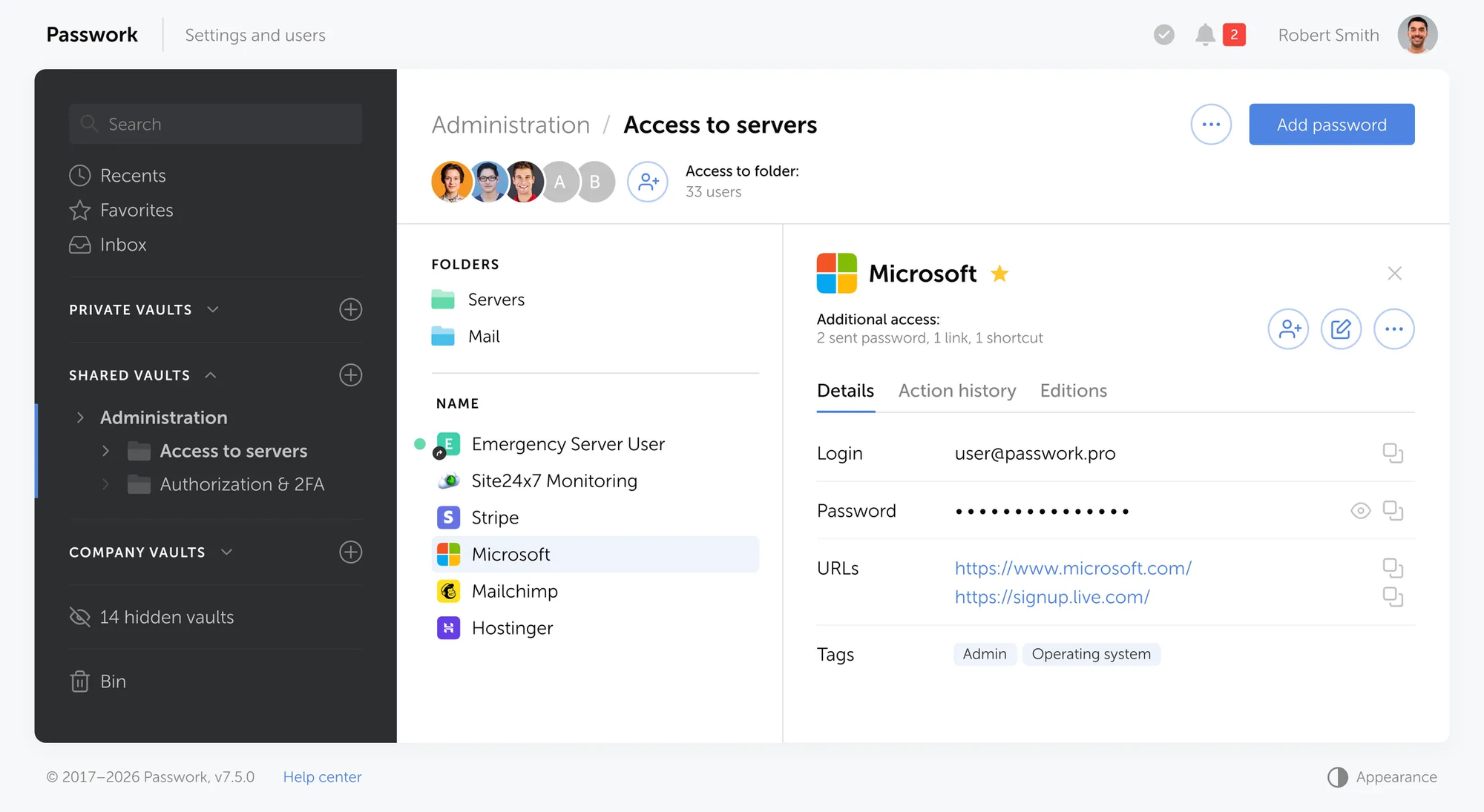
The seven lifecycle stages need different tooling at different layers. Dynamic credential engines and KMS systems handle machine-to-machine secrets at infrastructure scale. What they don't replace is a governed layer for credentials that humans create, share, and rotate: admin accounts, break-glass credentials, shared service keys, API keys managed by operations teams, and anything that currently lives in a spreadsheet, a shared inbox, or someone's personal password manager..
Passwork covers that layer. The sections below map its capabilities to the lifecycle stages where human-managed credentials need the most governance.
Storage and classification
Passwork stores credentials in structured vaults organized by folder, environment, and team. Each entry carries metadata: URL, login, custom fields, tags, and notes. You can mirror your infrastructure topology in the vault layout (separate vaults for production and staging, folders by team or service), which makes both access scoping and rotation inventory practical.
The encryption model matters here. Server-side storage uses AES-256-CFB. With client-side encryption (CSE) enabled, each vault is encrypted in the browser before it leaves the device. The server stores only ciphertext; decryption requires the master key, which is derived from the user's master password and never transmitted. For organizations that cannot route sensitive credentials through an external service under any circumstances, the CSE model removes that dependency entirely.
Access control and least privilege
Role-based and group-based permissions let you grant vault access to a team rather than to individuals. When an engineer joins the DevOps group, they inherit the group's vault access automatically. When they leave, you revoke access once – not once per vault.
Access scope is granular. Each vault or folder carries independent permissions. A CI/CD service account gets read access to the specific folder it needs and nothing else. A security auditor gets read-only access to designated vaults without the ability to modify or export values. Passwork integrates with AD/LDAP and supports SAML SSO, so provisioning and offboarding follow the same identity workflows as the rest of your stack.
Rotation automation
Passwork's CLI (passwork-cli) and Python SDK support a full rotation workflow. The standard pattern is: generate the new value, apply it to the target system, validate that the system accepts it, then write the new value to Passwork. That ordering is intentional. Updating Passwork first, before the target system confirms the change, leaves the two sources out of sync.
A PostgreSQL rotation script using the CLI:
#!/bin/bash
set -euo pipefail

NEW_PASS=$(openssl rand -base64 32 | tr -d '=+/' | cut -c1-32)

# Apply to the database first
psql -h pg.prod.internal -U postgres \
  -c "ALTER ROLE app_user WITH PASSWORD '${NEW_PASS}';"

# Then update Passwork — only reached if the database command succeeded
passwork-cli update --password-id "$PASSWORK_ITEM_ID" --password "$NEW_PASS"
If the database command fails, set -euo pipefail stops the script before Passwork is updated. The vault reflects the actual state of the target system, not a hoped-for state.
The exec mode handles the other direction: retrieving secrets at runtime without writing them to disk or shell history:
passwork-cli exec --password-id "$DB_CREDS_ID" -- ./start-service.sh
The credential is injected as an environment variable for the duration of the child process. It does not appear in ps output after the process exits and is not written to any log the CLI produces.
For API integrations, Passwork 7.6.0 added dedicated token rotation endpoints. Service accounts have their own accessToken and refreshToken pair. CI/CD pipelines can rotate their own API credentials programmatically via POST /api/v1/sessions/refresh without requiring an administrator to intervene between cycles.
Audit trail and evidence
Every access event, credential modification, and permission change is recorded in Passwork's action history. The log includes the actor, timestamp, action type, and affected resource. For SIEM integration, event export is available in CEF format, which means Passwork's audit trail flows into your central security monitoring rather than sitting in a separate silo.
For compliance purposes, the action history answers the "who accessed which credential, when, and from which session" question for human-managed secrets without a separate access review process. Rotation records, access grants, and revocation events are all present in the same log.
Passwork holds ISO 27001 certification and is compliant with GDPR and NIS2.
Conclusion

A secure secrets program is not measured by whether credentials change every 90 days. It's measured by whether the organization knows which secrets exist, who owns them, where they are used, how quickly they can be revoked, and what evidence proves the controls work.
The secrets rotation lifecycle gives teams a structured answer to those questions. Inventory first: find the secrets, name the owners, map the consumers. Remove hardcoded credentials from source code and configuration files.
Centralize human-shared credentials in a managed system with access control and audit logging. Automate rotation and revocation where the target system supports it. Build validation and rollback into every rotation workflow.
Keep the audit trail. When an incident happens, the log is the only record that tells you what was accessed, by whom, and for how long.
The rotation schedule is the easy part. The harder work comes after: finding the API keys unused since 2022, tracking down who owns the shared inbox credentials that three teams rely on, retiring the database password that was "temporary" eighteen months ago.
That work starts with having a place to put credentials that isn't a spreadsheet – somewhere with access control, ownership records, and a log. Passwork is built for that layer of the governance program. Try it in your infrastructure and see how far the inventory gets before the first rotation cycle runs.
Passwork is available as a self-hosted solution with full control over your data. Explore deployment options
Frequently Asked Questions

What is the difference between secret rotation and secret revocation?
Secret rotation replaces a credential with a new version on a scheduled or event-driven basis, while keeping the service available throughout the transition. Secret revocation disables a credential immediately in response to a specific event -- exposure, compromise, offboarding, or scope change -- without necessarily replacing it on a schedule. Rotation is planned; revocation is reactive.
How often should secrets be rotated?
Rotation frequency should be risk-based, not uniform. High-sensitivity credentials with broad access -- production database passwords, admin API keys, service account tokens -- should rotate every 30 to 90 days. Lower-sensitivity credentials with narrow scope can rotate less frequently. Any credential should rotate immediately after a suspected or confirmed exposure, regardless of schedule.
Should API keys be rotated automatically?
Yes, where the issuing system supports it. Automated rotation is more consistent, faster, and produces a better audit trail than manual processes. For API keys issued by third-party SaaS providers that don't support automated rotation, document a manual rotation runbook with defined frequency, approval steps, and validation requirements. GitGuardian's 2026 research found that 64% of secrets confirmed valid in 2022 were still exploitable four years later – a figure that reflects the gap between having a rotation policy and executing it across the full credential inventory.
Are dynamic secrets better than rotated secrets?
Dynamic secrets are preferable for workloads that can request and renew credentials on demand -- CI/CD pipelines, ephemeral containers, short-lived jobs. They eliminate the rotation problem by making credentials expire automatically. For long-running applications, legacy systems, and third-party integrations that can't request credentials dynamically, rotated static secrets remain the standard. Most production environments use both models, matched to the workload type.
How do you rotate secrets without downtime?
Use the two-secret strategy: generate the new value, validate it against the target system, roll it out to a subset of consumers, monitor for errors, complete the rollout, then disable the old value after confirming all consumers have migrated. Bind consumers to a specific secret version rather than a latest alias in production. Google Cloud's Secret Manager documentation warns that continuously resolving latest can cause service-wide outages if a bad version is adopted immediately.
What should happen after a secret is exposed?
Disable or revoke the compromised value at the issuing system -- not just in the vault. Generate a replacement credential. Update all dependent systems. Validate that the replacement works and the old value no longer grants access. Monitor for any continued use of the revoked credential. Then investigate: how long was it exposed, what was accessed, and how did it escape the intended environment? Document the full timeline as incident evidence.
Which secrets should be retired instead of rotated?
Any credential that is no longer needed should be retired, not rotated. Credentials for decommissioned systems, departed employees, discontinued integrations, and expired service agreements should be revoked and destroyed – not kept on a rotation schedule. Rotating an unnecessary credential keeps it alive and in scope. The retirement decision should be part of every access review cycle.
 Alex Muntyan
 Alex Muntyan
 Alex Muntyan
Table of contents
- Key takeaways
- What is the secrets rotation lifecycle?
- Why rotation alone does not solve credential risk
- Which secrets need lifecycle management?
- The seven stages of a secure secrets rotation lifecycle
- Manual rotation vs automated rotation
- Rotated secrets vs dynamic secrets
- How to rotate secrets without downtime
- Common failure modes and how to prevent them
- Compliance and audit evidence for the secrets lifecycle
- A practical policy template for secrets rotation lifecycle
- Where Passwork fits in a secrets governance program
- Conclusion
- Frequently Asked Questions
Table of contents
- Key takeaways
- What is the secrets rotation lifecycle?
- Why rotation alone does not solve credential risk
- Which secrets need lifecycle management?
- The seven stages of a secure secrets rotation lifecycle
- Manual rotation vs automated rotation
- Rotated secrets vs dynamic secrets
- How to rotate secrets without downtime
- Common failure modes and how to prevent them
- Compliance and audit evidence for the secrets lifecycle
- A practical policy template for secrets rotation lifecycle
- Where Passwork fits in a secrets governance program
- Conclusion
- Frequently Asked Questions

Self-hosted password manager for business
Passwork provides an advantage of effective teamwork with corporate passwords in a totally safe environment. Double encryption and zero-knowledge architecture ensure your passwords never leave your infrastructure.
Learn more