

A developer needs to test a database connection quickly. They paste the password directly into the config file, push the commit, and move on. The feature ships. The password stays. Six months later, the repository is forked, the CI/CD logs are indexed, and that credential is sitting in three places no one is monitoring.
This is how most hardcoded secrets enter the wild – through convenience that outlasts its context. GitGuardian found 28.65 million new hardcoded secrets added to public GitHub repositories in 2025, a 34% year-over-year increase and a 152% rise since 2021.
Key takeaways
- Hardcoded secrets are credentials embedded directly in source code, configs, scripts, or application packages – static values written at development time instead of injected at runtime from a secure source.
- Private repositories are not a safe place for secrets. Compromised developer accounts, CI/CD integrations, forks, and backups all expand the exposure surface beyond what "private" implies.
- AI-assisted development is making the problem worse. Commits from AI coding tools are twice as likely to contain secrets. Leaks of AI-service credentials grew 81% year-over-year in 2025.
- Deleting the line is not enough. A committed secret persists in Git history, forks, CI/CD logs, and local clones. Rotation or revocation comes first. Removal is the cleanup step.
- Detection must be continuous and layered. IDE plugins catch secrets before commit; CI/CD scanning catches what slips through; repository-wide scans surface historical exposure. Each layer has blind spots. None of them works without a defined owner and triage process for every finding.
- The root cause is workflow friction, not carelessness. Developers hardcode secrets when there is no faster, approved alternative. Prevention means removing that friction – not just adding scanners.
- Every credential type needs a designated home. Machine secrets belong in a vault or secrets manager with runtime injection. Human and shared credentials belong in a corporate password manager with access controls and audit trails. Credentials that have no designated home end up in code.
What are hardcoded secrets?
Hardcoded secrets are passwords, API keys, tokens, private keys, or other credentials written directly into source code, scripts, configuration files, or application packages. They are static values embedded at write time rather than injected at runtime from a secure source. MITRE classifies this vulnerability as CWE-798: Use of Hard-coded Credentials and rates its exploit likelihood as high.
The OWASP community page on use of hard-coded passwords covers the password-specific variant, but the full scope of hardcoded secrets extends well beyond passwords.
| Secret type | Example | Why it is sensitive |
|---|---|---|
| Password | Database or admin account password | Can grant direct user or system access |
| API key | Cloud, payment, CRM, or messaging API key | Can allow data access, transactions, or service abuse |
| Access token | OAuth token, Git token, CI/CD token | May bypass normal login flows |
| SSH / private key | Deployment key or server key | Can allow server or repository access |
| Certificate / key material | TLS private key or signing key | Can enable impersonation or decryption |
| Connection string | Database URL with username and password | Often combines host, account, and password in one value |
Where do hardcoded secrets usually appear?
Hardcoded secrets appear wherever code is written, built, stored, or deployed – which is a much larger surface than most teams realize.
In the codebase and version control:
- Application source code and inline comments
- Configuration files (
.properties,.yaml,.json,.xml) - Local development files (
.env,.env.local) committed by mistake - Infrastructure-as-code templates (Terraform, Ansible, CloudFormation)
In build and deployment systems:
- CI/CD pipeline definition files with credentials written inline
- Build logs and artifacts that echo environment values
- Container images with secrets baked into layers
In distributed and embedded systems:
- Mobile apps and client-side JavaScript bundles
- Firmware, IoT devices, routers, and embedded controllers
In informal storage:
- Documentation, internal wikis, and README files
- Support tickets, Jira issues, and Confluence pages
- Slack exports, email threads, and shared spreadsheets
A note on .env files: they are safer than writing values directly into code, but only if they are excluded from version control, protected locally, and never copied into logs or build artifacts. A .env file committed once is a hardcoded secret.
Why do developers hardcode secrets?
The root cause is almost never carelessness. It is workflow friction.
- Fast local testing. Hardcoding a value takes ten seconds. Setting up a vault reference takes longer, especially without a standard template.
- Avoiding configuration drift. When dev, staging, and production environments are inconsistently managed, developers sometimes hardcode values to guarantee the right credential reaches the right system.
- Copying from documentation or examples. Official docs and Stack Overflow answers frequently show credentials as placeholders. Those placeholders get replaced with real values and committed.
- AI-generated code. Coding assistants may reproduce insecure patterns from training data or insert placeholder credentials that look functional. The risk is highest when generated code bypasses normal security review or when a developer replaces a placeholder with a real value without moving it to a secure source.
- No standard secret-management workflow. When there is no approved way to handle secrets locally, developers invent their own -- and convenience usually wins.
- Missing pre-commit checks. Without automated gates, a hardcoded secret can travel from a developer's editor to a shared repository in a single push.
- Unclear ownership of service accounts and shared credentials. When no one owns a credential, no one manages it safely.
Why are hardcoded secrets so risky?
The numbers make the trend hard to dismiss. GitGuardian tracked ~11 million new hardcoded secrets on public GitHub in 2021; by 2025 that figure had reached 28,649,024 – a 152% increase in four years.
New hardcoded secrets detected on public GitHub, 2021–2025
Detection alone is not closing the gap: 64% of secrets confirmed as valid in 2022 were still active and exploitable in 2026. Hardcoded secrets are not a legacy problem being gradually resolved – the exposure surface is growing faster than remediation can keep up.
| Risk | How it happens | Possible impact |
|---|---|---|
| Repository exposure | Code is public, forked, shared too broadly, or accessed through a compromised account | Attackers obtain usable credentials |
| Git history persistence | Secret remains in earlier commits after a "fix" commit | Old credentials can still be recovered from history |
| CI/CD compromise | Tokens in pipeline files or logs grant build or deploy access | Source code theft, poisoned builds, production access |
| Cloud abuse | API keys allow access to cloud resources | Data theft, crypto mining, service disruption, cost spikes |
| Lateral movement | One credential leads to additional systems | Privilege escalation and broader compromise |
| Compliance exposure | Credentials unlock regulated data or audit-relevant systems | Fines, audit findings, breach notifications |
Private repositories are not a safe place for secrets. Repository access is often broader than administrators realize. CI/CD tools, backup systems, developer endpoints, third-party integrations, and forks all expand the exposure surface. A compromised developer account is enough to extract every secret in every private repository that account can read.
Verizon's 2025 DBIR also found that web application infrastructure made up 39% of disclosed secrets in public Git repositories, and 66% of those were JWTs. Generic secrets – the category hardest to detect with pattern-matching tools – made up 58% of all leaked credentials in 2024, according to GitGuardian.

Passwork is a corporate password and secrets manager: API keys, tokens, SSH keys, and admin credentials — all in encrypted vaults with role-based access and audit logs, not in code or chat threads. Explore Passwork
What should you do if a hardcoded secret is found?

The instinct to delete the line and push a fix commit is understandable. It is also insufficient. Once a secret is committed, assume it has been copied, cached, logged, or indexed somewhere you cannot reach.
Incident response workflow
- Classify the secret. Determine whether it is a password, API key, token, private key, certificate, or connection string.
- Identify the owner and scope. Find which system, environment, privilege level, and account the secret controls.
- Revoke or rotate immediately. Treat the value as compromised from the moment it was committed or exposed.
- Check access logs. Look for suspicious activity before and after the exposure window.
- Remove it from the codebase. Replace the hardcoded value with a reference to a secure source.
- Clean repository history if needed. Use approved tooling such as
git filter-repoor BFG Repo-Cleaner, and coordinate with repository owners -- rewriting history affects all collaborators. - Update dependent systems. Confirm that all applications, jobs, and integrations are using the new value.
- Document the incident. Record root cause, owner, remediation time, and what control will prevent recurrence.
- Add a prevention control. Pre-commit hooks, CI/CD scanning, policy updates, or access review -- at least one concrete change before closing the incident.
How can organizations detect hardcoded secrets?
One-time scanning is not enough. Secrets enter codebases continuously, and detection needs to match that pace.
| Detection layer | What it catches | Limitation |
|---|---|---|
| IDE plugins | Secrets before code is committed | Depends on developer adoption; not centrally enforced |
| Pre-commit hooks | New secrets before they enter Git | Can be bypassed unless enforced at the repository level |
| Pre-push hooks | Secrets before code reaches a remote repository | Still local and developer-controlled |
| CI/CD scanning | Secrets in pull requests and builds | May detect after exposure to shared systems |
| Repository-wide scans | Historical leaks across branches and commits | Requires triage, ownership mapping, and rotation workflow |
| Public monitoring | Secrets exposed in public repos or paste sites | Reactive unless combined with prevention |
| Validity checks | Whether a detected secret still works | Must be handled carefully to avoid unsafe testing |
The Verizon 2025 DBIR found that the median time to remediate discovered leaked secrets on GitHub was 94 days. That gap exists because detection without ownership and triage SLAs produces alert fatigue, not action. Every detected secret needs a named owner and a defined response path.
How can teams prevent hardcoded secrets?
Prevention is a layered problem. No single control is sufficient on its own.
| Control | What it prevents | Practical guidance |
|---|---|---|
| Secrets manager or vault | Storing machine secrets in code | Store runtime secrets outside the codebase; inject them at runtime |
| Environment variables | Direct code embedding | Use only with strict environment controls; never commit .env files |
| Pre-commit and CI scanning | Accidental commits | Block secrets before merge or deployment |
| Least privilege | Overpowered leaked credentials | Scope tokens to only required systems and actions |
| Short-lived credentials | Long exposure windows | Prefer expiring tokens and workload identity where possible |
| Rotation policy | Persistent risk from old values | Rotate on schedule and immediately after any exposure |
| Separate environments | Production compromise from dev leaks | Use distinct credentials for dev, test, staging, and production |
| Developer training | Repeated unsafe shortcuts | Explain approved patterns; provide ready-to-use templates |
| Password governance | Credentials shared through code, docs, or chat | Centralize shared human and admin passwords in a controlled password manager |
Most organizations end up managing both categories: machine secrets for applications and pipelines, and human credentials for shared admin accounts, team access, and operational workflows. Keeping them in separate, unconnected systems creates its own problems – inconsistent access policies, duplicate audit trails, and credentials that fall through the gap between tools. Passwork covers both in a single platform, under one access model and one audit log.
Two credential categories, one place to manage them
The table below shows where each credential type belongs.
| Credential category | Better home | Reason |
|---|---|---|
| Human user passwords | Corporate password manager | Supports secure sharing, access control, review, and password policies |
| Shared admin passwords | Corporate password manager or PAM workflow | Requires accountability, rotation, and controlled team access |
| API keys used by applications | Secrets manager or cloud vault | Applications need runtime retrieval and automated rotation |
| CI/CD deployment tokens | CI/CD secret store or vault | Build systems need controlled injection and auditability |
| SSH keys for servers | Key management / PAM / approved secure storage | Requires ownership, rotation, and access governance |
| Database connection strings | Secrets manager or vault | Should be injected at runtime, not committed to code |
The goal is to ensure every credential lives in a system designed for how it is actually used. For most teams, that means one platform that handles both categories – not two separate tools with separate access models and separate audit trails. That is the gap Passwork fills.
How Passwork eliminates hardcoded secrets across the stack
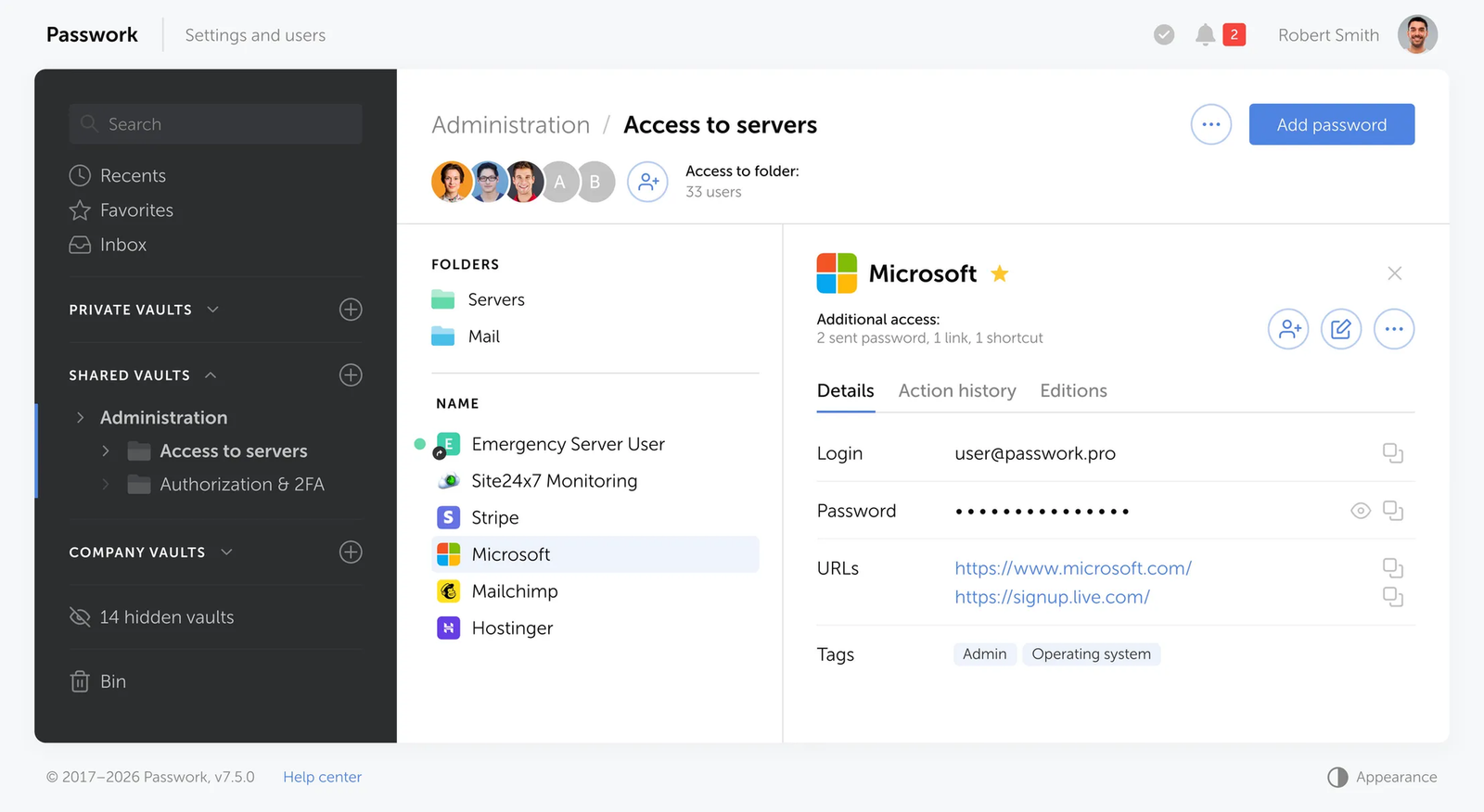
Hardcoded secrets appear when teams lack a convenient, reliable place to store credentials and retrieve them at runtime. Passwork removes that gap. It handles every credential type an organization manages – user passwords, shared admin accounts, API keys, database connection strings, SSH keys, TLS certificates, and CI/CD tokens – with the storage, access control, and audit trail that each category requires.
The same vault where an operations team stores admin passwords is the same system a deployment pipeline queries for a database connection string. One access model, one audit log, one rotation workflow.
Storing secrets so they never have to be hardcoded
Passwork organizes credentials in a structured vault hierarchy. Teams arrange secrets by environment and category – infrastructure/production/databases, services/stripe, servers/ssh-keys – and each level carries independent access controls. A secret in the right vault has a named owner, an environment tag, and a defined set of consumers. Secrets without owners are the ones that end up committed to repositories.
Custom fields support named secrets directly: AWS_SECRET_KEY, STRIPE_SECRET, REDIS_AUTH, OAUTH_CLIENT_SECRET. That naming feeds into CLI and SDK retrieval, making the vault self-documenting and eliminating the configuration confusion that drives developers to hardcode a value "just for now."
CLI injection: the direct alternative to hardcoded environment variables
passwork-cli exec runs any command with secrets injected as environment variables, for the duration of that command only. The credential does not appear in shell history, does not write to disk, and does not persist after the child process exits.
# Run deploy script — secrets exist only for the duration of this command
passwork-cli exec --folder-id "$PROD_SECRETS_FOLDER_ID" ./deploy.sh
This replaces the .env file committed to a repository, the hardcoded value pasted from a chat message, and the environment variable printed in CI output. The application reads its configuration from the environment as designed; the difference is where those values come from.
For a single value in a shell script:
DB_PASS=$(passwork-cli get --password-id "$ITEM_ID")
# DB_PASS is available in this shell, never written to disk
For rotation — updating the credential after changing it in the target system:
passwork-cli update --password-id "$ITEM_ID" --password "$NEW_PASS"
The CLI handles decryption and re-encryption locally. Passwork's server stores only ciphertext. Even a full server compromise yields nothing readable.
CI/CD integration without hardcoding pipeline tokens
CI/CD pipelines are a primary source of hardcoded secrets — tokens and connection strings committed directly into pipeline files because there was no better option. Passwork provides that option.
The Docker image passwork/passwork-cli runs as a job image in GitLab CI, GitHub Actions, and Bitbucket Pipelines. The pipeline stores only three bootstrap credentials in the CI platform's secret storage: PASSWORK_HOST, PASSWORK_TOKEN, and PASSWORK_MASTER_KEY. Everything else lives in Passwork.
# GitLab CI — no credentials in the pipeline file
deploy_prod:
  image: passwork/passwork-cli:latest
  script:
    - passwork-cli exec --folder-id "$SECRETS_FOLDER_ID" ./deploy.sh
# GitHub Actions — credentials injected from platform secrets only
- name: Deploy with secrets
  run: |
    docker run --rm \
      -e PASSWORK_HOST="${{ secrets.PASSWORK_HOST }}" \
      -e PASSWORK_TOKEN="${{ secrets.PASSWORK_TOKEN }}" \
      -e PASSWORK_MASTER_KEY="${{ secrets.PASSWORK_MASTER_KEY }}" \
      passwork/passwork-cli:latest \
      exec --folder-id "${{ vars.SECRETS_FOLDER_ID }}" ./deploy.sh
For Kubernetes, Passwork supports an init container that fetches secrets before the main application starts, and a sidecar that refreshes them after rotation — without restarting the pod.
Service accounts: machine identity without credential sprawl
Every CI/CD pipeline or automation script that accesses Passwork uses a dedicated service account with its own role, its own token pair, and access only to the vaults it actually needs. A deployment pipeline gets read-only access to production secrets. A rotation script gets read-write access to the databases folder. When a pipeline is retired, its service account is removed.
API tokens have configurable lifetimes. For a CI/CD job that runs for minutes, the access token lives for 15-60 minutes. For an always-on rotation service, the access token runs for 1-4 hours and the refresh token for 30 days. Token pair rotation happens programmatically via POST /api/v1/sessions/refresh, so the bootstrap credential never becomes permanently long-lived.
Access control that maps to how teams actually work
Passwork's permission model works at both vault and folder level. Permissions inherit down the folder tree but can be overridden at any level. The platform team has full access to infrastructure/production. Developers access infrastructure/development. The CI/CD service account gets read-only access to the production folder it needs.
Role-based access, groups, and AD/LDAP synchronization mean that when an engineer joins a team, they inherit the group's vault access. When they leave, access is removed once. The security dashboard flags credentials as compromised when they have not been rotated after a user's access was revoked — directly detecting the failure mode that produces active exposed secrets.
Password complexity policies enforce minimum requirements on master passwords and authentication passwords. Account lockout policies limit failed sign-in attempts. SAML SSO ties vault access to the existing identity provider, so Passwork authentication follows the same lifecycle as every other corporate system.
Audit trail and zero-knowledge architecture
Every read, write, and permission change is recorded: which account, which credential, which action, at what timestamp. Service accounts appear in the log under their own identity. The log exports in CEF format for SIEM integration, so Passwork's access history flows into the same security monitoring platform as network and endpoint events.
Encryption and decryption happen on the client – in the browser, in passwork-cli, or in the SDK. The server stores only ciphertext. Passwork administrators and database operators have no technical means to read stored secrets, even with direct database access. For self-hosted deployments, encrypted credential data never transits a third-party system. Passwork is ISO 27001 certified and compliant with GDPR and NIS2.
Hardcoded secrets prevention checklist
No single control is sufficient. The items below cover policy, tooling, and process — all three layers need to be in place before the checklist is complete.
Conclusion

Hardcoded secrets are a preventable form of credential exposure. The technical controls exist: secret managers, pre-commit hooks, CI/CD scanning, short-lived credentials, and least-privilege access. The harder part is building the workflow that makes secure practices the path of least resistance for every developer on every commit.
The full defense is layered. Secure storage for machine secrets. Scanning at every stage of the pipeline. Rotation policies with defined owners and SLAs. Developer workflow templates that remove the friction that causes shortcuts. And access governance for the human credentials that live outside application code – the shared admin passwords, service account credentials, and team access tokens that tend to spread through informal channels when no better option exists.
Passwork gives teams a single system to store, access, rotate, and audit every credential type. Developers retrieve secrets at runtime instead of pasting them into code. Pipelines pull from a vault instead of reading from committed files. Operations staff manage shared admin passwords in the same platform where DevOps handles infrastructure secrets. When a credential is found in a repository, the response starts in Passwork: revoke the old value, generate the new one, update dependent systems, and confirm through the audit log that the old credential is no longer in use.
If your team still shares service, admin, or project passwords through informal channels, start by centralizing them in Passwork and defining who is allowed to access, rotate, and review each credential. That single change removes a category of risk that no amount of code scanning will catch. Try Passwork free
Frequently Asked Questions

What is an example of a hardcoded secret?
A database password written directly in a source file, an AWS access key in a .yaml config, an SSH private key in a deployment script, or a JWT signing secret in application code. Any credential embedded as a static value in code, a configuration file, a script, or a compiled application package qualifies as a hardcoded secret.
Are hardcoded secrets the same as hardcoded passwords?
Hardcoded passwords are one type of hardcoded secret. The broader category also includes API keys, OAuth tokens, SSH keys, private certificates, TLS key material, encryption keys, and database connection strings. MITRE's CWE-798 covers the full class under "use of hard-coded credentials."
Is it safe to store secrets in private repositories?
No. Private repositories reduce public exposure but do not make secrets safe. Access is often available to many developers, automated tools, and integrations. Compromised developer accounts, misconfigured permissions, CI/CD pipelines, backups, forks, and local clones all expand the exposure surface beyond what "private" implies.
Is deleting a hardcoded secret from code enough?
No. If the secret was committed, it may still exist in Git history, forks, CI/CD logs, build artifacts, local clones, and backups. Rotate or revoke the credential first. Then remove it from the codebase and clean repository history if the exposure scope warrants it.
Are environment variables enough to prevent hardcoded secrets?
Environment variables help separate configuration from code, but they are not a complete control. Teams still need secure storage for those values, access controls, rotation policies, and protection against leaks in logs or build artifacts. Environment variables reduce the risk of secrets in source files; they do not replace a secrets management strategy.
How long do leaked secrets typically remain active?
According to GitGuardian's State of Secrets Sprawl 2026 report, 64% of secrets confirmed valid in 2022 were still active and exploitable in 2026. The Verizon 2025 DBIR found a median remediation time of 94 days for discovered secrets on GitHub. Long credential lifetimes are the main reason a single leaked secret can cause sustained damage.
 Alex Muntyan
 Alex Muntyan
 Alex Muntyan
Table of contents
- Key takeaways
- What are hardcoded secrets?
- Where do hardcoded secrets usually appear?
- Why do developers hardcode secrets?
- Why are hardcoded secrets so risky?
- What should you do if a hardcoded secret is found?
- How can organizations detect hardcoded secrets?
- How can teams prevent hardcoded secrets?
- Two credential categories, one place to manage them
- How Passwork eliminates hardcoded secrets across the stack
- Hardcoded secrets prevention checklist
- Conclusion
- Frequently Asked Questions
Table of contents
- Key takeaways
- What are hardcoded secrets?
- Where do hardcoded secrets usually appear?
- Why do developers hardcode secrets?
- Why are hardcoded secrets so risky?
- What should you do if a hardcoded secret is found?
- How can organizations detect hardcoded secrets?
- How can teams prevent hardcoded secrets?
- Two credential categories, one place to manage them
- How Passwork eliminates hardcoded secrets across the stack
- Hardcoded secrets prevention checklist
- Conclusion
- Frequently Asked Questions

Self-hosted password manager for business
Passwork provides an advantage of effective teamwork with corporate passwords in a totally safe environment. Double encryption and zero-knowledge architecture ensure your passwords never leave your infrastructure.
Learn more