

Role-based access control (RBAC) is a method for managing access rights that assigns permissions to roles instead of to individual people. A user gets access by being placed into a role, and the role carries a predefined set of permissions. Instead of making 50 individual permission decisions for a new hire, you make one: "this person is an accountant." The role already knows what accountants can access.
Most organizations arrive at RBAC the same way: through the accumulated cost of managing access without it. A new hire joins, and IT reconstructs their permissions from scratch, typically by copying an existing employee's access and deferring the cleanup indefinitely. Over time, this produces a permission structure nobody can fully explain and no one can confidently audit.
This is the access problem RBAC is built to solve.
RBAC in brief: 8 key takeaways
- RBAC exists to replace manual, one-off access decisions with a structure defined once and reused for every hire, departure, and audit.
- RBAC assigns access by job function (role), not by individual person, cutting onboarding from hours to one click.
- It fixes offboarding by tying access removal to role removal, closing the gap where ex-employees keep system access.
- RBAC is not automatic security. It requires defined roles and ongoing maintenance, or it drifts back into chaos.
- Most organizations need only 5 to 10 roles to start. Creating too many too early causes role explosion, which recreates the complexity RBAC is meant to remove.
- RBAC already runs underneath tools your team uses daily: AWS IAM, Kubernetes, GitHub, Salesforce, Google Workspace, and Microsoft 365 all build access control on the same user-role-permission model.
- Least privilege becomes the default outcome, not a policy someone has to enforce case by case.
- In Passwork, roles control administrative rights and groups control vault access. Holding an admin role does not by itself grant access to any password data.
What is role-based access control (RBAC)
RBAC is a method of managing access that assigns permissions to roles instead of to individual people. A person gets access by being assigned to a role, and the role determines what they can see and do. Change the role, and access changes with it, automatically.
Three components make this work:
- Users are the people (or service accounts) who need access.
- Roles are job functions: Developer, Accountant, HR Manager, Read-Only Viewer.
- Permissions are the specific actions a role can perform, such as reading a database or editing a shared file.
The flow is simple: User → Role → Permissions. Assign the role once, and the user inherits everything attached to it.
Supporting elements and relationships:
- Role assignments (mappings) are the mappings that link specific users to the roles they're authorized to hold.
- Sessions let a user activate a subset of their assigned roles during a specific working period, such as an on-call role that's only active during a scheduled shift.
- Role hierarchy is an optional structure where senior or parent roles automatically inherit permissions from junior or child roles.
- Constraints are rules that prevent conflicting permissions, such as Segregation of Duties (SoD) rules stopping one person from both approving and processing the same invoice.
These elements combine into three named RBAC models: Core RBAC (users, roles, and permissions only), Hierarchical RBAC (adds role hierarchy), and Constrained RBAC (adds constraints like SoD).
David Ferraiolo and Richard Kuhn introduced role-based access control in a paper presented at the 15th National Computer Security Conference in Baltimore. It argues that discretionary access control, the dominant model at the time, doesn't fit how commercial and civilian government organizations actually assign access, and proposes RBAC as a non-discretionary alternative built around job functions instead of individual identities.
→ Ferraiolo, D.F. and Kuhn, D.R., "Role-Based Access Controls" (1992), NIST
RBAC in the real world: Where it matters most
RBAC runs underneath most tools your team already uses:
- AWS Identity and Access Management (IAM) assigns roles like Developer or Read-Only Auditor to control who can launch servers versus who can only view logs.
- Kubernetes RBAC uses Role and ClusterRole objects to decide who can deploy to a cluster and who can only inspect it.
- Google Workspace and Microsoft 365 ship with built-in admin tiers, from Super Admin down to Helpdesk Admin, so a support agent can reset a password without touching billing settings.
- GitHub separates repository access into Read, Triage, Write, Maintain, and Admin roles.
- Salesforce uses profiles and permission sets to decide which records a sales rep can see versus a sales manager.
- Database platforms like PostgreSQL and Snowflake grant read, write, or admin roles at the schema level, so a data analyst can query tables without the ability to drop them.
These are the same three components covered earlier (users, roles, permissions), just implemented differently per platform. Three situations show the payoff most clearly.
- Growing teams. At 10 people, ad-hoc permissions work fine. At 30, they start breaking. At 100, they are a security incident waiting to happen. Slack illustrates the pattern at small scale: Owner, Admin, Member, and Guest roles exist precisely because "everyone can do everything" stops working once a workspace passes a few dozen users. This scaling wall is part of why the global RBAC market is projected to grow at roughly 12% CAGR through 2030, according to Fortune Business Insights (2024). RBAC scales by managing roles, not headcounts.
- Compliance and audit. A SOC 2 auditor asks for an access review. Without RBAC, that means exporting a dozen spreadsheets and spending a week cross-referencing who has access to what. With RBAC, a single role-based report answers it: query the "Finance" role in your database platform or IAM console, and you get every account holding that role in one hour.
- Remote and hybrid work. When people work from anywhere, access to sensitive systems needs control that does not depend on being inside an office network. This is the operational core of zero trust architecture, as defined in NIST SP 800-207: access decisions rely on identity and role, not network location. RBAC keeps that promise, tying access to job function regardless of where someone logs in from.
The access problem: 5 signs your permissions are a mess
If your organization shows two or more of these five patterns, your access model has already broken down and is quietly increasing your breach risk with every new hire and departure.
- Onboarding takes days, not hours. IT manually assigns permissions system by system because there is no template for "what a developer needs." Every new hire becomes a fresh negotiation.
- Offboarding is a guessing game. When someone leaves, nobody is fully confident every access point got revoked. Old accounts linger in tools nobody remembers to check.
- "Just copy Karen's permissions." New hires inherit whatever access an existing employee has accumulated, including years of extra permissions nobody ever removed. This is how privilege creep spreads.
- The auditor asks who has access to this, and you can't answer in under an hour. There is no single source of truth. Answering means opening several systems and cross-referencing manually.
- Everyone is a local admin somewhere. Privilege sprawls across servers, SaaS tools, and file shares until nobody, including IT, has a full picture. This pattern is common: Verizon's 2024 Data Breach Investigations Report found that 74% of all breaches involve the human element, including privilege misuse and access errors.
According to Palo Alto Networks 2026 Identity Security Landscape report, 96% of respondents say human identities operate with access far beyond what their roles require. Every unchecked box above is a door someone forgot to lock.
How RBAC fixes each access problem
RBAC replaces the guesswork behind each problem from the list above with a defined, repeatable process.
- Onboarding becomes one assignment. Define the Junior Developer role once, covering the GitHub repo, CI/CD pipeline, staging server, and team chat. New hire, one role, done.
- Offboarding becomes complete. Remove the role, and every permission tied to it disappears with it. No hunting across 15 systems wondering where the ex-employee might still have a live session.
- No more permission cloning. Every new hire starts with exactly their role's permissions, not a copy of a colleague's seven years of accumulated access.
- Audits become fast. "Who has access to the financial database?" Run a report filtered by role. Answer in seconds, with an audit trail showing when and why access changed.
- Least privilege becomes the default, not an exception. The principle of least privilege means giving people the minimum access needed to do their job. Roles define that minimum. Nobody gets extra access "just in case," because there is no case-by-case decision to make.
Getting started with RBAC: the first 3 steps
Implementing RBAC does not require a six-month project. Most organizations can define a working role structure in an afternoon and refine it from there.
- Map your roles. List every job function in your organization. Resist the urge to over-engineer. Start with 5 to 10 roles: Engineering, Finance, HR, IT Admin, Read-Only. You can split roles later once patterns emerge.
- Step 2. Define what each role needs. For every role, list the minimum access required to do the job. When in doubt, leave it out. Adding access later is a small task. Discovering someone had access they should not have is a much bigger one.
- Step 3. Audit what exists. Compare current permissions against your new role definitions. The difference between what people have and what their role should grant is your cleanup list.
For teams managing shared credentials, server passwords, API keys, admin panels, Passwork applies this same RBAC model to the password vault. Define a Developers role with access to dev and staging credentials. Define a Finance role with access to banking and invoicing logins. Nobody sees everything, and access changes automatically when roles change.
How Passwork implements RBAC: roles, groups, and vault types
Passwork splits role-based access control into two distinct layers:
- Roles control what a user can configure in the system
- Groups control what data a user can see
A user can hold an administrative role and still have zero access to a given vault, because vault access comes entirely from group membership, not from role.
Roles: administrative permissions
A role in Passwork defines system-level administrative rights, not data access. The three default roles are Owner, Administrator, who manages users, authentication settings, integrations, and licensing, and User, who has no administrative privileges. Custom roles can narrow this further, for example an Auditor role that can view security logs and generate access reports without the ability to create users or change system settings.
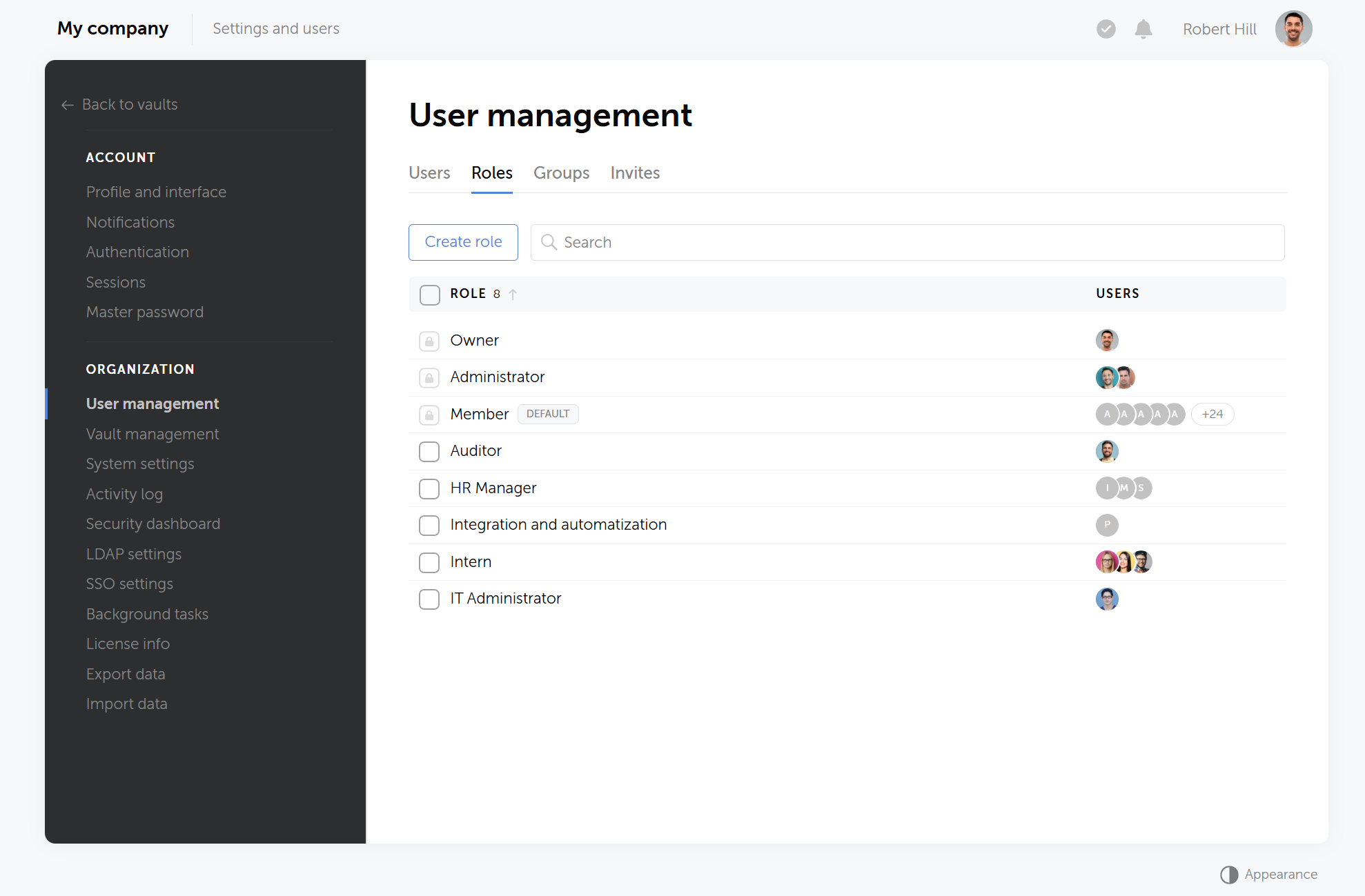
Crucially, holding the Administrator role does not automatically grant access to any vault's contents. In Zero-Knowledge mode, administrators cannot read password data unless they are separately added to a vault through a group or individual grant.
Groups: data access
A group is what actually determines which vaults and folders a user can see and use. Instead of granting a vault to 12 individual developers one by one, an administrator grants it once to the Developers group, and every current and future member inherits that access automatically.
This is the mechanism that maps directly to the RBAC model described earlier in this article: the group is the role, in the access-control sense, and vault permissions are the permissions attached to it.
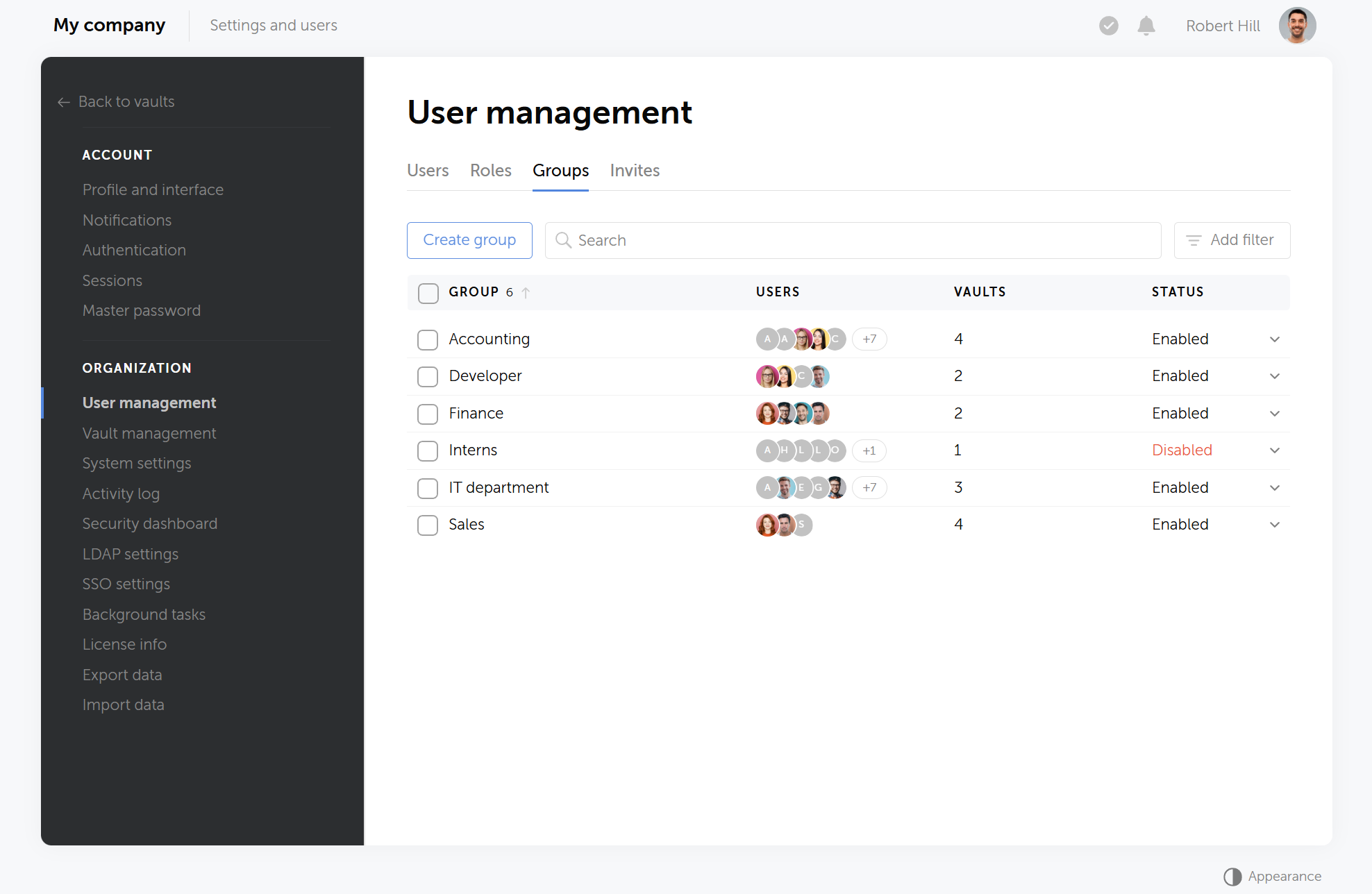
Groups can be created manually or synchronized from Active Directory or LDAP, so an existing Finance security group in AD maps to a matching group in Passwork, with membership changes propagating without manual work on either side.
Vault types: where access boundaries live
A vault is an encrypted container for passwords and secrets, built around a multi-level folder structure. Every vault is created private by default, visible only to its owner, and becomes shared once the owner adds other users or groups to it. Administrators can also mark vaults as hidden to keep navigation clean for users who do not need to see them regularly.
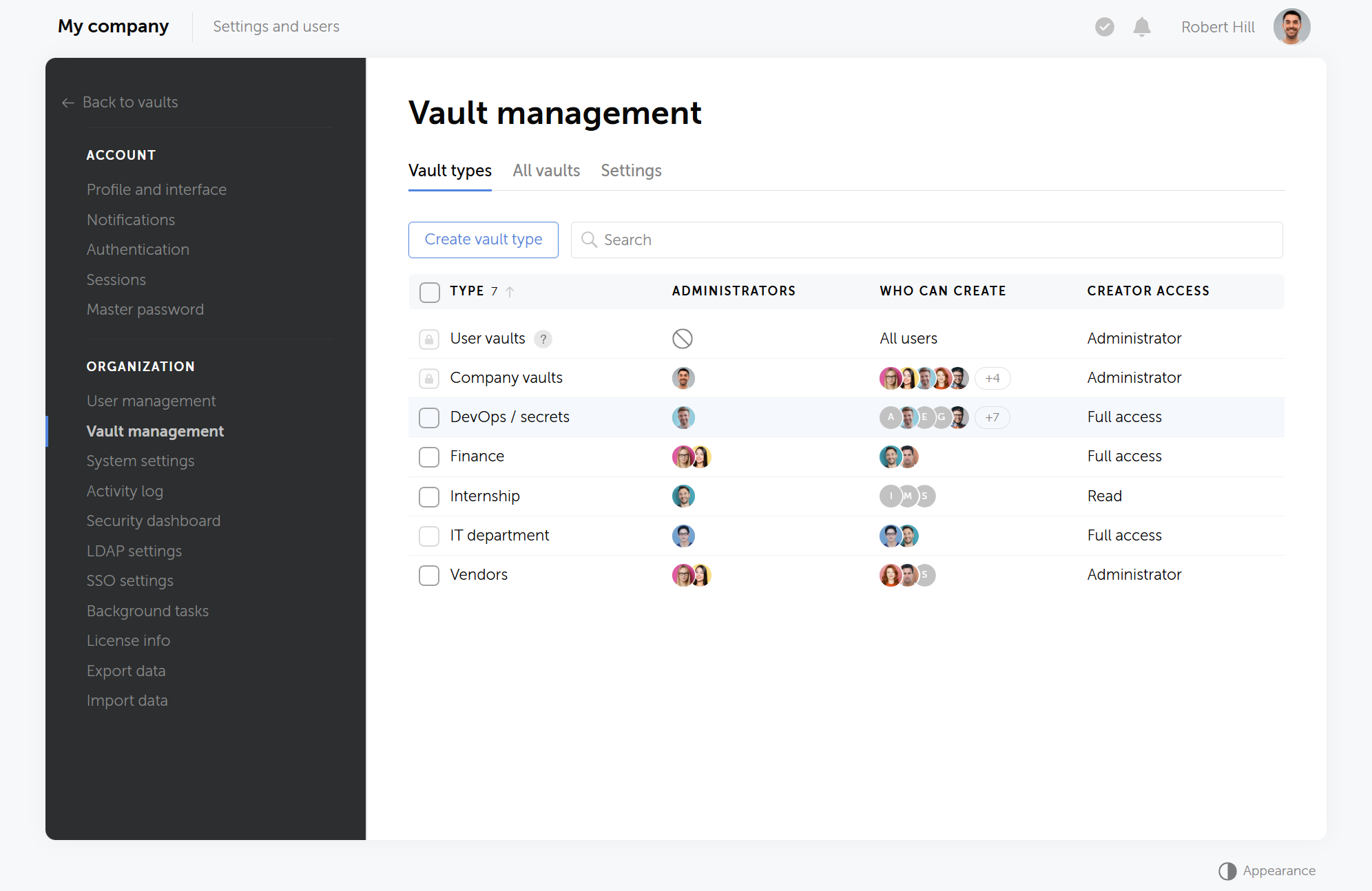
Within a shared vault, each group or user is assigned one of several access levels: Forbidden, Read only, Read and edit, Full access, or Administrator. A contractor group can hold Read only access to a single folder while the core team group holds Full access to everything else, without splitting the credentials into a separate vault.
The result is a clean separation that mirrors good RBAC design generally: roles govern the system, groups govern the data, and vaults define the boundary where that data lives.
Getting past the mess
Every unplanned onboarding costs real time: the two hours IT spends guessing permissions for each new hire, and the hour spent reconstructing access history when an auditor asks who can reach what. RBAC turns that recurring cost into a one-time setup. Define roles once, and every hire, departure, and audit runs against a structure that already has the answer.
Roles require periodic review to stay accurate as teams and responsibilities change. Starting with 5 to 10 roles this week gives most organizations a working structure that a year of ad-hoc permission fixes never produces.
Teams that share passwords across tools, servers, and services can apply this same model to credentials. Passwork's role-based vaults assign password access by group, so each team sees exactly the credentials their role requires.
FAQ: Quick answers to common RBAC questions
What's the difference between RBAC and ABAC?
RBAC assigns access by role, or job function. ABAC (attribute-based access control) assigns access by attributes like time, location, or device. Most organizations should start with RBAC. It is simpler and covers the majority of use cases. Add ABAC later for fine-grained rules, such as VPN-only access during business hours.
How many roles do I need?
Start with 5 to 10 roles, one per distinct job function: HR, Engineering, Finance, IT Admin, Read-Only. You can always add more. The common mistake is creating hundreds of roles too early, known as role explosion, which defeats the purpose of RBAC by recreating the same complexity it was meant to remove.
What's the difference between RBAC and just putting people in AD groups?
Active Directory groups can implement RBAC, but they are not RBAC by themselves. RBAC requires roles mapped explicitly to defined permissions with a documented rationale. An AD group with no clear definition of what it grants access to, or why, is just chaos with a different label.
Can RBAC work in a small company of 15 people?
Yes. Small teams often benefit most, since roles are easier to define before access sprawl sets in. Start with 3 to 5 broad roles covering your main functions. The mistake is waiting until the company grows to 50 people and access is already tangled.
How do I make the business case for RBAC to leadership?
Frame it around risk and time, not technology. Reference the average breach cost of $4.88 million (IBM, 2024) and the fact that 74% of breaches involve human error or privilege misuse (Verizon DBIR, 2024). Then show the time currently spent on manual onboarding, offboarding, and audit prep. RBAC reduces both.
 Passwork Team
 Alex Muntyan
 Passwork Team
Table of contents
- RBAC in brief: 8 key takeaways
- What is role-based access control (RBAC)
- RBAC in the real world: Where it matters most
- The access problem: 5 signs your permissions are a mess
- How RBAC fixes each access problem
- Getting started with RBAC: the first 3 steps
- How Passwork implements RBAC: roles, groups, and vault types
- Getting past the mess
- FAQ: Quick answers to common RBAC questions
Table of contents
- RBAC in brief: 8 key takeaways
- What is role-based access control (RBAC)
- RBAC in the real world: Where it matters most
- The access problem: 5 signs your permissions are a mess
- How RBAC fixes each access problem
- Getting started with RBAC: the first 3 steps
- How Passwork implements RBAC: roles, groups, and vault types
- Getting past the mess
- FAQ: Quick answers to common RBAC questions

Self-hosted password manager for business
Passwork provides an advantage of effective teamwork with corporate passwords in a totally safe environment. Double encryption and zero-knowledge architecture ensure your passwords never leave your infrastructure.
Learn more