


Access management for the passwords your team uses every day

Centralise team passwords and secrets, sync permissions from Active Directory, support SSO authentication, and deploy on-premise on your own servers or in our EU-based Cloud. ISO 27001 certified, AES-256 client-side encryption, full audit log.

Trusted by 10,000+ companies worldwide

Maxon PWC Deutsche Post Orange TDK Victoria Police

Why leading companies choose Passwork

  • Made in Europe

    Developed in Europe, with full GDPR and NIS2 compliance and data sovereignty

  • ISO 27001 certified

    Development and infrastructure meet the international benchmark for information security

  • Trusted by public sector

    Chosen by government agencies and highly regulated industries across Europe

  • Enterprise‑grade protection

    Zero-knowledge architecture with client-side encryption keeps your passwords private

  • Independent research shows 30% savings compared to competitors

The access management problems most IT teams face.
And how Passwork solves them.

Password sprawl and chaos across departments

Credentials live in browsers, KeePass files, shared spreadsheets and chat threads. Mass resets are routine, no one is sure who has access to what, and audits drag for weeks.

One vault per business unit

Vaults, folders and individual passwords held in one place. Role-based access maps to who actually owns what. The audit log answers "who saw this credential, and when".

Provisioning and revoking access by hand wastes hours and leaves gaps

New starters wait days for the right credentials. Mid-year role changes leave orphan access on systems no-one tracks. Leavers walk off with passwords still active in vendor portals. The work is repetitive, easy to skip, and only surfaces when an audit finds the gap.

Identity-driven permissions via LDAP and SAML

Sync users and groups from Active Directory or any LDAP server. Connect SAML 2.0 with Azure AD (Entra ID), Okta, ADFS or Google Workspace. AD groups drive Passwork roles, joiner/leaver work happens once.

Consumer tools fail ISO 27001, NIS2 and GDPR requirements

Auditors and regulators ask for proof that access to credentials is granted, used, reviewed and revoked under the active framework. Most consumer-grade password managers cannot produce a clean access-control evidence line.

ISO 27001 certified, GDPR compliant, NIS2 ready

Passwork holds an active ISO 27001 certificate, processes data in line with GDPR, and is ready for NIS2. Every read, write, share, export and permission change writes a row to the audit log with user, time and target. Export to your SIEM and attach to your evidence pack.

Most password managers lack EU residency and sovereignty

Procurement, legal and security teams reward suppliers that store and process data in the EU. Most leading password managers are US-headquartered, with EU residency offered as a paid add-on or only via self-hosting. Suppliers who can answer the residency question with a clean "yes" move evaluations forward faster.

Self-hosted on your own servers, or EU-based Cloud in Germany

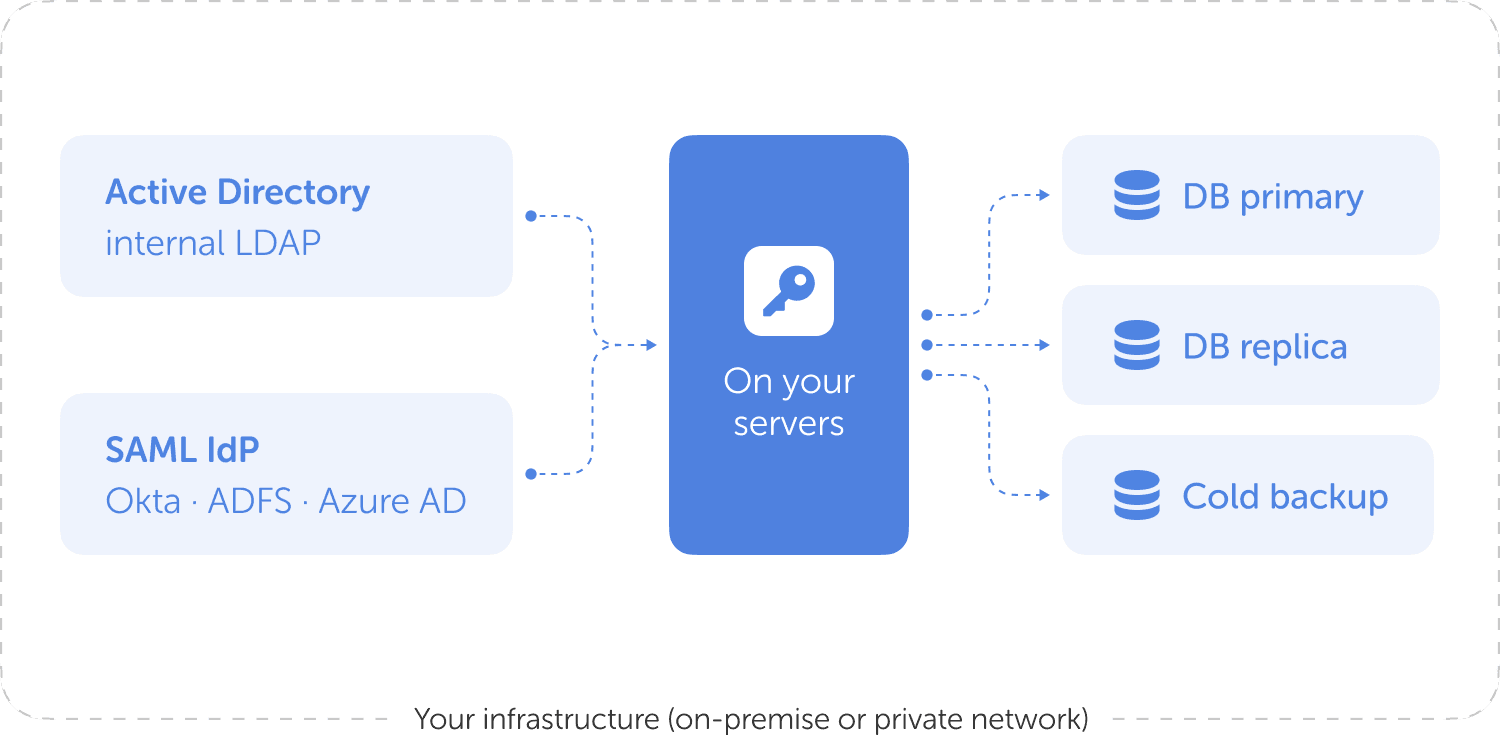
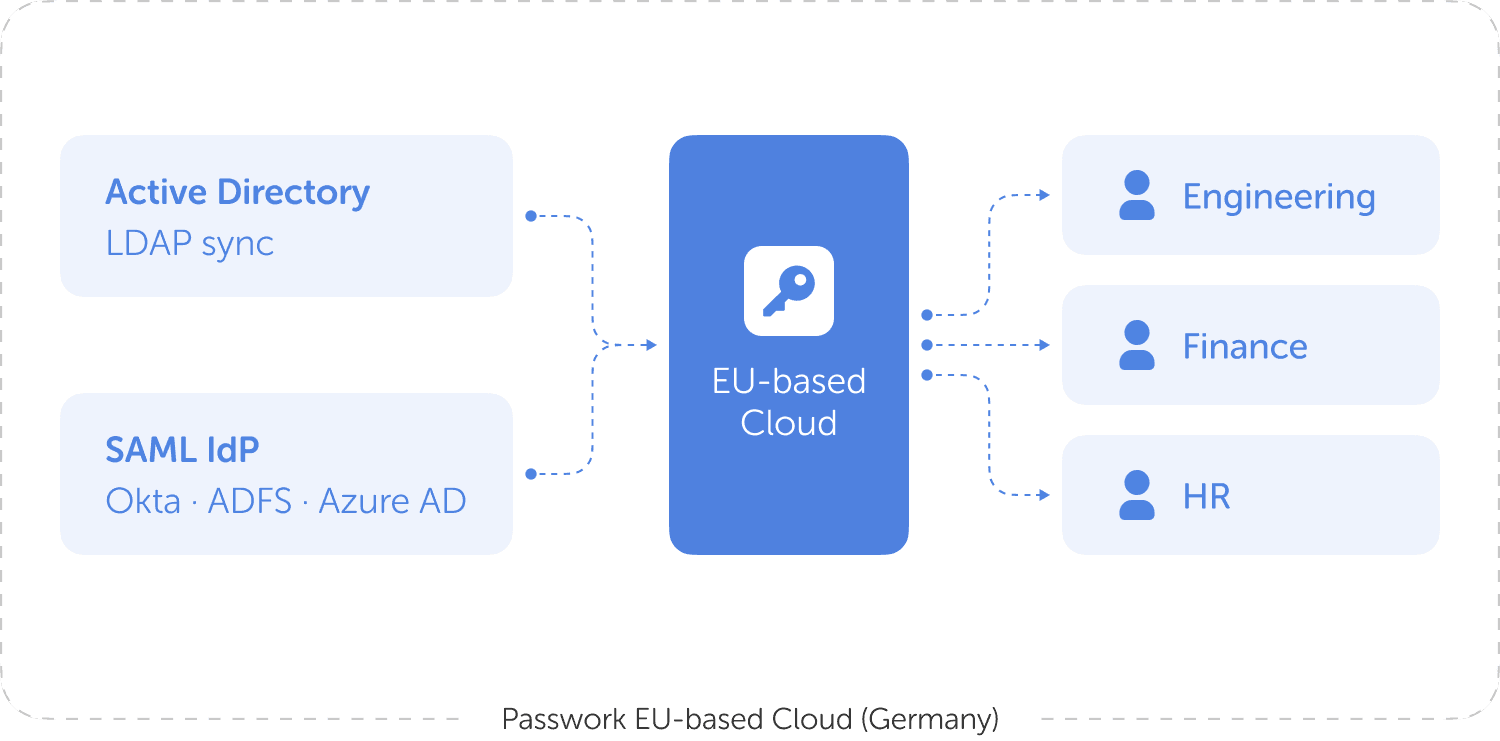
Run Passwork on-premise on your own servers or in your private network for full control of data and keys. Or use the cloud edition in EU data centers in Germany. Same access management features, your choice of residency.

Legacy tools cannot keep up with CI/CD workflows

DevOps teams need to read database credentials, API tokens and SSH keys from pipelines without a human in the loop. KeePass workarounds and env files are brittle and unaudited.

REST API with key rotation and audit on read

Read, write, rotate and audit secrets from CI/CD or scripts. API keys can be scoped and rotated programmatically. Every machine read is in the audit log alongside human reads.

Remote and hybrid teams improvise on credential sharing

Without a vault that works from anywhere, distributed staff fall back on chat threads, screenshots and email. Auditors flag it, leavers walk off with credentials, and customer-facing teams find expired logins inside support tickets.

Same vault, same audit, from any browser or phone

Web app, native mobile apps and browser extensions for any user with an internet connection. Office and remote staff share identical permissions and identical audit trail. IP allowlist available where you need tighter control.

Migrating off LastPass, Bitwarden, 1Password or KeePass is painful

Inherited tools have shared folders and improvised role logic. Cutover risk and the cost of human migration kill many deals before they start.

Import from multiple sources and get 50% off your first year

Import folder structures and shared vaults from LastPass, Bitwarden, 1Password, KeePass, Dashlane or Pleasant Password Server. Python connector and CLI for scripted migrations. Most pilots are live in two weeks. Switching teams get 50% off the first year on Passwork when migrating from a competing password manager.

Try Passwork on a real access scenario

Connect Active Directory or your IdP, import a vault, define a few roles, and watch the audit log fill up. Free for two weeks, no credit card, on your real data.

Three steps to access management that holds up in audit.
Connect identity, set permissions, prove control.

Connect Active Directory or your SSO

Connect Active Directory or your SSO

Connect Passwork to Active Directory, an LDAP server or any SAML 2.0 identity provider. Users and security groups land in Passwork on a schedule.

Map permissions to Active Directory groups

Map permissions to Active Directory groups

Tie vaults and folders to your Active Directory groups (self-hosted edition). Set read, write, share or audit-only at the level you need. Inheritance handles the boring cases automatically.

Prove control with the audit log

Prove control with the audit log

Every access, change and share is logged with user, time and target. Export to your SIEM, attach to your ISO 27001 evidence, ship the NIS2 review.

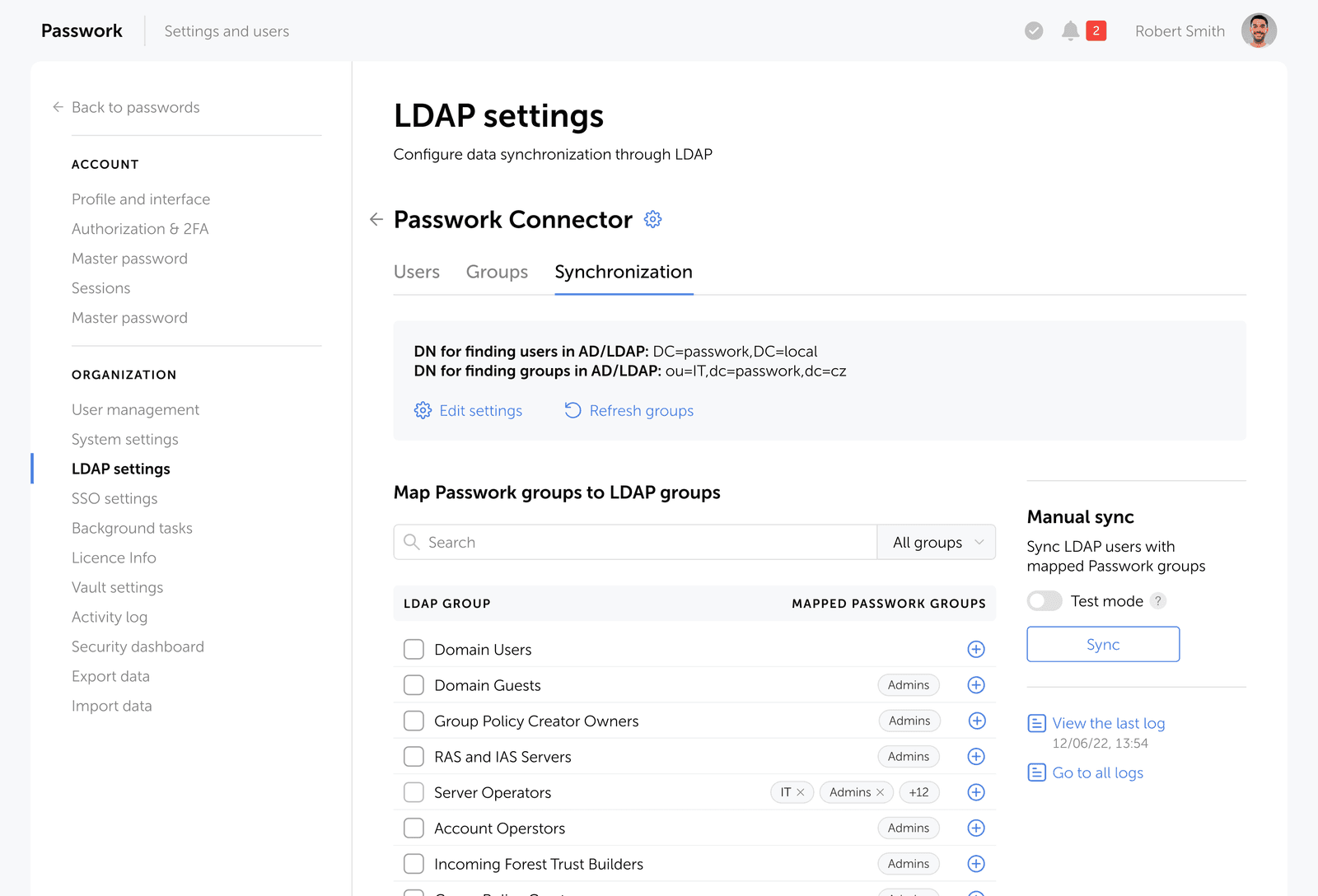
Vault management with Active Directory at the centre

Permissions inherit from your AD groups. Add a person to SRE in AD and the right credentials show up in their vault, with no admin click in Passwork.

  • One vault per business unit, folder structure inside
  • Permissions on vault, folder or individual password
  • AD groups drive Passwork access automatically
  • SAML SSO into the web app, 2FA and YubiKey supported
  • Audit log on every read, write, share and export
  • Bulk import from LastPass, KeePass, 1Password, Bitwarden
Passwork LDAP settings: map directory groups to vault access

Pick where the data lives.
Passwork is on-premise first. Self-host on your own servers for full control of data and keys, or pick the EU-based Cloud when you want zero infrastructure to run.

Switching from another password manager?
Get 50% off your first year

Bulk import folders and shared vaults from your current tool. Most pilots are live in two weeks.

How Passwork compares on access management.
An access-management view of the field. Configurations vary by plan.

Capability
Self-hosted
EU-hosted data
LDAP / AD sync
Enterprise SSO
Role-based access
REST API
SIEM audit logs
50% off for switchers
Passwork
LastPass Bitwarden 1Password KeePass
Native No Enterprise plan Cloud only File-based
Yes Limited EU region available EU region available Self-controlled
Native AD Connector Directory Connector SCIM Bridge Manual / plugin
Yes Yes Yes OIDC only No
Native Group-based Custom roles Vault-level Plugin-based
Yes Provisioning API Public API Connect No
Yes Cloud only Events API Events API Local only
Yes No No No N/A

What Passwork brings to access management

The feature set ISO 27001 auditors and NIS2 reviewers actually ask about, on the web, on mobile and in the terminal.

Trusted by businesses
worldwide

One password manager. Every device.
Use Passwork anywhere - in your browser, on mobile, or on desktop.

Browser extension

Search, autofill, and create credentials without leaving the browser. Works with Chrome, Firefox, Edge, and Safari.

  • One-click autofill on any login page
  • Search across all vaults from the extension
  • Create and save new credentials instantly
  • Generate strong passwords on the fly
Available for
Browser extension password editing screenshot
Browser extension password generator screenshot
Browser extension password card screenshot
Browser extension settings screenshot

Mobile app

Quick access to your corporate passwords from your mobile device

Available in

2FA mobile app

Convenient login verification using the Passwork authenticator app

Available in

Desktop app

Full password management functionality in a native desktop application

Available for

Four steps from sign-up to your first audit-ready vault.
The path most teams follow, with concrete time-to-value at each step.

  • Start a free trial

    Pick self-hosted or EU-based Cloud. Self-hosted is a Docker compose; Cloud is up in 3 minutes. No credit card.

  • Connect identity

    Connect Passwork to AD or your SAML IdP. Users and groups land in Passwork on a schedule.

  • Import vaults and roles

    CSV from your current tool, REST API for bulk. Map AD groups to vaults and folders.

  • Pilot and roll out

    25 to 50 users in week two. 1,000 seats across the business in four to eight weeks.

Ready to secure your access management

Join thousands of IT professionals who trust Passwork to manage their passwords securely. Start your free trial today or get a personalised quote.

Frequently Asked Questions

Access management is the practice of controlling who can use which IT resources, when, and under which conditions. For passwords and secrets it covers how credentials are stored, who is allowed to view or use them, how access is granted or revoked, and how every action is logged. Access management is one part of identity and access management (IAM); IAM also covers user provisioning, single sign-on and authentication.

Passwork is an access management tool focused on team passwords and secrets. It works alongside an IAM (Okta, Azure AD, Google Workspace) by syncing users, groups and SSO from the identity provider. Passwork is not a PAM today; PAM tools handle shared privileged accounts and session recording, and a dedicated Passwork PAM module is on the roadmap for later in 2026. Passwork stores individual team credentials, applies role-based permissions and writes a full audit log.

Passwork connects to Active Directory or any LDAP server. Users and security groups are imported on a schedule. When a person joins a group in AD, their access in Passwork updates without manual steps. When they leave, access is revoked everywhere. Vault, folder and password permissions can be mapped to AD groups.

Yes. Passwork supports SAML 2.0 with Azure AD (Entra ID), Okta, ADFS, Google Workspace and any compliant identity provider. Each tenant can have its own IdP configuration. Role mapping from security groups happens automatically after first login.

Yes. Self-hosted Passwork runs on your own servers, on-premise or in your private network. The application, database and key material stay inside your network. The cloud edition runs in EU data centers in Germany. Both editions share the same access management features, audit log and integrations.

Both protect team passwords with client-side encryption. Passwork is built around IT-team access management with native LDAP/AD sync, SAML 2.0 across multiple identity providers, role-based permissions on vaults and individual passwords, REST API with key rotation, and an EU-data-residency self-hosted option. Bitwarden has consumer roots and a different feature ladder for enterprise customers.

Every read, write, share, export and permission change is logged with user, time and target. The log is exportable for SIEM ingestion. Combined with role-based permissions, this covers the access-control audit requirements in ISO 27001 and supports NIS2 reporting.

Passwork is ISO 27001 certified. Cloud customers' data is stored in EU data centers in Germany, which keeps personal data inside the European Union for GDPR purposes. Self-hosted customers control the location of their data entirely. The platform is NIS2 ready.

A typical pilot covers one department in one to two weeks: connect AD or SSO, import a vault, define a few roles, onboard 25 to 50 users. A full rollout to 1,000 seats with multiple vaults usually takes four to eight weeks. The free trial is the recommended starting point.

Yes. Passwork accepts CSV exports from LastPass, KeePass, 1Password, Bitwarden, Dashlane and Pleasant Password Server. Folder structure and shared vaults are preserved. The REST API and CLI let you script larger migrations.

Passwork is priced per user per month with volume tiers. Self-hosted is sold as a site license; EU-based Cloud is billed monthly per active user. Teams switching from a competing password manager get 50% off the first year. Passwork access management pricing and plans.

Self-hosted Passwork supports clustering and failover for high availability and runs on customer-controlled hardware sized to the user count. Cloud deployments scale horizontally inside Passwork's EU data centers. Reference deployments include single-tenant rollouts of 1,000+ users and MSP multi-tenant rollouts across many client tenants.

Yes. The Passwork MSP access management program provides a dedicated multi-tenancy instance with isolated client databases, an MSP portal for remote management, white-label client workspaces with unique domains, and per-tenant SAML configuration.

Self-hosted Passwork supports primary and replica databases with cold backup, clustering and failover for high availability. Customers run their own backup schedule and retention. Encrypted vault exports via the Passwork REST API and CLI documentation provide an additional offsite recovery path.

Yes. A dedicated Passwork PAM module covering shared privileged accounts and session control is planned for release later in 2026. Today's Passwork access management already covers individual team credentials with role-based permissions and an audit log.