
On November 25, 2026, 1Password said an attacker had used an employee's corporate GitHub account to push malicious code to its backend and copy customer account records. IT teams that lived through December 2022 asked one question: is this LastPass again? As disclosed so far, no.
A 1Password breach vs LastPass breach comparison shows two different kinds of loss. 1Password's incident notice lists names, sign-in emails, identifiers and timestamps for a subset of customers, and says vault contents were never available to the attacker. LastPass lost backups of all customer vault data in 2022, with website URLs stored unencrypted.
Every statement below about either company comes from its own notices, the UK regulator or a named publication.
Facts in this article are current as of November 26, 2026. 1Password has said it will update its incident notice.
Key takeaways
- 1Password says an attacker copied account records for a subset of customers in November 2026 and that vault contents were not accessed.
- LastPass confirmed in December 2022 that backups of all customer vault data had been copied, with website URLs unencrypted.
- The outcomes differ on three points: the reach of the attacker's foothold, the scope of client-side encryption, and what a stolen vault copy needs to be opened.
- LastPass took 119 days from its first notice to confirm the vault backup theft, so the 1Password notice deserves a second reading on a set date.
- Eight questions about encryption scope, backups, code deployment and disclosure show where your own vendor would land.
1Password breach vs LastPass breach: What each exposed, side by side
1Password's November 2026 breach exposed account records: names, sign-in emails, identifiers and timestamps for a subset of customers. LastPass's 2022 breach exposed backups of every customer vault, with website URLs unencrypted, plus an MFA database and its decryption key. The table compares the two incidents on ten points, each taken from a primary source.
| Point of comparison | 1Password, November 2026 | LastPass, 2022 |
|---|---|---|
| First public notice | November 25, 2026 | August 25, 2022 |
| Entry point | An employee's corporate GitHub account | A developer's compromised endpoint, then a senior employee's personal device |
| What the attacker reached | Source code, the CI/CD system and backend services | 14 of 200 source code repositories, then cloud backup storage and its decryption keys |
| Customer account data copied | Names, email addresses, account and user identifiers, account creation and last sign-in times | Company names, end-user names, billing addresses, email addresses, phone numbers, IP addresses |
| Vault data copied | None, according to 1Password | Backups of all customer vault data |
| Left unencrypted in the stolen data | The account records themselves | Website URLs, file paths to installed software, some email addresses |
| Authentication material exposed | Secure Remote Password (SRP) parameters, public keys, tokens from invitation and recovery emails | A backup of the MFA and federation database, with its decryption key |
| Scope | "A subset" of customers; no count published | Up to 1.6 million UK users, per the UK regulator; roughly 30 million vaults, per TRM Labs' estimate |
| Time from first notice to confirmed scope | Still open | 119 days until the vault backup theft was confirmed |
| Known downstream harm | None reported as of November 26, 2026 | More than USD 35 million in cryptocurrency thefts traced by TRM Labs; a £1.2 million regulatory fine |
Sources: 1Password's notice of November 25, 2026; LastPass's notices of December 22, 2022 and March 1, 2023; the UK Information Commissioner's Office (ICO); TRM Labs.
What happened at 1Password in November 2026
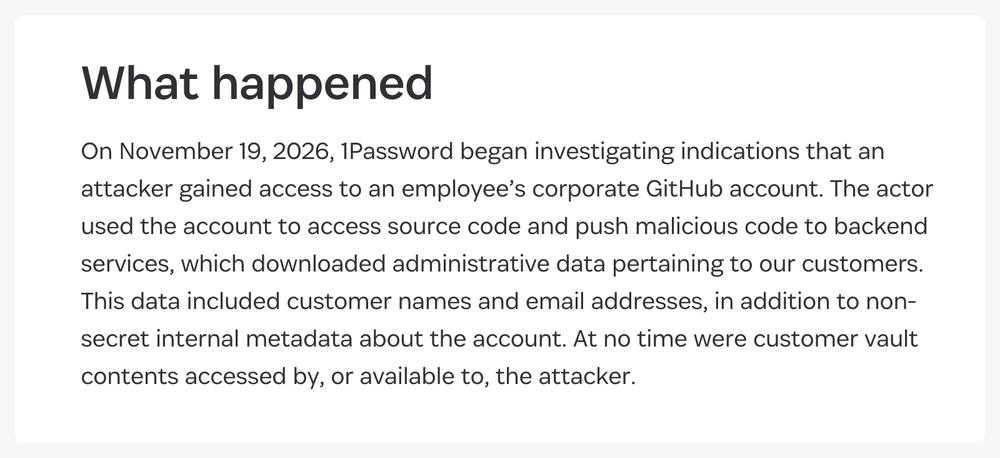
An attacker gained access to an employee's corporate GitHub account, read private source code and pushed malicious code to 1Password's backend services. Those services then downloaded administrative data about customers. 1Password began investigating on November 19, 2026 and published its notice six days later, on November 25.
What was copied
The copied records cover what 1Password calls a subset of its users:
- Names and the email addresses used to sign in
- Account and user identifiers, account creation times and last sign-in times
- Public keys and SRP parameters
- Tokens from emailed links for invitations, provisioning and account recovery
The attacker also copied private source code and gained access to the CI/CD system. A token alone does not complete an invitation or recovery: it also needs an SSO sign-in or a code sent to the user's email, and 1Password has lengthened that code from six digits to ten alphanumeric characters.
The company states that vaults, the keys that protect them, and its apps and browser extensions were not affected. See how developer accounts and build pipelines become the entry point in our earlier analysis.
What 1Password has not said yet
- How many customers are in the subset
- How the GitHub account was compromised
- How long the malicious code ran
- Why that code could not reach vault data
What happened at LastPass in 2022
LastPass was breached in two stages that began in August 2022. An attacker first took source code and encrypted credentials from the development environment, then compromised a senior employee's personal device to obtain the keys to cloud backup storage. From there the attacker copied backups of all customer vault data, according to LastPass and the ICO.
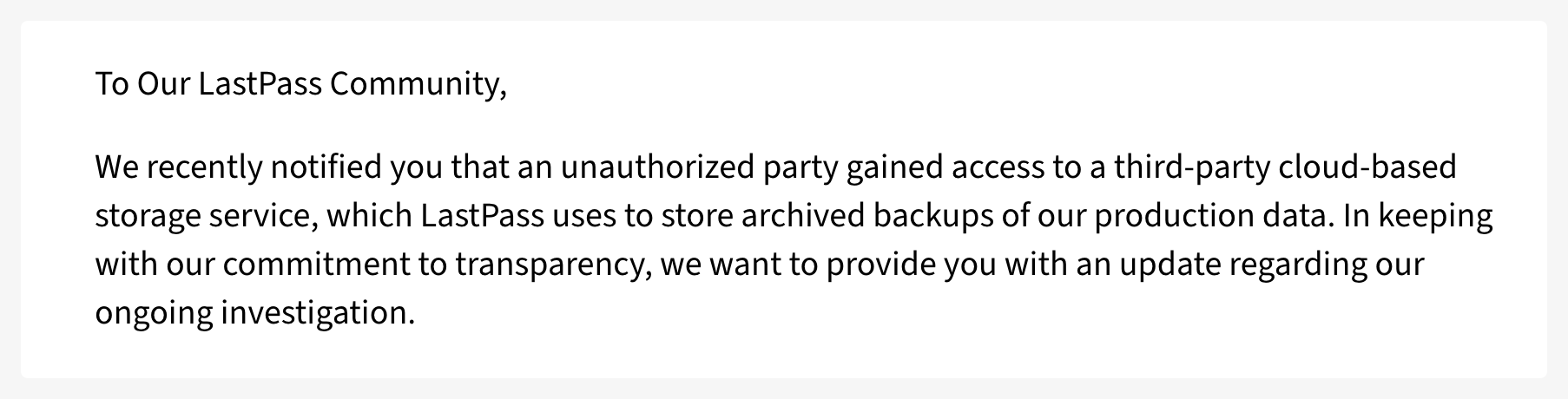
The sequence, according to the ICO:
- The attacker compromises an employee's corporate laptop, reaches the development environment and takes 14 of 200 source code repositories, along with encrypted company credentials.
- The keys to those credentials sit in the vaults of four senior employees. The attacker reaches one employee's personal device through a known vulnerability in a third-party streaming service.
- A keylogger captures that employee's master password, and a trusted device cookie bypasses MFA.
- The employee's business vault holds the AWS access key and the decryption key for the backup database. The attacker copies its contents.
In those backups, passwords, usernames and secure notes were encrypted with keys derived from each master password. Website URLs, file paths to installed LastPass software and some email addresses were not. Customer names, billing addresses, phone numbers and IP addresses left in readable form, as did a backup of the MFA and federation database with its decryption key.
A stolen vault can be attacked offline, one master password at a time. LastPass's stated defaults in 2022 were a 12-character minimum master password and 100,100 PBKDF2 iterations, and the unencrypted URLs told an attacker which services each vault held credentials for.
TRM Labs reported in December 2025 that it had traced more than USD 35 million in stolen cryptocurrency to the breach, with wallet drains continuing into late 2025. On December 11, 2025, the ICO fined LastPass UK Ltd £1.2 million.
Why the LastPass breach reached vault data and the 1Password breach did not
Three things decided the outcome: what the attacker's foothold could reach, which fields were encrypted on the client, and what a stolen vault copy would need to be opened. At LastPass, the first two went the attacker's way. 1Password's notice describes a foothold that returned account records, and it does not explain what kept vault data out of reach.
What the foothold could reach
At LastPass, the attacker ended up inside the backup storage that held every vault copy, with the keys to decrypt it. Those keys were kept in four senior employees' own vaults, so one compromised personal device was enough.
At 1Password, the malicious code ran in backend services that returned administrative records. The notice says vault contents were not "accessed by, or available to, the attacker".
What sat outside client-side encryption
A zero-knowledge design protects only the fields the client encrypts. LastPass left website URLs and some other fields outside that protection, and they left with the backups. In 1Password's case the readable data was the account record: who the customer is and when they last signed in.
Related reading
Our explainer covers what zero-knowledge encryption does and does not protect.
What a stolen vault copy needs to be opened
A LastPass vault copy is protected by the master password alone, stretched with PBKDF2. 1Password's support documentation says account data is protected by a 128-bit Secret Key combined with the account password, and the company says it stores neither.
That difference would matter only if 1Password vault data were ever copied. According to the notice, it was not.
What stolen account metadata is worth to an attacker
Names, sign-in addresses and last sign-in times are enough to write a phishing email that reads like a real security notice from the vendor. The copied tokens add a second risk for the small group of users who had an invitation or account recovery pending. 1Password's own notice warns customers about phishing attempts.
Contact data is the recurring loss in this category. In June 2026, LastPass said attackers had used OAuth tokens held by its vendor Klue to reach customer contact details and support cases in its Salesforce environment, Help Net Security reported. No vaults were involved.
Three checks for administrators of an affected account:
- Review pending invitations and recovery requests, and reissue any that were open during the incident.
- Tell staff that the vendor will never ask for the account password or Secret Key.
- Confirm that SSO or MFA is enforced on password manager sign-in.
Related reading
The full administrator checklist and a table of what each stolen item allows an attacker to do are in our analysis of the 1Password breach .
Why a first disclosure is not the final scope
A first notice describes what the vendor knows on that day. LastPass's first two notices in 2022 said there was no evidence of access to customer data or encrypted vaults. Its fourth, published 119 days after the first, confirmed that a backup of customer vault data had been copied.
| Date | What LastPass said |
|---|---|
| August 25, 2022 | An unauthorized party took source code and technical information from the development environment; no evidence of access to customer data or encrypted vaults |
| September 15, 2022 | Investigation complete; activity limited to four days in August; no evidence of access to customer data or encrypted vaults |
| November 30, 2022 | Unusual activity in third-party cloud storage; "certain elements" of customer information accessed |
| December 22, 2022 | A backup of customer vault data was copied |
Eight questions to ask your password manager vendor
Each question below comes from a failure point in one of the two incidents. Together they cover what the vendor's servers can read, where backups and their keys sit, who can change production code, and what the vendor commits to disclose. A vendor that answers all eight in writing has given you a usable picture of your exposure.
- Which fields are encrypted on the client, and which can your servers read? LastPass stored website URLs unencrypted. A good answer is a field-by-field list, not a general claim of zero-knowledge.
- What customer data does your backend hold at all? Both incidents exposed account records. Ask for the list.
- What protects a stolen vault copy besides the master password? Ask for the key derivation function, the iteration count and any second secret that enters the derivation.
- Where are backups stored, and who holds the keys to them? At LastPass the keys sat in the vaults of four senior employees. A good answer names the storage and the custodians.
- Who can push code to production services, and what approvals stand in the way? At 1Password, the attacker used one employee's GitHub account to push code to backend services.
- How are developer accounts, endpoints and CI/CD secrets protected? Both incidents began on the engineering side. In GitGuardian's State of Secrets Sprawl Report 2026, 59% of the machines compromised in the Shai-Hulud 2 supply chain attack were CI/CD runners.
- How do you verify that the client software we run has not been altered? The client holds the decryption keys. 1Password states that its apps and browser extensions were not affected.
- What do you commit to disclose after an incident, and by when? LastPass customers waited 119 days for the full scope. Ask for a timeline in the contract.
In an on-premise deployment, questions 2 and 4 are answered inside your own perimeter. Our comparison of cloud, self-hosted and hybrid deployment models covers that trade-off.
Passwork: An on-premise alternative to a vendor-hosted vault
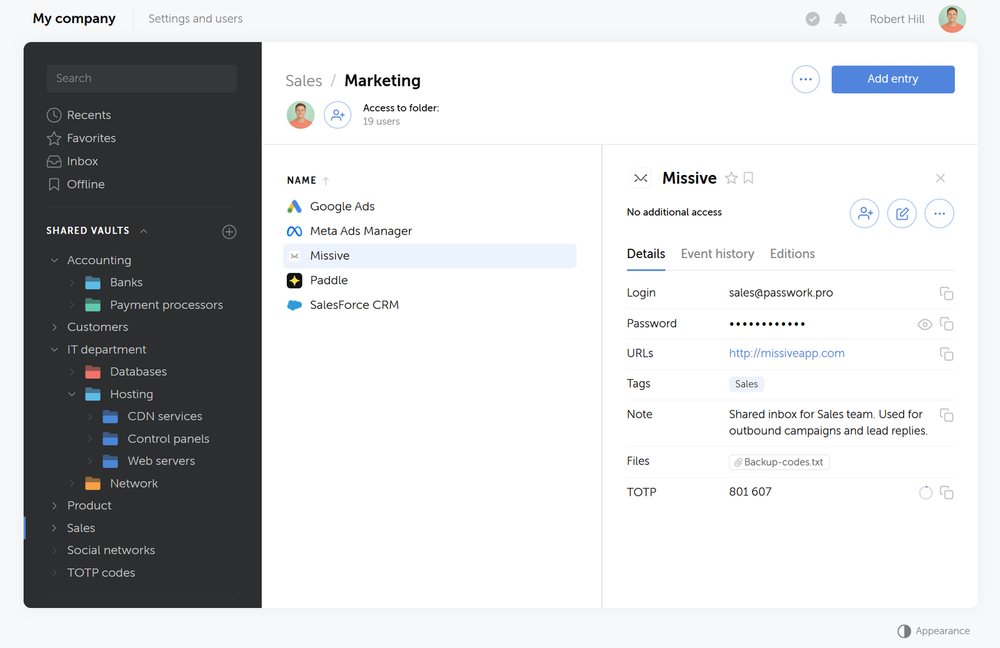
Passwork is an on-premise password manager: the vault database, the encryption keys and the backups sit on infrastructure the customer runs. A breach of the vendor's backend finds no customer vault copy and no customer user directory there. The table maps the failure points of the two incidents to this deployment model.
| Failure point | With Passwork Self-Hosted |
|---|---|
| Vault backups in the vendor's cloud storage | Backups stay on your storage, under your control |
| Customer account records in the vendor's backend | User accounts live in your instance and sync from your AD/LDAP |
| Fields the server can read | Double encryption: client-side encryption, so the server stores ciphertext and encrypted keys, and a separate server-side AES-256 layer encrypts the database; each vault has its own key |
| An internet-facing vendor service | The instance can run in a segmented or air-gapped network |
| Trust in vendor statements | Source code available to customers for audit; ISO 27001 certification; penetration tests through HackerOne |
Passwork uses double encryption. Client-side encryption is on by default: data is encrypted and decrypted with AES-256 on the user's device, and the keys never leave it. On the server, a separate 256-bit server key encrypts the database with AES-256. The two layers are independent, so a compromise of one does not expose data protected by the other.
Three levels of access control
Where the vault runs is half of the exposure. The other half is who can reach what inside it. Passwork splits that question into three levels, and each one is set separately.
- System roles. A role defines what a user can do in the system: manage users, change settings, configure sign-in methods, use the API. Three roles are built in: Owner, Administrator and Member. You can add any number of custom roles, such as an auditor who reads the Activity log and changes nothing.
- Vault types. A vault type sets the rules for every vault created under it: who its permanent administrators are, who may create such vaults and what access the creator gets. The vault owner cannot remove the corporate administrators the type assigns, so no team can take shared credentials out of IT's view.
- Vault and folder access. Inside a vault, users and groups get Full, Read-only or Forbidden access, down to a single folder. Forbidden overrides access inherited from a group, so you can close one folder to people who see the rest of the vault.
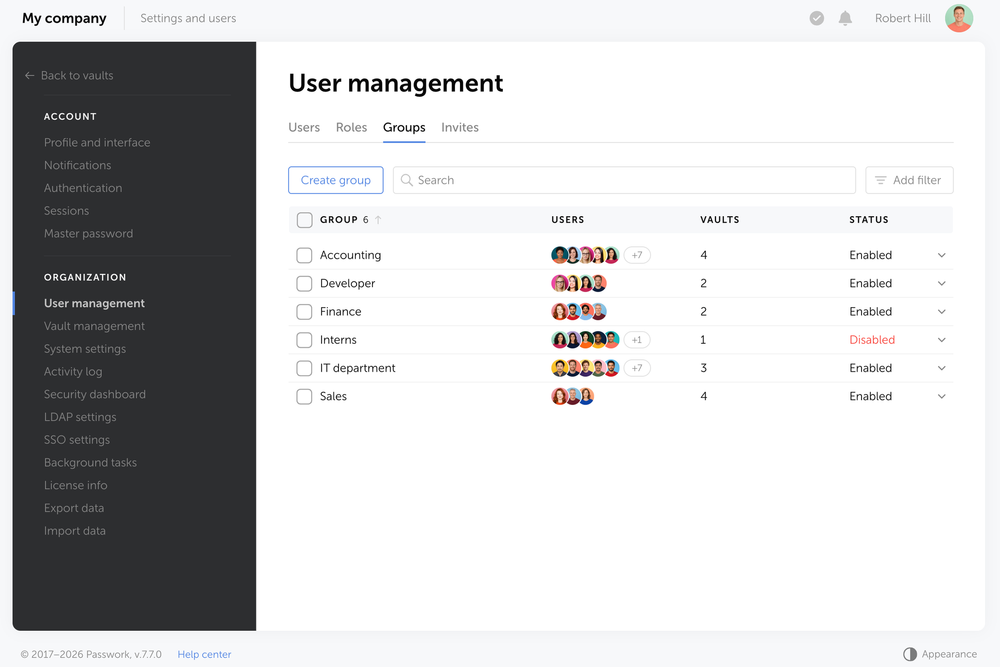
Groups sync from Active Directory or LDAP, so access follows the directory. Disable an account there and its vault access goes with it.
What else the security team gets
- Sign-in. SAML SSO, LDAP/AD, passkeys and two-factor authentication with TOTP.
- Activity log. Every user, admin and system action is recorded and exports to Syslog, Windows Event Viewer or a SIEM.
- Security dashboard. It flags weak and old passwords, and passwords that were accessible to users whose access has since been revoked. After an incident, that is your rotation list.
- Auditable source code. Customers can review the source code. Passwork is ISO 27001 certified and commissions external penetration tests through HackerOne every year.
- Secrets management. API keys, tokens and certificates live in the same vaults, under the same roles and the same log. Pipelines read them through the REST API, the CLI, the Python connector or Docker.
The model fits organizations with data residency or air-gap requirements and a team that already runs servers.
Conclusion
Set side by side, the 1Password breach and the LastPass breach are different losses: one vendor lost a customer list with timestamps, the other lost the vaults. What separated them was the reach of the attacker's foothold and the scope of client-side encryption, and you can check both at your own vendor before an incident.
Frequently asked questions
Was the 1Password breach as serious as the LastPass breach?
As disclosed on November 25, 2026, no. The 1Password attacker copied account records such as names, sign-in emails and timestamps for a subset of customers, and 1Password says vault contents were not accessed. In 2022 LastPass lost backups of all customer vault data, with website URLs stored unencrypted.
What was stolen in the LastPass 2022 breach?
Backups of all customer vault data, with passwords and notes encrypted and website URLs unencrypted. The attacker also took customer names, billing addresses, email addresses, phone numbers and IP addresses, plus a backup of the MFA and federation database together with its decryption key.
Has 1Password had a security incident before?
Yes. In 2023, 1Password reported suspicious activity on its Okta instance, tied to Okta's support system breach, and concluded that no user data was accessed. The November 2026 incident is the one in which the company confirmed that customer account records were copied.
Can a zero-knowledge password manager still leak data?
Yes. Zero-knowledge protects the fields that are encrypted on the user's device. The vendor can still read account records, billing details, timestamps and any field it stores outside client-side encryption. A breach of the vendor's systems exposes that readable data even when every vault stays encrypted.
Do 1Password customers need to change their passwords?
1Password says customers do not need to update anything in their accounts, and that it does not store account passwords or Secret Keys. Administrators should still review pending invitations and recovery requests and warn users about phishing messages that mention the incident.
 Passwork Team

 Alex Muntyan
 Passwork Team
Table of contents
- Key takeaways
- 1Password breach vs LastPass breach: What each exposed, side by side
- What happened at 1Password in November 2026
- What happened at LastPass in 2022
- Why the LastPass breach reached vault data and the 1Password breach did not
- What stolen account metadata is worth to an attacker
- Why a first disclosure is not the final scope
- Eight questions to ask your password manager vendor
- Passwork: An on-premise alternative to a vendor-hosted vault
- Conclusion
- Frequently asked questions

Self-hosted password manager for business
Passwork provides an advantage of effective teamwork with corporate passwords in a totally safe environment. Double encryption and zero-knowledge architecture ensure your passwords never leave your infrastructure.
Learn more