

Credentials move between people every day. A developer gets a database credential via Slack. A contractor receives an admin account through email. Finance keeps the payroll system login in a shared spreadsheet. Each handoff is a breach waiting to happen. In 2026, that wait has a measurable value, and often counted in minutes.
This article breaks down exactly what's at stake in 2026, why employees keep doing it anyway, and how to fix it without making security feel like punishment.
Key takeaways
- Shared credentials are an access governance problem, not a user behavior problem. Policies that rely on employees doing the right thing fail at scale. Architecture that makes the right thing the easiest thing does not.
- Vault-mediated access eliminates the raw credential handoff. Users get into systems through the vault. They never see the password. Every action is logged and tied to an individual identity.
- RBAC at the group level is the only model that scales. Managing permissions per individual breaks down past a dozen people. Group-based inheritance means one change covers everyone on the team.
- MFA on privileged accounts limits blast radius when credentials are compromised. Credential compromise is a matter of when, not if. A second factor means a stolen password alone is not enough.
- Audit trails need to exist before the incident, not after. Incident response without logs is reconstruction from memory. Build the trail now.
- Legacy systems are a constraint, not an excuse. A service account stored in a vault with mediated access is not perfect, but it is documented, auditable, and revocable.
- Shadow IT is a friction signal. If employees are using personal tools for work credentials, the corporate vault is harder to use than it should be. Fix the onboarding, not the policy.
- Automate offboarding at the directory level. Every day a former employee retains access is an open liability. AD/LDAP integration closes it without manual intervention.
The dangers of insecure password sharing in 2026
Insecure password sharing exposes organizations to credential stuffing, account takeover (ATO), and insider threats — all of which have become significantly easier to execute as AI-enhanced attack tooling has matured. The core problem is that shared credentials destroy individual accountability: when five people use the same login, no audit trail tells you which one caused the breach.
The threat landscape has shifted materially as GPU hardware and cracking tooling have both advanced. Hive Systems' 2025 Password Table shows that short passwords remain dangerously exposed regardless of complexity. NIST SP 800-63B (updated August 2025) reflects the same reality: the guidelines now set a minimum floor of 15 characters and explicitly drop mandatory complexity rules in favor of length, recognizing that brute-force resistance scales exponentially with length, not with character substitution.
Time it takes a hacker to bruteforce your password in 2025
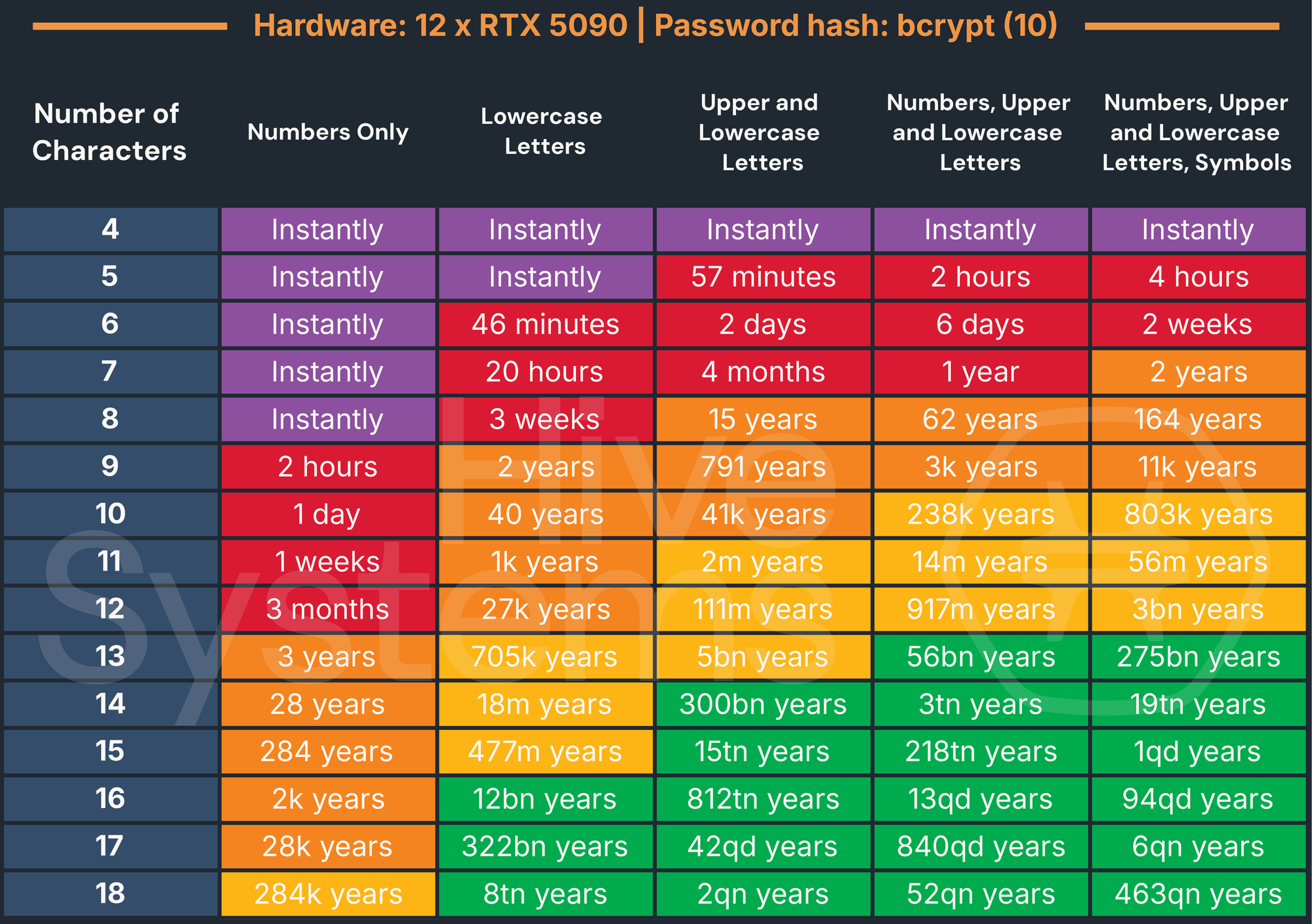
Credential stuffing has scaled with this tooling. Attackers feed leaked credential databases — billions of username/password pairs are available on dark web markets — into automated tools that test them across hundreds of services simultaneously. Shared passwords amplify the blast radius: one leaked credential can compromise every system where that password was reused.
Brute-force attacks have similarly benefited from AI. Modern cracking algorithms use neural networks to model human substitution patterns. Replacing a with @ or appending ! to a dictionary word no longer provides meaningful resistance. The attacker's model already accounts for it.
Insider threats are the less-discussed risk. When credentials are shared informally (over chat, email, or verbally) there is no record of who holds them at any given time. A disgruntled employee, a contractor whose engagement ended, or a former colleague who was never properly offboarded can retain access indefinitely. Without individual accounts and audit trails, you cannot detect the access, let alone attribute it.
How insecure sharing maps to specific attack vectors
| Attack type | How insecure sharing enables it | Blast radius |
|---|---|---|
| Credential stuffing | Shared passwords are reused across systems. One leaked pair unlocks every service where that credential was used. | All systems sharing the same credential |
| Account takeover (ATO) | Attackers use stuffed or brute-forced credentials to gain persistent access. Shared accounts make detection harder — anomalous activity blends in with multiple legitimate users. | The account and every system it touches |
| Brute-force attack | Short or predictable shared passwords are cracked faster than individual ones are rotated. AI-driven cracking models account for common substitution patterns. | The target system and any reused credentials |
| Insider threat | No record of who holds a shared credential at any given time. A departing employee, contractor, or offboarded colleague can retain access indefinitely. | Any system the credential reaches |
| Privilege escalation | Shared admin credentials give every holder elevated access, regardless of their actual role. One compromised user means full admin exposure. | All systems accessible via the shared admin account |
| Phishing amplification | When credentials are shared over chat or email, attackers intercepting those channels capture live, usable passwords — not hashed values. | Every system the intercepted credential accesses |
| Supply chain compromise | Shared credentials passed to vendors or contractors extend the attack surface beyond the organization's perimeter. A breach at the third party becomes a breach at yours. | All systems the vendor credential reaches |
| Lateral movement | A single shared credential covering multiple systems gives an attacker a ready-made path across the network without needing to escalate further. | The entire shared-credential scope |
| Undetected persistence | Shared accounts have no individual baseline behavior. Attackers can maintain access for months without triggering anomaly detection. Verizon's 2025 DBIR notes the median time to detect a credential-based breach remains measured in months. | Any system accessible via the shared account |
Beyond convenience: Why employees still share passwords (and the real cost)
Employees share work passwords for the same mundane reasons they always have: emergencies, shared team accounts, delegated tasks. Sharing is the rational response when the secure path is slower than the task itself. When the formal access request process takes longer, people skip it.
That friction has a name. A 2025 peer-reviewed study "Digital detox: Exploring the impact of cybersecurity fatigue on employee productivity and mental health" published in Discover Mental Health (PMC/PubMed) surveyed 351 employees across IT, finance, healthcare, and education and found that cybersecurity fatigue (defined as mental and emotional exhaustion from repeated security demands) directly contributes to disengagement, reduced compliance, and burnout.
Cybersecurity fatigue — a state of mental and emotional exhaustion from repeated exposure to security demands — manifests through cognitive overload, stress, and disengagement, significantly impacting employee productivity and organizational resilience.
When mandatory rotation cycles, authentication prompts, and access request queues pile up, security stops feeling like protection and starts feeling like friction. The workaround becomes obvious: share the credential directly and get the work done.
This is a design failure, not a discipline problem. Proofpoint's research on human-centric threats consistently shows that employees bypass controls because the secure path takes longer than the insecure one. The credential gets shared, the task gets done, and no one thinks much about it.
Until something goes wrong. Verizon's 2025 DBIR found that credentials remain one of the most exploited entry points across industries. IBM's 2025 Cost of a Data Breach Report puts a number on what that means in practice: breaches involving compromised credentials take an average of 246 days to identify and contain — over eight months of undetected exposure — and carry an average total cost of $4.57M.
The accountability gap is what makes this hard to recover from. Once a credential is shared, you lose the ability to tie actions to individuals. That matters for incident response, for compliance audits, and for the basic question of "who changed this configuration at 2 a.m. on Saturday?" Shared credentials don't just create risk — they destroy the audit trail you need to understand what happened after the fact.
The ripple effect: Business impacts of insecure credential sharing
Insecure credential sharing creates financial, legal, and reputational exposure that extends well beyond the initial breach. Credential compromise is the dominant attack vector across industries. The breach itself is rarely the most expensive part. Incident response, regulatory scrutiny, and the audit trail gaps left by shared accounts compound the damage long after the initial intrusion.
Lifecycle of a shared password
| Step | Stage | Description |
|---|---|---|
| 1 | Creation | One person sets a shared credential |
| 2 | Distribution | Shared via Slack, email, or verbally |
| 3 | Drift | Unknown number of people hold it |
| 4 | Exposure | Credential appears in a breach database |
| 5 | Compromise | Attacker uses it across multiple systems |
The compliance dimension is specific and consequential. GDPR Article 32 requires "appropriate technical and organisational measures" to protect personal data — and shared credentials with no audit trail fail that standard directly. SOC 2 Trust Services Criteria CC6.1 requires logical access controls tied to individual identities. HIPAA's Technical Safeguard requirements under 45 CFR §164.312(a)(2)(i) mandate unique user identification. Sharing a single login across a team violates all three frameworks simultaneously.
Reputational damage follows a different timeline than financial damage. The breach costs are immediate. The reputational costs compound. Customers, partners, and regulators all factor breach history into their risk assessments. A credential-based breach that could have been prevented with basic access governance is particularly difficult to explain to a board or a regulator.
The offboarding scenario illustrates the risk concretely. An employee leaves with access to five shared accounts. Because credentials were never formally assigned, no one knows which systems they could reach. Revoking access means:
- Identifying every shared password the employee knew
- Finding every system where that password was used
- Notifying every team that depends on those credentials
- Rotating all of them without breaking anything in production
In practice, many organizations skip this entirely. That's how former employees retain active access for months.
Implementing frictionless governance: Solutions for secure password sharing
Frictionless governance is a credential management model that eliminates insecure sharing by making secure access faster than the workaround. It rests on three components: individual accountability (every user has their own identity), RBAC (permissions assigned to roles, not individuals), and audit logging (every access event is recorded and attributable).
The practical implementation requires four things:
- A password vault with role-based access control. Users access credentials through the vault, not by receiving the password directly. RBAC (role-based access control) means permissions are inherited from group membership — add someone to the DevOps group, they get DevOps vault access. Remove them, access is revoked immediately.
- End-to-end encryption with a zero-knowledge architecture. Credentials are encrypted client-side before leaving the user's device. The server stores ciphertext. Even a compromised server exposes nothing usable. AES-256 is the current standard for this.
- MFA on every account. Multi-factor authentication (MFA) doesn't prevent credential sharing, but it limits the damage when a shared credential is compromised. An attacker with a stolen password still needs the second factor. For privileged accounts, hardware tokens or FIDO2 keys are preferable.
- Passphrases over complex short passwords. A 16-character passphrase — four random words — is both more resistant to brute-force attacks and easier for users to remember than
P@ssw0rd!2. Length provides exponential resistance; complexity provides linear resistance.
| Criterion | Shared accounts | Individual vaults |
|---|---|---|
| Accountability | None — actions cannot be attributed | Full — every action tied to a user identity |
| Offboarding | Manual rotation of all shared passwords | Single access revocation in the vault |
| Audit trail | None or incomplete | Complete, timestamped, per-user |
| Breach blast radius | All users of the shared credential | Limited to the compromised individual |
| Compliance posture | Fails GDPR Art. 32, SOC 2 CC6.1, HIPAA §164.312 | Supports all three frameworks |
Identity and Access Management (IAM) integration extends this model to the directory level. When Passwork is connected to AD/LDAP, user provisioning and deprovisioning happen automatically. A user disabled in Active Directory loses vault access without any manual intervention. That's the offboarding problem solved at the infrastructure level.
Addressing legacy systems and shadow IT
Legacy systems are the most common reason teams justify shared credentials. A system built in 2008 may have no concept of individual user accounts — it has one admin login, and everyone who needs access uses it. This is a real constraint, not a policy failure.
The practical solution is a service account pattern with vault-mediated access. The shared credential lives in the vault, encrypted. Users access the system through the vault's session management — they never see the raw password. Access is logged at the vault level even if the target system has no native audit capability. When someone leaves, you rotate the credential in the vault. The system itself doesn't need to change.
One-time secrets and secure links address the adjacent problem: occasionally, a credential genuinely needs to be transmitted to someone outside your vault. A one-time secret link expires after a single view or after a defined time window. It's not a permanent solution, but it's categorically safer than a Slack message that sits in chat history indefinitely.
Shadow IT — employees using personal credential managers for work passwords — is harder to detect and carries its own risks. A personal vault has no organizational audit trail, no offboarding hook, and no guarantee of encryption standards. The fix is organizational: make the corporate vault easier to use than the personal one. If onboarding takes five minutes and the browser extension autofills credentials, most employees will use it. Friction is the enemy of adoption.
How Passwork makes secure sharing the default
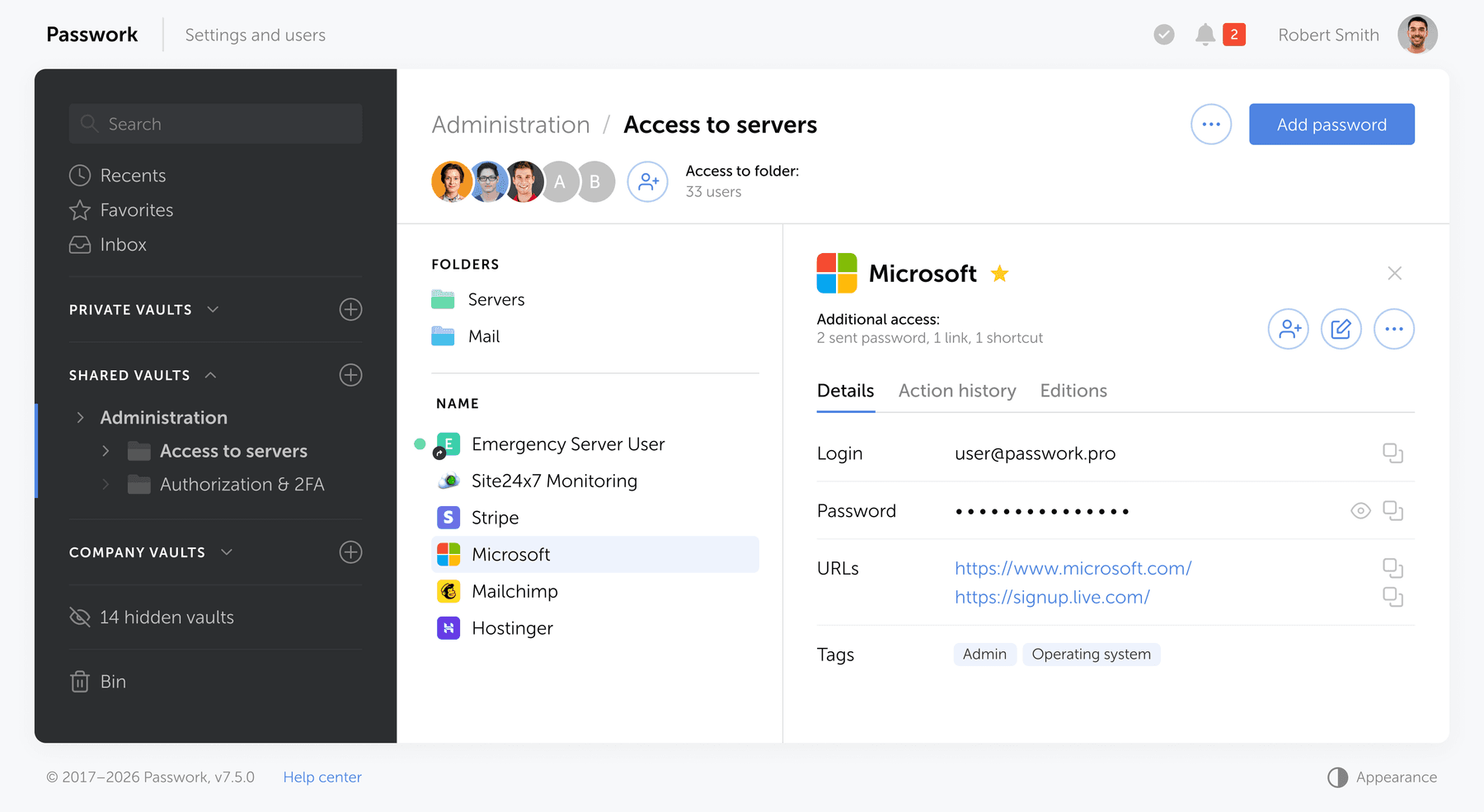
The issues described above (shared credentials, broken offboarding, missing audit trails, legacy system constraints) are exactly what Passwork is built to handle. Here's how each maps to a specific capability.
- Shared credentials without accountability. Passwork replaces direct password handoffs with vault-mediated access. Users interact with systems through the vault. They never receive the raw credential. Every access event is logged, timestamped, and tied to an individual identity.
- Broken offboarding. Passwork integrates with AD/LDAP. When a user is disabled in Active Directory, vault access is revoked automatically. No manual rotation, no guesswork about which accounts they could reach.
- No audit trail. Every action in Passwork is recorded. When an incident occurs, you have a complete, attributable log. Not "someone on the DevOps team," but a specific user at a specific time.
- Legacy systems with shared logins. Passwork supports a service account pattern: the credential lives in the vault, encrypted. Users access the system through vault-mediated sessions and never see the password. The target system doesn't need to change.
- Occasional external sharing. For credentials that genuinely need to leave the vault — a contractor, a one-time handoff — Passwork generates one-time secret links that expire after a single view or a defined time window. Safer than a Slack message by design.
- Compliance gaps. Role-based access control, individual identity binding, and a full audit log directly support GDPR Article 32, SOC 2 CC6.1, and HIPAA §164.312 requirements. The audit trail you need for a regulator is the same one you need for incident response.
Moving from insecure to secure sharing: A practical 6-step migration
Most teams fail because the transition from informal sharing to structured access feels like a project no one has time for. This guide breaks it into six steps that can be executed incrementally, educing exposure at each stage without disrupting operations.
- Audit what you're actually sharing. Before you can fix the problem, you need to know its scope. Survey your teams and document every shared credential: what system it accesses, who holds it, and how it was distributed. Spreadsheets, Slack history, and email threads are the most common sources. Don't skip this step. You cannot revoke access you don't know exists.
- Classify by risk. Not all shared credentials carry equal risk. Prioritize by blast radius: production database credentials and admin accounts first, internal tooling second, low-sensitivity shared accounts last. This gives you a migration sequence that reduces exposure quickly without requiring you to move everything at once.
- Deploy the vault and onboard your team. Set up Passwork and connect it to your directory service (AD/LDAP). Create role-based groups that mirror your existing team structure. Onboarding works best when the vault is already populated before you ask people to use it. Import existing credentials into the appropriate vaults before the rollout meeting.
- Migrate credentials in priority order. Move high-risk credentials into the vault first. For each one: store it in Passwork, assign access to the relevant role group, and immediately stop distributing the raw password. For legacy systems that can't support individual accounts, implement the service account pattern — credential in the vault, access mediated through Passwork.
- Enforce the new process and retire the old one. Block the informal channels. This means a clear policy: no credentials in Slack, email, or shared documents. For external sharing, use Passwork's one-time secret links instead of direct messages. The policy only works if the vault is already easier to use than the workaround — which is why steps 3 and 4 come first.
- Audit, rotate, and maintain. Once credentials are in the vault, use Passwork's security audit tools to identify weak passwords, flag credentials that haven't been rotated, and review access logs for anomalies. Set a rotation schedule for privileged accounts. Review role group memberships quarterly — or trigger a review automatically on any organizational change.
The full migration for a 50-person team typically takes one to two weeks when executed in this order. The audit in step 1 usually takes the longest.
Key takeaways for CISOs and IT leaders
The core shift required is treating credential sharing as an access governance problem, not a user behavior problem. Policies that rely on employees "doing the right thing" will fail at scale. Architecture that makes the right thing the easy thing will not.
- Replace shared credentials with vault-mediated access. Users get access to systems through the vault, not through the password itself.
- Implement RBAC at the group level. Individual permission management doesn't scale; group-based inheritance does.
- Enforce MFA on all privileged accounts. Credential compromise is a matter of when, not if — MFA limits the damage.
- Establish audit trails before you need them. Incident response without logs is guesswork.
- Address legacy systems explicitly. A service account in a vault is not a perfect solution, but it's a documented, auditable one.
- Treat shadow IT as a design signal. If employees are using personal tools forwork credentials, your corporate tooling has a friction problem.
- Automate offboarding. Every day a former employee retains access is a liability. Directory integration eliminates the manual step.
Conclusion
Shared credentials have always been a liability. In 2026, with AI-enhanced cracking tools and breach costs averaging $4.57 million per incident, they're an indefensible one.
The fix doesn't require asking employees to be more disciplined. It requires building systems where the secure path is also the faster one. When vault access takes less time than a Slack message, people use the vault. When offboarding triggers automatic revocation, former employees don't retain access for months. When every action is logged, incident response stops being guesswork.
Start with your highest-risk shared credentials: admin accounts, production database access, anything touching regulated data. Move those into a vault with role-based access controls first. Then work outward, in priority order, using the six-step migration above.
Frequently asked questions

Why is insecure password sharing a significant security risk in 2026?
AI-enhanced cracking tools can break an 8-character password in under 12 minutes on consumer hardware (Hive Systems, 2025), and credential stuffing attacks run at industrial scale using billions of leaked pairs. Shared passwords eliminate individual accountability — when a breach occurs, there is no audit trail to identify who had access or when.
How can organizations securely manage passwords for legacy systems that only support a single shared login?
Use a service account pattern: store the shared credential in an encrypted vault and grant users vault-mediated access rather than the raw password. Access is logged at the vault level even when the target system has no native audit capability. When personnel changes occur, rotate the credential in the vault — the system itself does not need to change.
What is frictionless governance in the context of credential management?
Frictionless governance is a credential management model that makes secure access faster than the workaround. It combines individual user identities, RBAC for group-based permission inheritance, and full audit logging — so employees never need to share a raw password to get their work done.
How does shadow IT create credential security risks?
When employees store work passwords in personal credential managers, the organization loses audit trails, offboarding hooks, and control over encryption standards. A departing employee's personal vault retains every credential they saved there. The fix is making the corporate vault easier to use than the personal alternative — faster onboarding, browser autofill, mobile access.
Which compliance frameworks are violated by shared credentials?
Shared credentials without individual attribution violate GDPR Article 32 (appropriate technical measures for data protection), SOC 2 Trust Services Criteria CC6.1 (logical access controls tied to individual identities), and HIPAA 45 CFR §164.312(a)(2)(i) (unique user identification). All three require the ability to tie access events to a specific person.
How long does it typically take to detect a credential-based breach?
According to IBM's 2025 Cost of a Data Breach Report, breaches involving compromised credentials take an average of 246 days to identify and contain. Shared accounts make this worse: without individual behavioral baselines, anomalous activity blends in with normal multi-user traffic and rarely triggers alerts.
 Alex Muntyan
 Alex Muntyan
 Alex Muntyan
Table of contents
- Key takeaways
- The dangers of insecure password sharing in 2026
- Beyond convenience: Why employees still share passwords (and the real cost)
- The ripple effect: Business impacts of insecure credential sharing
- Implementing frictionless governance: Solutions for secure password sharing
- How Passwork makes secure sharing the default
- Moving from insecure to secure sharing: A practical 6-step migration
- Key takeaways for CISOs and IT leaders
- Conclusion
- Frequently asked questions
Table of contents
- Key takeaways
- The dangers of insecure password sharing in 2026
- Beyond convenience: Why employees still share passwords (and the real cost)
- The ripple effect: Business impacts of insecure credential sharing
- Implementing frictionless governance: Solutions for secure password sharing
- How Passwork makes secure sharing the default
- Moving from insecure to secure sharing: A practical 6-step migration
- Key takeaways for CISOs and IT leaders
- Conclusion
- Frequently asked questions

Self-hosted password manager for business
Passwork provides an advantage of effective teamwork with corporate passwords in a totally safe environment. Double encryption and zero-knowledge architecture ensure your passwords never leave your infrastructure.
Learn more