
Every IT admin who runs KeePass for a team tells the same story. It starts with one shared .kdbx file on a network drive. Then someone can't open it because a colleague has it locked. Then a junior sysadmin saves over a change someone else made an hour ago. Then an employee leaves, and nobody's quite sure which passwords they had access to.
KeePass is a genuinely excellent tool — for one person. The moment you put it in front of a team, you're not managing passwords anymore. You're managing a single file.
Key takeaways
- KeePass is excellent for individuals but structurally unsuitable for teams. The moment you add a second user, you lose real-time sync, granular access control, and audit trails — the three things that prevent credential breaches and compliance violations.
- Multi-user sync is manual and error-prone. Concurrent edits on a shared
.kdbxfile cause data loss. The "last-writer-wins" problem scales linearly with team size. There is no merge, no conflict detection, and no warning. - Access control is binary. Everyone who needs the master password gets full access to every credential. There is no concept of "this user can read cloud credentials but not database passwords." Offboarding requires rotating every credential they could have seen.
- KeePass produces no audit logs. You cannot prove who accessed a specific credential, when, or from where. This fails SOC 2 CC6.1, GDPR Article 32, NIS2, ISO 27001, and PCI DSS 4.0 — every modern compliance framework.
- The operational cost compounds quickly. Sync conflicts, manual offboarding, credential rotation, and audit gaps create administrative overhead that grows with team size.
- The fix is a purpose-built vault with RBAC, AD integration, and automated audit trails. Not a bigger spreadsheet, not a better file-sharing tool — a credential manager built for teams operating under compliance frameworks.
The allure of KeePass for small businesses
KeePass appeals to SMBs for three reasons that are completely rational: it costs nothing, stores data locally, and has been audited by the open-source community for over two decades. For a five-person shop with no compliance obligations and a single IT generalist, those are real advantages.
The encryption is solid. KeePass 2.x uses AES-256 by default, with optional ChaCha20 support — the latter being faster on mobile hardware where AES hardware acceleration isn't available. The .kdbx format is well-documented, portable, and not going anywhere.
KeePass remains a meaningful part of the consumer adoption curve, particularly among technically literate users who distrust cloud services. However, the enterprise segment (where compliance audits, multi-team access, and audit logging are mandatory) has almost entirely moved to purpose-built solutions.
What is AES-256?
AES-256 (Advanced Encryption Standard with a 256-bit key) is a symmetric block cipher standardized by NIST in 2001 (FIPS 197). It operates on 128-bit blocks across 14 rounds of substitution, permutation, and key mixing. The 256-bit key length makes brute-force attacks computationally infeasible with current and near-future hardware. AES-256 is the encryption standard used in TLS, full-disk encryption (BitLocker, FileVault), and most enterprise credential managers — including Passwork, which applies it client-side before any data leaves the device.
What is ChaCha20?
ChaCha20 is a stream cipher designed by Daniel J. Bernstein in 2008 as a faster, hardware-independent alternative to AES. It applies 20 rounds of ARX operations (add, rotate, XOR) to a 256-bit key and a 96-bit nonce, producing a keystream that is XORed with plaintext. Unlike AES, ChaCha20 does not rely on hardware acceleration instructions — making it significantly faster on devices without AES-NI support, such as older mobile CPUs and embedded systems. It is widely used in TLS 1.3 (paired with Poly1305 as ChaCha20-Poly1305) and is the default cipher in WireGuard. KeePass 2.x supports ChaCha20 as an alternative to AES-256 for database encryption, which is why it performs better on low-end Android and iOS hardware.
What is a .kdbx file?
.kdbx is the binary database format used by KeePass 2.x and its forks. The file stores all credentials in an encrypted container — protected by AES-256 or ChaCha20 — and is unlocked with a master password, a key file, or both. The format is self-contained and portable: the entire credential store lives in a single file with no server, no sync engine, and no user accounts. KDBX 4.0 (introduced in KeePass 2.35) added Argon2 as the key derivation function, replacing AES-KDF and significantly increasing resistance to GPU-based brute-force attacks. The single-file design is what makes .kdbx excellent for individual use — and what makes it structurally unsuitable for concurrent multi-user access.
The "KeePass scale trap": When free becomes expensive

KeePass was designed as a single-user application. Its multi-user documentation acknowledges this directly — the official KeePass help page on multiple users describes workarounds, not native features. When you put a .kdbx file on a network share and give five people access, you've built a system that will eventually fail. Here's exactly how.
The last-writer-wins problem
KeePass has no real-time sync engine. When two users open the same database file simultaneously, each holds a local copy in memory. When User A saves, the file updates. When User B saves thirty seconds later, their version overwrites User A's changes entirely. There is no merge, no conflict detection, and no warning.
KeePass does offer a manual "Synchronize" function that can merge two .kdbx files — but it requires a deliberate action from the user, and it only works if both versions are available. On a network share where the file gets overwritten on save, that second version is already gone.
All-or-nothing access
KeePass has one master password (or key file) per database. Everyone who needs access gets the same key. There is no concept of "this user can read the cloud server credentials but not the database passwords." You can create separate .kdbx files for different access levels, but now you're managing multiple files and multiple sync processes — and you still have no audit trail.
RBAC (role-based access control) — the ability to define what each user or group can see and do — simply doesn't exist in KeePass's architecture. It's a design choice for a single-user tool.
The offboarding
When an employee with access to the shared KeePass database leaves your organization, the correct security response is to rotate every credential they could have seen. All of them. Because you have no log of what they accessed, you can't scope the rotation — you have to assume worst-case.
For a database with 200 entries, that's a full day of work. For a database with 800 entries across production systems, SaaS tools, and client environments, it's a multi-day incident. And it happens every time someone leaves.

Passwork's role-based vaults let you revoke access for a departing employee in a single action. See how it works
Security vs. compliance: The 2026 regulatory landscape
KeePass's encryption is genuinely strong. AES-256 with a well-chosen master password is not the weak point. The weak point is that KeePass produces no evidence of what happened inside the database — and in 2026, that evidence is what auditors ask for.
What GDPR Article 32 requires
GDPR Article 32 mandates "appropriate technical and organisational measures" to ensure security appropriate to the risk. For credential management, the Article 32 working interpretation includes encryption at rest, access controls, and — critically — the ability to demonstrate that access controls are working. That last part requires logs.
A KeePass database can't tell you who opened it, when, from which machine, or what they looked at. If a regulator asks you to demonstrate that access to personal data credentials was appropriately restricted, a .kdbx file is not an answer.
NIS2 Directive: Access control and incident response
The NIS2 Directive (effective October 2024 for EU organizations) mandates that operators of essential services and important entities implement "advanced access control" and maintain detailed logs of access to critical assets. For credential management, this means:
- Role-based access control (RBAC) with per-user authentication
- Immutable audit logs of all credential access
- The ability to revoke access immediately upon employee departure
A shared KeePass file with a single master password violates all three requirements. Rekeying the entire database when someone leaves is not "immediate revocation" — it's a workaround that creates administrative overhead and increases the risk of human error.
ISO 27001:2022 and access control requirements
ISO 27001 Annex A.8.2 (Access Control) and A.8.15 (Logging) require organizations to implement controls that restrict access to information to authorized users and maintain records of access. For credential repositories, this translates to:
- Granular access permissions tied to job roles
- Audit trails showing who accessed what, when, and from where
- Automated enforcement of the principle of least privilege
KeePass offers none of these. A database shared among team members with a single password is the opposite of least privilege — it's maximum privilege for everyone.
PCI DSS 4.0: Payment card data protection
If your organization handles payment card data, PCI DSS 4.0 Requirement 7.1 mandates that access to cardholder data be restricted to personnel with a legitimate business need. Requirement 10.2.1 requires logging of all access to systems containing cardholder data, including the user ID, date, time, and nature of the access.
A KeePass database storing payment gateway API keys or database credentials cannot satisfy these requirements. There is no per-user authentication, no audit trail, and no way to prove to a PCI auditor that access was restricted to authorized personnel.
SOC 2 Type II and CC6.1
SOC 2 Trust Services Criteria CC6.1 requires that logical access to systems storing sensitive data be restricted to authorized users and that access be logged. A shared KeePass database with a single master password fails both conditions. There's no per-user authentication, and there's no log.
This isn't a theoretical risk. Auditors ask for access logs during SOC 2 Type II assessments. "We use KeePass" ends that conversation badly.
NIST SP 800-63B (Revision 4)
NIST SP 800-63B, finalized August 2025, recommends a minimum password length of 15 characters for memorized secrets and explicitly discourages mandatory periodic rotation in favor of breach-triggered rotation. KeePass can store compliant passwords — but it can't enforce the policy, report on compliance, or prove to an auditor that the policy was followed.
The scale of the threat
The numbers make the compliance argument concrete. According to IBM's 2025 Cost of a Data Breach Report, the average breach cost for businesses with fewer than 500 employees reached $3.31 million. Credential compromise is consistently among the top initial access vectors. A compliance violation on top of a breach compounds the financial damage through regulatory fines and remediation costs.
The SMB password security maturity curve
Most SMBs move through three recognizable stages. Naming this progression helps teams identify where they are and what the next step actually looks like.
- Stage 1 — Excel/shared doc. Credentials in a spreadsheet, often on a shared drive or email thread. No encryption. No access control. Fully auditable in the worst possible way: anyone with the file can see everything.
- Stage 2 — KeePass. Encrypted file, strong cryptography, zero cost. A genuine improvement over Stage 1. Appropriate for individuals and very small teams with no compliance requirements. Breaks down above five users, under audit, or when someone leaves.
- Stage 3 — Corporate vault. Purpose-built multi-user credential management with RBAC, AD/LDAP integration, per-user audit logs, MFA enforcement, and automated offboarding. This is where teams with compliance obligations, more than ten users, or any client-facing security requirements need to be.
The trap is staying at Stage 2 past the point where it fits. The cost of that delay is the administrative overhead, the incident exposure, and the audit findings.
The 5-point KeePass stress test for your business
Run through these five questions against your current setup. Each "yes" is a signal that KeePass is creating risk your team may not have priced in.
- Do you have more than 5 users accessing the shared database?
Above five concurrent users, sync conflicts become a near-daily event. The "last-writer-wins" problem scales linearly with team size. - Can you prove who accessed a specific credential and when?
If a client asks which of your staff accessed their system credentials last Tuesday, can you answer? KeePass cannot produce that record. A corporate vault with audit logging can. - Is the database stored on a shared drive, Dropbox, or similar?
Cloud sync tools like Dropbox add their own conflict resolution on top of KeePass's — which means you can end up with multiple.kdbxversions and no reliable way to know which is current. Network shares have the file-locking problem described above. - How long does it take to fully revoke access for a former employee?
If the answer is "we change the master password and then rotate everything they might have seen," you're describing a multi-hour incident that happens every time someone leaves. With per-user access controls, revocation is a single action. - Is MFA protecting the vault itself?
KeePass supports key files as a second factor, but distributing and managing those key files across a team is its own operational problem. Native MFA integration — TOTP, hardware keys, SSO — requires a purpose-built tool.
If you answered "no" to questions 2 and 5, or "yes" to questions 1, 3, and 4, your team has outgrown KeePass.
How do you manage credential access when your team scales beyond five people? Passwork handles multi-team credential management with RBAC, audit logging, and real-time sync — without the operational overhead. Try Passwork free
Beyond KeePass: Choosing a corporate access management solution
The criteria for a team-grade credential manager are not complicated, but they're non-negotiable once you're operating at any scale or under any compliance framework.
Shared vaults with granular permissions
Each team or project should have its own vault. Individual users get access to the vaults they need, at the permission level they need (read, write, admin). When someone's role changes, you update their vault membership — not the master password. This is role-based access control (RBAC), and it's the foundation of compliance. KeePass has no equivalent.
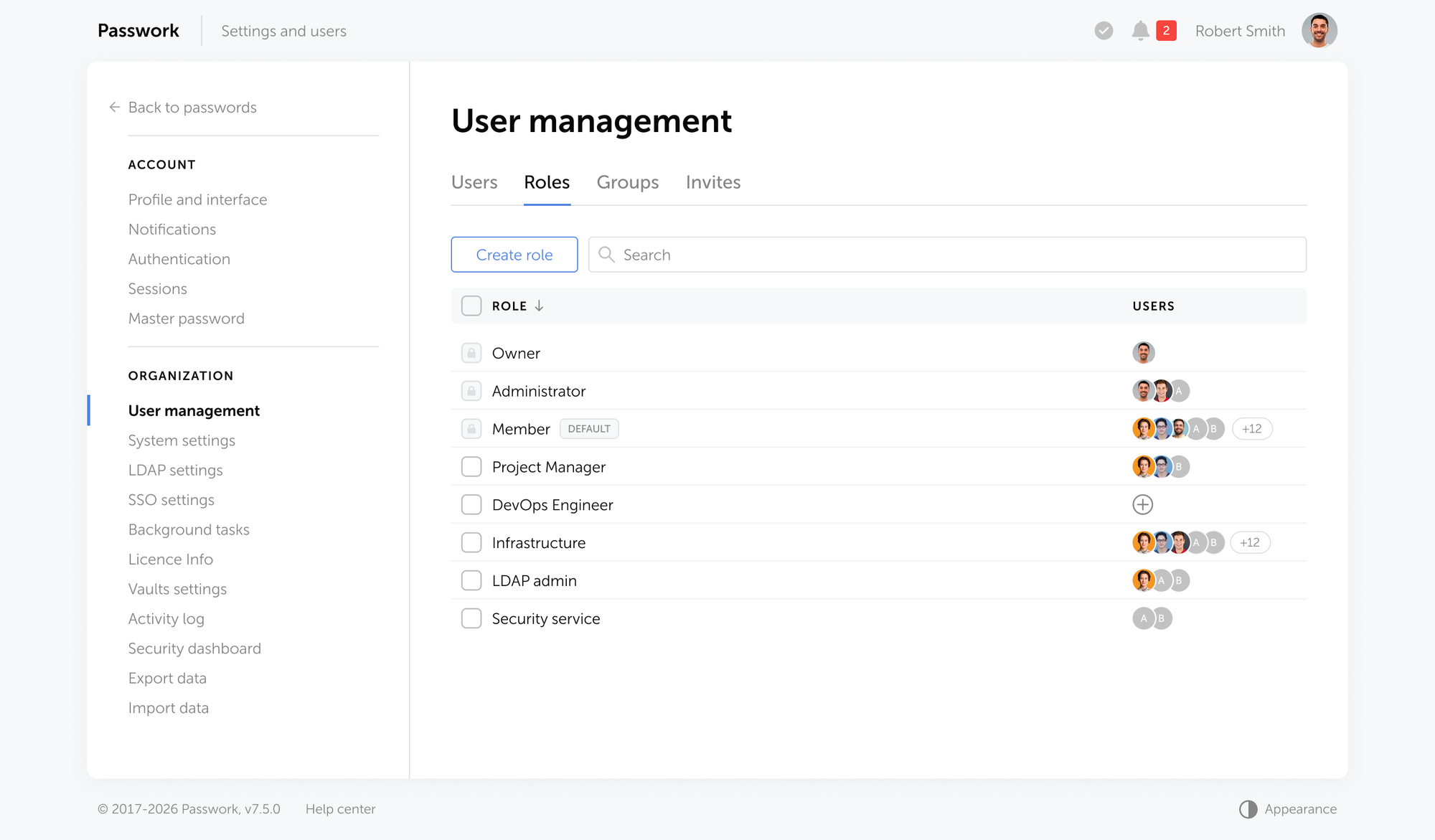
Passwork assigns permissions to groups, so when a developer joins the DevOps team, they inherit the team's vault access automatically. When they leave, you revoke it once.
RBAC tied to your directory
AD/LDAP integration means user provisioning and deprovisioning happen automatically. When admin terminates an account in Active Directory, vault access goes with it. No manual step, no gap. Passwork integrates natively with Active Directory and LDAP, so your credential access follows your organizational structure — not the other way around.
Per-user audit logs
Every credential view, copy, edit, and share should be logged with a timestamp and user identity. This is the record that satisfies SOC 2 CC6.1 and supports GDPR Article 32 accountability. KeePass produces no logs.
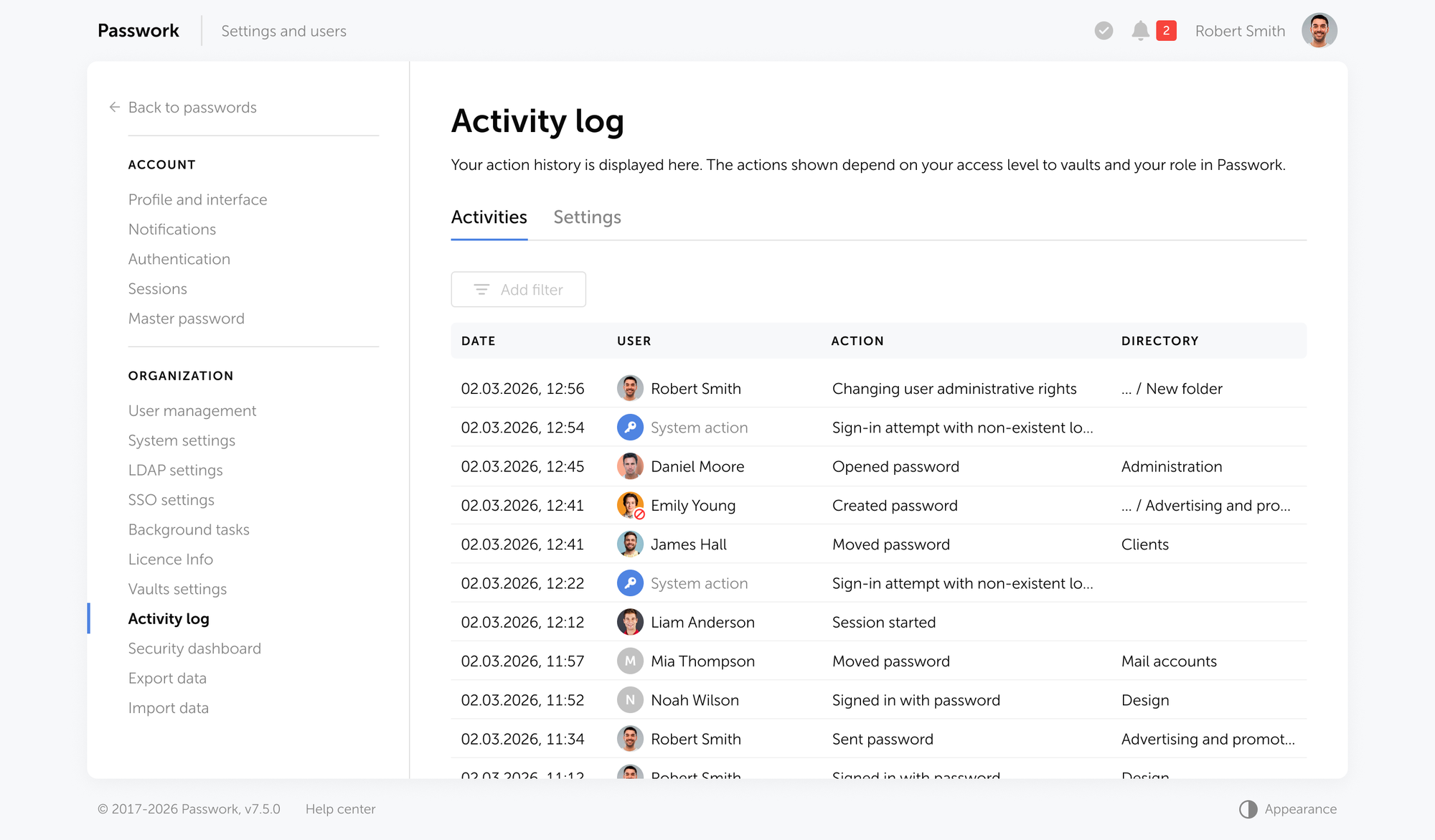
Passwork maintains a complete audit trail of every action, exportable for compliance reviews and incident investigations.
MFA enforcement at the vault level
Not optional, not per-user preference — enforced by policy, with support for TOTP, hardware tokens, and SAML SSO. KeePass supports key files, which is not MFA. Passwork enforces MFA at the vault level, with support for multiple authentication methods tied to your identity provider.
Autofill and browser integration
A modern credential manager integrates with browsers and CLI tools to autofill passwords and inject secrets into deployment pipelines. KeePass has browser plugins, but they're community-maintained and lack the security model of a centralized vault. Passwork provides native browser extensions and CLI tools that pull credentials on-demand from your vault, with full audit logging of every autofill action.
Zero-knowledge architecture
Your credential data should be encrypted client-side before it ever reaches the server. This means the server (whether self-hosted or cloud) cannot decrypt your credentials. It's a guarantee, not a promise. KeePass encrypts locally, but offers no team collaboration without manual file sharing. Passwork uses AES-256 client-side encryption with zero-knowledge architecture: credentials are encrypted before transmission, stored encrypted on the server, and decrypted only on authorized clients.
Self-hosted or cloud, your choice
Some SMBs have regulatory or contractual reasons to keep credential data on-premises. A tool that offers genuine self-hosting gives you the control KeePass offers without the operational limitations. Passwork is available as a cloud password and secrets manager and a self-hosted deployment on your own infrastructure, with full AES-256 encryption and zero-knowledge architecture. Your data never leaves your control.
KeePass vs. Passwork: feature comparison
| Feature | KeePass | Passwork |
|---|---|---|
| Multi-user sync | Manual / error-prone | Real-time, conflict-free |
| Granular permissions (RBAC) | None | Per-user, per-vault |
| Audit logs | None | Full per-user activity log |
| MFA enforcement | Key file only | TOTP, SSO, hardware keys, passkeys, biometrics |
| AD/LDAP integration | None | Native |
| Automated offboarding | None | Single-action revocation |
| Autofill and browser integration | Community plugins | Native extensions |
| Zero-knowledge encryption | Local only | Client-side + server |
| SIEM integration | None | Syslog, REST API |
| Compliance evidence | None | Exportable audit reports |
| Self-hosted option | File-based only | Full infrastructure control |
The difference is architectural. When your team grows beyond five people, the operational friction of KeePass becomes real. Credential rotation requires rekeying the entire database. Offboarding means everyone changes their master password. Access control is binary — either someone has the master password or they don't. Passwork eliminates that friction: granular permissions, automated offboarding, per-user audit trails, and real-time sync without conflicts.
If your organization operates under compliance requirements (GDPR, SOC 2, NIS2, ISO 27001, PCI DSS), the gap widens further. A shared KeePass database fails every audit. Passwork with RBAC, audit logging, AD integration, and zero-knowledge encryption satisfies compliance requirements without creating administrative overhead.
Conclusion

KeePass is a starting point. For a solo admin or a two-person team with no external audit requirements, it does the job. For any team operating above that threshold it creates more risk than it eliminates.
The administrative debt accumulates quietly: sync conflicts that cost an hour here, an offboarding rotation that costs a day there, an audit finding that costs a quarter. None of it shows up on the KeePass invoice because there isn't one. But the cost is real.
The next step is straightforward: map your current credential inventory, identify which teams share access to which systems, and evaluate whether your current tool can tell you who has access to what. If it can't, you have your answer.
If your team has outgrown KeePass, Passwork is built for exactly this moment. You get granular permissions, real-time sync, per-user audit logs, AD integration, MFA enforcement, and zero-knowledge encryption. All without the operational debt of managing shared master passwords and manual credential rotation. Try Passwork free
Frequently asked questions

Is KeePass safe for business use?
KeePass uses AES-256 encryption and is open-source with a long security track record, making it cryptographically sound. For business use, the security risk is the absence of audit logs, granular access controls, and MFA enforcement. These gaps create compliance exposure under GDPR Article 32 and SOC 2 CC6.1.
Can multiple users share a KeePass database?
Yes, but with significant limitations. KeePass has no real-time sync engine. When two users edit the same .kdbx file simultaneously on a network share, the last save overwrites the previous one with no merge or warning. KeePass's own documentation describes this as a known limitation requiring manual workarounds.
What is the main difference between KeePass and a corporate password manager?
The core difference is access architecture. KeePass uses a single master password shared by all users — there are no individual accounts, no per-user permissions, and no activity logs. A corporate password manager assigns each user their own authenticated session, enforces role-based access to specific vaults, and logs every credential interaction.
Does KeePass support Active Directory or LDAP?
No. KeePass has no native AD or LDAP integration. User provisioning and deprovisioning are entirely manual. In contrast, enterprise-grade credential managers integrate with AD/LDAP so that access rights follow directory group membership automatically.
Why does KeePass fail compliance audits?
KeePass cannot produce evidence of who accessed which credentials and when. SOC 2 Type II auditors require access logs under CC6.1. GDPR Article 32 requires demonstrable access controls. A .kdbx file with a shared master password satisfies neither requirement, regardless of how strong the encryption is.
When should an SMB move from KeePass to a corporate password manager?
The practical threshold is five or more users, any compliance obligation (SOC 2, GDPR, HIPAA, ISO 27001), or any situation where you need to prove access history. If an employee departure requires rotating credentials rather than revoking a user account, that's a clear signal the current tool isn't fit for purpose.
 Alex Muntyan
 Alex Muntyan
 Alex Muntyan
Table of contents
- Key takeaways
- The allure of KeePass for small businesses
- The "KeePass scale trap": When free becomes expensive
- Security vs. compliance: The 2026 regulatory landscape
- The SMB password security maturity curve
- The 5-point KeePass stress test for your business
- Beyond KeePass: Choosing a corporate access management solution
- Conclusion
- Frequently asked questions
Table of contents
- Key takeaways
- The allure of KeePass for small businesses
- The "KeePass scale trap": When free becomes expensive
- Security vs. compliance: The 2026 regulatory landscape
- The SMB password security maturity curve
- The 5-point KeePass stress test for your business
- Beyond KeePass: Choosing a corporate access management solution
- Conclusion
- Frequently asked questions

Self-hosted password manager for business
Passwork provides an advantage of effective teamwork with corporate passwords in a totally safe environment. Double encryption and zero-knowledge architecture ensure your passwords never leave your infrastructure.
Learn more