
Centralized password management for SMBs is the practice of storing, sharing, and controlling every business credential through one secured platform instead of spreadsheets, browsers, or chat messages. It gives small and mid-sized businesses the same credential control enterprises rely on, minus the price tag and the security team required to run it.
Most small and mid-sized businesses already "manage passwords." Someone keeps credentials in a browser. Someone else uses a free local personal vault like KeePass. Shared admin logins for Stripe, Google Workspace, or the ERP sit in a Slack thread from last year. That is password storage. It is not centralized password management.
In 2026, centralized password management for SMBs means one organization-owned system where team credentials live in shared vaults, access is granted on purpose, and leaving employees stop seeing company logins without a scavenger hunt. The same credential vault can hold human passwords and machine secrets (API keys, tokens, database strings) because the stack no longer separates "apps people click" from "apps pipelines call."
Key takeaways
- Centralized password management puts every business credential in one organization-owned system with defined roles and an audit trail. Personal password managers don't solve this.
- SaaS sprawl, hybrid work, offboarding gaps, and shadow AI are driving SMBs toward centralization in 2026. IBM's 2026 report ties shadow AI to 43% of breaches, up from 20%.
- Spreadsheets and browser storage leave no way to detect or revoke a compromised credential. That's the core risk centralization removes.
- Verizon's 2026 DBIR found stolen or reused credentials in 39% of all breaches, and among SMB ransomware cases with known company size, 96% of victims were small or mid-sized businesses.
- A centralized platform needs shared vaults with folder structure, granular RBAC, complete audit logging, automated offboarding, and enforced MFA at minimum.
What centralized password management actually means
Centralized password management means one organization-owned system stores and controls every shared business credential, with defined roles, permission levels, and a record of who accessed what. It is distinct from a personal password manager (e.g., KeePass), which protects one person's logins, and from enterprise privileged access management (PAM), which adds session recording and just-in-time elevation for infrastructure access.
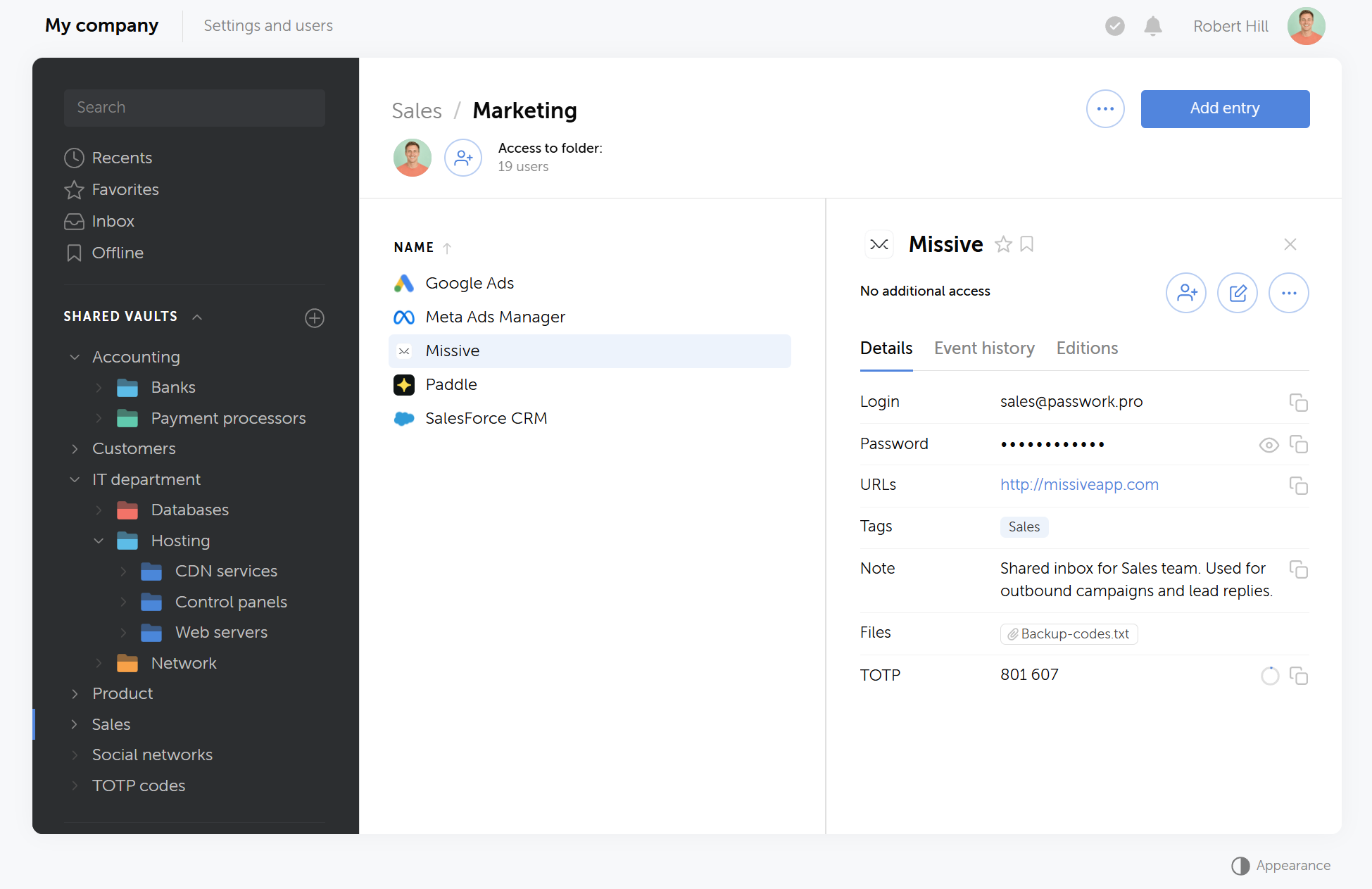
A personal password manager solves one person's login problem. Centralized password management solves the organization's problem: who can access what, when, and with whose approval. That distinction is the whole point.
In practice, centralization rests on five mechanics:
- One system of record for company credentials, not five unofficial copies scattered across tools.
- Shared vaults and folders mapped to teams or departments, so credential sharing follows the org chart.
- Access levels, from read-only to vault admin, so nobody needs a single shared master login for the whole office.
- An activity log that answers who viewed, changed, or exported a given credential.
- Room to grow. The platform should support LDAP/AD or SSO once the company is ready for them, so identity management scales with the team instead of requiring a new tool later.
Personal password managers remain useful for personal accounts. They break down when the credential belongs to the company: billing owners change, contractors rotate, and nobody can prove who still has the AWS root email password.
Related reading
KeePass is a common starting point for SMBs: free, encrypted, and easy to install. What it doesn't provide out of the box is centralization: no shared vaults, no audit trail, no group-based access or revocation. See this breakdown of KeePass for SMB password management for what it handles well and where it runs out of runway.
Why SMBs feel this harder in 2026
Four pressures stack at once, and none of them existed in this combination five years ago. A 40-person company now runs dozens of SaaS tools without a dedicated security team, splits its workforce across home networks and coffee shops, and increasingly pastes credentials into AI tools nobody vetted.
- SaaS sprawl without an IT department of twenty. A small company can end up running dozens of cloud tools without anyone dedicated to managing access. Each tool needs an admin login, and most teams solve this the fast way: a shared inbox and a password written down somewhere everyone can find it. Nobody owns that password six months later, and nobody remembers who has seen it.
- Hybrid and remote work. Sending a password over Slack or email was already risky when everyone worked from one office. With people logging in from home routers and personal laptops, autofill from a shared vault is the only option that doesn't involve typing a password into a chat window.
- Offboarding risk. When someone leaves, whatever lived in their personal vault, browser, or notes app leaves with them. A centralized password manager lets you disable the account, pull them from every group, and rotate the shared SaaS logins that existed only in their laptop. Without it, access review happens only after something goes wrong.
- Shadow AI is the newest leak. Employees now paste API keys, database strings, and passwords into ChatGPT or Copilot while troubleshooting, and none of that activity touches a vault or an audit log. According to IBM's Cost of a Data Breach Report 2026, shadow AI was involved in 43% of breaches, up from 20% the year before, and 92% of organizations hit by an AI-related breach lacked basic AI access controls.
What is shadow AI, and how do you get ahead of it?
Shadow AI is what happens when employees use AI tools nobody vetted, approved, or logged, often to solve a problem faster than IT can respond to a ticket. Read what shadow AI is and how it works for a closer look at how it forms inside SMBs and what a governance response actually looks like.
Where does your business actually stand on password management
Most SMBs fall into one of four recognizable stages, from ad-hoc chaos to centralized governance. Each stage carries a specific risk, and moving to the next closes it.
Stage 1: Ad-hoc chaos
Spreadsheets, sticky notes, Slack DMs with a password pasted in.
Stage 2: Browser-based storage
Chrome or Edge saves the passwords.
Stage 3: Basic password manager
A team adopted a tool, but nobody governs it.
Stage 4: Centralized governance
A structured vault, RBAC, audit logging, and an enforced policy work together. Risk drops sharply.
According to Verizon's 2026 Data Breach Investigations Report, stolen or reused credentials showed up in 39% of all breaches, usually paired with an exploited vulnerability or a compromised third party rather than acting alone. These attackers don't calibrate their methods to company size. CrowdStrike's 2025 State of SMB Cybersecurity Survey found that among SMBs that experienced a cyber incident, 29% of those with fewer than 25 employees were hit by ransomware, the highest rate of any company size group, larger SMBs included.
The smallest teams are the least equipped to absorb that hit. Teams sitting at stages 1 and 2 have no mechanism to detect a compromised credential or revoke it quickly, because nothing is centralized enough to check in the first place. That gap is exactly what stage 4 closes.
Why SMBs are the target, not the exception
SMBs face the same breach patterns as organizations of any size, and attackers rarely single them out based on industry or revenue. According to Verizon's 2026 Data Breach Investigations Report, System Intrusion remains the top breach pattern in small organization breaches, the same pattern that leads across large enterprises too, and financially motivated external actors carry out most of these attacks.
"We're too small to matter" is the wrong read on the threat. Verizon's own researchers put it plainly: attackers hitting SMBs are "casting out wide nets" hoping enough victims pay, not researching company size or sector first. What decides who gets breached is simpler and more mundane: whether their credentials were already compromised or their edge devices had an unpatched hole.
The action-level data backs this up. Among the SMB breaches Verizon analyzed, ransomware appeared in 83% of incidents, the use of stolen credentials in 39%, and exploited vulnerabilities in 30%. The ransomware numbers land hardest on the smallest companies specifically: of the ransomware cases where Verizon could confirm organization size, about 96% of the victims were SMBs.
Set against numbers like these, a password platform priced per user per month is not an expense worth debating. It is a small, predictable cost against a threat that does not discriminate by company size.

Closing the gap that stolen credentials leave open doesn't require a big budget or a long rollout. Try Passwork free and see how a structured vault, role-based access control, and audit logging look in your own infrastructure.
What to look for in a centralized password management platform
A centralized password management platform for SMBs needs shared vaults with folder structure, granular RBAC, complete audit logging, enforced MFA, and a deployment model that matches your compliance needs, whether that's self-hosted or cloud-hosted. Automated offboarding and API access matter once the team scales past a handful of people.
Here is what to check before choosing one:
Vault structure
Folders or tags organized by department keep credentials findable without a search bar doing all the work.
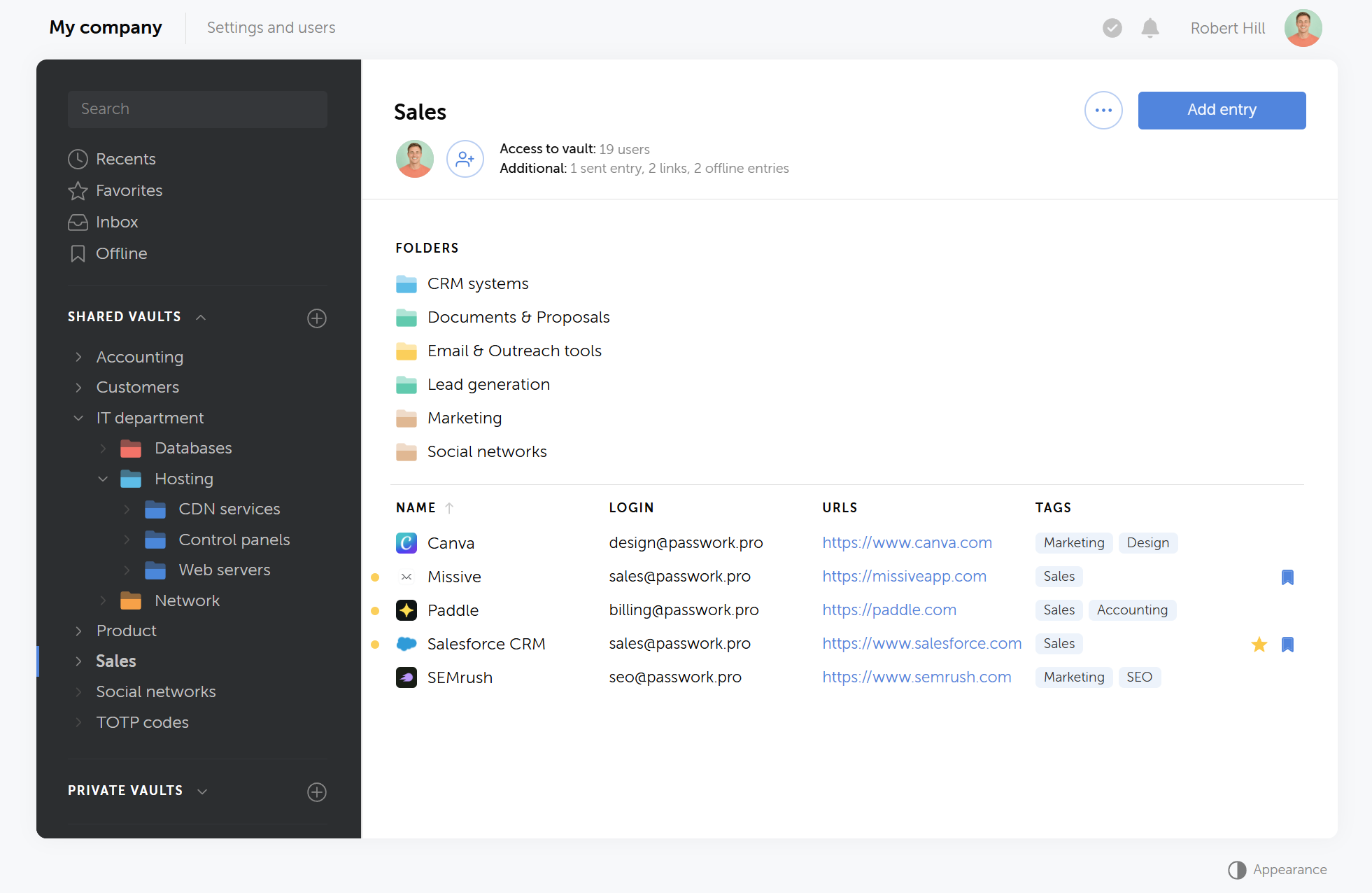
Passwork organizes credentials into vaults and nested folders that map to departments and projects. Adding a new user should not mean clicking through twenty passwords. Mapping directory groups (LDAP/AD) later is optional — the group habit should start on day one.
RBAC granularity
Good platforms separate two layers of permission: system roles (who can invite users, configure SSO, read logs) and resource access levels (who can see or edit a specific vault or folder). Most staff only need read or write access to their own team's vault. Admin roles should stay rare.
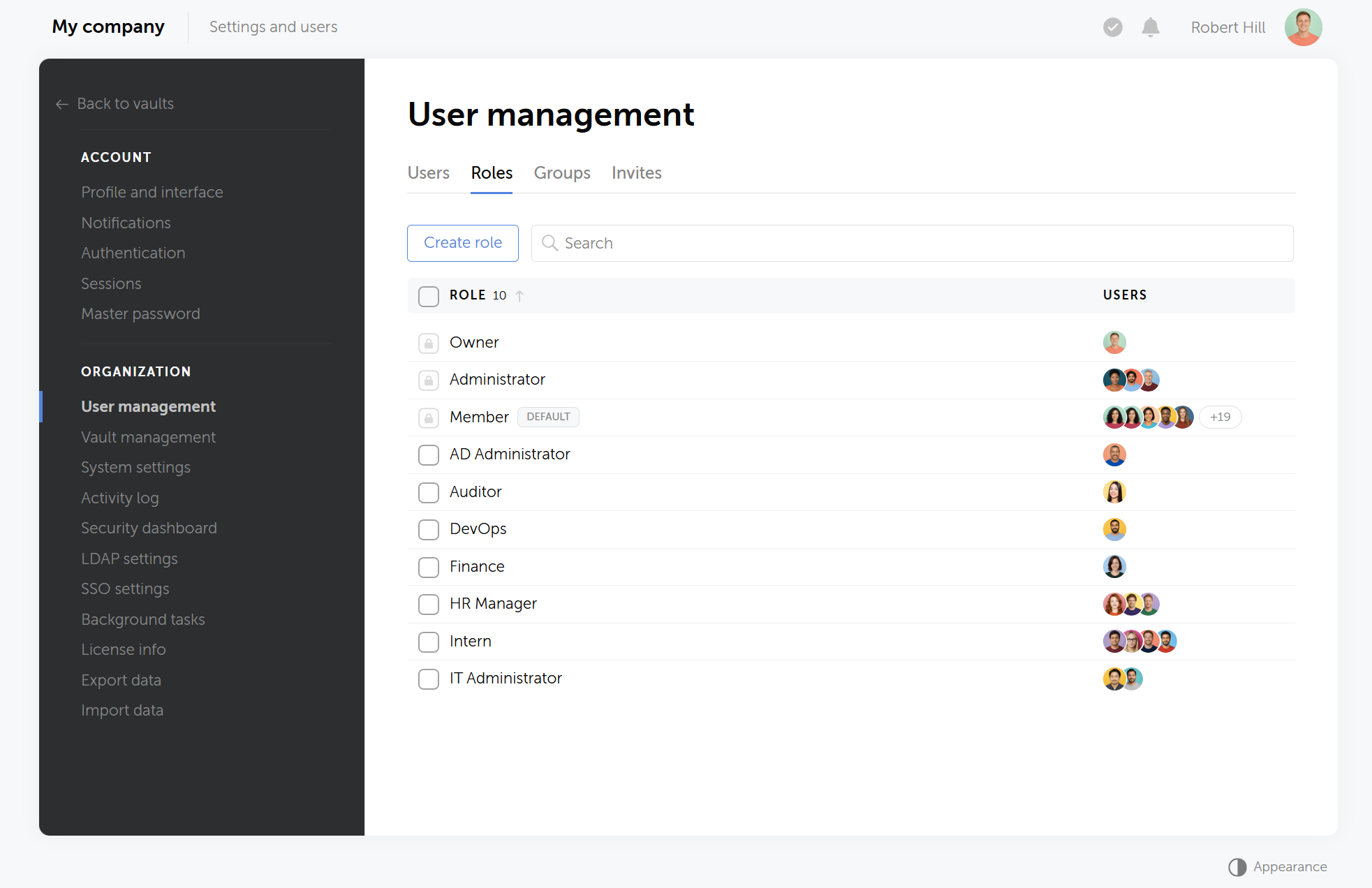
Passwork ships with predefined roles and lets you build custom ones, such as AD Administrator or DevOps, scoped to exactly the permissions that role needs. This separation matters in practice: an auditor who can review the log shouldn't automatically be able to edit vault contents, and a system administrator managing LDAP sync shouldn't need access to Finance's credentials.
Audit logging
The log should cover views, edits, and exports, not just logins. Without this, "who accessed the client's database credentials last month" has no answer.
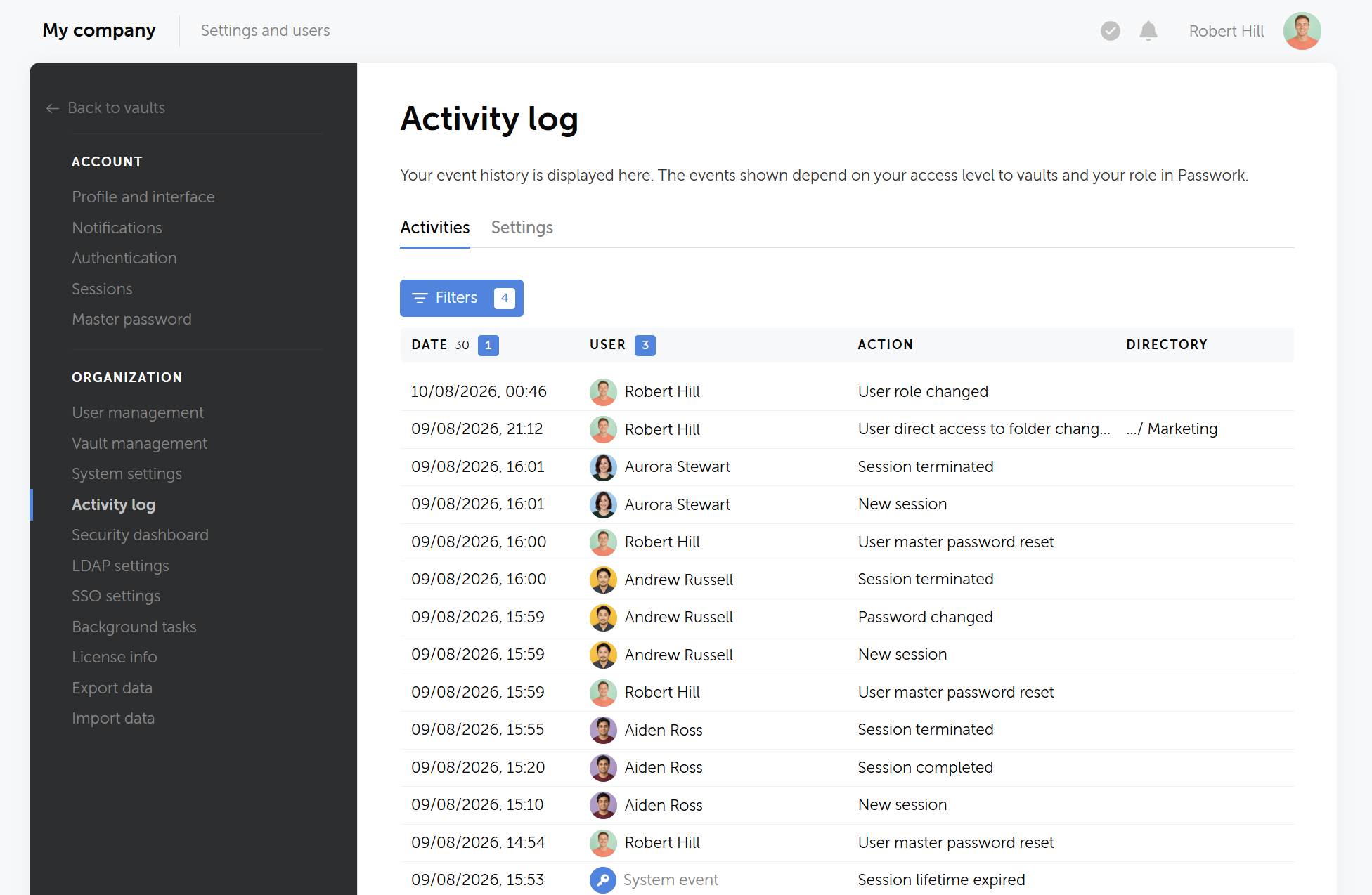
Passwork's activity log records every action in the system. When a folder's permissions change or a master password gets reset, the entry shows up immediately, searchable by user, date, or action type.
MFA enforcement
NIST SP 800-63B recommends multi-factor authentication for any account with elevated access. Enforce it on any role that can see sensitive vaults, not just the admin account.
Passwork supports MFA at the account level and lets administrators require it organization-wide rather than leaving it opt-in per user. That closes the gap where the CEO enables two-factor authentication but the contractor with database access never bothers.
Automated offboarding
One click should disable a departing employee's vault access across every shared folder they touched, not fifteen separate revocations.
In Passwork, disabling a single user's account immediately revokes their access across every vault and folder they had permissions to, regardless of how many teams or projects that spanned.
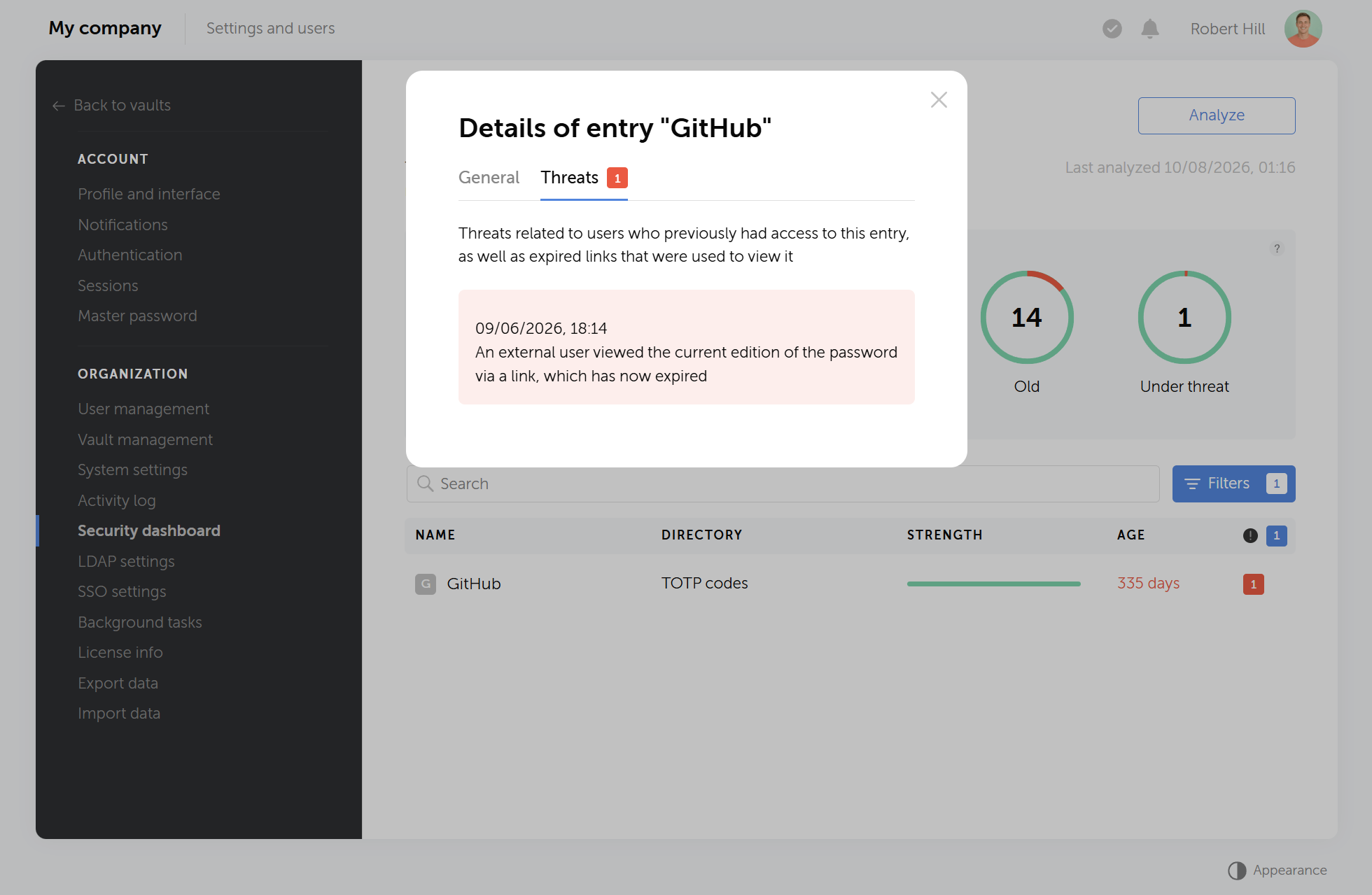
The Security dashboard shows exactly what that account could reach before deactivation, so an admin reviewing an offboarding case doesn't have to reconstruct access history from memory or the audit log alone.
Browser extension, desktop and mobile apps
Autofill from a shared vault beats copying a password out of a chat thread. Adoption depends on it.
Passwork's browser extension works with Chrome, Firefox, Edge, and Safari, autofilling credentials directly from shared vaults without leaving the page. Mobile and desktop apps cover the same ground for staff who need vault access outside a browser, field technicians and remote sales reps in particular.
The Security dashboard shows exactly what that account could reach before deactivation, so an admin reviewing an offboarding case doesn't have to reconstruct access history from memory or the audit log alone.
API access
Optional at first. Becomes relevant once teams start pulling secrets into CI/CD pipelines instead of committing them to .env files.
Passwork's REST API lets DevOps teams pull secrets programmatically at deploy time, rotate credentials on a schedule, and integrate vault access into existing automation instead of manually copying keys between systems. This is the point where a password manager stops being a browsing convenience and starts functioning as infrastructure.
Room to grow: SSO and LDAP
None of the above requires SSO or LDAP on day one. A five-person team can run entirely on local accounts and manual invites. The moment headcount crosses 20 to 30, or the org already runs Active Directory for everything else, manual user management turns into a part-time job.
LDAP/AD integration syncs your existing directory structure into Passwork's group and role system, so a new hire added to the "Developer" AD group automatically inherits the matching vault access, no separate provisioning step in Passwork itself.
The practical benefit shows up at offboarding, again. Disable a user in Active Directory, and their Passwork access disappears in the same sync cycle.
Bottom line
Centralized password management isn't an enterprise feature scaled down for small teams. It's a targeted control against the breach vector that hits SMBs hardest: credentials that stayed valid after they should have been revoked.
Start with one pilot department this week. Import its credentials into Passwork, set up group-based access, and pick a cutover date to retire the spreadsheet for good.
If your team shares credentials through spreadsheets, chat, or browser storage, Passwork gives you a self-hosted vault with RBAC, audit logging, and one-click offboarding, without enterprise pricing. Set up Passwork on your infrastructure and stop wondering who still has the Wi-Fi password from three hires ago.
Frequently asked questions
Do small businesses really need centralized password management, or is a shared spreadsheet enough?
A spreadsheet cannot tell you who viewed a password, when it was last changed, or whether a former employee still has a copy. For a 10-person team, the annual cost of a password management platform is typically less than one hour of downtime from a locked account.
How long does it take to migrate from spreadsheets or a basic password manager?
Migrating one department typically takes a few hours: importing credentials via CSV or the platform's built-in tools, organizing them into folders, and assigning group access. Most SMBs run the pilot and full rollout within two to four weeks, department by department, rather than a single company-wide cutover.
Can we host a password manager on our own servers?
Yes. Self-hosted options like Passwork let you deploy the vault on your own infrastructure. This matters for GDPR-governed teams, IT service providers handling client credentials, and any organization that cannot store access data on a third-party cloud.
Is centralized password management overkill for a 5-person team?
No. A 5-person team can run entirely on local accounts and manual invites, no SSO or LDAP required. The value at that size is still real: one shared vault instead of a Slack thread, and a way to remove access the day someone leaves.
Does switching to a centralized platform slow down daily work?
Not if browser autofill is set up. Employees pull credentials from the vault extension the same way they'd use saved browser passwords, minus the risk of a device-bound copy.
Can we migrate away from KeePass without losing our existing data?
Yes. Passwork supports importing from KeePass's export format, preserving folder structure and entries. The manual step is reassigning group-based access, since KeePass has no concept of shared roles or permissions to carry over.
What happens to shared passwords when an employee leaves?
With centralized management, you revoke their access in one click, and every credential they could see becomes invisible to them instantly. The audit log also shows every credential they accessed during their time on the team, something impossible with spreadsheets or browser sharing.
How does centralized password management work with contractors and freelancers?
Contractors get added to a group with scoped access to only the vaults their project requires. When the contract ends, removing that one group membership revokes every credential they touched, without hunting down what they might have copied.
 Alex Muntyan
 Passwork Team
 Passwork Team
Table of contents
- Key takeaways
- What centralized password management actually means
- Why SMBs feel this harder in 2026
- Where does your business actually stand on password management
- Why SMBs are the target, not the exception
- What to look for in a centralized password management platform
- Bottom line
- Frequently asked questions
Table of contents
- Key takeaways
- What centralized password management actually means
- Why SMBs feel this harder in 2026
- Where does your business actually stand on password management
- Why SMBs are the target, not the exception
- What to look for in a centralized password management platform
- Bottom line
- Frequently asked questions

Self-hosted password manager for business
Passwork provides an advantage of effective teamwork with corporate passwords in a totally safe environment. Double encryption and zero-knowledge architecture ensure your passwords never leave your infrastructure.
Learn more