
SaaS credential management is the practice of tracking every password, shared login, and access key a company uses for cloud apps like Salesforce or Slack, and controlling who can see and use each one. It means treating every credential as inventory you can find, share on purpose, and revoke when people leave. The goal is one controlled vault for human passwords and machine secrets — not five tools that each hold a slice of the truth
Most companies use more SaaS apps than IT officially tracks: a CRM login in a browser profile, a Gmail password shared over Slack, staging database strings sitting in a private repo. Nobody centrally owns any of these logins, which means nobody is watching them either. Each one is an open entry point that could sit there for months before anyone notices it's been misused.
Passwork is built for that job: a business password and secrets manager you can run on your own servers or as a cloud service, with shared vaults, role-based access, LDAP/SSO, and a REST API for automation. The five steps below work the same way for teams already running Passwork and for teams still evaluating a system.
Key takeaways
- A SaaS credential inventory grouped by risk and owner exposes shadow access before it turns into a breach.
- Vault structure only helps if it mirrors how teams already search for access, not the legacy mess it replaces.
- Migration works only with a fixed cutover date. Running chat, spreadsheets, and a vault side by side just relocates the sprawl.
- Access through groups instead of individual grants makes offboarding one action instead of a search across five tools.
- Connecting SSO, LDAP/AD, and a CI-friendly API extends control to machine secrets, not just human logins.
What counts as a SaaS credential
A SaaS credential is anything used to prove identity and get access: a password, a shared login, an API key, or a security certificate. A company's list of SaaS apps (what it pays for) is not the same as its list of credentials (how each app is actually accessed). One app can have several: ten people logging in through SSO, one shared billing account, and an API key a script uses to pull reports.
Knowing the apps a company uses shows what it's paying for. Knowing the credentials shows who can get in, and that's the list that matters for security.
Step 1: Build your SaaS credential management inventory
Start with a SaaS credential list. Group by risk. Do not "clean up" during this step. Cleaning mid-inventory creates a second mess. Capture, then move. For each SaaS app and internal service, write:
- Which tool this is (SaaS app name)
- Who owns the account (person or team)
- Where the secret sits today (chat, wiki, CI variable, sticky note)
- Who needs it next quarter (upcoming hires, projects, or teams)
- What breaks if it disappears (dependent workflows, integrations, or services)
Example:
| Field | Value |
|---|---|
| Tool | Marketing analytics tool |
| Owner | Marketing lead |
| Current location | Pasted into a shared Slack channel |
| Needed by (next quarter) | Two new hires joining the marketing team |
| Impact if lost | Team loses access to campaign reporting dashboards |
One entry like this tells anyone exactly who to ask, where to look, and what's at stake.
Step 2: Design vaults and folders that match how you work
A password vault only helps SaaS credential management when its folder hierarchy matches how teams already search for access, not how the old, chaotic system grew. Centralization fails when the new store just relocates the mess. Pick a hierarchy someone can explain in one sentence. Group vaults by department or product, then split infrastructure secrets by environment.
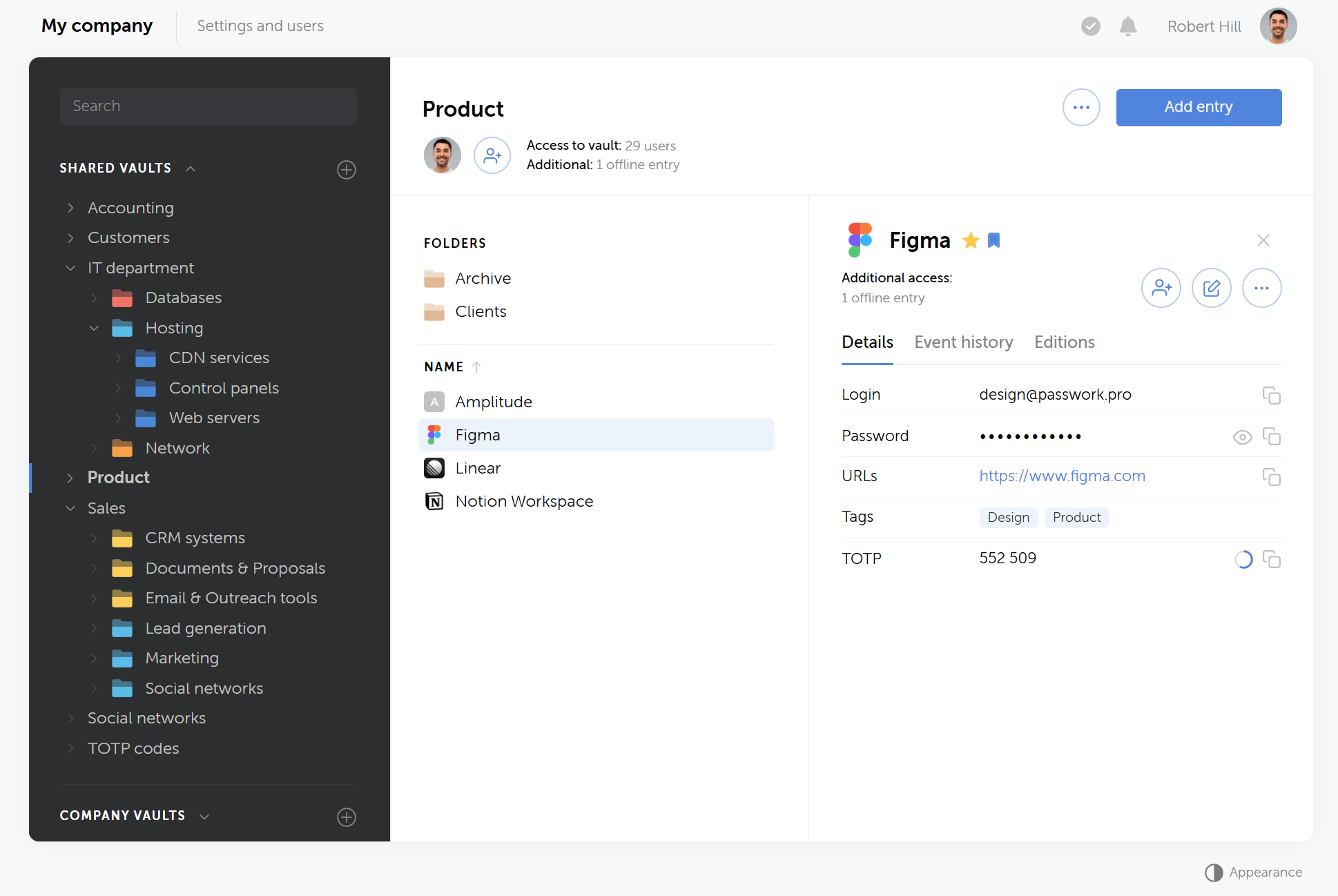
Nesting stays shallow in most branches. Two levels are usually enough: a vault for the team, a folder for the tool category. Add a third level only when a second-level folder isn't uniform on its own. If a folder already describes everything inside it, stop there.
Data hierarchy example:
Two audiences use this same tree differently. Humans browse by team name. Pipelines fetch by folder ID, which is why onboarding docs for DevOps recommend environment-first folders: a job can pull everything it needs with one --folder-id instead of stitching SaaS credentials into code.
Naming rules help more than nested depth:
- Prefer
stripe-prod-dashboardoverNew password (2) - Put the environment in the name or the folder, not only in someone's head
- Use custom fields for non-password secrets (API keys, client IDs) instead of stuffing everything into the password field
The last decision is who sees the vault at all. Corporate vaults are where team SaaS credentials belong. Private vaults are for personal work logins that should not outlive the employee.
Step 3: Migrate once, then delete the parallel stores
SaaS credential migration only reduces cloud management risk when the old storage gets shut down on a fixed date. Running a chat channel, a spreadsheet, and a password manager side by side as competing sources of truth just recreates the sprawl the migration was supposed to fix.
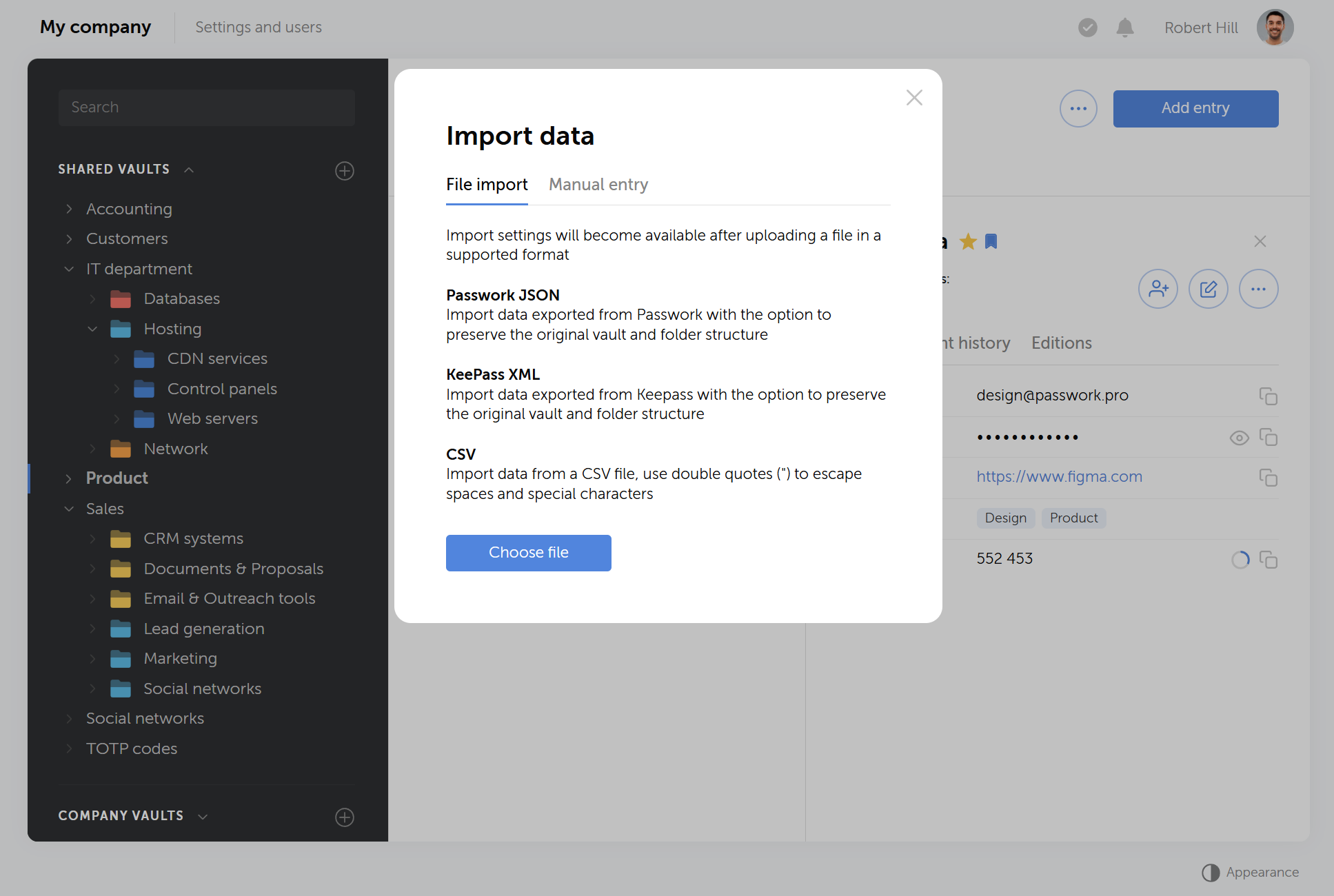
Import beats retyping. Passwork accepts structured imports (JSON, CSV and common password-manager export formats). Move a pilot department first — enough records that people feel the pain of the old way, not so many that a bad folder design becomes permanent.
Rules that keep migration honest:
- One source of truth after cutover. The Slack channel and the shared Google Sheet become read-only archives, then get deleted on a published date.
- Rotate SaaS credentials after import when the old channel was shared. Anything that lived in chat is compromised by definition. Changing the password in the SaaS app, then updating the vault, beats updating the vault first and hoping the app still accepts the old value.
- Shortcuts instead of copies. If two teams need the same SaaS credential, share access or use a shortcut rather than duplicating the secret. Duplicates drift.
Expect a messy two weeks. That is normal. The failure mode is leaving Notion and the password vault both "official" for six months.
Step 4: Gate access with roles, groups, and vault permissions
Central SaaS credential storage without least privilege turns a password vault into a very large, searchable pastebin. Effective SaaS credential management separates what a person can do to the platform itself from what they can do to a specific set of shared secrets.
Passwork separates two layers:
- System roles — what someone can do to the instance (invite users, change SSO, read the activity log). Built-ins include Owner, Admin, and User. Unlimited custom roles let you carve out Support or Auditor without handing out full admin.
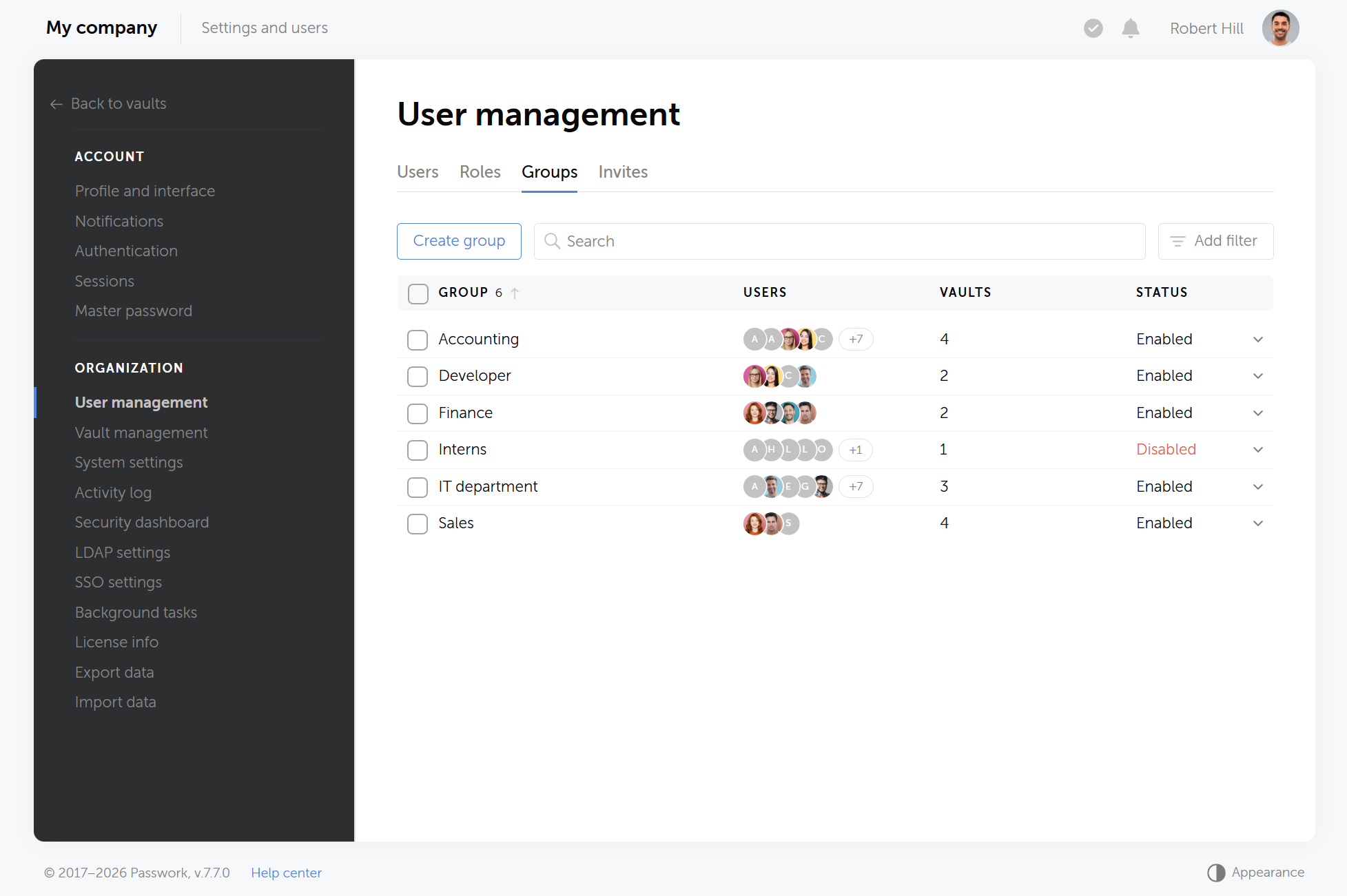
- User groups — what they can do to shared SaaS credentials. Levels run from Forbidden through Read, Edit, and Full access up to Admin on that resource.
Grant access to groups, then map people into groups. When someone joins Support, they inherit vault access with the group. When they leave, you remove them once. LDAP/AD can sync group membership so directory changes flow into the password vault instead of waiting on a ticket.
Be strict with Admin on vaults. Most people need Read on the apps they use. Admin is for team leads who organize folders and review who has access.
Step 5: Connect identity, automation, and offboarding
A password vault used only for interactive logins covers half of SaaS credential management. The other half is the machine-to-machine secrets pipelines pull at build or deploy time. Wiring the vault to SSO, LDAP/AD, and a CI-friendly API turns it into the single control point for both human logins and automated cloud management workflows.
- SAML SSO so people enter the password vault with the same IdP they use for the rest of the SaaS stack (Azure AD, Okta, ADFS, Google Workspace, and similar).
- LDAP/AD when the directory is the source of truth for accounts and group-based vault access.
- Browser extension and desktop/mobile clients so the daily path is autofill, not copy-paste from a web tab.
For the machine side of the stack, keep humans out of CI:
- Use a service account with an API key (or session tokens consumed by
passwork-cli), scoped to the vaults and folders the pipeline needs for SaaS credential access. - Pull secrets at job time. Do not bake them into images.
- Rotate: update the secret in the target system first, then save the new value in the password vault — the reverse order creates silent outages.
- Review the activity log (and Syslog/CEF export to SIEM if you have one) for copies, exports, and access changes.
Offboarding is where this setup pays off. Disable the departing user's account, revoke their API sessions, and confirm they're removed from every group. If a shared SaaS admin password lived only in the vault, rotating it is one action, not a search through five inboxes to see who else had a copy.
What SaaS credential management done right looks like
SaaS credential management is centralized when access flows through groups instead of DMs, offboarding revokes password vault access in one action, and every credential lookup can be traced in an activity log. None of this needs a long program — inventory, structure, and migration run in parallel over a few weeks.
You are centralized when:
- A new hire gets vault access through a group, not a DM with five passwords
- A departing hire loses SaaS reach without a scavenger hunt
- Engineers can point a pipeline at a folder ID and stop committing
.envfiles - Security can answer "who could see the Stripe login last month?" from the activity log
None of that requires a twelve-month program. Inventory in a week. Structure and pilot in another. Migrate in waves. Permissions and SSO in parallel with the waves. Automation last — after the folders exist.
Conclusion
Centralizing SaaS credentials only works if the tool holding them enforces who's accountable for each vault, keeps human logins and service accounts on separate tracks, and produces a record you can hand to security without reconstructing it from memory.
Passwork ties that accountability to a role you define upfront, not to whoever happened to click "create vault" first. So when the person who set up the Marketing vault leaves the company, oversight doesn't leave with them — it stays with the role. Service accounts handle the machine side the same way: a CI pipeline gets its own scoped identity instead of quietly running on someone's personal login long after that person has moved teams.
Human passwords and machine secrets end up on the same platform, under one price. That's one vendor to manage instead of two, and one activity log to check instead of piecing together exports from a password manager and a separate secrets tool.
Frequently asked questions

What is SaaS credential management?
SaaS credential management is the practice of tracking who owns, uses, and can access every password and login connected to a company's cloud apps. It covers accounts that don't go through single sign-on, including shared logins and software credentials like API keys.
Should personal SaaS logins go in the same vault as team credentials?
No. Personal work logins belong in private vaults tied to the individual, while shared SaaS credentials belong in corporate vaults tied to a team or department. Mixing the two means personal access outlives the employee, and team credentials become harder to find during an audit.
What's the difference between a password and a credential?
A password is something a person types in to log into an account. A credential is broader: it includes API keys, security certificates, and tokens that software uses instead of people. Every password is a credential, but not every credential is a password.
Do we still need a password vault if we already use SSO?
Yes. SSO covers only the apps that support it, and many SaaS tools still don't. A password vault handles everything SSO can't reach: shared logins, legacy systems, vendor portals, and the API keys that never touch an identity provider in the first place.
How is a secrets manager different from a password vault?
A secrets manager stores machine credentials such as API keys, tokens, and certificates, often with automatic rotation built in. A password vault stores credentials people type in manually. Full SaaS credential management needs both, tracked in one inventory rather than two disconnected systems.
How does SaaS credential management simplify offboarding?
When credentials are stored in a shared vault instead of scattered across chat and spreadsheets, offboarding becomes one action: disable the account, revoke API sessions, and remove the person from every group. Nobody needs to search five inboxes to find out who else had a copy of a shared password.
How do you track SaaS credentials used by CI/CD pipelines?
Pipelines use a scoped service account with an API key or session token, not a personal login. The account gets access to only the vaults and folders a specific job needs, and secrets are pulled at build or deploy time instead of being baked into images or committed as .env files.
How long does migrating to a centralized password vault usually take?
A pilot department can move in about a week, with inventory and structure work running in parallel beforehand. Full rollout typically happens in waves rather than all at once, with permissions and SSO configured alongside each wave and automation added last, after the folder structure is stable.
 Alex Muntyan
 Passwork Team
 Alex Muntyan
Table of contents
- Key takeaways
- What counts as a SaaS credential
- Step 1: Build your SaaS credential management inventory
- Step 2: Design vaults and folders that match how you work
- Step 3: Migrate once, then delete the parallel stores
- Step 4: Gate access with roles, groups, and vault permissions
- Step 5: Connect identity, automation, and offboarding
- What SaaS credential management done right looks like
- Conclusion
- Frequently asked questions
Table of contents
- Key takeaways
- What counts as a SaaS credential
- Step 1: Build your SaaS credential management inventory
- Step 2: Design vaults and folders that match how you work
- Step 3: Migrate once, then delete the parallel stores
- Step 4: Gate access with roles, groups, and vault permissions
- Step 5: Connect identity, automation, and offboarding
- What SaaS credential management done right looks like
- Conclusion
- Frequently asked questions

Self-hosted password manager for business
Passwork provides an advantage of effective teamwork with corporate passwords in a totally safe environment. Double encryption and zero-knowledge architecture ensure your passwords never leave your infrastructure.
Learn more