
Passwork's vault policies (also called Vault Types): a configurable governance layer that lets administrators define, for each category of vault, who its permanent administrators are, what access level vault creators get, and who is allowed to create vaults of that type. Once set, these rules apply automatically to every vault created under that type.
Most enterprises can't say with certainty who has administrator rights over a given team's shared credential vault, because admin access gets granted informally, without a policy behind it. Enterprise password vault policies fix this by binding admin rights to the vault's policy itself, not to whoever happened to create it.
This guide explains how Passwork's Vault Types architecture gives CIOs and CISOs a working model for vault governance, beyond basic password rules.
Key takeaways
- Vault policies bind admin rights to the vault type itself, not to whoever created it, closing the gap where nobody can say who actually controls a shared vault.
- Passwork avoids a single master key that unlocks every vault at once; recovery runs through a separate, offline recovery account instead.
- Compared to consumer tools that rely on a shared key or super-admin, Passwork avoids that single point of failure by design.
- A named 5-policy checklist (limiting private vaults, assigning corporate admins, planning emergency access, syncing RBAC via AD/LDAP, and aligning password rules with NIST SP 800-63B Rev. 4) turns a deployment into working governance.
- Non-removable admins and exportable audit logs give auditors direct evidence for NIS2 Article 21(2) and ISO 27001 controls 5.15/8.15, which factors into 39% of breaches per Verizon's 2026 DBIR.
What are vault policies and why CIOs need them
Vault policies are governance rules that determine who can create a vault, who is automatically granted administrator access to it, and who cannot be removed from that access. They shift the conversation from "password complexity requirements" to vault governance: structural control over corporate credential storage, not just the credentials themselves.
Three categories of tools claim to solve this:
- Consumer password managers handle personal or small-team credential sharing well but were not built for departmental governance at scale.
- Privileged access management (PAM) platforms secure infrastructure-level and service accounts but add cost and complexity that most credential-sharing use cases don't need.
- Enterprise password managers with dedicated vault policy engines sit between the two, and that's the approach this article focuses on.
CIO action item: Audit your organization for "rogue vaults" — shared folders or team vaults created without IT's knowledge, often inside a consumer tool an individual department adopted independently.
The architecture behind vault policies: how Passwork structures access control
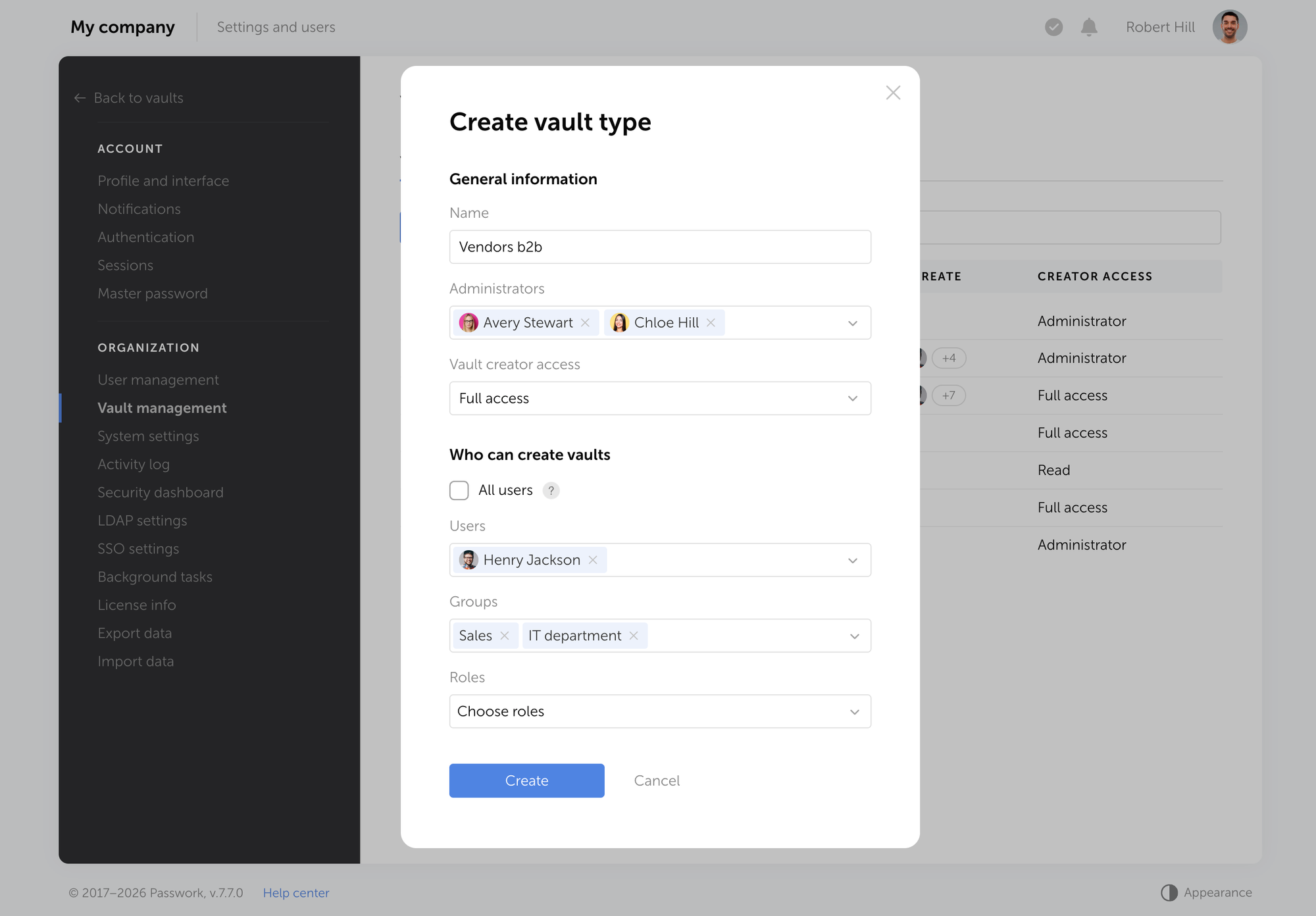
Passwork 7.1 introduced a vault types architecture where each vault policy defines its own administrators, creator permissions, and creation rules before a single vault exists. Every new vault built under that policy automatically inherits its designated administrators, and the vault's owner cannot remove them.
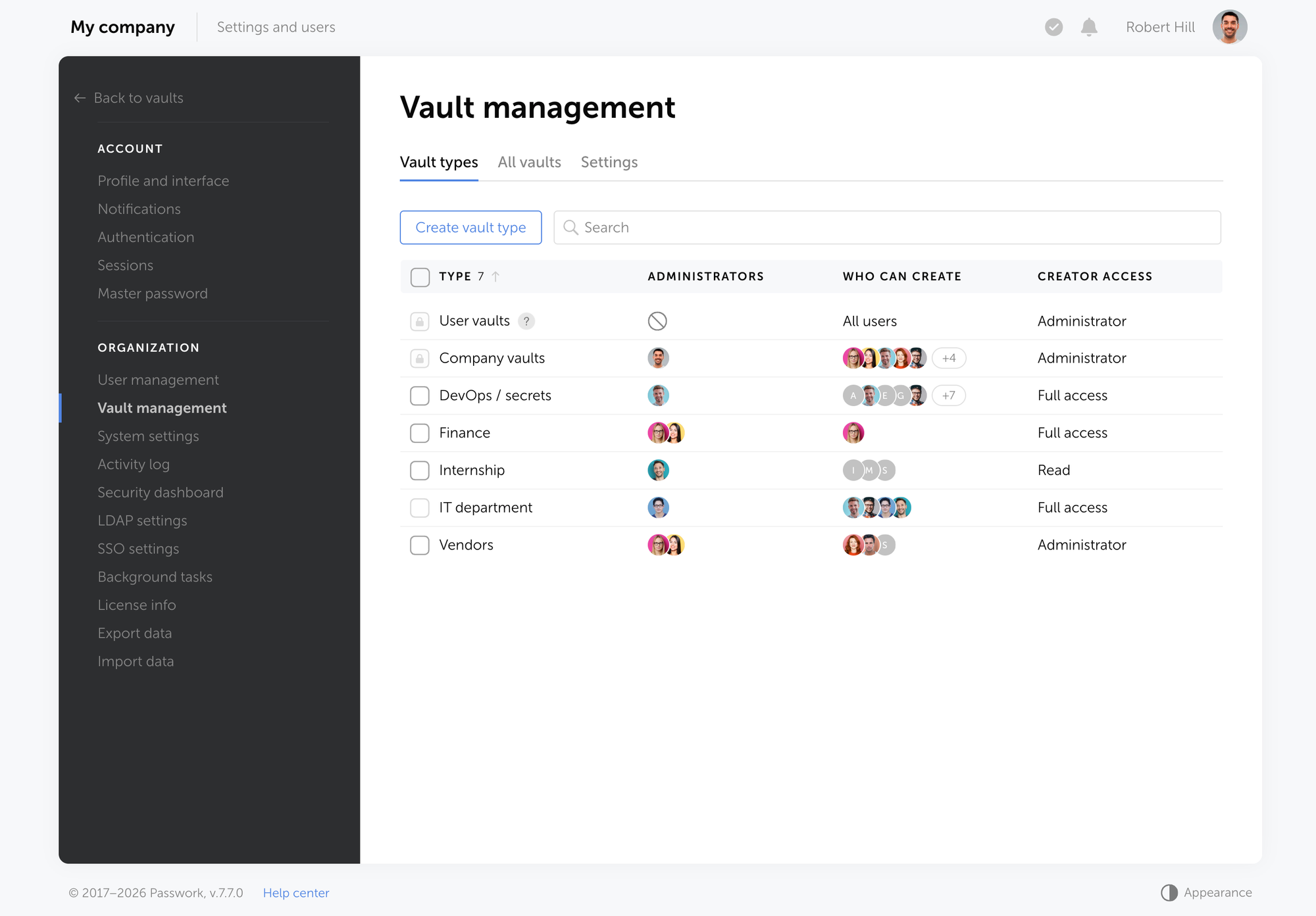
Two basic vault types ship by default: User vaults, private or shared credential stores controlled entirely by their creator, and Company vaults, which always include the organization's corporate administrators. Beyond these, administrators can create unlimited custom vault types, one per department, project, or access tier, each with its own designated administrators and creation rules.
This produces three concrete outcomes for the business:
- Command over team vaults without a single super-administrator holding a master key to every password in the company.
- A recovery path that works when someone leaves or loses access, through a pre-provisioned recovery account whose master password is stored offline.
- No mandatory "one button" or master key that unlocks the entire organization's credentials at once.
Version 7.4 added restriction controls specifically for User vaults, letting administrators limit sharing and creation permissions on the personal-vault tier too, closing a gap that basic vault types alone didn't cover.
CIO action item: Map your organizational structure to vault types, one per department or project, and assign corporate administrators before teams start creating vaults on their own.
How Passwork compares to other approaches to vault access control
What matters for any credential management tool is whether the admin role is bound to a policy in advance, and whether recovering access requires a key that also opens everything else in the organization. In the table below, "No" in the single-key column is the answer you want: it means there's no built-in single point of failure.
| Product | Corporate admins by vault policy | Access recovery | Single key opens everything |
|---|---|---|---|
| Passwork | Yes | Yes | No — by design |
| 1Password | Partially | Partially | No — by design |
| LastPass | No | Partially | Yes — single point of failure |
| Bitwarden | No | Yes | Yes — single point of failure |
| Passbolt | No | Yes | Yes — single point of failure |
| CyberArk | Partially | Partially | Partially — depends on deployment |
Consumer-oriented password managers often let team admins manage a shared vault, but rarely apply that policy automatically to every new vault a department creates.
Some tools rely on a single super admin who can reset any user's password and reach every shared folder in the company. Others tie all corporate vaults to one shared encryption key, so compromising that key exposes everything at once.
PAM platforms solve a different problem: they vault privileged infrastructure credentials, often behind their own master or breakglass key, rather than governing team-level password sharing.
CIO action item: Score your current credential tool against these three criteria: policy-bound admin assignment, a working recovery path, and the absence of a mandatory universal key.
The 5-policy vault governance checklist every CIO should implement
Five specific configuration decisions turn a password manager deployment into functioning vault governance. Each addresses a distinct failure mode observed in real incident response engagements, not a theoretical risk.
- Disable private vault creation and sharing where it isn't required. Unrestricted private vaults are exactly how rogue vaults form outside IT's visibility. Restrict private vault creation to roles that genuinely need it.
- Assign corporate administrators to every team and departmental vault policy. This guarantees continuous oversight without depending on any single individual remembering to add themselves.
- Define an emergency access policy before you need one. Decide between a single organization-wide recovery contour or separate recovery accounts per department, and store master credentials for that recovery account offline.
- Implement RBAC (role-based access control) through Active Directory or LDAP. Syncing groups and roles automatically applies the principle of least privilege and removes manual provisioning errors when staff change roles.
- Align password length and rotation rules with current NIST guidance. NIST SP 800-63B Rev. 4 (2025) sets a 15-character minimum for passwords used as the sole authentication factor and formally retires the mandatory 90-day rotation requirement (NIST SP 800-63B, 2025) [verify exact publication URL before print]. Forced rotation without evidence of compromise pushes users toward predictable, incremented passwords, which is precisely the outcome the guidance now discourages.
CIO action item: Run a gap audit against all five policies this quarter, and assign an owner for each finding rather than treating the audit as a one-time report.
Meeting NIS2 and ISO 27001 requirements with vault governance
Vault policies map directly onto two requirements auditors check first: documented access control and a verifiable audit trail. NIS2 Directive (EU) 2022/2555, Article 21(2), requires access control policies and multi-factor authentication as part of an entity's cybersecurity risk-management measures. ISO/IEC 27001:2022 controls 5.15 and 8.15 require the same pairing: a defined access model plus a record of who exercised it and when.
Corporate administrators bound to a vault policy cover the access-control side without a manual spreadsheet. Timestamped, exportable audit logs cover the rest.
Verizon's 2026 DBIR found credentials present at some stage of 39% of breaches, as the initial access vector in 13% of confirmed breaches, and the lead vector behind 52% of Basic Web Application Attacks. IBM's 2026 Cost of a Data Breach Report puts the global average breach cost at $4.99 million, a 12% increase over last year and a record high.
CIO action item: Ask your security team for a current NIS2 access-control coverage report this month, before an auditor asks for it first.
What this means for your rollout
Vault governance is a structural decision, made the way network segmentation is: designed around departments and risk tiers before an incident forces a redesign. The organizations that get this right treat it that way from the start. Under NIS2 and GDPR, that structure is now a requirement for enterprises in scope.
Start with the audit, not the tool. Map which vaults exist today, who actually controls them, and where the recovery path breaks if one person leaves.
Frequently asked questions
What is the difference between a password policy and a vault policy?
A password policy governs the credential itself (length, complexity, rotation). A vault policy governs the container: who can create it, who is automatically an administrator, and who cannot be removed. Enterprise governance needs both, but vault policies close the access-control gap password rules alone leave open.
Can a corporate administrator be removed from a Passwork vault?
No. Administrators assigned at the vault policy level are automatically added to every new vault under that policy and cannot be removed or demoted by the vault's owner, ensuring continuous oversight even if individual vault owners change (see Passwork 7.1: Vault types).
Does Passwork require a single master key that unlocks all company vaults?
No. Passwork supports either a unified recovery contour or separate recovery accounts and keys per department or vault policy. Organizations choose the structure; there's no mandatory single key that opens every vault at once.
How does vault governance help with NIS2 compliance?
NIS2 Article 21(2) requires documented access control policies and audit capability. Vault policies with non-removable corporate administrators and exportable audit logs give auditors direct evidence of who can access credentials and when access changed.
Is a 90-day password rotation policy still required under NIST guidance?
No. NIST SP 800-63B Rev. 4 (2025) removes the mandatory periodic rotation requirement for passwords, recommending rotation only after evidence of compromise, alongside a 15-character minimum for single-factor passwords.
 Passwork Team
 Alex Muntyan
 Alex Muntyan
Table of contents
- Key takeaways
- What are vault policies and why CIOs need them
- The architecture behind vault policies: how Passwork structures access control
- How Passwork compares to other approaches to vault access control
- The 5-policy vault governance checklist every CIO should implement
- Meeting NIS2 and ISO 27001 requirements with vault governance
- What this means for your rollout
- Frequently asked questions
Table of contents
- Key takeaways
- What are vault policies and why CIOs need them
- The architecture behind vault policies: how Passwork structures access control
- How Passwork compares to other approaches to vault access control
- The 5-policy vault governance checklist every CIO should implement
- Meeting NIS2 and ISO 27001 requirements with vault governance
- What this means for your rollout
- Frequently asked questions

Self-hosted password manager for business
Passwork provides an advantage of effective teamwork with corporate passwords in a totally safe environment. Double encryption and zero-knowledge architecture ensure your passwords never leave your infrastructure.
Learn more