

Secure password sharing is the practice of granting access to shared credentials through an encrypted vault, where users authenticate to the vault rather than receiving the raw password. It preserves individual accountability and provides a revocable, auditable access trail — the two properties that informal sharing methods structurally cannot provide.
Most organizations are nowhere near that standard. Credentials move through the business in ways nobody designed and nobody tracks: a database password sent over Slack, an admin account emailed to a contractor, a payroll login in a spreadsheet that three people in Finance can open. The access is real. The audit trail is not.
Key takeaways
- Credential breaches take 241 days to detect on average. IBM's 2025 Cost of a Data Breach Report puts the global average breach cost at $4.44 million. Without centralized credential governance, there is no reliable way to know a credential is compromised until the damage is done.
- Credentials shared via Slack, email, or spreadsheets leave no audit trail. When a team member leaves, there is no reliable way to identify every system they could access. The accountability gap is architectural: the credential has been shared, but ownership has never been transferred.
- A password manager with AD/LDAP integration automates provisioning on day one and revokes all vault access the moment an AD account is disabled. Without it, offboarding stays manual and former employees keep access longer than anyone intends.
- NIST SP 800-63B Rev. 4 raises the minimum password length to 15 characters and prohibits mandatory periodic rotation. If your policy still mandates 90-day rotation, it is out of date: forced rotation drives predictable incremental changes, not stronger credentials.
- Audit logs turn a security incident from a guessing game into a structured investigation. A timestamped record of who accessed which credential, when, and from where tells you exactly what was exposed — and who had access at the time.
- Shared admin logins make individual attribution impossible. When five people use the same credential, there is no way to know who changed a setting, who authenticated during an incident, or whose access needs to be revoked. Vault-mediated sharing assigns access to a person, not a password.
- One-time secure links and time-limited access eliminate the manual revocation problem. The link expires after use, the permission expires on a set date. No offboarding ticket required.
Why is secure password sharing in teams critical?
The financial stakes are concrete. According to IBM's 2025 Cost of a Data Breach Report, the global average cost of a data breach was $4.44 million, and breaches involving compromised credentials take an average of 241 days to identify and contain. That is nearly eight months of undetected exposure — long enough for an attacker to map your infrastructure, exfiltrate data, and establish persistence before anyone notices.
The 241-day figure is not a worst-case scenario. It is the median. Organizations that lack centralized credential governance have no reliable mechanism to detect that a credential has been compromised until the damage is already done. Structured credential management reduces the detection gap that makes breaches expensive.
Insecure password sharing: risks and solutions
| Insecure method | Security and compliance risks | Secure alternative |
|---|---|---|
| Messaging apps and email | Credentials remain in chat histories indefinitely, increasing exposure to hijacking and phishing. Missing audit trails violate GDPR and NIS2 standards. | Vault-mediated sharing keeps credentials encrypted. One-time secure links for external contractors expire automatically after use. |
| Shared spreadsheets and local files | Shared access points eliminate individual accountability, lack granular permissions, and increase bulk exfiltration risks. | Role-based access control restricts permissions to Read, Edit, or Admin. Departmental vaults limit the blast radius. |
| Manual offboarding | Orphaned accounts leave residual access to environments because IT cannot track every system a former employee accessed. | Active Directory and LDAP integration automates provisioning. Disabling an AD account instantly revokes all associated vault access. |
| Shared admin logins | Shared passwords prevent individual attribution during incidents and fail SOC 2 controls. Forced rotation leads to weak passwords. | Centralized governance replaces shared logins with individual vault accounts. Vault access requires phishing-resistant MFA and NIST-compliant passwords. |
The problem with insecure password sharing: Messengers, spreadsheets, and email
According to the 2026 Verizon Data Breach Investigations Report, сompromised credentials are the initial access vector in 13% of breaches, but appear somewhere in the attack chain in 39% of all incidents — a significant share across more than 22,000 confirmed breaches analyzed in the report.
In the median case, only 49% of a user's passwords across different services are unique, meaning one leaked credential routinely opens access to multiple systems through credential stuffing — a finding from Verizon's own supplemental 2025 DBIR credential research that remains current.
The root problem is architectural. When credentials are shared via Slack, email, or a spreadsheet, there is no audit trail. When a team member leaves, there is no reliable way to identify every system they could access. The credential exists somewhere outside the vault (in an inbox, a chat history, a screenshot) and there is no revocation mechanism short of rotating the password across every affected system manually.
This is the accountability gap. The credential has been shared, but ownership has not been transferred. Nobody knows who has it, where it is stored, or whether it has already been forwarded. A vault-mediated access model closes that gap by design: access is granted to a person, not a password, and it can be revoked in a single action.
A guide to secure shared password management
The architecture of secure credential sharing rests on three decisions: which tool you use, how you structure access, and what permissions model you apply. Get these right and the rest of the implementation follows.
Step 1: Choose an enterprise password manager with zero-knowledge architecture
The vault provider must never have access to stored credentials. Zero-knowledge architecture means encryption and decryption happen on the client side. The server holds only ciphertext.
This is the foundational requirement for GDPR data sovereignty: if the vendor cannot read your credentials, a vendor-side breach cannot expose them. For EU organizations, on-premise deployment or EU-hosted cloud (with data residency in EU jurisdiction) eliminates US Cloud Act exposure entirely.
Step 2: Structure vaults by team and sensitivity level
Organize shared credentials by department, project, or system — Development, Operations, Finance, Marketing. This structure limits the blast radius of a compromised account.
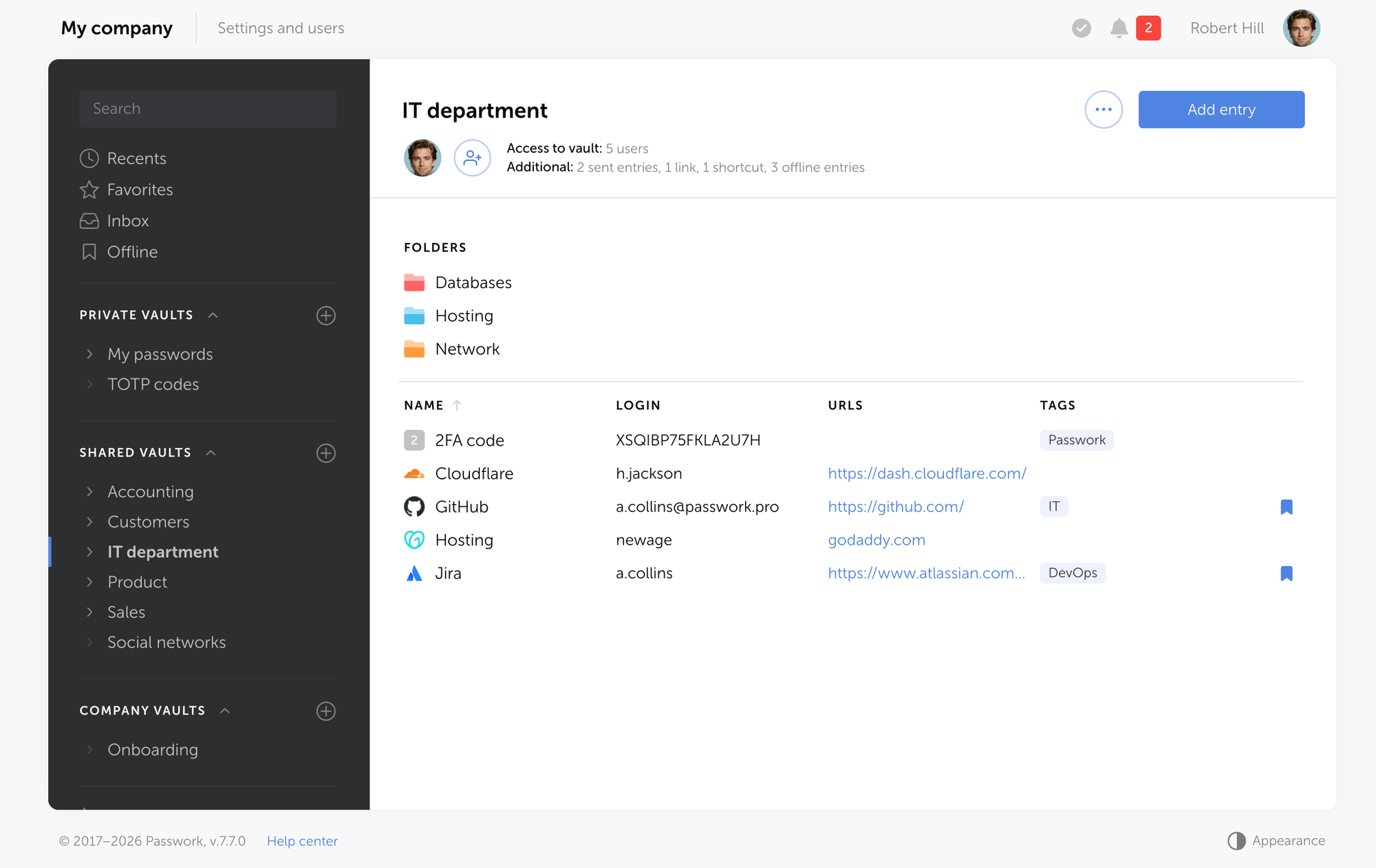
If a Marketing team member's vault access is compromised, the attacker reaches marketing credentials, not production database strings. It also makes access reviews tractable: you are reviewing a bounded set of permissions, not an undifferentiated list of every credential in the organization.
Step 3: Implement a three-tier role-based access model
The three-tier model is the minimum viable governance structure for secure credential sharing in teams:
- Read: The user can view and copy the raw password within the vault but cannot modify or delete it. Appropriate for team members who need to authenticate to a system directly, but should have no ability to change or delete the credential.
- Edit: The user can update and manage credentials within their assigned group. Appropriate for team leads and system owners who are responsible for keeping credentials current.
- Administration: The user manages group membership, permissions, and access policies. Restricted to IT administrators and security leads.
This model ensures that permissions are scoped to responsibility: team members authenticate and read, leads manage, administrators govern. Changing someone's role is a single permission update.
Password sharing best practices for secure credential sharing
Beyond the basic vault structure, five operational practices separate a compliant system from one that merely looks compliant on paper.
One-time secure links for external contractors
When a vendor or freelancer needs access to a specific credential, a one-time link generates a URL that expires after a single use or after a defined time window. The recipient accesses the credential without being added to the vault as a permanent user. Once the link expires, access ends automatically. There is no manual revocation step, no forgotten offboarding ticket, no residual access.
Picture the alternative: a contractor finishes a six-week engagement. Someone on the IT team is supposed to remove their vault access. That ticket sits in a queue for two weeks. The contractor, now working for a different client, still has access to your staging environment. One-time links make that scenario structurally impossible.
Time-limited access for temporary projects
Most enterprise password managers support access grants with a defined expiration date. Set it when you provision the contractor — if the engagement runs six weeks, access expires on week six. No offboarding ticket required, no manual follow-up, no access that quietly outlasts the project. This eliminates the most common source of credential sprawl: former users who were never properly removed.
Phishing-resistant MFA on the vault itself
According to Okta's 2025 Secure Sign-In Trends Report, workforce MFA adoption reached 70% — meaning nearly 30% of users still lack it entirely. For vault access, phishing-resistant MFA (FIDO2 hardware keys or device-bound passkeys) is the operative standard under NIS2.
SMS-based OTPs are not recommended: they are vulnerable to SIM-swapping and real-time phishing proxies, and NIS2 auditors are increasingly aware of the distinction.
Password length aligned with NIST Rev. 4
The 2025 update to NIST SP 800-63B Rev. 4 raises the minimum password length to 15 characters when a password is used as the sole authenticator, and explicitly deprecates mandatory periodic rotation, replacing it with compromise-triggered credential changes.
This is the most significant revision to federal password guidance in nearly a decade. If your policy still mandates 90-day rotation, it is already out of date and actively counterproductive: forced rotation drives users toward predictable incremental changes (Password1! → Password2!) rather than genuinely stronger credentials.
Comprehensive access auditing
Audit logs must capture who accessed which credential, when, and from where. For GDPR and NIS2 compliance, this is the primary evidence auditors request — ahead of policy documents, ahead of architecture diagrams, ahead of anything else. A timestamped log showing exactly who accessed the production database credential at 2:14 AM on a Tuesday carries more weight in an audit than a hundred pages of access control policy.
Operational best practices for secure credential sharing
| Best practice | Operational value | Compliance and security impact |
|---|---|---|
| One-time secure links | Generate expiring URLs for external contractors to provide single-use credential access without adding permanent users to the vault. | Eliminates manual revocation steps and prevents residual access from forgotten offboarding tickets. |
| Time-limited access | Set automatic expiration dates on vault permissions for temporary project engagements. | Prevents credential sprawl by ensuring former users lose access automatically when a project ends. |
| Phishing-resistant MFA | Enforce FIDO2 hardware keys or device-bound passkeys for all primary vault logins. | Meets active NIS2 standards and blocks advanced threats like SIM-swapping and real-time phishing proxies. |
| NIST-aligned password policy | Enforce a 15-character minimum length and replace periodic rotation with compromise-triggered changes. | Aligns with NIST SP 800-63B Rev. 4 guidelines and stops users from creating weak, predictable credentials. |
| Comprehensive access auditing | Capture timestamped logs detailing who accessed which credential, when, and from where. | Provides the primary evidence required for GDPR and NIS2 compliance audits. |
Regulatory requirements: GDPR, NIS2, SOC 2, and ISO 27001
Unmanaged credentials create both a security exposure and a compliance failure — often simultaneously. GDPR Article 32 requires "appropriate technical and organisational measures" to protect personal data. Shared credentials with no audit trail fail that standard directly: demonstrating appropriate access controls requires evidence of who had access to what, and when.
| Framework | Relevant requirement | How centralized password management addresses it |
|---|---|---|
| GDPR (Art. 32) | Appropriate technical measures to protect personal data | Encrypted vault, RBAC, audit logs, and zero-knowledge architecture |
| NIS2 (Art. 21) | Documented access control policies and MFA deployment | Role-based access model, phishing-resistant MFA, and access review records |
| SOC 2 (CC6.1) | Logical access controls tied to individual identities | Individual vault accounts replace shared logins; every action is attributed |
| ISO 27001 (A.5.15 / A.5.16) | Access control policy and user access management | Centralized provisioning, deprovisioning, and periodic access reviews |
NIS2 enforcement is active. Fines reach €10 million or 2% of global annual turnover. Pre-audit findings from Q4 2025 across Germany, the Netherlands, and Austria consistently flagged missing MFA, over-privileged accounts, and unmanaged service credentials as primary failures.
The pattern across failed audits is consistent: organizations had controls in place but could produce no logs, no access review records, no credential hygiene reports. Auditors treat undocumented controls the same as absent ones.
The skills gap compounds the problem. According to ENISA's NIS Investments 2025 report (published December 2025), 76% of EU organizations report difficulties recruiting qualified cybersecurity profiles, and 45% cite a lack of required skills as their main barrier.
For understaffed teams, automated tooling covers the gap that headcount cannot: vault-based access control, AD integration, and scheduled access reviews run continuously without requiring a dedicated IAM team to operate them manually.
Read our NIS2 compliance guide for a detailed mapping of compliance requirements to specific technical controls.
Practical implementation steps: The 4-step password governance model
The 4-step password governance model gives IT managers a concrete deployment sequence that surfaces problems early and builds organizational adoption before a company-wide rollout.
Step 1: Run a pilot with the IT department
Start with the team that will administer the system. A two-week pilot surfaces integration issues, user experience friction, and policy gaps before they affect the broader organization. It also gives your IT team direct experience with the tool before they are expected to support it.
Passwork deploys on-premise or in the EU cloud, so the pilot environment mirrors your production setup exactly — no separate infrastructure required. Your IT team can validate the vault structure, test AD sync, and confirm audit log output before rolling out to the rest of the organization.
Step 2: Integrate with Active Directory or LDAP
Integrating with Active Directory or LDAP is the single most important technical step. AD/LDAP integration automates user provisioning: new employees appear in the vault on their first day, with access determined by their AD group membership. When an AD account is disabled (at offboarding) all associated vault access is revoked immediately. No manual offboarding ticket. No two-week queue. No former employee with active access to your staging environment.
This matters because the alternative is a manual process that doesn't scale. When you have 200 employees and 40 shared credential groups, tracking who has access to what without automated sync becomes a guessing game rather than a governance process.
Passwork's AD and LDAP integration handles this natively. Group membership in AD maps directly to vault permissions — when someone moves from the Development team to Operations, their vault access updates automatically on the next sync.
Step 3: Train the team on the new workflow
The secure path must be faster than the insecure workaround. If sharing a credential through a password manager takes 5 minutes while sharing it via Slack takes 5 seconds, people will use Slack. Training should focus on the three most common scenarios:
- Sharing a credential with a new team member.
- Granting temporary access to a contractor through a one-time link, and revoking access when a project ends.
- Keeping it task-oriented rather than policy-oriented.
Keep it task-oriented rather than policy-oriented. In Passwork, all three scenarios take under a minute from the vault interface — generating a one-time link for a contractor requires two clicks and produces a URL that expires automatically after first use or after a defined time window. That speed is what makes adoption stick.
Step 4: Establish ongoing monitoring and quarterly access reviews
Schedule quarterly reviews to identify stale permissions, unused credentials, and accounts that were never properly offboarded. Audit logs make this tractable: the review becomes a structured query rather than a manual investigation.
You are looking for accounts that haven't been accessed in 90 days, credentials that haven't been rotated since a known compromise window, and contractor accounts that should have expired. Passwork's security audit tools surface these automatically — weak passwords, inactive accounts, and over-privileged users appear in a single report rather than requiring a manual sweep across every vault.
Conclusion

Secure password sharing is an access governance problem. Moving credentials into a vault is the first step. RBAC, audit logs, phishing-resistant MFA, and AD integration are what separate a compliant, auditable system from a slightly more organized version of the same risk.
The 4-step password governance model gives you a workable sequence: pilot with IT, connect to AD, train on the actual workflow, review quarterly. Skip AD integration and offboarding stays manual. Skip training and people keep using Slack.
If your password policy predates August 2025, it needs a review. If your organization is in scope for NIS2 and cannot produce access logs on demand, the gap is real, measurable, and fixable. The tooling to close it exists — the question is whether it fits your infrastructure and compliance requirements.
Passwork is built for exactly that context: organizations that need full credential governance without surrendering data to a third-party cloud. It deploys on-premise or in the EU cloud, integrates natively with AD and LDAP, and produces the audit trails NIS2 auditors ask for by default. If the 4-step model described in this article is where you want to land, Passwork is the infrastructure that makes each step operational.
Frequently Asked Questions

What is secure password sharing in teams?
Secure password sharing in teams is the practice of using encrypted, centrally managed vaults with role-based access controls to distribute credentials without exposing the actual passwords to end users. It preserves individual accountability and provides a revocable, auditable access trail — the two properties that email and chat-based sharing cannot provide.
How does a password manager help with NIS2 compliance?
A password manager helps with NIS2 compliance by enforcing strong authentication policies, providing centralized audit logs of all credential access, and enabling rapid revocation of access when users leave or change roles. These controls address the documented access control requirements of NIS2 Article 21 directly, and the audit logs serve as the primary evidence regulators request.
What is the difference between a one-time secure link and time-limited access?
A one-time secure link expires after a single use, making it suited for sharing a credential with an external contractor who needs access once. Time-limited access grants a user ongoing access to a vault entry until a defined expiration date, suited for temporary project engagements. Both eliminate the manual revocation step that most offboarding processes miss.
What does NIST SP 800-63B Rev. 4 require for enterprise passwords?
The August 2025 revision of NIST SP 800-63B requires a minimum password length of 15 characters when a password is used as the sole authenticator, and explicitly prohibits mandatory periodic password rotation. Passwords should only be changed when there is evidence of compromise — not on a fixed schedule.
How does Active Directory integration improve credential security?
AD/LDAP integration automates vault provisioning and deprovisioning. When a new employee's AD account is created, they receive vault access based on their group membership automatically. When their AD account is disabled at offboarding, vault access is revoked immediately — eliminating the most common source of post-employment credential exposure.
Is RBAC overkill for a small team?
No. A three-tier model (read, edit, and administration) is the minimum viable structure and scales down to teams of any size. Even with five people, that distinction matters: a contractor on Read can't accidentally overwrite a production credential, and an Administrator is the only one who can add or remove other users from a vault.
 Alex Muntyan
 Alex Muntyan
 Alex Muntyan
Table of contents
- Key takeaways
- Why is secure password sharing in teams critical?
- The problem with insecure password sharing: Messengers, spreadsheets, and email
- A guide to secure shared password management
- Password sharing best practices for secure credential sharing
- Regulatory requirements: GDPR, NIS2, SOC 2, and ISO 27001
- Practical implementation steps: The 4-step password governance model
- Conclusion
- Frequently Asked Questions
Table of contents
- Key takeaways
- Why is secure password sharing in teams critical?
- The problem with insecure password sharing: Messengers, spreadsheets, and email
- A guide to secure shared password management
- Password sharing best practices for secure credential sharing
- Regulatory requirements: GDPR, NIS2, SOC 2, and ISO 27001
- Practical implementation steps: The 4-step password governance model
- Conclusion
- Frequently Asked Questions

Self-hosted password manager for business
Passwork provides an advantage of effective teamwork with corporate passwords in a totally safe environment. Double encryption and zero-knowledge architecture ensure your passwords never leave your infrastructure.
Learn more