
Team password management is the practice of storing, organizing, and sharing credentials across a group using a dedicated tool (password manager), rather than messengers, spreadsheets, or individual browser vaults. Done right, it gives every team member access to exactly what they need, nothing more, with a full audit trail of who touched what and when.
This guide covers the real problems teams run into when sharing credentials without a proper system, what to look for in a solution, how Passwork addresses each challenge, and how to run a migration without disrupting your team.
Key takeaways
- Credential abuse appears in 39% of all breaches, making it the most pervasive technique across the full attack chain — not just at initial access.
- The three failure modes of informal credential sharing are visibility gaps, scope creep, and offboarding failures. All three are preventable with a structured password manager.
- NIST SP 800-63B Rev. 4 has changed the rules: 15-character minimum passwords, no mandatory composition requirements, and no periodic expiration. Many organizations are still running policies that contradict all three.
- Effective team password management requires more than storage: RBAC, audit logs, AD/LDAP integration, SSO, and secure external sharing are non-negotiable for any team beyond a handful of people.
- Offboarding is a security event, not an HR formality. A 7-step credential checklist run on or before an employee's last day closes the gaps that most incidents exploit.
- Migration succeeds or fails on change management, not technology. The most common failure is leaving the old spreadsheet in place after rollout.
The cost of informal credential sharing
Most teams start with a shared Google Sheet, a Slack message, or a sticky note on the server room door. It works. Until it doesn't.
The average cost of a data breach dropped to $4.44 million in 2025, the first decline in five years, according to IBM's 2025 Cost of a Data Breach Report. That's still $4.44 million per incident. And stolen or compromised credentials remain deeply embedded in how attacks unfold: Verizon's 2026 Data Breach Investigations Report found that credential abuse appears at some point in 39% of all breaches, making it the single most pervasive technique in the dataset.
The informal sharing problem has three distinct failure modes:
- Visibility gaps. When a password lives in a Slack thread, there's no record of who has it, who forwarded it, or whether it was changed. If that credential is later compromised, you can't reconstruct the timeline.
- Scope creep. Spreadsheets don't enforce access boundaries. A developer who needed one database password in January still has the whole sheet in December, including credentials for systems they've never touched and accounts they have no business accessing.
- Offboarding failures. This is where informal sharing causes the most damage. When an employee leaves, IT has no reliable inventory of what they had access to. The standard response (change every shared password) is both disruptive and rarely complete. Some credentials get missed. Some don't get changed for weeks.
A 2024 Huntress study found that 46% of people had a password stolen that year. For organizations relying on shared spreadsheets and chat messages, that exposure is multiplied across every account in the file.
What teams actually need from a password manager
Before evaluating any tool, it helps to define the requirements clearly. The list below reflects what IT managers and security teams consistently identify as non-negotiable.
A centralized, structured repository
Credentials scattered across individuals' browsers and personal vaults are functionally invisible to the organization. A team password manager needs a single, searchable repository that the whole team can access, organized by project, system, or department, with consistent naming and tagging.
Flexible, granular access control
Not everyone needs everything. A junior developer doesn't need production database credentials. A contractor doesn't need internal admin accounts. Role-based access control (RBAC) lets you define who can read, edit, or manage credentials at the vault or folder level, and enforce those boundaries automatically.
Secure sharing mechanisms
Sometimes you need to share a credential with someone outside your organization: a vendor, a contractor, a partner. Sending it over email or chat is a security event waiting to happen. The right tool provides time-limited, single-use links that expire after first access or after a set window.
Activity monitoring and audit logs
Compliance frameworks including SOC 2 Trust Services Criteria CC6.1 and ISO 27001 Annex A.9 require documented evidence of who accessed what and when. An audit log isn't optional. It's the paper trail that keeps you out of trouble during an incident or an audit.
Integration with existing IT infrastructure
A password manager that requires a separate identity silo creates more work, not less. Integration with Active Directory (AD), LDAP, and SSO providers means users authenticate with the credentials they already have, and provisioning/deprovisioning happens automatically when HR updates the directory.
NIST SP 800-63B Rev. 4: What changed in 2025
NIST SP 800-63B Rev. 4 (2025) updates the digital identity guidelines that most enterprise security policies reference. Several changes directly affect how organizations should configure their password policies.
| Policy area | Rev. 3 guidance | Rev. 4 guidance |
|---|---|---|
| Minimum password length | 8 characters | 15 characters (when password is the sole authenticator) |
| Composition rules | "Should not" impose arbitrary rules | "Shall not" impose arbitrary composition requirements |
| Periodic expiration | Discouraged | Prohibited unless compromise is suspected |
| Compromised password screening | Strongly encouraged | Mandatory |
The shift from should not to shall not on composition rules is significant. Organizations that still enforce "must include one number, one symbol, one uppercase letter" policies are now out of alignment with NIST guidance, and for good reason. Research consistently shows that forced complexity rules produce predictable patterns: Password1!, Summer2024@, Qwerty#1. Length is a more reliable security signal than character diversity.
The 15-character minimum reflects the same logic. A 15-character passphrase like correct-horse-battery-staple is far more resistant to brute-force attacks than an 8-character P@ssw0rd.
The mandatory compromised password screening requirement means organizations need a mechanism to check new passwords against known breach databases at the point of creation or reset, not just at login.
How Passwork addresses each challenge
Managing credentials requires a constant balance between strict security controls and operational speed. Passwork solves these infrastructure challenges by integrating directly into your existing directory services, automating access control, and providing complete visibility over credential usage.
Data organization: Vaults, folders, tags, and history
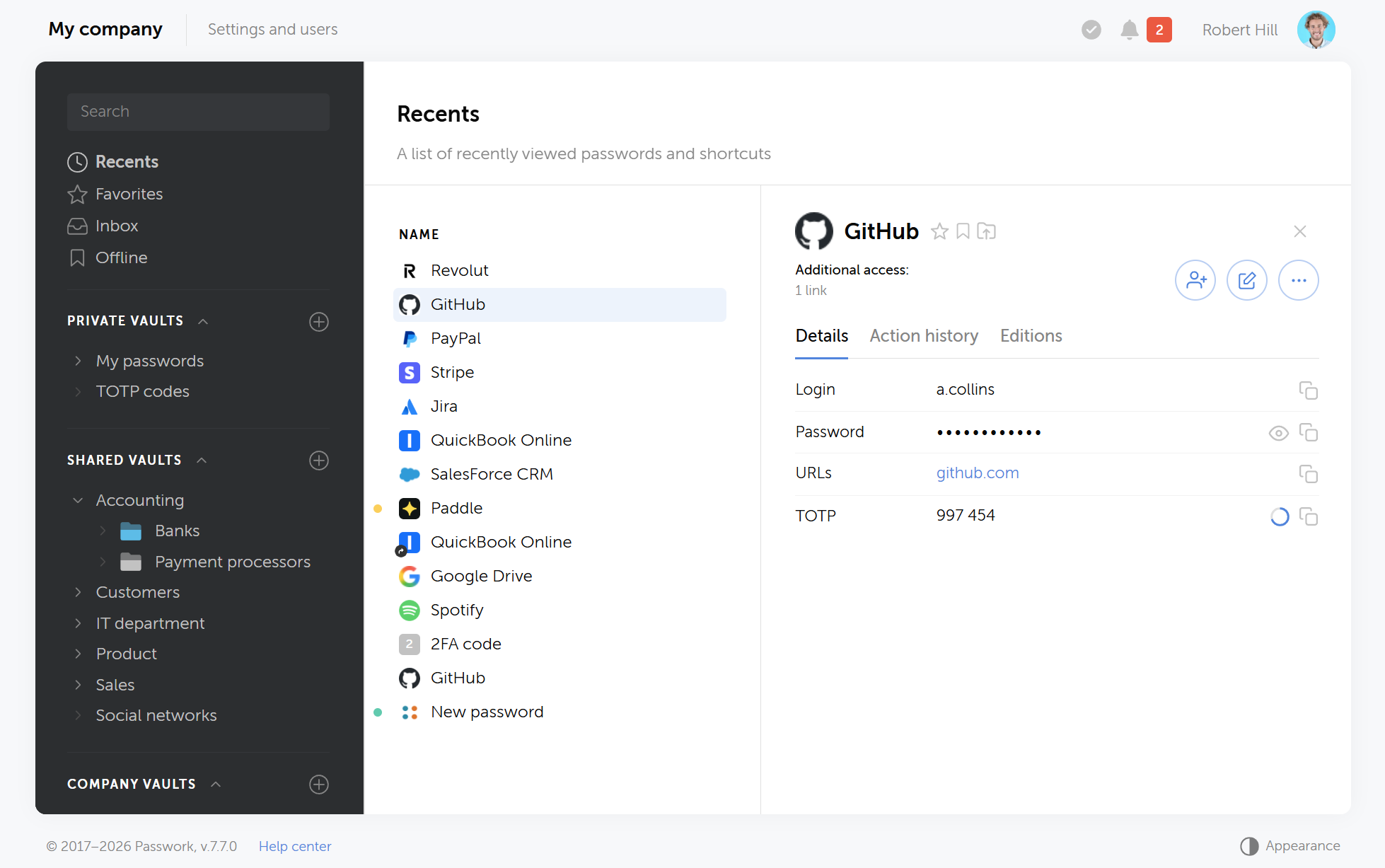
Passwork structures credentials in a hierarchy of vaults and folders. A vault might correspond to a department or a project. Folders within it group related credentials. Tags add a cross-cutting dimension: you can tag credentials by environment (production, staging, dev) or by system type (database, cloud, network) regardless of where they sit in the folder tree.
Every credential entry maintains a full change history. If a password was rotated last Tuesday at 14:32 by a specific user, that's recorded. If you need to roll back or audit a change, the history is there. This is the kind of traceability that SOC 2 and ISO 27001 auditors ask for.
Role-based access: Separating data access and system administration
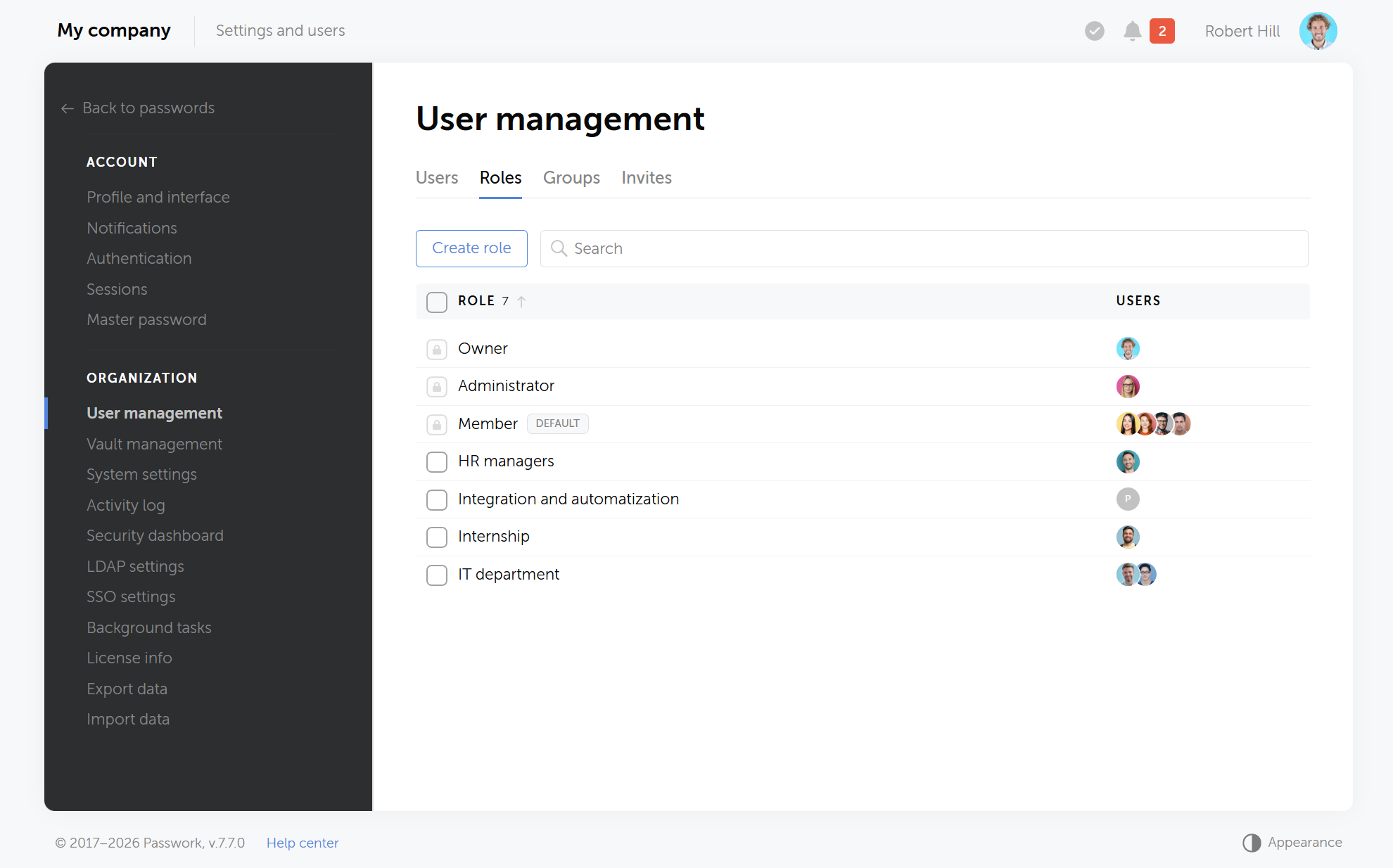
Passwork separates data access from administrative control through two distinct mechanisms: user groups and system roles.
- User groups control data access — This model manages access to vaults and folders. You assign permissions to a group (such as the DevOps team) and every member inherits those permissions automatically. When someone joins the team, they get access. When they leave, you remove them from the group and access is revoked across every vault and folder that group touches.
- System roles define administrative privileges — Predefined and custom roles manage access to system settings, LDAP configurations, and global audit logs. This ensures standard users only interact with their assigned vaults, while administrators manage the platform infrastructure. Under the Zero-Knowledge model, system administrators cannot access actual passwords.
Permissions within vaults are granular: read-only, edit, and admin. A read-only user can retrieve credentials but can't modify or delete them. An admin can manage the vault's structure and membership. You can mix these permissions across different vaults for the same user: a developer might have edit access to the staging vault and read-only access to production.
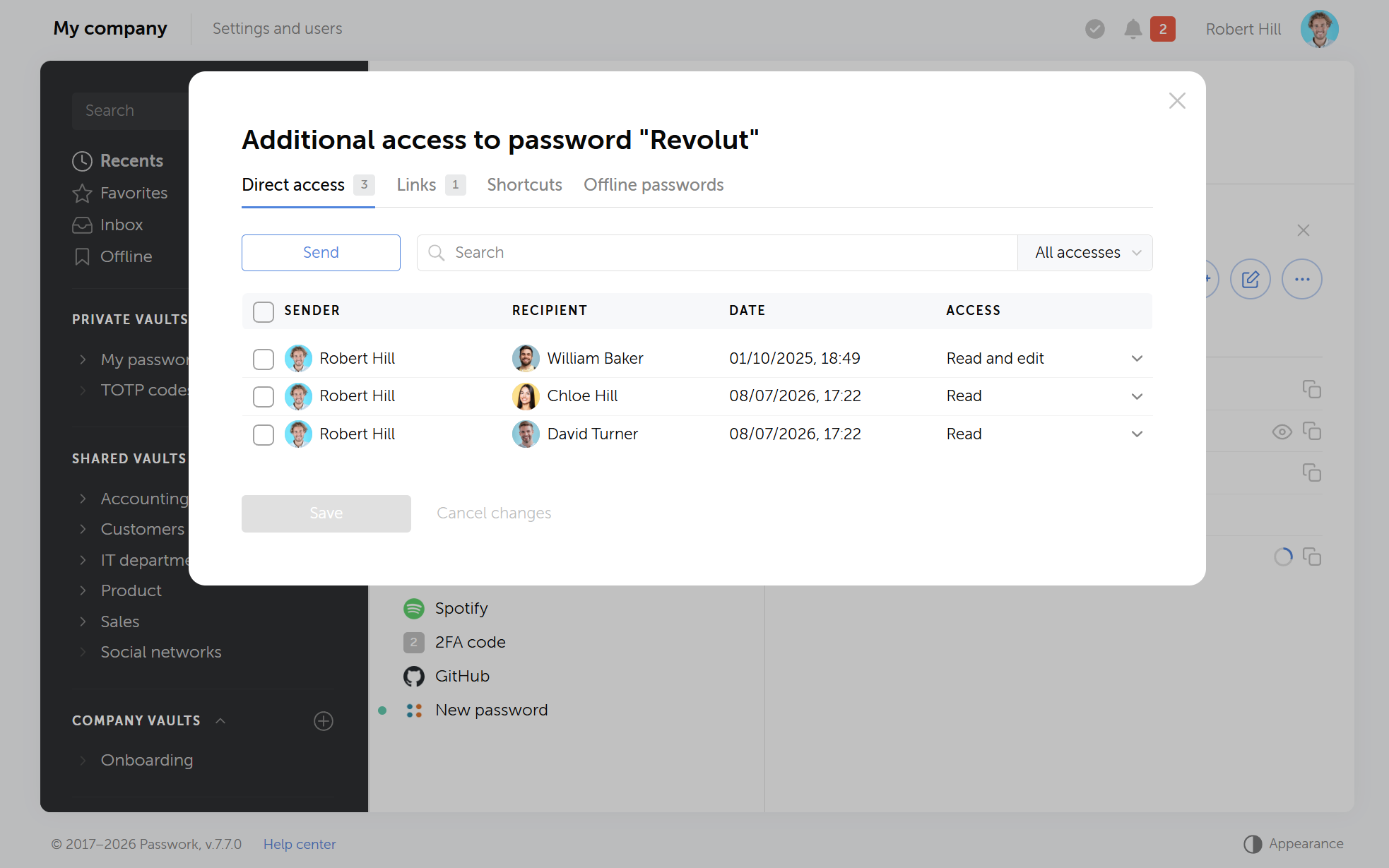
This structure directly solves the offboarding problem. When an employee leaves, you deactivate their account. Their group memberships are removed. Access is gone. No manual inventory of "what did this person have access to?" required.
Security and integration: 2FA, AD/LDAP, and SSO
Passwork enforces two-factor authentication (2FA) at the organization level. Administrators can make it mandatory for all users, not just optional. Supported methods include TOTP authenticator apps, hardware security keys, biometrics, and passkeys.
For organizations running Active Directory or LDAP, Passwork syncs users and groups directly from the directory. User provisioning and deprovisioning follow the directory: when HR disables an account in AD, the corresponding Passwork access is revoked automatically. This eliminates the manual step that most offboarding processes miss.
SSO integration via SAML means users authenticate through your existing identity provider. No separate Passwork credentials to manage, no password reuse risk, and no friction for the end user.
External sharing: Secure one-time links
Sharing a credential with an external party (a contractor, a vendor, a penetration tester) without exposing your vault is a common operational need. Passwork handles this with time-limited, single-use sharing links. You generate a link for a specific credential, set an expiration (hours, days, or a single access), and send it. Once the link expires or is used, it's gone. The recipient never gets access to the vault itself.
This is categorically different from pasting a password into an email. The link is encrypted in transit, the access event is logged, and you can revoke it before expiration if circumstances change.
Auditing: Activity logs and security dashboard
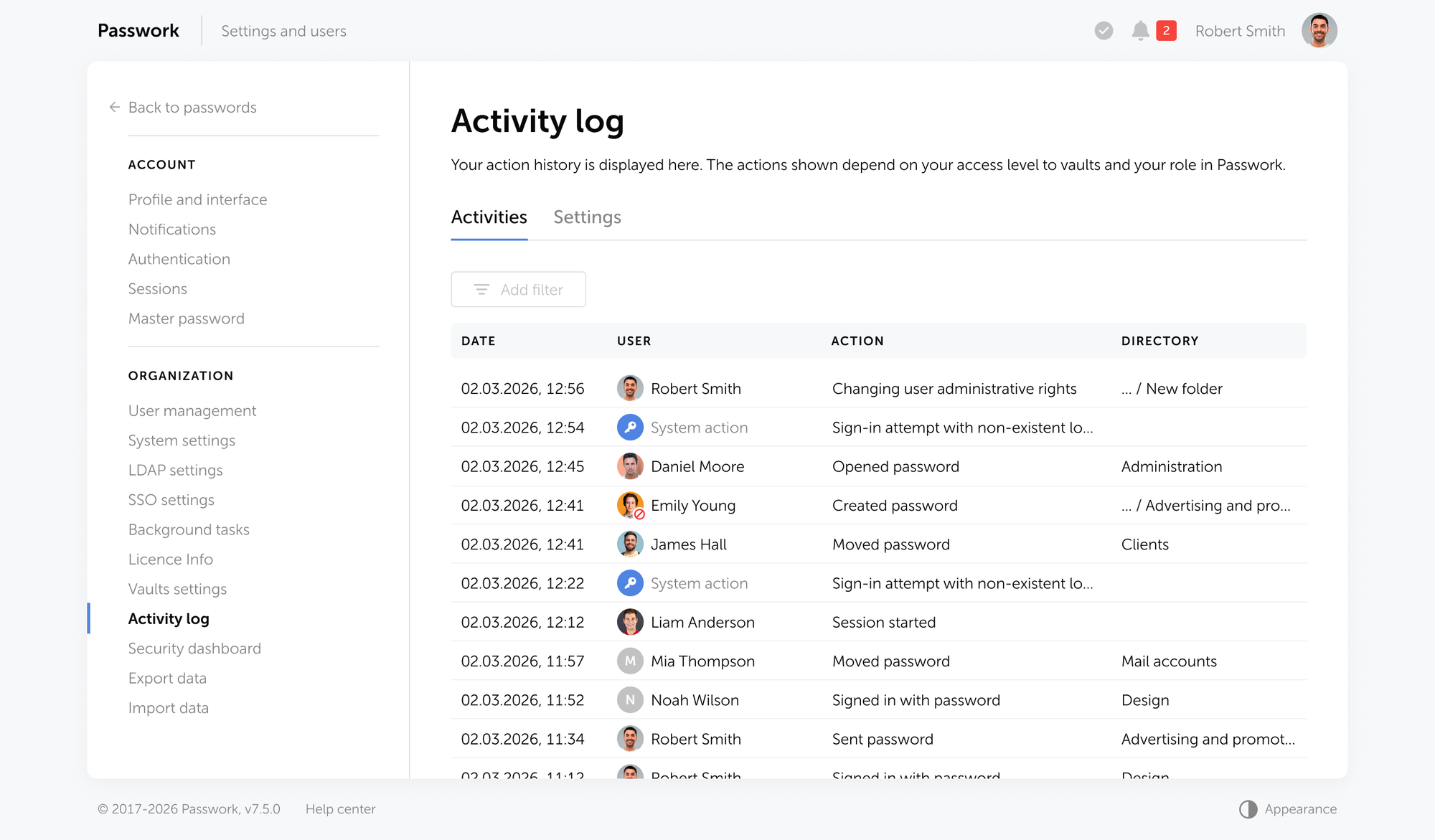
Every action in Passwork (credential creation, modification, access, sharing, deletion) is recorded in the activity log with a timestamp and user attribution. The log is exportable and can be forwarded to a SIEM via Syslog or Windows Event Viewer integration.
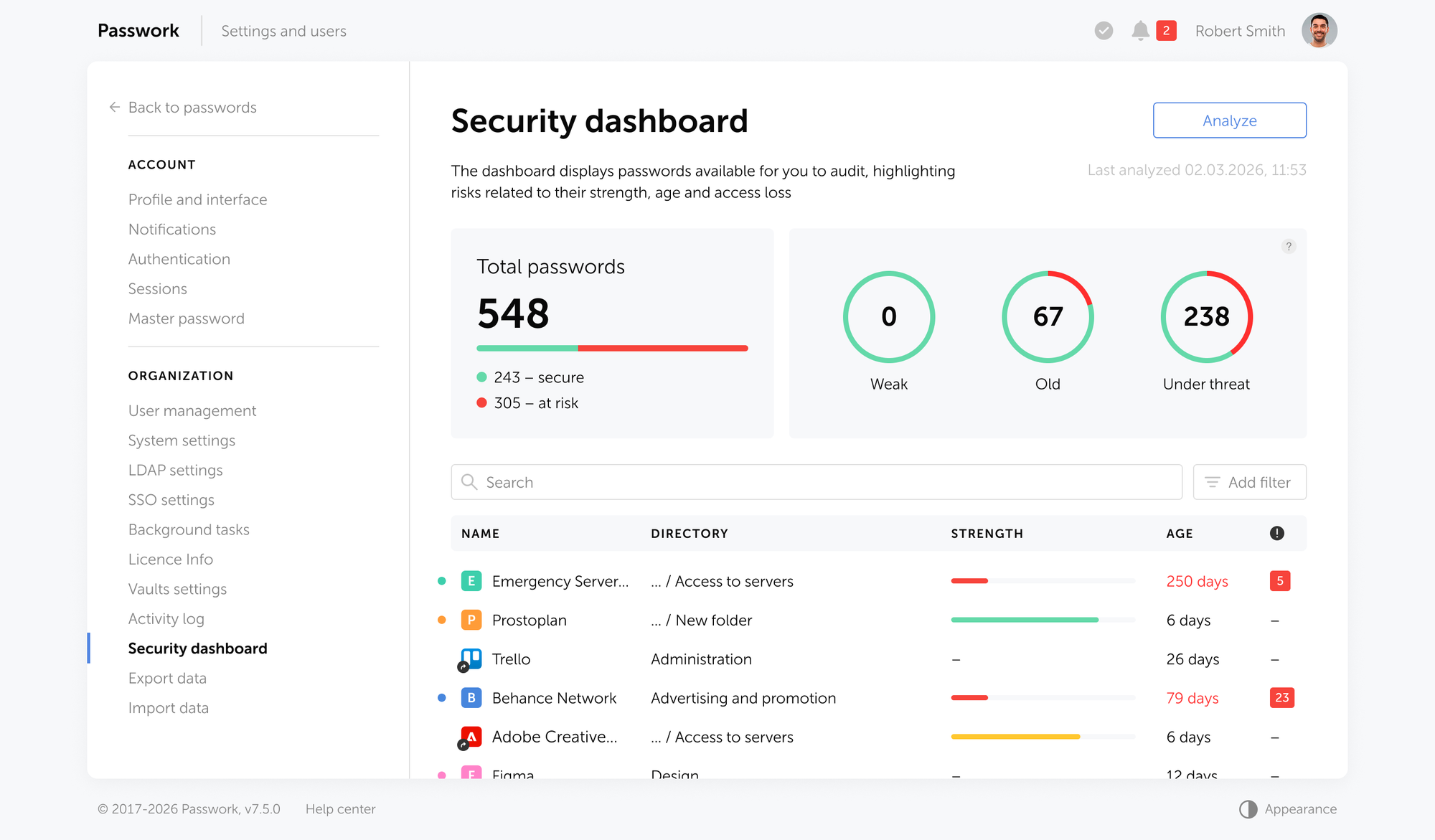
The security dashboard surfaces weak passwords, old passwords, and credentials that haven't been rotated in a defined period. This gives the security team a continuous view of credential hygiene without manual audits. When a credential shows up as weak or reused, it's visible to the administrator, not buried in a spreadsheet.
Self-hosted vs. cloud: Which deployment fits your organization
Passwork is available in two deployment models. The choice between them depends on your compliance requirements, IT capacity, and risk tolerance.
| Criterion | Self-hosted | Passwork Cloud |
|---|---|---|
| Data residency | Your own infrastructure | EU sovereign cloud |
| Deployment time | Hours to days | Minutes |
| Compliance control | Full (you own the stack) | Shared responsibility model |
| Maintenance overhead | Your team manages updates | Managed by Passwork |
| Encryption | AES-256, client-side, on your servers | AES-256, zero-knowledge, client-side |
| Ideal for | Regulated industries, government, high-security environments | SMBs, distributed teams, fast deployment |
Self-hosted deployment makes sense when your organization operates under strict data sovereignty requirements: government agencies, financial institutions, healthcare organizations, and companies subject to sector-specific regulations that prohibit data leaving internal infrastructure. You run Passwork on your own servers (Linux with Docker or Windows Server), and all credential data is encrypted with AES-256 before it ever touches the disk. The encryption keys stay with you.
Passwork Cloud is the right choice when you need to be operational quickly and don't have the IT capacity to manage on-premises infrastructure. The cloud instance is hosted within EU jurisdiction, and uses the same zero-knowledge, client-side encryption architecture as the self-hosted version. Passwork Cloud is ISO 27001 certified and GDPR and NIS2 compliant.
Both models support the full feature set: RBAC, AD/LDAP integration, SSO, audit logs, and the REST API.
The offboarding checklist: Securing credentials when someone leaves
Most credential security incidents tied to departing employees happen because offboarding is treated as an HR process, not a security process. The steps below should run in parallel with, or ahead of, the employee's last day.
The 7-step offboarding credential checklist
- Disable the account immediately. In Passwork, deactivating a user account revokes all vault and folder access instantly. If AD/LDAP sync is configured, this happens automatically when the directory account is disabled.
- Audit shared credentials. Review the activity log for credentials the departing employee accessed in the last 30-90 days. This is your rotation list.
- Rotate credentials they had edit access to. Read-only access is lower risk; edit access means they could have copied or modified the credential. Rotate those first.
- Revoke any active sharing links. Check for unexpired one-time links the employee generated. Revoke them before the last day.
- Reassign vault ownership. If the employee owned or administered any vaults, transfer ownership to another administrator before the account is deactivated.
- Check for personal vaults. Some users store work credentials in personal browser vaults or password manager accounts outside the corporate tool. This is shadow IT. Address it in your policy, not just at offboarding.
- Document the process. Log the offboarding actions taken, the credentials rotated, and the timestamp. This is the evidence trail for a future audit.
The difference between a clean offboarding and a credential incident is usually whether step 2 happened before or after the employee left.
Best practices for team password management in 2026
Implementing a password manager is only the first step toward securing your organization's infrastructure. To build a resilient security posture, you must align your daily workflows with modern authentication standards and eliminate the habits that expose credentials to external threats.
The following practices focus on reducing the attack surface, securing machine-to-machine communication, and establishing a seamless user experience that naturally eliminates insecure workarounds.
Address shadow IT before it addresses you
Shadow IT in credential management means employees using personal password managers, browser-saved passwords, or shared spreadsheets outside the sanctioned tool. According to Huntress (2024), more than a quarter of cybersecurity professionals identify employees using the same or weak passwords as their most problematic security habit.
The solution isn't a policy memo. It's making the approved tool easier to use than the workaround. Browser extensions, mobile apps, and autofill support remove the friction that drives people to informal alternatives. If using a password manager is faster than opening a spreadsheet, most employees will use it.
Apply NIST Rev. 4 minimums to your password policy
Update your organization's password policy to reflect NIST SP 800-63B Rev. 4 (2025):
- Minimum 15 characters for passwords used as the sole authenticator
- No mandatory composition rules (no "must include a number and symbol" requirements)
- No periodic expiration; rotate only on confirmed or suspected compromise
- Screen new passwords against a compromised credential database
Passwork's security dashboard flags weak passwords that don't meet your defined thresholds. Pair this with a policy that reflects current NIST guidance, and you have a defensible credential hygiene posture.
Treat non-human credentials as first-class citizens
API keys, service account passwords, database connection strings, and deployment tokens are credentials too. They're often more dangerous than human credentials because they're long-lived, rarely rotated, and frequently embedded in code or configuration files.
Passwork handles secrets (machine credentials) alongside human passwords, with the same RBAC, audit logging, and rotation tracking. The Passwork technical guides cover secrets management for DevOps workflows, including CI/CD pipeline integration.
Enforce 2FA across the board
The FIDO Alliance's 2026 State of Passkeys report found that 5 billion passkeys are now in active use globally, and 68% of organizations are deploying, piloting, or rolling out passkeys for employee authentication. Passkeys represent the direction of travel, but in the meantime, TOTP-based 2FA on every account is the baseline.
In Passwork, administrators can make 2FA mandatory at the organization level. There's no opt-out for users. If your current setup makes 2FA optional, that's a policy gap worth closing today.
Migrating your team to a centralized password manager
Migration fails when it's treated as a technical project rather than a change management project. The technical steps are straightforward. Getting the team to stop using the old methods takes more work.
The 5-phase migration framework
- Inventory (week 1-2). Identify all credential stores currently in use: spreadsheets, shared browser profiles, personal password managers, chat messages. Don't assume you know all of them; ask the team. The goal is a complete picture before you start moving anything.
- Structure design (week 2-3). Define your vault and folder hierarchy before importing anything. A flat structure with 200 credentials in one vault is barely better than a spreadsheet. Design around how your team actually works: by project, by system, by environment, or by team.
- Import and validate (week 3-4). Import credentials from existing sources using Passwork's import tools. Validate that entries are complete and correctly categorized. Assign ownership and access permissions before announcing the migration.
- Training and rollout (week 4-5). Run a short session (30 minutes is enough for most teams) covering the browser extension, how to retrieve a credential, and how to share one. The goal is removing the excuse "I don't know how to use it."
- Decommission old stores (week 6+). Set a hard deadline for retiring the spreadsheet or shared folder. Announce it in advance. After the deadline, delete the old store and confirm with the team that the new system is the only source of truth.
The most common migration failure is leaving the old system in place "just in case." As long as the spreadsheet exists, some people will use it.
Putting it into practice

The gap between "we have a password manager" and "our credential security is actually under control" is wider than most teams expect. The tool is the easy part. The work is the vault structure, the access policy, the offboarding process, and the ongoing hygiene: making sure weak credentials get rotated and that the spreadsheet someone in finance is still using gets retired.
Start with the inventory. You can't secure what you can't see. Once you know what credentials exist and where they live, every other step follows logically.
Frequently asked questions

What is team password management?
Team password management is the practice of storing, sharing, and controlling access to credentials across a group using a dedicated tool. It replaces informal methods (spreadsheets, chat messages, shared browser profiles) with a structured system that enforces access controls, logs activity, and supports secure offboarding.
Why is sharing passwords via messengers or email a security risk?
Credentials sent through messaging platforms or email are stored in multiple locations outside your control: the sender's sent folder, the recipient's inbox, message history, and potentially third-party servers. There's no expiration, no access revocation, and no audit trail. If either account is compromised, the credential is exposed.
What should a team password manager include?
A team password manager should provide centralized credential storage, role-based access control (RBAC), audit logging, secure external sharing, integration with AD/LDAP and SSO, and mandatory 2FA enforcement. For DevOps teams, API access and secrets management for CI/CD pipelines are also necessary.
What does NIST SP 800-63B Rev. 4 require for passwords?
NIST SP 800-63B Rev. 4 (2025) requires a minimum of 15 characters when a password is the sole authenticator, prohibits mandatory composition rules (such as requiring numbers or symbols), eliminates periodic expiration policies, and mandates screening new passwords against known compromised credential databases.
How does a password manager help with employee offboarding?
A password manager with RBAC and AD/LDAP integration makes offboarding deterministic. Deactivating a user account or removing them from a directory group revokes their access to all associated vaults immediately. The activity log shows which credentials they accessed, giving you a precise rotation list rather than a guess.
What is the difference between self-hosted and cloud password management?
A self-hosted password manager runs on your own infrastructure, giving you full control over data residency, encryption keys, and configuration. A cloud password manager is hosted by the vendor. Both can use zero-knowledge encryption, meaning the vendor's servers never see plaintext credentials. Self-hosted is preferred for regulated industries; cloud is faster to deploy and requires less maintenance overhead.
How do you migrate a team to a new password manager?
Start with an inventory of all existing credential stores, design your vault structure before importing anything, import and validate credentials, run a short training session, and set a hard deadline for retiring the old system. The most common failure is leaving the old spreadsheet or shared folder accessible after the migration; as long as it exists, some team members will use it.
 Alex Muntyan
 Alex Muntyan
 Alex Muntyan
Table of contents
- Key takeaways
- The cost of informal credential sharing
- What teams actually need from a password manager
- NIST SP 800-63B Rev. 4: What changed in 2025
- How Passwork addresses each challenge
- Self-hosted vs. cloud: Which deployment fits your organization
- The offboarding checklist: Securing credentials when someone leaves
- Best practices for team password management in 2026
- Migrating your team to a centralized password manager
- Putting it into practice
- Frequently asked questions
Table of contents
- Key takeaways
- The cost of informal credential sharing
- What teams actually need from a password manager
- NIST SP 800-63B Rev. 4: What changed in 2025
- How Passwork addresses each challenge
- Self-hosted vs. cloud: Which deployment fits your organization
- The offboarding checklist: Securing credentials when someone leaves
- Best practices for team password management in 2026
- Migrating your team to a centralized password manager
- Putting it into practice
- Frequently asked questions

Self-hosted password manager for business
Passwork provides an advantage of effective teamwork with corporate passwords in a totally safe environment. Double encryption and zero-knowledge architecture ensure your passwords never leave your infrastructure.
Learn more