
![10 things to consider before choosing a corporate password manager [2026]](https://storage.ghost.io/c/ea/f1/eaf1376c-e95e-464e-9e89-2c384ddf359d/content/images/2024/09/8-things-consider-corporate-password-manager-2.png)
A corporate password manager is a centralized security control that stores, encrypts, and governs access to organizational credentials (user passwords, service account secrets, API keys, and certificates) within a structured vault with role-based permissions, audit logging, and identity provider integration.
The problem with most buying guides is that they answer the wrong question. "Which tool should I buy?" depends entirely on your infrastructure, your compliance obligations, and your team. The better question is: "What should I evaluate, and how?" That's what this framework answers.
Key takeaways
- Encryption architecture is the first filter. Not all AES-256 implementations are equal. What matters is where keys are generated and whether the vendor can ever access your plaintext.
- RBAC granularity separates real access control from checkbox compliance. A flat admin/member model is technically RBAC. Least privilege is what NIST SP 800-207 actually requires for zero trust architecture.
- Directory integration is non-negotiable at scale. Without AD/LDAP sync, user provisioning and deprovisioning depend on manual steps. At 50+ users, that gap is where incomplete offboarding turns into credential leaks.
- Compliance certifications don't map themselves. ISO 27001 confirms the vendor has a documented security management system. Whether their architecture satisfies your GDPR Article 32, NIS2 Article 21, or SOC 2 CC6.1 obligations is a mapping exercise you have to do before shortlisting.
- Deployment model is a compliance and operational decision, not a security one. Zero-knowledge architecture provides the same cryptographic isolation on-premise and in the cloud. Choose based on data residency requirements and your team's capacity to own patching, backup, and failover.
- A vault without audit logs is a black box. Credential reads, permission changes, failed logins, and bulk exports must all generate tamper-evident, timestamped records, and those records must flow into your SIEM.
- Offboarding is where credential hygiene collapses. The four-step checklist (identify, rotate, revoke, audit) only works if the tool gives you a complete access picture before you close the account.
- Per-seat price is not TCO. SIEM connectors, and advanced reporting are frequently sold as premium add-ons. Apply the full TCO formula to every shortlisted vendor before comparing sticker prices.
- Secrets management and password management are two different access patterns that should live in one tool. Human credentials are accessed interactively; machine secrets are retrieved programmatically via API or CLI. Verify both before assuming a single license covers your DevOps workflows.
- UX is a security property. The most cryptographically sound password manager fails if your team routes around it. Adoption is the metric that determines whether the tool reduces your risk or just your budget.
1. Encryption architecture and zero-knowledge model
Not all AES-256 implementations are equal. The encryption standard matters less than where keys are generated, where they live, and whether the vendor can ever access your plaintext. A true zero-knowledge architecture means encryption and decryption happen client-side. The server stores only ciphertext. The vendor has no mathematical path to your credentials, even under a court order or a breach of their own infrastructure.
The SpyCloud 2025 Annual Identity Exposure Report found 159,313 stolen credential records specifically from password manager users recaptured from the criminal underground. Vault providers are targets. Architecture is the last line of defense when the perimeter fails.
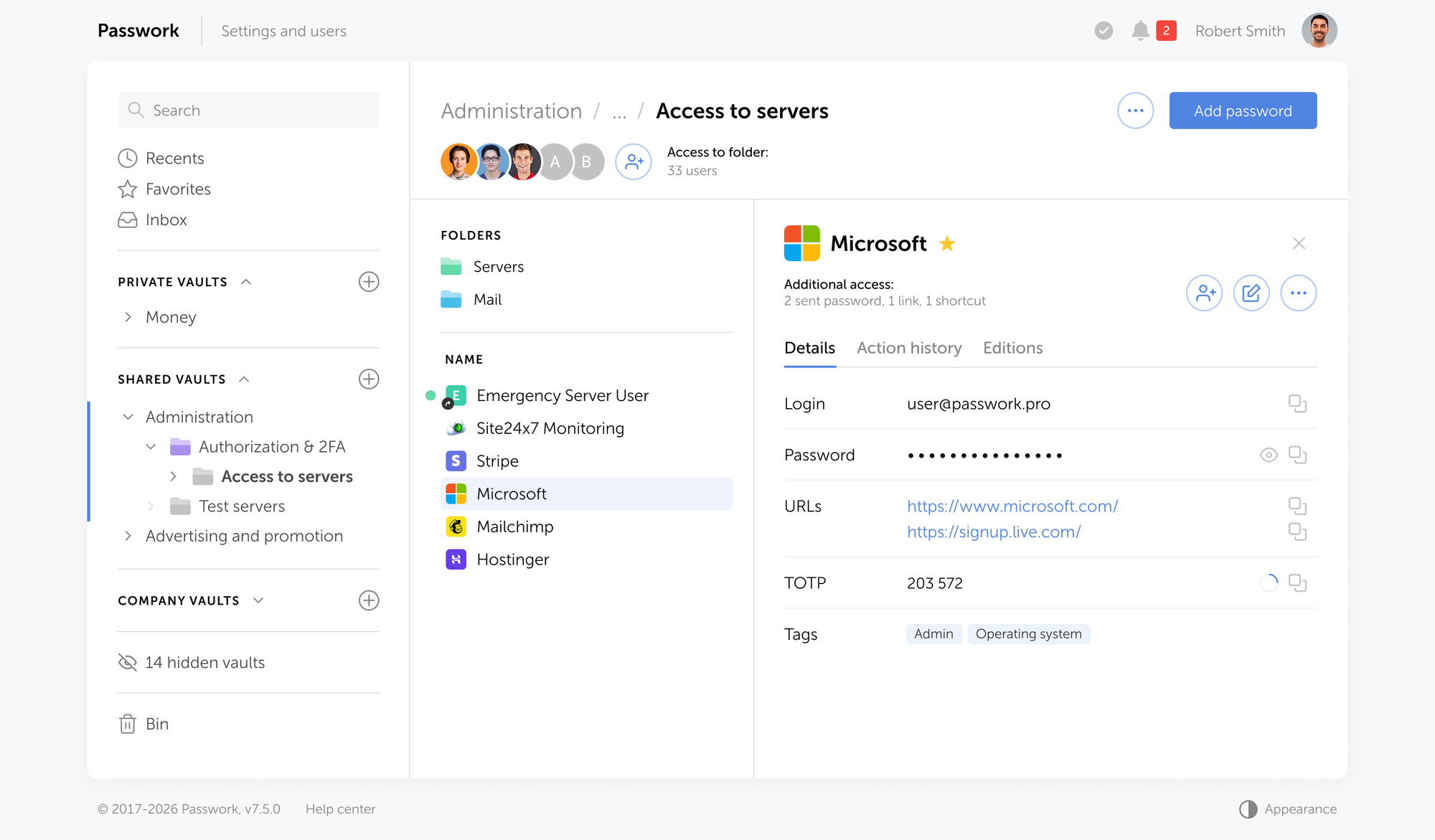
Passwork implements this model directly: encryption and decryption happen client-side using AES-256, the server stores only encrypted blobs, and the source code is available for independent audit. If you want to verify the implementation rather than trust a marketing claim, that's the path.
What to verify during a POC:
- Request the vendor's security whitepaper and locate the key derivation specification. If it's absent, ask directly: "What algorithm derives the vault encryption key from the master password?"
- Capture network traffic during a login session. You should see only encrypted payloads (no plaintext credentials in transit).
- Ask: "If your infrastructure were fully compromised tomorrow, what would an attacker obtain from our vault?" The answer should be: encrypted blobs, decryptable only with the user's key.
2. Access control granularity
Role-based access control (RBAC) is an access control model in which permissions are assigned to roles rather than to individual users, and users acquire permissions by being assigned to those roles. In a credential store, that means access rights are defined at the role level (DevOps team, finance, IT admin) and permissions follow automatically when a user joins or leaves a role.
Every enterprise password manager claims RBAC support. The real question is how granular the permission model gets in practice. A flat "admin / member" binary is technically RBAC. It is not, however, least privilege — a principle NIST SP 800-207 identifies as foundational to zero trust architecture: every subject should operate with the minimum access rights required to complete their task, and no more.
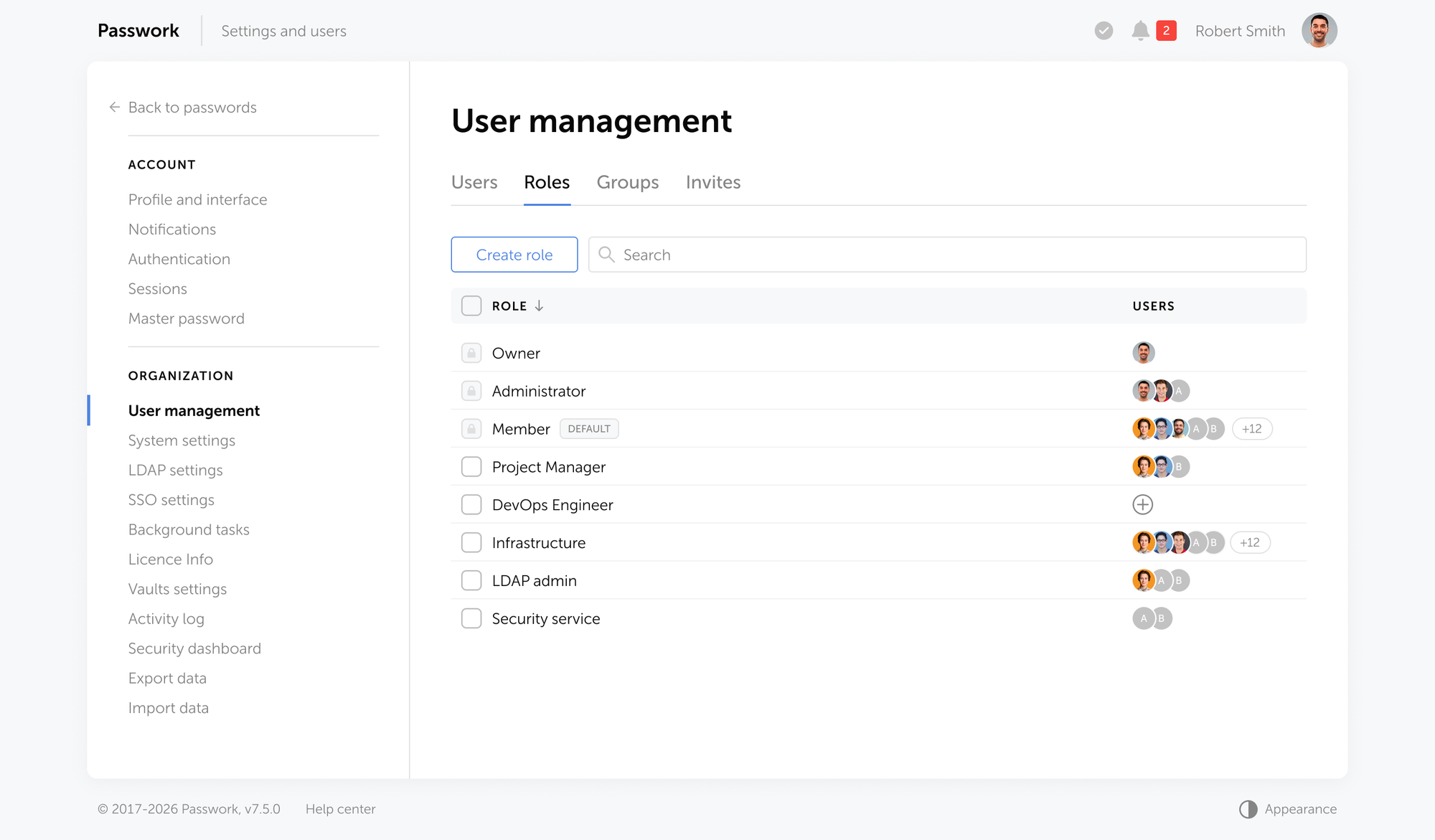
A developer who needs read access to one set of API keys should not inherit write access to infrastructure credentials simply because they share a team vault with a sysadmin.
A mature access control model should support at minimum:
- Per-vault and per-folder permissions (read, write, admin) independent of each other
- Group-based access so onboarding a new team member inherits the right permissions automatically
- Temporary access grants with automatic expiry
- Segregation of duties — the person who creates a credential is not necessarily the person who can share it
What to verify during a POC:
- Create a user with read-only access to Folder A and write access to Folder B. Confirm the permissions hold independently.
- Test offboarding: remove a user and verify their access to all shared vaults is revoked immediately.
- Create an auditor role and confirm the account can view activity logs and the security dashboard but cannot modify, copy, or share any credential.
Passwork implements this through two parallel access control layers:
- Groups govern data access — they determine which vaults, folders, and secrets a user can see and interact with, at what permission level (read, write, admin).
- Roles govern system administration — they control who can configure Passwork itself, manage users, and adjust settings.
The two layers are independent, which means you can give a user broad data access without any administrative rights, or grant a narrowly scoped admin role to someone who has no access to credential data at all.
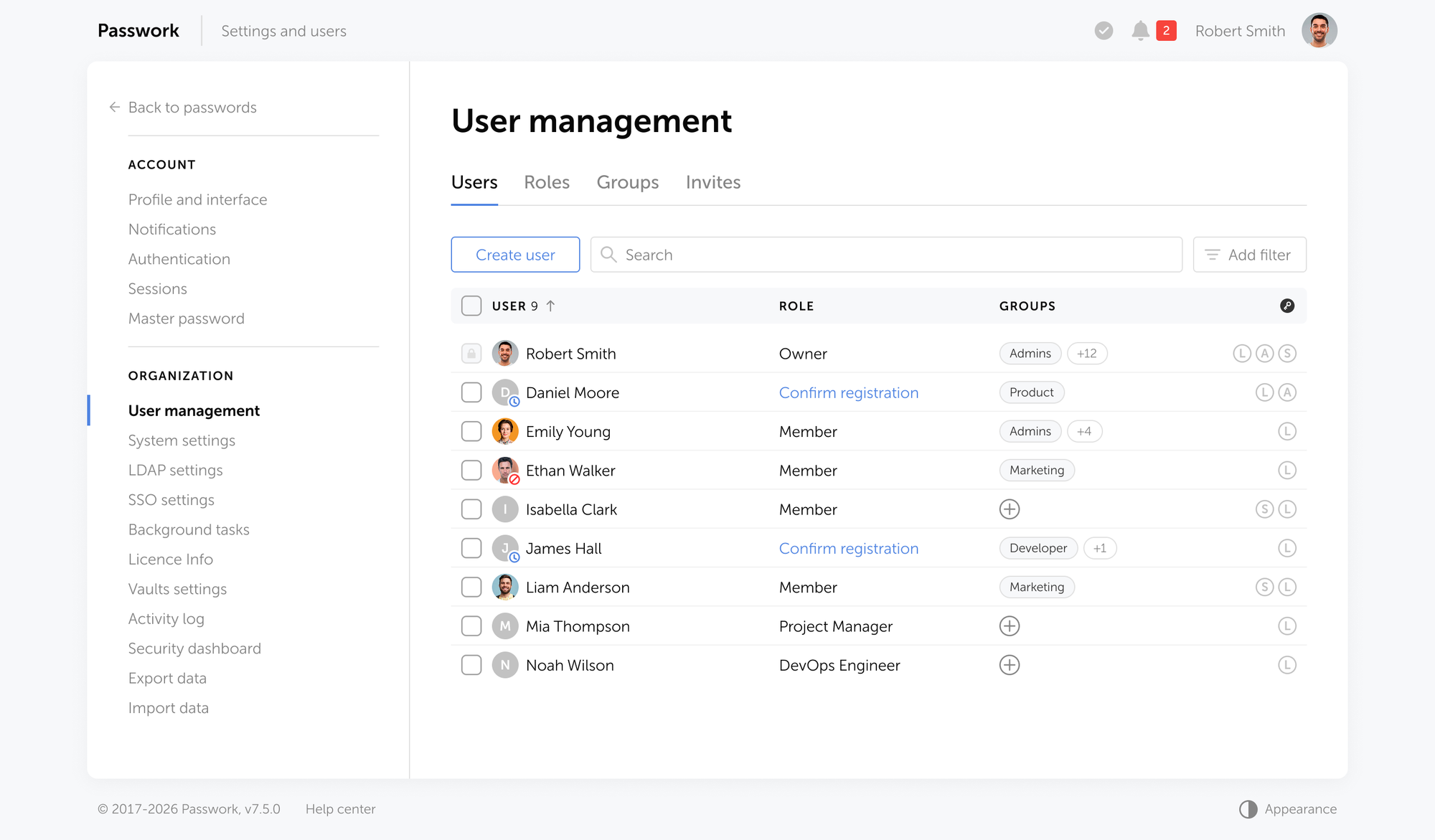
In practice, that separation may look like this:
| Role | Scope | Can access credentials? |
|---|---|---|
| Global administrator | Full system control: users, settings, all vaults | Only if explicitly granted via group membership |
| Branch / department administrator | Scoped to their organizational unit | Only within their unit's groups |
| Vault administrator | Creates and manages vaults, assigns group access, sets vault types | Only within their assigned vaults |
| Team lead | Manages access rights for their own team's folders | Only within their team's groups |
| Auditor | Activity logs and security dashboard — read only | No |
| Regular user | Works with credentials in vaults and folders they've been granted access to | Yes — within assigned groups only |
| API / service account | Programmatic access via token for CI/CD pipelines and automation | Yes — scoped to specific vaults via API token permissions |
| AD/LDAP administrator | Directory synchronization and group mapping only | No |
3. Identity infrastructure integration
A corporate password manager must integrate with your existing identity provider (IdP) and sync with your directory service for automated user lifecycle management.
SSO handles authentication. Directory integration handles provisioning and deprovisioning. Without it, when an employee leaves, someone has to manually revoke their vault access. In a 500-seat organization, that gap is where credential leaks happen (from incomplete offboarding).
LDAP and Active Directory integration matters for organizations that haven't moved fully to cloud identity. Group-to-vault mapping lets you mirror your existing AD group structure directly into vault permissions, eliminating the manual work of replicating that structure inside the password manager.
What to verify during a POC:
- Test SAML SSO login end-to-end with your IdP. Verify that session timeout and re-authentication policies from the IdP are respected.
- Map an AD/LDAP group to a vault. Add a test user to that group in the directory. Confirm vault access appears within the expected sync window.
- Remove the test user from the directory group. Confirm vault access is revoked on the next sync without manual intervention.
Passwork provides native LDAP and Active Directory integration on both Standard and Advanced plans. SAML SSO and LDAP group mapping allow automated synchronization of directory groups directly to vault permissions.
| If you have | Look for |
|---|---|
| Microsoft Entra ID | SAML 2.0 SSO + Entra group sync via LDAP |
| Okta | SAML SSO + Okta LDAP interface or group push |
| On-premise Active Directory | LDAP integration + group-to-vault mapping |
| Google Workspace | SAML SSO + Google Secure LDAP |
| No centralized IdP yet | Built-in MFA, local user management, migration path to directory service |
4. Compliance and certification posture
ISO 27001 can confirm the vendor runs a documented information security management system that has passed independent audit. What it does not confirm is whether their architecture satisfies your specific regulatory obligations — that mapping is your responsibility.
Map your requirements to controls before you evaluate vendors. The table below shows the most common mappings:
| Regulation | Control reference | Password manager feature required |
|---|---|---|
| GDPR | Article 32 — Technical security measures | Encryption at rest and in transit, access logging, breach notification capability |
| NIS2 | Article 21 — Risk management measures | MFA, access control, incident logging, supply chain security |
| ISO 27001 | Annex A.9 — Access control | RBAC, unique user IDs, privileged access management |
| ISO 27001 | Annex A.12.4 — Logging and monitoring | Audit trails, SIEM export, tamper-evident logs |
GDPR Article 32 requires "appropriate technical and organisational measures" to protect personal data. For credential management, that translates to encryption at rest, access logging, and a documented process for revoking access when an employee leaves.
NIS2 Article 21 extends similar obligations to a broader set of sectors than its predecessor directive. Organizations in energy, transport, health, and digital infrastructure now face explicit requirements around access control policies and incident logging — both of which a password manager directly addresses.
What to ask the vendor:
- Can you provide your ISO 27001 certificate and scope statement?
- How does your architecture support GDPR Article 32 — specifically encryption at rest and access logging?
- Does your product support NIS2 Article 21 requirements around access control and audit logging?
Passwork is ISO 27001 certified, GDPR and NIS2 compliant, and has undergone penetration testing through HackerOne's bug bounty program. For European organizations, that combination covers the core of what a security or compliance team will ask for during vendor assessment.
5. Deployment model: On-premise vs. cloud vs. hybrid
The assumption that on-premise is inherently more secure than cloud does not hold up to scrutiny. A zero-knowledge cloud architecture gives you the same cryptographic isolation as self-hosting — the vendor cannot access your plaintext regardless of where the server sits. What changes is the operational model, the compliance paper trail, and who owns the infrastructure risk.
Self-hosting makes sense for a range of scenarios:
- Air-gapped environments
- Strict data residency requirements
- Regulatory frameworks that mandate full control over where data physically resides
- Organizations whose internal security policies simply require that credential data never leaves their own infrastructure
For European organizations, a sovereign EU cloud deployment keeps data within EU jurisdiction on infrastructure not subject to non-EU legal reach. It is an increasingly common middle path between full self-hosting and standard SaaS.
| Criterion | Self-hosted / on-premise | Cloud (zero-knowledge) |
|---|---|---|
| Data sovereignty | Full control | Vendor-managed, contractual guarantees |
| Deployment speed | Days to weeks | Hours to days |
| Operational overhead | Owned by your team (patching, backup, failover) | Managed by vendor |
| Compliance documentation | You produce it | Vendor provides ISO 27001 / SOC 2 |
| Air-gap support | Yes | No |
| Sovereign EU cloud option | Yes | Depends on vendor |
| TCO at 100 users | Higher (infra + license) | Lower (subscription only) |
Passwork can be deployed on-premise within your own infrastructure, in your organization's private cloud, or in a sovereign EU cloud environment. The cloud option is available for teams that prefer managed infrastructure. Both models run on the same zero-knowledge AES-256 architecture.
6. Audit logging and SIEM integration
A password vault without audit logs is a black box. You cannot investigate an incident, demonstrate compliance, or detect anomalous access patterns without a complete event record. Visibility is what separates a password vault from a password governance tool.
According to the SpyCloud Annual Identity Exposure Report, 91% of organizations reported an identity-related incident in the past year. Without logs, you cannot answer the first question in any incident response: "What was accessed, by whom, and when?"
The minimum loggable events for enterprise use:
- Vault access (read, write, copy-to-clipboard)
- Permission changes (grants, revocations, role modifications)
- Failed authentication attempts and lockouts
- User provisioning and deprovisioning events
- Export and bulk download operations
- Administrative configuration changes
SIEM integration matters if you have a SOC. Logs that live only inside the password manager's own UI are not actionable at scale. Look for syslog export, webhook support, or native connectors to Splunk, Microsoft Sentinel, or your SIEM of choice.
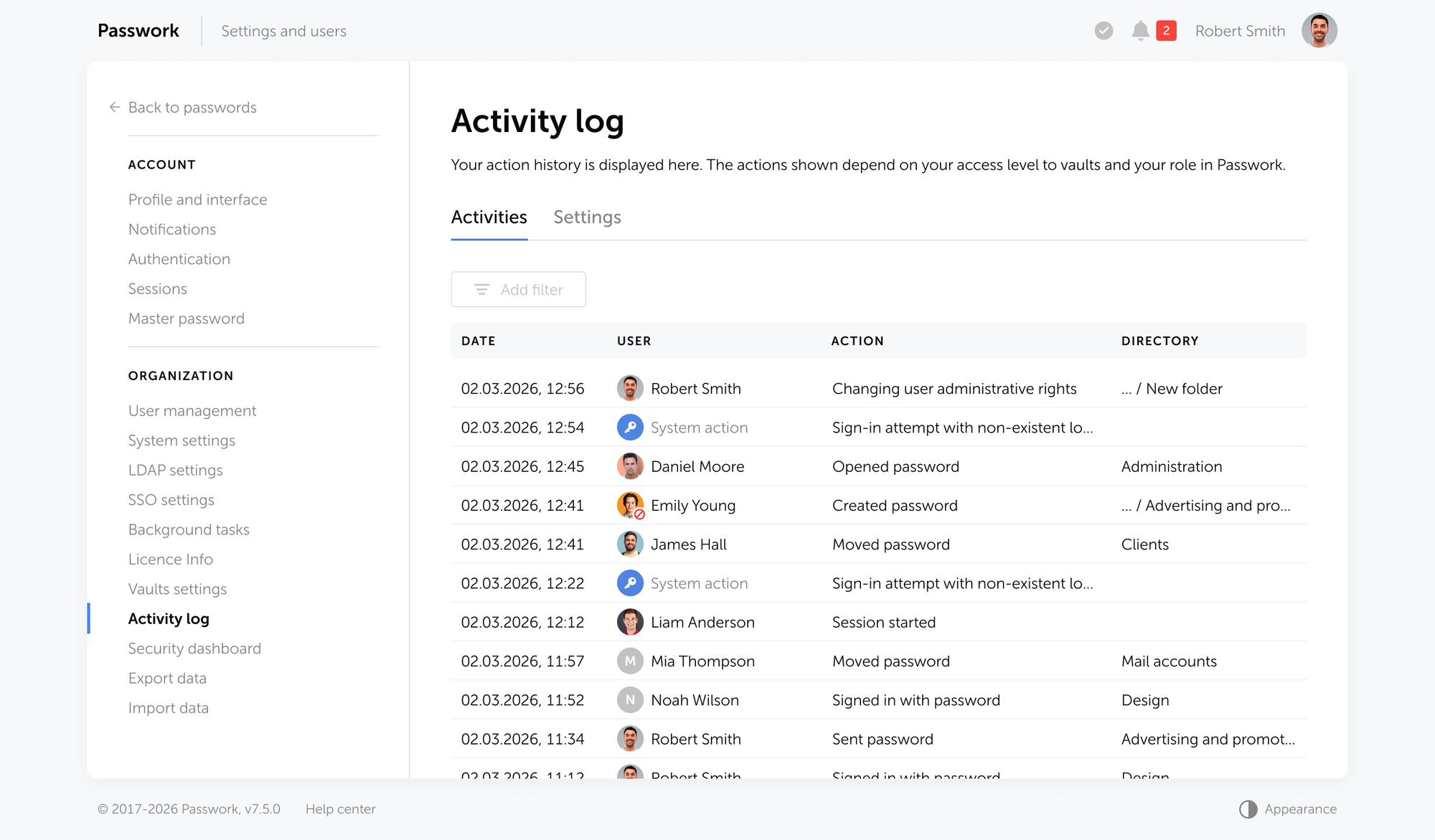
What to verify during a POC:
- Perform a credential read, a permission change, and a failed login. Confirm all three generate distinct, timestamped log entries.
- Export logs to your SIEM test environment. Verify the format parses correctly and events are queryable.
- Check whether logs are tamper-evident — can an admin delete their own audit trail?
Passwork logs every action across the system: credential reads, permission changes, failed logins, exports, and administrative events. The audit log supports granular filtering by user, vault, event type, and time range.
Notification rules are configurable per event category, so your security team gets alerted on the actions that matter without noise from routine operations. For SOC teams, Passwork integrates with SIEM platforms directly, so event data flows into your existing detection and response workflows without manual export.
7. Offboarding and credential hygiene
Every organization has a credential debt problem. It accumulates quietly: shared accounts that outlive the people who created them, service credentials tied to a personal email, API keys that were "temporary" in 2022. A password manager must surface this debt.
Offboarding is where credential hygiene either holds or collapses. When an employee leaves, the question is which shared credentials they had access to, which ones they may have copied locally, and which service accounts were provisioned under their name.
The offboarding credential checklist has four steps:
- Identify all vaults and folders the departing user had access to — including read-only access, which is routinely overlooked.
- Rotate any shared credentials they could read. Read access means the credential was visible, assume it was noted.
- Revoke personal API tokens and service account credentials issued to that individual.
- Audit the 30-day activity log for that user before revoking access. Bulk exports or unusual read patterns in the final weeks are worth investigating before you close the account.
Directory integration helps significantly here. When a user is removed from an AD or LDAP group, vault access tied to that group is revoked on the next sync. The gap closes from days to minutes. Without directory integration, offboarding depends on a human remembering to revoke access in a separate system.
What to verify during a POC:
- Deprovision a test user from your directory. Confirm vault access is revoked within the expected sync window.
- Pull the departing user's activity log for the past 30 days. Verify the log is complete, filterable by event type, and exportable for the offboarding record.
- Check whether shared credentials the user had read access to are flagged anywhere — either by the system or through a manual audit workflow.
Passwork's audit log gives you a full activity history per user, so the offboarding review is a query, not a manual reconstruction. Access revocation through AD/LDAP group removal is automatic on sync.
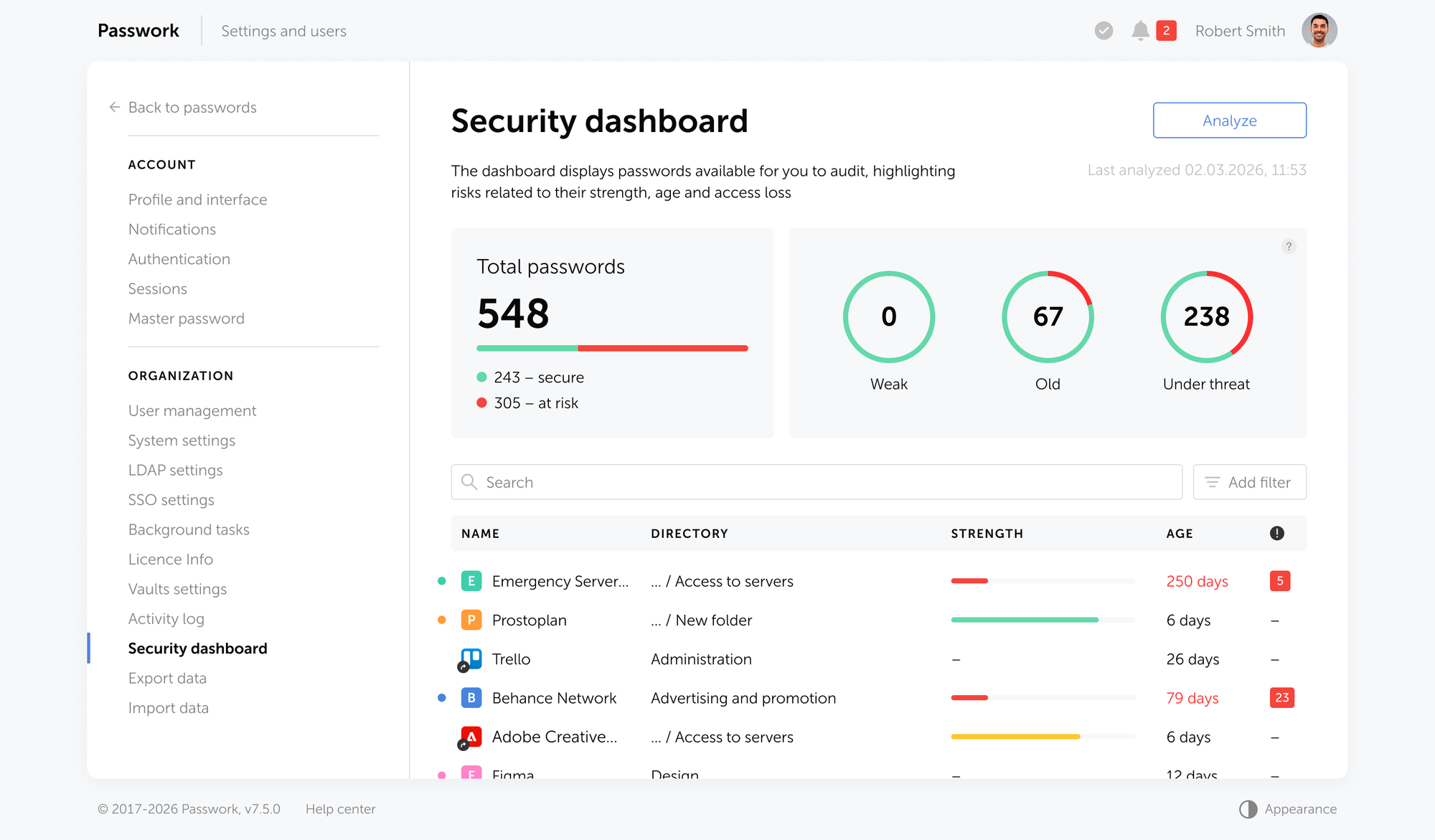
The Security dashboard surfaces all active accesses tied to a departing employee — vaults, folders, and shared credentials are highlighted in one view, so nothing gets missed before the account is closed.
8. Total cost of ownership
Per-seat price is the starting line. Before signing, look carefully at what each vendor actually includes in their base plan versus what gets added to the invoice later.
The questions worth asking every vendor on your shortlist:
- What features are included at the base tier, and what requires an upgrade?
- Is SCIM provisioning included, or does it require an enterprise plan?
- What is the support SLA, and what tier unlocks it?
- Are there per-vault or per-secret limits that trigger overage charges?
A useful framework for comparing total spend across vendors:
TCO = (per-user price × user count × 12)
    + implementation cost (engineering time + vendor onboarding)
    + training cost (hours × hourly rate × user count)
    + premium add-ons (SIEM connector, advanced reporting)
    + annual renewal or subscription fee
Apply this to each shortlisted vendor before you compare sticker prices. The gap between advertised and actual annual cost is often where decisions change.
Passwork's pricing covers both a password manager and a secrets manager under a single license — one tool for human credentials and machine identities, at one price.
According to Passwork's TCO research, organizations report a total cost of ownership 30% lower over a three-year horizon compared to comparable enterprise credential management tools, driven by transparent per-user pricing and no feature gating on core functionality.
9. Secrets management and DevOps readiness
Human credentials are one problem. Service accounts, API keys, CI/CD tokens, SSH keys, and database connection strings are a separate problem. The two categories require different access patterns: humans access credentials interactively through a browser extension or mobile app. Machines access secrets programmatically through an API or CLI at runtime.
If your organization runs CI/CD pipelines, Kubernetes workloads, or any automated deployment process, hardcoded secrets in environment variables or config files are a real risk. The question to ask a vendor is not "do you support secrets management?" — most will say yes. The question is: "Can my GitHub Actions workflow retrieve a database credential at deploy time without it ever touching a config file?"
That requires a REST API with fine-grained access tokens, a CLI utility for terminal-based retrieval, and ideally an SDK for programmatic integration. Verify also that the tool supports secret rotation — updating a credential in the vault and propagating the change to downstream systems without manual intervention.
What to verify during a POC:
- Retrieve a test secret via the CLI. Confirm the credential is never written to disk or shell history.
- Configure a GitHub Actions or GitLab CI pipeline to pull a secret from the vault at runtime. Verify the secret does not appear in build logs.
- Test secret rotation: update a credential in the vault and confirm downstream systems pick up the change without manual intervention.
- Check access token granularity: can you scope a token to a single vault or folder, rather than granting pipeline access to the entire credential store?
Passwork covers both sides of this without a separate tool or license. The REST API covers every action available in the UI, there is a CLI utility for terminal-based retrieval, and a Python SDK for programmatic integration. Access tokens are scoped at the vault level, so a pipeline gets access to exactly what it needs and nothing else. For technical implementation details, see the Passwork technical guides.
10. User experience and adoption dynamics
The most cryptographically sound password manager is worthless if your team routes around it. UX is a security property. If the browser extension takes five seconds to autofill a login form, or copying a password from the web UI requires navigating through four clicks and a confirmation dialog, people will stop using the tool within a month.
Password manager usage rose from 20% in 2019 to 32% in 2023 (Pew Research Center). That's growth, but it also means 68% of users still aren't using one.
Of 19.03 billion leaked passwords analyzed by Cybernews (2025), 94% were reused or duplicated. The behavior that creates that number is the path of least resistance. A password manager wins adoption by being less friction than the alternatives, not by being more secure in the abstract.
Adoption risk factors to assess before buying:
- Browser extension compatibility with your primary browsers and internal web apps
- Mobile app quality (iOS and Android) for teams that access credentials on the go
- Autofill reliability on non-standard login forms
- Onboarding time for non-technical users (target: under 30 minutes to first productive use)
- Bulk import capability from existing sources (CSV, browser export, other vaults)
How to design a meaningful UX pilot:
Select 10–15 users across three groups: a power user (sysadmin), a typical office user, and a skeptic who actively resists new tools. Run the pilot for 3–4 weeks. Measure: How many credentials did each user store? How many times did they bypass the vault and use a browser or notes app instead? What broke? The skeptic's feedback is the most valuable signal you'll get before a full rollout.
Putting the framework to work

The 10-Factor Enterprise Password Manager Selection Framework is not a checklist to race through in an afternoon. Each criterion has dependencies: your compliance obligations shape which deployment model is viable. Your identity infrastructure determines which integrations are non-negotiable. Your team's technical capacity determines whether self-hosting is realistic or aspirational.
Start with criteria 4 (compliance), 3 (identity integration), and 5 (deployment model) — those three together will eliminate most vendors from your shortlist before you spend time on POC testing. Then use criteria 1 (encryption), 6 (audit logging), and 7 (offboarding) to validate the finalists. Criteria 8 (TCO), 9 (secrets management), and 10 (UX) close the decision.
The right corporate password manager is the one that fits your security architecture, satisfies your compliance obligations, integrates with your existing identity infrastructure, and gets used by your team every day.
Frequently asked questions

What is a corporate password manager?
A corporate password manager is a centralized security control that stores, encrypts, and governs access to organizational credentials — user passwords, service account secrets, API keys, and certificates — within a structured vault with role-based permissions, audit logging, and identity provider integration.
What is zero-knowledge architecture in a password manager?
Zero-knowledge architecture means encryption and decryption happen client-side. The server stores only ciphertext. The vendor has no mathematical path to your plaintext credentials — not under a breach of their own infrastructure, not under a court order. Verify this at the protocol level: ask for the key derivation specification, not just the marketing claim.
Is on-premise more secure than cloud for a corporate password manager?
Not necessarily. With zero-knowledge architecture, the vendor never holds your plaintext — so a breach of their infrastructure yields only encrypted blobs. On-premise gives you physical control over where data resides and removes dependency on a third-party provider entirely, but it adds patching, backup, and failover overhead that most teams underestimate. Base the decision on your compliance requirements and operational capacity, not on a security assumption.
What is the difference between a password manager and a secrets manager?
A password manager handles human credentials — login usernames and passwords accessed interactively through a browser or app. A secrets manager handles machine identities: API keys, database connection strings, CI/CD tokens, and certificates accessed programmatically by applications and pipelines. The best enterprise password managers now span both categories, but verify that the tool provides CLI and SDK access with automated rotation before assuming it can replace a dedicated secrets manager for DevOps workflows.
Can a corporate password manager replace SSO?
No — they solve different problems. SSO authenticates users to applications through a centralized identity provider. A password manager stores and governs credentials, including those for applications that don't support SSO, shared accounts, infrastructure credentials, and API keys. They are complementary: the password manager should integrate with your SSO provider so users unlock their vault with the same identity they use everywhere else. Running one without the other leaves gaps.
What should I verify during a password manager POC?
At minimum, test five things: end-to-end encryption behavior (capture network traffic and confirm no plaintext credentials in transit), RBAC granularity (assign conflicting permissions to a test user and verify they hold independently), directory integration (add and remove a user from an AD/LDAP group and confirm vault access follows automatically), audit logging completeness (perform a credential read, a permission change, and a failed login — confirm all three generate distinct log entries), and offboarding (deprovision a test user and confirm access is revoked within the expected sync window without manual intervention).
How does directory integration reduce offboarding risk?
When a user is removed from an AD or LDAP group, vault access tied to that group is revoked on the next sync — no manual step required. Without directory integration, offboarding depends on a human remembering to revoke access in a separate system. That gap is where credential leaks from incomplete offboarding occur.
 Alex Muntyan
 Alex Muntyan
 Alex Muntyan
Table of contents
- Key takeaways
- 1. Encryption architecture and zero-knowledge model
- 2. Access control granularity
- 3. Identity infrastructure integration
- 4. Compliance and certification posture
- 5. Deployment model: On-premise vs. cloud vs. hybrid
- 6. Audit logging and SIEM integration
- 7. Offboarding and credential hygiene
- 8. Total cost of ownership
- 9. Secrets management and DevOps readiness
- 10. User experience and adoption dynamics
- Putting the framework to work
- Frequently asked questions
Table of contents
- Key takeaways
- 1. Encryption architecture and zero-knowledge model
- 2. Access control granularity
- 3. Identity infrastructure integration
- 4. Compliance and certification posture
- 5. Deployment model: On-premise vs. cloud vs. hybrid
- 6. Audit logging and SIEM integration
- 7. Offboarding and credential hygiene
- 8. Total cost of ownership
- 9. Secrets management and DevOps readiness
- 10. User experience and adoption dynamics
- Putting the framework to work
- Frequently asked questions

Self-hosted password manager for business
Passwork provides an advantage of effective teamwork with corporate passwords in a totally safe environment. Double encryption and zero-knowledge architecture ensure your passwords never leave your infrastructure.
Learn more