
Building a serious security program takes a systematic approach: start with the fundamentals, layer on controls in the right order, and keep improving. Budget size and headcount matter less than sequencing. That's what this cybersecurity checklist for small business gives you.
This checklist follows the National Institute of Standards and Technology (NIST) Cybersecurity Framework, the same structure used by government agencies and large enterprises. It walks through every stage, from writing a security policy to testing your incident response plan, with concrete steps you can act on this week.
Key takeaways
-
The 7 most critical actions to protect your business:
- Deploy a password manager and enforce MFA everywhere, starting with email and financial accounts.
- Inventory your assets and classify your data before choosing security tools.
- Train employees on phishing at onboarding, then reinforce it with annual refreshers and quarterly simulations.
- Enable automatic updates and prioritize critical patches. Vulnerability exploitation now outpaces stolen credentials as a breach cause.
- Follow the 3-2-1 backup rule (3 copies / 2 media / 1 offsite) and test restoration quarterly.
- Apply least privilege and revoke access the day someone leaves.
- Build and test an incident response plan before you need one.
NIST cybersecurity framework
The NIST Cybersecurity Framework organizes security work into six core functions: Govern, Identify, Protect, Detect, Respond, and Recover. It gives small businesses without a security department a proven, non-proprietary structure for organizing their security work.
Each function answers a different question:
- GOVERN — Who owns security decisions, and what are the rules?
- IDENTIFY — What assets and risks do we actually have?
- PROTECT — What safeguards stop an incident from happening?
- DETECT — How do we notice something has gone wrong?
- RESPOND — What do we do once we know?
- RECOVER — How do we get back to normal operations?
The checklist below follows that order. Eighteen steps, mapped to six functions:
| NIST function | Step | Action |
|---|---|---|
| Govern | 1 | Create a cybersecurity policy |
| Govern | 2 | Conduct a risk assessment |
| Govern | 3 | Address compliance requirements |
| Govern | 4 | Consider cyber insurance |
| Identify | 5 | Inventory hardware and software |
| Identify | 6 | Classify your data |
| Protect | 7 | Secure your passwords |
| Protect | 8 | Enforce multi-factor authentication |
| Protect | 9 | Train your employees |
| Protect | 10 | Secure your network |
| Protect | 11 | Protect your endpoints |
| Protect | 12 | Back up your data |
| Protect | 13 | Control access to data |
| Detect | 14 | Monitor your systems |
| Detect | 15 | Implement intrusion detection |
| Respond | 16 | Create an incident response plan |
| Recover | 17 | Develop a business continuity plan |
| Recover | 18 | Test your recovery procedures |
GOVERN: Establish your cybersecurity foundation
Govern is where most small businesses skip straight to buying tools. That's a mistake. Without a policy, a risk assessment, and clear ownership of security decisions, every other control lacks direction and accountability.
Step 1. Create a cybersecurity policy
A cybersecurity policy is your organization's rulebook. It defines acceptable behavior and tells every employee what's expected of them.
Cover four areas at minimum:
- Acceptable use: what employees can and cannot do with company devices, networks, and data, including personal use of equipment and approved software.
- Password policy: unique passwords per account, no shared credentials, storage only in an approved password manager.
- Data handling: how to classify, store, share, and dispose of company and customer data.
- Incident reporting: who to contact and what information to provide when something looks wrong.
A tight, three-to-five-page policy that employees actually read beats a fifty-page document sitting unread in a shared drive.
Step 2. Conduct a risk assessment
A risk assessment identifies your most valuable assets and your biggest weaknesses, so you know where to spend limited security budget first.
Ask four questions:
- What data would cause the most damage if stolen or destroyed?
- Which systems are critical to daily operations?
- What are our biggest gaps? (No MFA, outdated software, untrained staff, weak backups)
- What's the business impact of ransomware, a data breach, or extended downtime?
The FCC's Small Biz Cyber Planner offers a free, guided assessment built specifically for small businesses. It takes about 30 minutes and produces a customized action plan.
Step 3. Address compliance requirements
Depending on your industry and where your customers are located, you may already be legally required to protect the data you hold.
- GDPR Article 33 gives EU businesses 72 hours to report a breach. EU companies should also check NIS2 access management requirements, which add specific audit-logging expectations.
- HIPAA's Security Rule covers patient health information.
- PCI DSS governs cardholder data.
- SOX requires controls over the accuracy and security of financial data and the systems processing it.
Non-compliance carries real financial exposure. GDPR fines can reach €20 million or 4% of annual global turnover, whichever is higher, per Article 83.
Step 4. Consider cyber insurance
Cyber insurance helps cover the cost of a breach: forensic investigation, legal fees, customer notification, credit monitoring, and business interruption losses.
Good security practices remain the primary defense. Insurance only covers the financial fallout after an incident. Insurers increasingly require proof of basic controls, such as MFA, employee training, and regular backups, before issuing coverage, and premiums have climbed sharply in recent years.
Before buying a policy, confirm exactly what's excluded. Many policies limit or exclude ransomware payments and business interruption coverage.
IDENTIFY: Know what you need to protect
Identify builds the inventory and classification work that every later control depends on. You have to know what you're protecting before you can protect it.
Step 5. Inventory your hardware and software
Maintain a running inventory of every device and application connected to your network: computers, servers, mobile devices, routers, and IoT devices on the hardware side; operating systems, business applications, cloud services, and browser extensions on the software side.
Record the device owner, OS version, software version, and last update date. This inventory does three jobs at once: it flags outdated or unsupported systems, tracks devices when employees leave, and maps your actual attack surface.
Endpoint management tools automate this for larger fleets; a spreadsheet updated quarterly works for smaller teams.
Step 6. Classify your data
Not all data deserves the same level of protection. Sorting it into tiers lets you focus security spending where it matters.
- Public: Marketing materials, published content.
- Internal: General business documents that wouldn't cause serious harm if disclosed.
- Confidential: Customer data, financial records, employee information, trade secrets.
- Restricted: Payment card data, health records, and other data subject to regulatory requirements.
Confidential and restricted data should be encrypted, access-limited to people with a documented business need, and handled under written procedures.
PROTECT: Implement your core defenses
Protect is the largest function in this checklist, and for good reason: it's where most day-to-day security controls live, from password hygiene to backups.
Step 7. Secure your passwords
Weak and reused credentials remain one of the easiest problems to fix, and among the most exploited. Verizon's 2026 DBIR found credential abuse now accounts for 13% of breaches, down from 20%, as vulnerability exploitation overtook it at 31%.
The fix: A password manager. Tools like Passwork generate unique 15+ character passwords, store them in an encrypted vault, share credentials without exposing them, flag weak or reused ones via a security dashboard, and log who accessed what.
Even with a manager in place, hold the line on fundamentals: length over complexity, one password per account, nothing hand-typed. See our password hygiene guide and why complexity rules no longer work.
Step 8. Enforce multi-factor authentication (MFA)
MFA requires two or more verification methods: something you know (a password), something you have (a phone or security key), or something you are (a fingerprint or face scan).
Turn it on immediately for:
- Email accounts (your inbox resets every other password)
- Financial systems
- Cloud storage
- Administrative accounts
- Any system holding sensitive data
Microsoft's identity security research has found that MFA blocks the overwhelming majority of account compromise attempts. Even if an attacker steals a password through phishing or a breach, MFA stops them at the second factor.
Step 9. Train your employees
Verizon's 2026 DBIR found the human element is a factor in 62% of breaches: phishing clicks, social engineering, or misconfiguration. People need explicit training to recognize these threats and know how to respond when they show up in their inbox.
Structure training in three layers: onboarding within the first week, an annual refresher on new threats and policy updates, and quarterly phishing simulations. When someone fails a simulation, respond with constructive coaching. Keep sessions short (15-20 minutes) and grounded in real scenarios.
Key topics to cover: phishing recognition, social engineering, password hygiene, physical security, and incident reporting. Our guide to social engineering vs. phishing attacks covers how these overlap and where 2026's AI-driven attacks changed the playbook.
Step 10. Secure your network
Your network is the foundation everything else runs on. Configure firewalls with least-privilege rules, use WPA3 for Wi-Fi (WPA2 if unavailable), and require a VPN for any remote access to sensitive data. Remote work introduces most of the gaps. Our breakdown of 10 remote work security fails shows what usually goes wrong, from default router passwords to skipped VPNs. If employees use personal devices, see our BYOD security guide for device-level controls.
Step 11. Protect your endpoints
Endpoints (computers, laptops, mobile devices) are where employees touch your data, and where malware most often gets a foothold.
Endpoint Detection and Response (EDR) tools have become the baseline: they identify suspicious behavior, contain threats automatically, and add forensic detail that plain antivirus lacks. Several vendors now price EDR for small-business budgets.
At minimum, every device needs:
- Real-time anti-malware scanning
- Automatic updates
- Scheduled full scans.
Patching matters more than most SMBs assume. Exploitation of unpatched vulnerabilities is now the single most common way attackers get in, per the 2026 DBIR cited above. Enable automatic updates wherever your software allows it, apply critical patches within 48 hours of release, and keep an inventory of software versions so you know what's still exposed.
If employees use mobile devices for work, add Mobile Device Management (MDM) to enforce policy, encrypt data, and enable remote wipe.
Step 12. Back up your data
The 3-2-1 rule: 3 copies of your data, 2 media types (e.g., local disk and cloud), 1 copy offsite. Back up all business-critical data, email, financial records, and system configs, daily for critical systems, weekly for the rest.
Retain multiple versions spanning at least 30 days; ransomware often sits dormant before activating, so you need clean backups from before the infection. Make backups immutable for a set period so ransomware can't encrypt them alongside production data.
Test restoration quarterly: confirm backups complete, data restores within acceptable timeframes, the restored data is usable.
Step 13. Control access to data
The principle of least privilege means users get only the minimum access their job requires.
Role-Based Access Control (RBAC) assigns permissions to roles. When someone changes jobs, you swap their role assignment and permissions update automatically. A password manager like Passwork gives you this control built in: its role-based system lets admins define who reaches which credentials and enforce separation of duties at the vault level.
Review access quarterly: remove departed employees immediately, adjust changed roles, revoke anything unnecessary.
Privileged account management: for admin accounts, limit how many exist, keep them separate from daily-use accounts, require MFA, log all activity, and use just-in-time access where possible.
Eliminate shared accounts. Where one is unavoidable, control it through a password manager that logs who accessed it and when.
DETECT: Monitor for suspicious activity
Assume a determined attacker eventually gets in. Detect is about noticing before they cause real damage.
Step 14. Monitor your systems
Log and monitor for:
- Failed login attempts (possible brute-force or compromised credentials),
- Unusual access patterns (logins from unexpected locations or odd hours),
- Unexpected system changes (new accounts, permission edits, new software), and
- Abnormal network traffic (unusual outbound connections or large transfers).
For businesses relying on general IT staff rather than a dedicated security team, two options fill the gap:
- Cloud-based Security Information and Event Management (SIEM) tools aggregate logs and flag anomalies, with pricing tiers built for SMBs.
- Managed Detection and Response (MDR) outsources 24/7 monitoring to a provider, giving you enterprise-grade detection without building an internal security operations center.
Step 15. Implement intrusion detection (for advanced SMBs)
As security maturity grows, consider Intrusion Detection Systems (IDS) or Intrusion Prevention Systems (IPS). IDS alerts you to malicious traffic patterns, IPS blocks it automatically. Most small businesses should treat this as a second-phase investment, once passwords, MFA, backups, and training are solid and monitored.
RESPOND: Plan for a security incident
A documented plan, built before an incident happens, cuts response time and limits damage. Skip this step and every decision during a real incident gets made under pressure, usually badly.
Step 16. Create an incident response (IR) plan
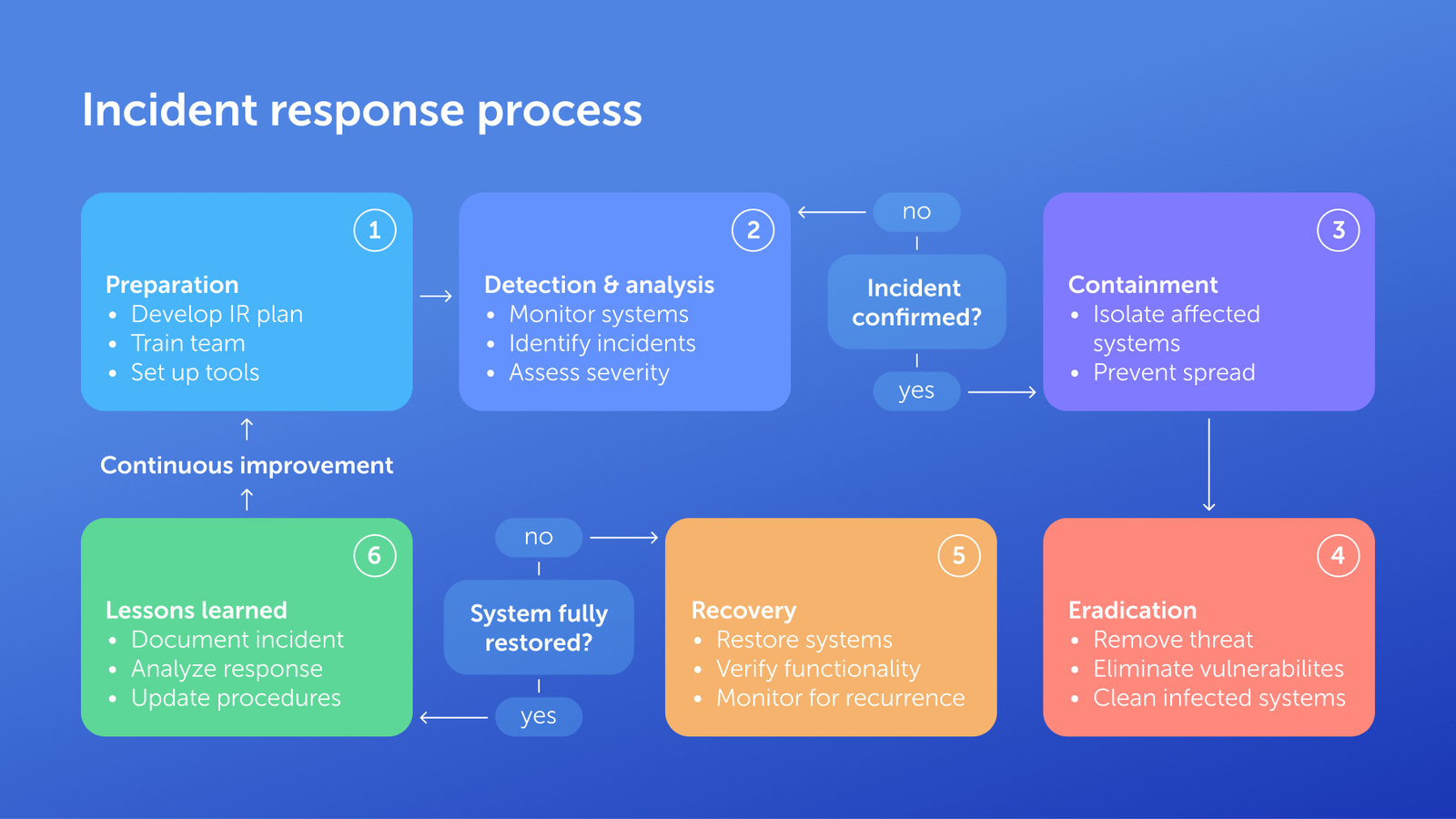
An incident response plan defines who does what, so nobody improvises when it matters. The six-step lifecycle:
- Preparation: document the plan, assign roles, run tabletop exercises.
- Detection and analysis: confirm scope and severity.
- Containment: isolate systems, disable compromised accounts.
- Eradication: remove the threat, fix the root cause.
- Recovery: restore from clean backups, bring systems back gradually.
- Lessons learned: review within two weeks, update the plan.
Maintain severity levels, an updated contact list (IT, legal, insurer, law enforcement), and customer/media communication procedures. Know your deadlines: GDPR requires notification within 72 hours (Article 33); many U.S. state laws allow 30-60 days.
RECOVER: Ensure business continuity
An incident response plan gets your technical environment clean, a business continuity plan keeps the company operating while that happens.
Step 17. Develop a business continuity plan (BCP)
Your BCP should identify which business functions are essential and must continue during an incident, such as customer service, order processing, or payroll. Define a Recovery Time Objective (RTO) for how fast each system needs to come back, and a Recovery Point Objective (RPO) for how much data loss is acceptable, since that number drives your backup frequency. NIST's contingency planning guide offers a detailed reference for building this out.
Document alternative procedures for running critical functions manually if primary systems are down, a communication plan for employees, customers, and vendors during an extended outage, and a succession plan for decisions if key people are unavailable.
Step 18. Test your recovery procedures
- Run tabletop exercises at least annually: gather the team, walk through a realistic scenario, and find the gaps in your plan before a real incident does.
- Run technical tests quarterly for critical systems: actually restore from backup, fail over to alternative systems, and confirm recovery works as documented.
- Mature organizations add full-scale simulations periodically, which are resource-intensive but surface issues nothing else will.
Document every test result and update your plans based on what you find.
Conclusion
A cybersecurity checklist for small business pays off when it's implemented in order: governance and risk assessment first, then identification, then the protective controls that stop most incidents before they start. Detection, response, and recovery close the loop for the incidents that get through anyway.
Start this week with the highest-impact, lowest-cost moves: deploy a password manager, turn on MFA everywhere, and schedule your first employee training session. Everything else in this checklist builds on that foundation.
Frequently asked questions
How much should a small business spend on cybersecurity?
Industry guidance suggests allocating 3-10% of your IT budget to cybersecurity, scaling up with your risk profile. For a business with a $50,000 annual IT budget, that's roughly $1,500-$5,000 a year. The fundamentals, a password manager, MFA, employee training, and backups, cost less than that for most small businesses and deliver most of the risk reduction.
What is the NIST Cybersecurity Framework?
The NIST Cybersecurity Framework is a voluntary framework from the National Institute of Standards and Technology that gives organizations a common structure for managing cybersecurity risk through six functions: Govern, Identify, Protect, Detect, Respond, and Recover. It scales from small businesses to government agencies without dictating specific products.
Do I need cyber insurance?
Cyber insurance helps offset the cost of a breach, including forensic investigation, legal fees, and business interruption, but insurers now expect proof of basic controls like MFA and regular backups before issuing a policy. Read exclusions carefully. Many policies limit or exclude ransomware payments entirely.
How often should we conduct security training?
Run onboarding training within an employee's first week, a comprehensive refresher at least annually, and phishing simulations quarterly. Frequency matters less than consistency. A single annual session without reinforcement fades fast, while short, regular touchpoints keep security awareness active.
What should we do if we're hit by ransomware?
Isolate affected systems immediately to stop the spread, activate your incident response plan, and contact law enforcement and your cyber insurance provider before considering any ransom payment. When possible, restoring from clean, tested backups sidesteps the ransom question entirely. Many insurance policies exclude or limit ransom payments, making tested backups your most reliable recovery path.
How do we know if our current security is adequate?
Run the risk assessment from Step 2 against this checklist: if you're missing MFA, a password manager, tested backups, or an incident response plan, you have measurable gaps to close. Adequacy is a moving target: it requires quarterly access reviews and annual reassessment as your business and the threat landscape change.
 Passwork Team
 Alex Muntyan
 Alex Muntyan
Table of contents
- Key takeaways
- NIST cybersecurity framework
- GOVERN: Establish your cybersecurity foundation
- IDENTIFY: Know what you need to protect
- PROTECT: Implement your core defenses
- DETECT: Monitor for suspicious activity
- RESPOND: Plan for a security incident
- RECOVER: Ensure business continuity
- Conclusion
- Frequently asked questions
Table of contents
- Key takeaways
- NIST cybersecurity framework
- GOVERN: Establish your cybersecurity foundation
- IDENTIFY: Know what you need to protect
- PROTECT: Implement your core defenses
- DETECT: Monitor for suspicious activity
- RESPOND: Plan for a security incident
- RECOVER: Ensure business continuity
- Conclusion
- Frequently asked questions

Self-hosted password manager for business
Passwork provides an advantage of effective teamwork with corporate passwords in a totally safe environment. Double encryption and zero-knowledge architecture ensure your passwords never leave your infrastructure.
Learn more